JTB FlexReport graphic license reports for applications using FlexNet/FLEXlm,IBM LUM, 12D, SLM/Sentinel or LM-X SmartPurger Batch script DWG SSMPropEditor edit Sheet Set Properties on multiple sheets at a time. Works both with AutoCAD's Sheet Set Manager (SSM) and AutoCAD Architecture's Project Navigator (PN) AutoCAD Automation Tools Batch create and update drawings ACAD_db Sync AutoCAD block attributes with database ACA_db Sync Property Sets with a database DwgNotes add and edit notes in drawings DimNotes Automate dimension notes in AutoCAD XClipClean Delete excessive xclipped objects in AutoCAD TimberTool For timber/structural shapes in ADT/ACA DwgInfoTip Infotip (tooltip) for DWG files DWG Columns Show DWG properties in Explorer Columns HTools AutoCAD productivity tools HVACPAC AutoCAD plug-in for HVAC and Piping work UnitCAD for AutoCAD AutoCAD plug-in for automation with parameters. and more...
If you have Autodesk Product Design suite Premium 2012 Package license and if you still use 2011 version of AutoCAD Mechanical and Inventor, you might find that it is using 2 seats (if you have more than 1 license) or for you get license error for the second product.
One work around to the issue is to make sure the Inventor 2011 is started prior to starting AutoCAD Mechanical 2011.
If you don't want to pass on the responsibility to the user then you can create an options file with the following line to exclude AutoCAD Mechanical 2011 to all the users, forcing the users to checkout Inventor 2011 feature code.
A customer of our license reporting managerJTB FlexReport recently had a problem with Autodesk Network License Manager and I found the solution in TS1053532 FLEXlm errors in the Event Viewer related to a network path:
Issue
Although the Start Server at Powerup option was selected in LMTOOLS, the FLEX service did not start automatically when you rebooted the license server. However, you were able to start the service manually.
In the Windows Event Viewer, there was an error message similar to the one below.
FLEXlm service failed to start. Cannot find the network path.
Solution
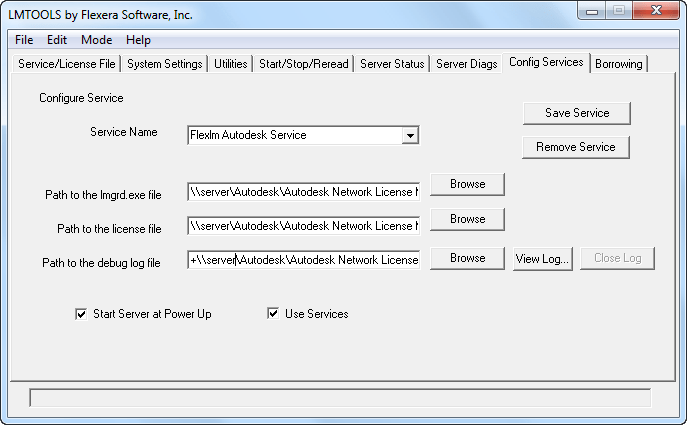
This error will occur if you use UNC paths when you configure the service in LMTOOLS.
In most Windows networks, proper credentials are required to access UNC paths and these credentials are usually not available before a user logs in to the machine. Because the FLEXlmservice tries to start before a user logs in, the UNC paths will not be resolved correctly. As a result, the FLEXlm service will not be started automatically when the license server is rebooted.
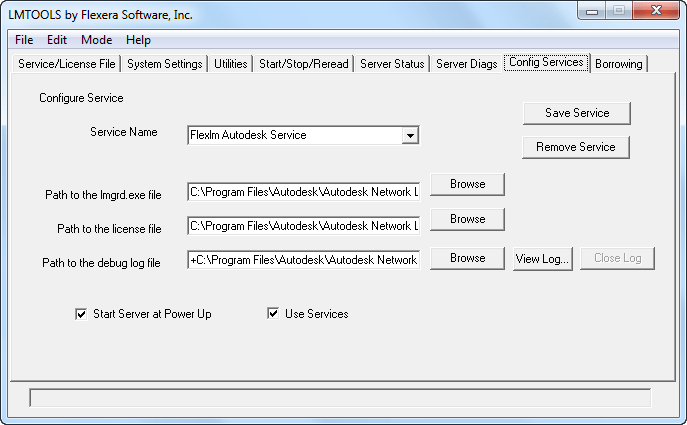
For this reason, it is strongly recommended that you use only valid, local drive letter paths when you configure the FLEXlm/FlexNetservice in LMTOOLS.
It is possible to configure the service to recognize UNC paths by elevating the rights of the service, but this is not recommended.
Sometimes it can be useful to convert a standalone license to a network license or the other way around. This works for AutoCAD and for verticals like AutoCAD Architecture, AutoCAD Electrical, AutoCAD Civil 3D, AutoCAD Map 3D, AutoCAD Mechanical, AutoCAD MEP, AutoCAD P&ID, AutoCAD Plant 3D and AutoCAD Structural Detailing. It can be done with a simple registry hack (start the Registry Editor with regedit.exe and take backup of the registry to be on the safe side).
For AutoCAD 2011 locate this key in the registry: HKEY_LOCAL_MACHINE\SOFTWARE\Autodesk\AutoCAD\R18.1\ACAD-9001:409\AdLM
In that directory change the type for the installation that you require:
For AutoCAD 2012: HKEY_LOCAL_MACHINE\SOFTWARE\Autodesk\AutoCAD\R18.2\ACAD-A001:409\AdLM
A tip is to locate HKEY_LOCAL_MACHINE\SOFTWARE\Autodesk\AutoCAD first and then you will find the version (R18.2 is for 2012 products) and then the vertical (ACAD-A004:409 is for AutoCAD Architecture 2012).
Project Nucleus integrates the Nucleus simulation engine from Autodesk® Maya® into AutoCAD® 2012 software. It allows designers to experiment with "form-finding" in the conceptual design phase by simulating forces directly in AutoCAD.
Project Nucleus can simulate a wide range of physical phenomena in real time, like wind, gravity, constraints, and collisions. These forces can help architects generate free-form shapes, many of which would be impossible to model by hand.
Here’s my try of simulating a cloth falling down onto a table. First showing part of the Ribbon tab Nucleus.
It’s starting.
Slowly falling down.
Depending on how quick computer you have this can take some time to simulate.
Because of the Wind noise it’s blowing off the table eventually.
As this is CPU intensive I can see how this could be great to be able to run in the cloud.
Known issues: we’re investigating a problem where duplicate data is saved in very specific cases using Process Monitor. Group Administrator is also having problems in some cases that we’re working to fix.
If you use SQL Server as database it might not always work to automatically update it. If you from scratched installed JTB FlexReport 6.2 or later it should not be a problem though. To know if the database is inconsistent you can send the following information to JTB World for confirmation.
Within Microsoft SQL Server Management Studio Open up the database and create a new query like below. Just change JTBFlexReport to whatever the JTB FlexReport database is named.
SELECT * FROM [JTBFlexReport].[INFORMATION_SCHEMA].[COLUMNS]
Then save the result using File>Save Result As a CSV file and send it to JTB World.
For complete information run also this query:
SELECT * FROM [JTBFlexReport].[INFORMATION_SCHEMA].[CONSTRAINT_COLUMN_USAGE]
JTB FlexReport is a report tool for applications using the FlexNet / FLEXlm (flexlm license manager), IBM LUM (IBM License Use Management), SPLM (Intergraph SmartPlant License Manager), SLM/Sentinel LM/Sentinel RMS, LM-X, Solidworks SNL License Manager, Licman, Primavera from Oracle or 12D software licensing as well as any Windows application like Acrobat, Visio, single licensed AutoCAD or AutoCAD LT.
Contact us to get a time limited license file for free. You can try it in your environment with your real data for a few weeks with full functionality. Full support is provided during trial period.