Saturday, June 30, 2007

Clean reinstallation of AutoCAD Architecture or AutoCAD MEP

When trouble comes it can be easier and quicker to simply reinstall. But to do a more complete reinstall there are ways to manually remove traces from the previous installation that includes deleting files and folders and registry keys. This is also useful in some cases when there are problems to just reinstall using "Add or Remove Programs" in Windows or "Programs and Features" in Vista. This document describes the steps to do that.

http://usa.autodesk.com/getdoc/id=TS1070370

Applies to:
AutoCAD Architecture 2008
Autodesk Architectural Desktop 2007
Autodesk Architectural Desktop 2006
Autodesk Architectural Desktop 2005
AutoCAD MEP 2008
Autodesk Building Systems 2007.1
Autodesk Building Systems 2007
Autodesk Building Systems 2006
Autodesk Building Systems 2005

AutoCAD Tips Newsletter's Resource of the Month

image

Via AutoCAD Tips Newsletter that I can recommend to you as AutoCAD user.

Thanks Ellen. Take a look at Ellen's website for more about AutoCAD as well as PowerPoint.

ef_resource_month

Thursday, June 28, 2007

Download AutoCAD Architecture 2008

Great that ACA 2008 can be downloaded. I hope other products will follow. And why not also have access to download older versions as well.

image

http://autodesk.com/aca2008-download

A downloadable version of AutoCAD® Architecture 2008 software is available here as an alternate form of media for users who have purchased AutoCAD Architecture 2008 and do not have DVD drives. Users should install the software using the serial number provided on the product DVD case.

Other downloads related to ACA 2008.

  • Hotfix - AecDtlComponents
  • Hotfix - DWF Package Not Viewable in Autodesk Design Review 2008
  • Certified Hardware XML Database Update
  • Hotfix - Hungarian Layout Switching
  • Hotfix - Vista Group Policy Objects
  • Hotfix - Live Update
  • UK Content Creation Guide
  • Unexpected Stop of the Creating Schedules Video
  • Hotfix - Autodesk Activation Update
  • ACA 2008 on www.jtbworld.com

    Visual LISP IDE surprises

    Running VLIDE in AutoCAD is a surprise each time. Most times the icons are visible enough but sometimes it's hard to see because of the light colors. This is in AutoCAD 2008 I have taken these screenshots.

    image

    image

    image

    image

    image

    image

    image

    This is a problem Autodesk is aware of but since VLIDE is such an old part of AutoCAD it's unlikely this problem will be fixed.

    Wednesday, June 27, 2007

    NanoScan

    I just tried Panda's free online NanoScan. I tried to run it before but now it works on Windows Vista. It took longer time to get it installed than to do the actual scan.

    It's an "instant" scanner that searches for viruses, spyware and other threats. It can detect, in less than a minute, a huge number of threats that could be running on your PC right now.

    Panda NanoScan

    Monday, June 25, 2007

    Compacting current database in Access

    In Access 2000 and Access 2003 there was a way to compacting the current database using this VBA code.

    CommandBars("Menu Bar"). _
    Controls("Tools"). _
    Controls("Database utilities"). _
    Controls("Compact and repair database..."). _
    accDoDefaultAction

    It doesn't work in Access 2007.

    You probably will get Run-time error '5': Invalid procedure call or argument

    But it works when changed to this.

    CommandBars("Menu Bar")._
    Controls("&Tools")._
    Controls("&Database utilities")._
    Controls("&Compact and repair database")._
    accDoDefaultAction

    or using DoCmd.RunCommand acCmdCompactDatabase

    The major problem is that you instead will get this error message.

    You cannot compact the open database by running a macro or Visual Basic code.

    Instead of using a macro or code, click the Microsoft Office Button, point to Manage, and then click Compact and Repair Database.

    What I did was to use this code to make it compact when closed.

    Application.SetOption "Auto Compact", True

    And when loaded restore it to not Auto Compact when closed.

    Application.SetOption "Auto Compact", False

    Sunday, June 24, 2007

    AUGI Nordic

    This is related to Sweden and our neighbor countries so the rest of this post is in Swedish translated from Danish from the first page on AUGI Nordic.

    Do we use the same language? No. But I do understand Norwegian better than Danish and Finnish not at all.

    Nu är den här!
    Support användare till användare av Autodesks programvaror till alla användare i den nordiska regionen. (Danmark, Finland, Norge och Sverige)

    AUGI Nordic Region Officiellt Organiserad
    Välkommen till AUGI Nordic – AUGI's nordiska avdelning.
    AUGI är platsen för professionella användare av lösningar från Autodesk. Här kan man följa med i senaste nytt – komma med förslag till förbättringar av programmen – tala med likasinnade – få goda råd - hitta lokala användarföreningar – ladda ner små program som andra användare gjort – få hjälp från kollegor från något av de nordiska länderna – starta en användargrupp. Kort sagt det mesta kan göras. Det enda som krävs är en anmälan (gratis medlemskap) plus en aktiv insats. Välkommen till AUGI Nordic!

    image

    www.auginordic.com

    Via BLAUGI

    PS. Bästa lexikon och ordlista för översättning mellan engelska och svenska är www.tyda.se or in English it would be "the best dictionary and vocabulary for translation between English and Swedish".

    Saturday, June 23, 2007

    Google Reader does not show URL's in the status bar

    As you can see below URL of links are not visible in the Internet Explorer status bar when using Google Reader. I have Windows Vista and IE7.

    image

    The problem starts first after a while almost like the bug with the shortcut keys.

    Safari Books Online

    I got a 30-day trial to Safari Books Online when I registered my copy of Adobe Acrobat 8.

    Below is what it look like when I searched for AutoCAD as an example. There where only three quite old books specifically about AutoCAD. There are many more books on subjects like databases, IT, programming, etc.

    • 72 books matching the category "Visual Basic".
    • 81 books matching the category ".NET".
    • 67 books matching the category "SQL Server".
    • 26 books matching the category "Adobe".

    image

    The search functionality and overall impression of the site is good so far.

    image

    Between $219.99 for a 10-Slot Tech Collection and $439.99 for unlimited access of an annual individual subscription. Is it worth it? I'm not sure yet. I usually don't buy and read that many books.

    Not so obvious is what 10-Slot Tech Collection really means. Notice that you need to keep a book on you bookshelf for 30 days. Slot values can range from one-half to three slots. Even if you only want to read one page of a book you need to add it to the bookshelf.

    Anyone of you that are using Safari Books Online or something like it? What alternatives are there?

    Friday, June 22, 2007

    Vista search within DWG files and AutoCAD 2008

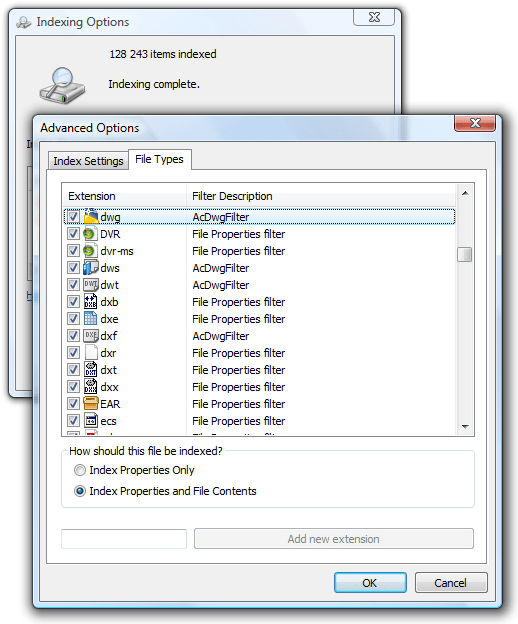
    It should be possible to search and find information within DWG files using Windows Explorer with the help of the AcDwgFilter that is included with AutoCAD 2008.
    Is it only me or does not the search and find functionality in Windows Explorer work in AutoCAD 2008 on Windows Vista?
    image
    On the topic there is a 3:rd party solution available. It seemed to work well in my limited tests.

    Marco van Schagen said...
    ... and now you can download a free trial of our new DWG IFilter 2007 at http://www.dwgifilter.com
    I hope to release our final within a few days. The 2007 version also works great with Windows Desktop Search!
    Via comments on Windows Desktop Search finds text within DWG's

    Wednesday, June 20, 2007

    Pan tips for AutoCAD

    Here are some tips on panning in AutoCAD.

    In some earlier versions (up to AutoCAD 2006) of AutoCAD you could hold down Shift and use the middle button (or wheel) on the mouse lock lock panning vertically or horizontally.

    In later versions (AutoCAD 2007 and on) you will notice that orbit (3DORBITTRANSPARENT) starts instead.

    Update: A reply in the discussion group also mention that if you first press down the middle button (or wheel) and then Shift it works as before.

    What you can do is using Ctrl and the middle button. It works the same way as before but you need to be stable on you hand to make it only pan up or down or to the left or right.

    But there still is a way to have it work as before. Use the command PAN (or 'PAN for transparent use) instead in combination with Shift and the left button or the middle button.

    This button for Pan Realtime image is also available on the Standard toolbar (at least in AutoCAD 2008)

    If you want more control on panning you can use the command line variant of PAN namely -PAN in combination with either Ortho on or Polar on. That way you can select to pan exactly a specified distance or even at a specified angle.

    For more on PAN enter PAN on the command line in AutoCAD and press F1 for help.

    I wrote up more details on this as a response to a question in the AutoCAD discussion groups.

    In 2006 I could hold the shift key down, then click, and drag my middle
    mouse button and I could only pan the contents of the viewport in a straight
    90 degree direction. Now in 2008 when I do this I get some 3D orbit command
    and not a pan. Can I change this back?

    Update via email from Tracy Lincoln that I was approved to add here.

    Nice PAN tip, keep up the good work!

    You can use the command alias P for PAN and -P for -PAN... you can also use 'P and '-P for transparent use of these commands.

    If you have right-click time sensitivity turned off and shortcut menu selected (Options > User Preferences > Windows Standard Behavior Area > Right-click Customization...) then you can right-click with nothing selected and select PAN or use the a key.

    Tuesday, June 19, 2007

    Autodesk Research

    Interesting reading on different research projects as well as several videos. Take a look at Autodesk Research http://www.autodesk.com/research

    image

    Image above from Boom Chameleon. More on 3D navigation.

    Maybe AutoCAD and other Autodesk software's soon will support the coming Microsoft Surface.

    Via It’s Alive in the Lab

    Monday, June 18, 2007

    Autodesk acquisition of the Swedish Opticore AB

    Opticore is a developer of 3D real-time software for interactive product visualization.

    Here is a snapshot of a Swedish Volvo C70 rendered using Opticore.

    image

    Press release and the Opticore AB website.

    "The acquisition of Opticore technology is part of Autodesk's commitment to set the direction for Digital Prototyping and offer a complete solution across the Manufacturing industry," said Robert "Buzz" Kross, senior vice president, Autodesk Manufacturing Solutions. "By adding Opticore products, Autodesk intends to offer the most complete design visualization solution in the market, providing automotive and product designers the opportunity to select the most cutting edge visualization product that best meets their needs."

    Some of the latest blog posts

    Subscribe to RSS headline updates from:
    Powered by FeedBurner

    Contact Us | About JTB World | Website General Terms of Use | Privacy Policy
    ^ Top of page

    © 2004- JTB World. All rights reserved.