Monday, October 14, 2013

AutoCAD Architecture 2014 Service Pack 1

AutoCAD Architecture 2014 Service Pack 1 Download at DL22420526

Problems Reported with the Customer Error Reporting Utility

As a result of detailed information from customers who used the Customer Error Reporting Utility, a number of problems were identified and fixed in AutoCAD Architecture 2014 SP 1. Updates have been made in the following commands and features:

Project Navigator

  • Closing AutoCAD Architecture while the Project Navigator is open may cause occasional crashes.

Object Viewer

  • Crash when saving an image in the object viewer while the steering wheel is enabled.

Schedule Table

  • Modifying text height appearance in schedule tables results to a crash.

The following defects have been fixed:

Boolean Operation

  • Some objects may disappear after performing Boolean operations such as cleaning up, inserting a window, modifying a roof line, and so on.

Corner Window

  • Elevations or sections of corner window styles may display incorrectly.

Elevation Label

  • Elevation labels may not reflect the current elevation location. As a work around, use AecElevationLabelClearCache command to fix the elevation labels with incorrect elevation location values.

Object Viewer

  • Some visual styles do not work in the object viewer.

Section

  • Generated sections may not display all lines.

WebDAV

  • Failure to create projects on WebDAV servers.

This Service Pack can be applied to AutoCAD Architecture 2014 installed as a standalone application as well as AutoCAD Architecture 2014 installed from the following Autodesk Design Suites.

Autodesk Building Design Suite 2014
Autodesk Factory Design Suite 2014

AutoCAD MEP 2014 Service Pack 1 Download at DL22421229

The following AutoCAD MEP issues have been fixed:

Cable Tray

  • Sometimes, when the global profile is active, the add grips icon (+ icon) on cable trays appear too far away.

MvPart

  • The part size of some special MvParts do not update correctly when you change their “L” values.

Schedule

  • Some schedule tables do not indicate that they are “out-of-date” when you add duct property sets while AECPSDAUTOATTACH is OFF.

This Service Pack can be applied to AutoCAD MEP 2014 installed as a standalone application as well as AutoCAD MEP 2014 installed from the following Autodesk Design Suites.

  • Autodesk Building Design Suite 2014

Autodesk AutoCAD Civil 3D 2014 Service Pack 1 Details and download at DL22421170

AutoCAD Electrical 2014 Service Pack 1.1 Details and download at DL22418370

Autodesk AutoCAD Map 3D 2014 Service Pack 1 Details and download at DL22356664

AutoCAD Mechanical 2014 Service Pack 1 Details and download at DL22336321

AutoCAD 2014 Service Pack 1 is included with the above vertical service packs.

Sunday, October 13, 2013

How to Exit Explorer in Windows 8

Here’s how to safely Exit Explorer in Windows 8 or Windows 8.1. Now why would you need to do that? Well there are times when it is useful like for programmers that work with Explorer Shell Extensions like our DWG Columns product to show DWG properties in Explorer.

Hold down Shift and Ctrl, right click on an empty area on the Windows taskbar and click on “Exit Explorer”.

A new feature in the Task Manager is the Restart option for Windows Explorer.

If you don’t see Windows Explorer click on More details at bottom left. If Windows Explorer is selected you will also notice that the End Task button at bottom right changes to Restart.

To start Explorer again, press Ctrl+Shift+Esc to start the Task Manager if it is not already running, and use File > Run new task. Type Explorer in the "Create new task" dialog and press Enter.

Now there is the option to use End task on Windows Explorer but if it is as good and clean as the Exit Explorer or not I don’t know. In earlier Windows versions it was not.

Exit Explorer in Windows Vista and Windows 7

Thursday, October 10, 2013

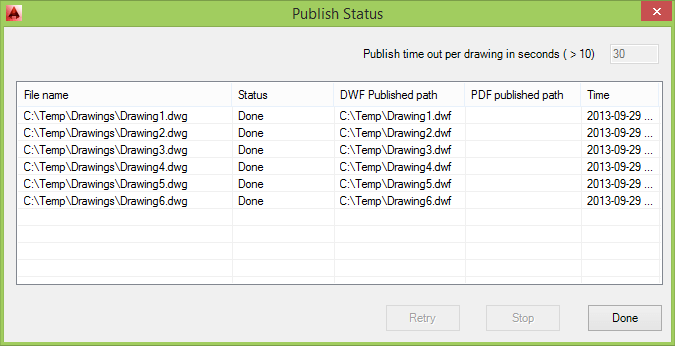
Batch Publish for AutoCAD 2.0 released

Batch Publish for AutoCAD 2.0 by JTB World has been released on Autodesk Exchange Apps.

This AutoCAD app simplifies the process of publishing (plotting) sets of drawings to DWF and/or PDF.

This plugin can be used with AutoCAD to simplify the process of publishing sets of drawings to DWF and/or PDF. It runs as a command within AutoCAD - as opposed to a separate executable - and uses a separate executable to monitor AutoCAD's health and restart it, as needed. The status of the batch publishing operation is stored to disk, allowing it to pick up from where it left off and also for any failed documents to be retried without starting from scratch. A setting is available to only publish drawings that have been modified since they were last published, making it easier to publish sets of documents on a regular basis.

Batch Publish for AutoCAD trial can be used to see if this app fits your needs and when ready to purchase visit Batch Publish for AutoCAD and you can get a license for 10 USD.

If you are interested in other useful AutoCAD helper functions take a look at DimensionPatrol, TransTips, OffsetInXref, HTools Menu for AutoCAD, UnitCAD for AutoCAD or HVACPAC.

Tuesday, October 8, 2013

Cloud Sync for AutoCAD Architecture/MEP plug-in preview

The Cloud Sync for AutoCAD Architecture/MEP plug-in is a free technology preview from Autodesk that allows users to manage drawing access on local computer networks and also across cloud storage services (e.g., Autodesk 360, Dropbox, Google Drive, SkyDrive). With this functionality and depending on how a user has elected to set up a given cloud storage service, automatic access to the Internet and automatic sync of a file between a local machine (or network) and the cloud storage service is possible.

The technology preview is available for Autodesk AutoCAD Architecture 2014/2013 or Autodesk AutoCAD MEP 2014/2013 software (English versions only). The technology preview will operate until April 1, 2014.

Right click on a construct, view or sheet and Check Out or Check In.

In the Project Navigator you can see what files are checked out by the current user or by other users.

It’s possible to  revert to previous versions using Rollback to this version in the Check-In History.

If this sounds interesting download it from Autodesk Labs site.

If you handle many sheets our SSMPropEditor can help to update sheet properties on multiple sheets at the same time.

Wednesday, October 2, 2013

Autodesk acquires Advance Steel and Advance Concrete

According to this press release Autodesk Signs Agreement to Acquire Structural Fabrication and Detailing Technology from Graitec.

No word in the press release of how these products runs on the AutoCAD or Revit platforms. But both Advance Concrete and Advance Steel runs on AutoCAD and there is some kind of bidirectional integration with Autodesk Revit Architecture and Autodesk Revit Structure.

More details from the press release:

Autodesk has signed a definitive agreement with the shareholders of Graitec to acquire certain technology assets, including Graitec’s Advance Steel and Advance Concrete product lines, and associated employees. The acquisition will enhance Autodesk’s current offerings for structural engineering and expand its portfolio of technology for Building Information Modeling (BIM) for structural fabrication and detailing. Through the proposed acquisition, Autodesk will continue to lead the industry’s migration to BIM and evolution of model-based workflows for structural engineers, detailers, fabricators and contractors who provide modeling, analysis, detailing, and production services.

“Autodesk continues to extend Building Information Modeling across the building lifecycle. The proposed acquisition of the Graitec technology will provide our customers with a more seamless structural engineering workflow, from design to fabrication and to construction, with enhanced offerings for structural steel and concrete detailing,” said Amar Hanspal, Autodesk senior vice president of Information Modeling and Platform Products. “We look forward to welcoming Graitec employees, customers and partners to the Autodesk community.”

Graitec is a global provider of CAD and engineering software for structural engineering, civil engineering and building construction headquartered in France. Graitec’s Advance Steel and Advance Concrete products offer modeling, detailing, and fabrication solutions to support BIM-based steel and reinforced concrete workflows. Graitec will to continue to sell and support Advance Steel and Advance Concrete, as well as sell, support, and develop its remaining products for structural engineering.

"Autodesk's acquisition of the Advance Steel and Advance Concrete products in support of its BIM strategy is a testament to the expertise of the Graitec team and the quality of our steel and concrete detailing solutions," said Francis Guillemard, CEO, Graitec. "Graitec continues to develop dedicated BIM software and services that are complementary to Autodesk, and together we look forward to maximizing the efficiency and performance of the global construction industry."

New AutoCAD Color Book Editor released

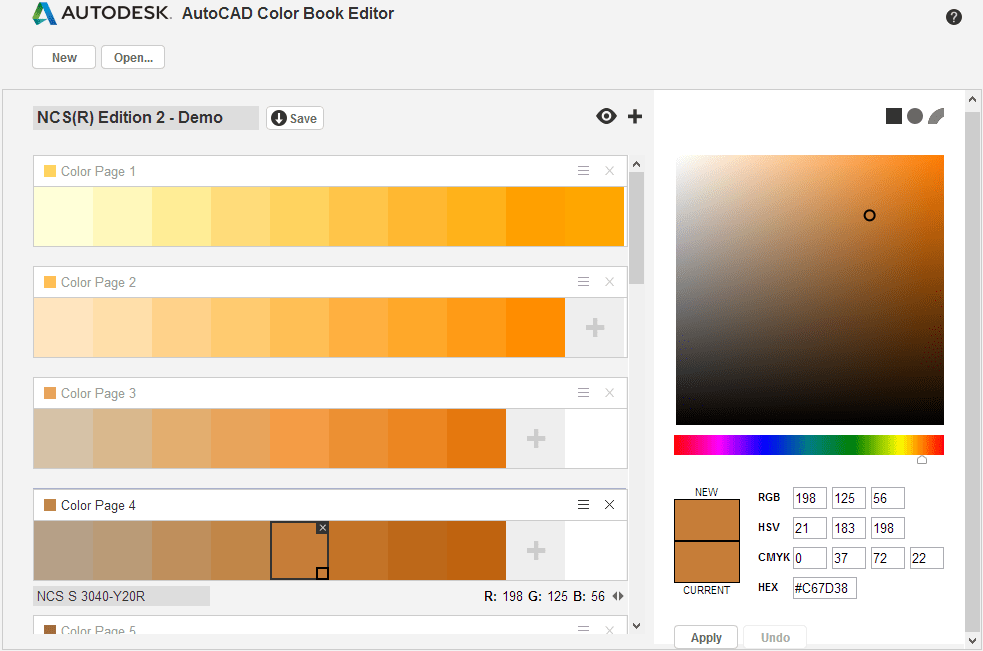
10 years after the first release of AutoCAD Color Book Editor (ACBEditor), it has been updated and improved by Autodesk and now available directly in your web browser at www.autodesk.com/acb.

Color Book functionality was added in AutoCAD 2004 and here is how the color book color selection look like in AutoCAD 2014 showing a demo of NCS. DIC, PANTONE and RAL are included out-of-the-box while others either can be downloaded free or purchased.

The AutoCAD Color Book Editor provides a way to create and edit your own color book (ACB) files for use in AutoCAD and AutoCAD-based products. A color book is a collection of color pages, and each color page contains the definitions of 1 to 10 colors. To help identify the color pages in a list, each color page displays a representative color, called the page color.

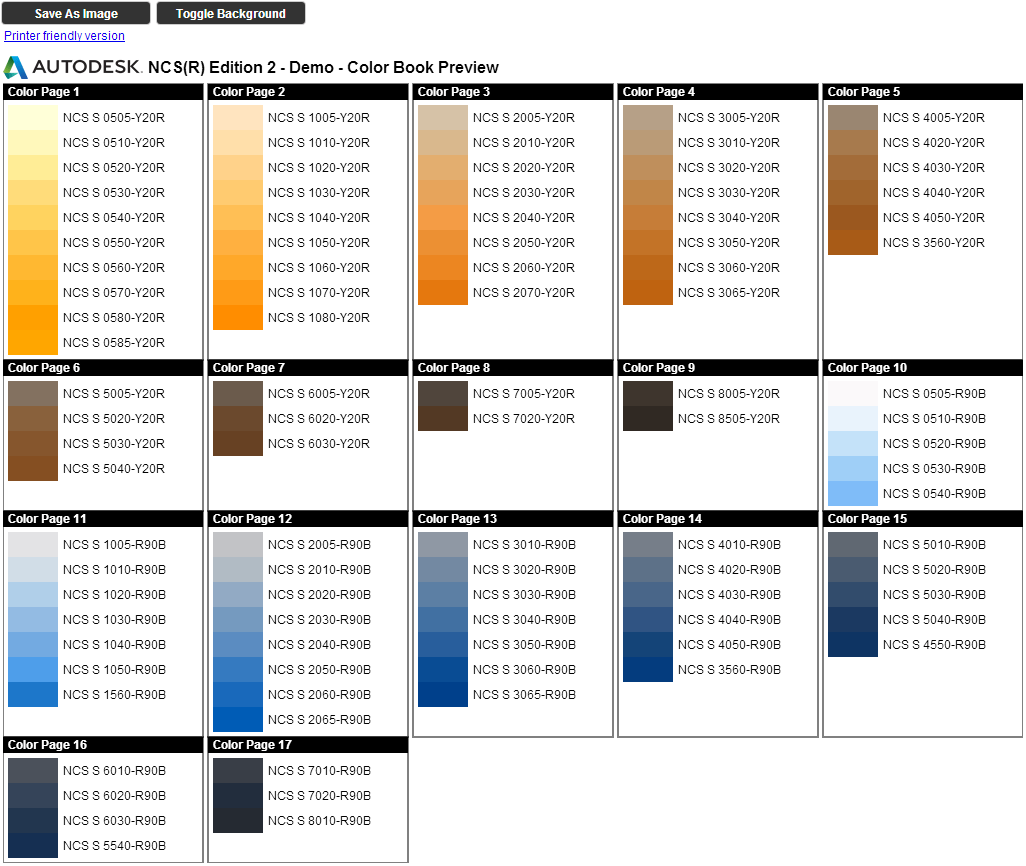
Here’s how the preview can look like.

Check with your paint manufacturer if they also offer download of their color book or palette in ACB format.

Benjamin Moore Color Palette Download
Sherwin-Williams Color Palette Download
Dunn Edwards Color Palette Download
Resene Color Palette Download

Note Some commercial color book files contain encrypted data to protect the provider's proprietary settings. The AutoCAD Color Book Editor does not facilitate creating or editing encrypted ACB files. You will find that opening an encrypted ACB file will show all colors as black.

Via Between the Lines

Monday, September 23, 2013

Cascading of AutoCAD 2014 with Product Design Suite 2014

If you use Autodesk Network License Manager and have licenses for both the point product AutoCAD 2014 and Product Design Suite 2014 on the license server but on the user’s machines only Product Design Suite 2014 installed, launching AutoCAD 2014 will take a Product Design Suite 2014 license. Why is that? AutoCAD 2014 shortcut is a vanilla AutoCAD profile of AutoCAD Mechanical 2014. So if if you want to have your users use the cheaper AutoCAD 2014 license instead you will have to also install the point product AutoCAD 2014.

  • Point Product AutoCAD 2014 = This is AutoCAD 2014 only!
  • AutoCAD 2014 in the Product Design Suite 2014 = AutoCAD Mechanical 2014 with Vanilla Profile.
  • AutoCAD Mechanical 2014 = One of the products in the Product Design Suite 2014.

Via Up and Ready

If you want to monitor license or application usage consider JTB FlexReport.

Friday, September 20, 2013

Autodesk 360 desktop companion Update 3

This update from Autodesk applies to Autodesk 360 desktop companion if your version is 4.0.27.1 to 4.0.32.100.

Note: If you have version 4.5.4.700 or above, you should not run this update. Users with 4.5.4.700 and higher will be automatically prompted to upgrade via an Autodesk 360 Desktop Companion system tray notification.

To see which version of Autodesk 360 desktop companion is currently installed, sign in to Autodesk 360. In the notification area (system tray), right-click the Autodesk 360 icon and choose Preferences.

Fixes in this live update include but are not limited to:

  • Stability Improvements

Download from Autodesk here: DL21520422

Here’s how to install Autodesk 360 Update 3 from the command line.

1.Download A360 UP3.
2.Open a windows command line (Start > Search > type cmd and hit Enter).
3.Change working director to the folder you downloaded A360 UP3.
   e.g. cd c:\a360u3
4.Run following command to extract msp file
   c:\a360u3> Autodesk360_x64_Release_update3.exe /e a360u3.msp
5.install the update 3 with following command
   c:\a360u3> msiexec /update a360u3.msp /passive /norestart

See also the recent AutoCAD 2014 Service Pack 1.

Wednesday, September 18, 2013

FlexNet license manager 11.12

The updated FlexNet (FLEXlm) version (based on Flexera Software’s FlexNet Publisher 2013 R2) has been released and is now available as a public download as well as the updated License Administration Guide.

Here are the news in Version 11.12 as far as I could find. There might be some bug fixes too that not are documented.

License Server Diagnostics in the Debug Log

Enhanced license server diagnostics will now be emitted in the license server debug log. Additional diagnostics are prefixed by “(@lmgrd-SLOG@)” for the lmgrd and “(@<vendor>-SLOG@)” for the Vendor Daemon, facilitating easy grep-like extraction from the debug-log. The Vendor Daemon would emit the additional diagnostics when run with lmgrd or lmadmin. These diagnostics are intended to assist publishers and Flexera diagnose license server issues.
These diagnostics include:

For lmgrd:
Start timestamp, Version, ProcessID, Network Info (IPv4/IPv6 interface, listening port), command-line options, list of license files, whether the license server is running as a windows service.

For Vendor Daemon:
Start timestamp, Version, ProcessID, Network info (IPv4/IPv6 interface, listening port, select timeout of vendor daemon), Vendor daemon name, Options file used, Trusted storage accessed (yes/no), Host name, Virtual/physical environment, (limited) hypervisor info if virtual, Lmbind used (yes/no), #Restarts of vendor daemon since lmgrd startup, #Rereads since vendor daemon (re)start, Last reread time, Reread initiation type (automatic versus lmreread).

Every 4 hours (and at vendor daemon shutdown) the following performance data are logged:
Details of the 10 peak client transactions (including client hostname, user, transaction time, concurrent clients at time of transaction, memory usage (Windows only)), Peak concurrent clients served, High watermark memory usage (Windows only), Transaction time for last 10 transactions.

Some examples from a log:

18:46:56 (lmgrd) Server's System Date and Time: Tue Sep 17 2013 18:46:56 W. Europe Daylight Time
18:46:56 (lmgrd) SLOG: Summary LOG statistics is enabled.

18:46:56 (lmgrd) (@lmgrd-SLOG@) ===============================================
18:46:56 (lmgrd) (@lmgrd-SLOG@) === LMGRD ===
18:46:56 (lmgrd) (@lmgrd-SLOG@) Start-Date: Tue Sep 17 2013 18:46:56 W. Europe Daylight Time
18:46:56 (lmgrd) (@lmgrd-SLOG@) PID: 6868
18:46:56 (lmgrd) (@lmgrd-SLOG@) LMGRD Version: v11.12.0.0 build 136775 x64_n6 ( build 136775 (ipv6))
18:46:56 (lmgrd) (@lmgrd-SLOG@)
18:46:56 (lmgrd) (@lmgrd-SLOG@) === Network Info ===
18:46:56 (lmgrd) (@lmgrd-SLOG@) Socket interface: IPV6
18:46:56 (lmgrd) (@lmgrd-SLOG@) Listening port: 27000
18:46:56 (lmgrd) (@lmgrd-SLOG@)
18:46:56 (lmgrd) (@lmgrd-SLOG@) === Startup Info ===
18:46:56 (lmgrd) (@lmgrd-SLOG@) Is LS run as a service: Yes
18:46:56 (lmgrd) (@lmgrd-SLOG@) Server Configuration: Single Server
18:46:56 (lmgrd) (@lmgrd-SLOG@) Command-line options used at LS startup: -c C:\Program Files\Autodesk\Autodesk Network License Manager\Autodesk2014.lic -l C:\Program Files\Autodesk\Autodesk Network License Manager\autodesk.log -z -s
18:46:56 (lmgrd) (@lmgrd-SLOG@) License file(s) used:  C:\Program Files\Autodesk\Autodesk Network License Manager\Autodesk2014.lic
18:46:56 (lmgrd) (@lmgrd-SLOG@) ===============================================

lmgrd.exe, lmutil.exe and lmtools.exe are all version 11.12 now. It might take some time before vendors start supporting this new version.

Previous FlexNet 11.11.1 described.

JTB World’s JTB FlexReport license monitoring tool has been tested with and supports this new version.

Tuesday, September 17, 2013

AutoCAD 2014 Service Pack 1

Time for AutoCAD 2014 SP1. Downloads available for AutoCAD 2014 at DL22264351 and for AutoCAD 2014 LT at DL22264544.

This Service Pack can be applied to AutoCAD 2014 installed as a standalone application as well as AutoCAD 2014 installed from the following Autodesk Design Suites.

  • Autodesk AutoCAD Design Suite 2014
  • Autodesk Building Design Suite 2014
  • Autodesk Factory Design Suite 2014
  • Autodesk Infrastructure Design Suite 2014
  • Autodesk Plant Design Suite 2014
  • Autodesk Product Design Suite 2014

_VERNUM (product version) detail:
AutoCAD 2014 SP1: I.108.0.0 (UNICODE)

Problems Reported with the Customer Error Reporting Utility

As a result of detailed information from customers who used the Customer Error Reporting Utility, a number of problems were identified and fixed. Updates have been made in the following commands and features:

Block

  • Occasional crashes related to operating blocks with the Lookup parameter.

Autodesk 360

  • Crashes when trying to sign out of Autodesk 360 from inside AutoCAD if you have previously uninstalled Autodesk 360.

Command Line

  • Occasional crashes when clicking or dragging the command line window in Windows 8.

Materials

  • Occasional crashes when opening a drawing that contains certain customized materials.

Plot

  • Occasional crashes when plotting a drawing with unreconciled layers.

General

  • Occasional crashes when switching drawings or layouts.
  • Occasional crashes when editing with grips or cycling grips.
  • Occasional crashes when exiting AutoCAD.
  • Occasional crashes when zooming or panning in a drawing that contains a locked viewport.

General Service Pack Updates

The following defects have been fixed:

3D Modeling

  • Cannot read specific solid modeling information after saving a drawing to 2004-based version of AutoCAD and reopening it in a 2014-based version.

Block

  • The uniform scale check box sometimes displays incorrectly as unchecked.

DGN Support

  • Issues with copying and pasting DGN linetypes in a drawing.

Document Switching

  • The file name is not displayed in the File tab on Turkish-language operating systems.

File Navigation

  • The application sometimes stops responding when the file selection dropdown list is being used on Windows 8 with a smart phone device plugged in.

Plot

  • Wipeout doesn't work when Lines Merge is turned on during plot.
  • Lines near a Wipeout boundary don't plot.
  • Some images don't plot when the visual style is set to Realistic and software acceleration is turned on.
  • In some cases, DWG files containing Raster images, PDF or DWF underlays don't plot correctly when publishing to DWFx.

Point Cloud

  • A memory leak issue.
  • Some point cloud scan files are not displayed correctly.
  • An API issue might cause the colors set by normalization and intensity to change after cropping.

Selection

  • SELECTIONPREVIEW is incorrectly set to 0 during drawing certain editing and zooming operations.

General

  • In certain cases, external commands in an acad.pgp file are not executed correctly.
  • There's a performance issue with drawings saved as AutoCAD 2010 drawings.
  • Changing the position of multiple blocks via the Properties palette is not correctly applied to all selected blocks.
  • In certain cases, drawing files with invalid fonts cause AutoCAD to freeze on startup.
  • AutoCAD crashes when a custom entity contains embedded AcDb3dSolid.

Security

This service pack removes the security warnings displayed in AutoCAD LT when loading .SCR files from network locations.

Security Hotfix: Autodesk AutoCAD Code Execution Vulnerability is included in AutoCAD 2014 Service Pack 1.

Wednesday, September 4, 2013

AutoCAD performance issues and VBA

Here is a reason why you may not want to use VBA if you have 64-bit version of AutoCAD 2008 - AutoCAD 2013.

Background

Initializing VBA System...

By just initializing the VBA system running for example VBAIDE, some commands in AutoCAD will take 10 times longer. It might be more or less depending on different factors. No DVB needs to even be loaded for this to happen.

Using ProcMon I found that without VBA initialized and loaded a QSAVE command resulted in less than 2100 registry and file events.

But with VBA initialized QSAVE caused almost 950,000 registry and file events. No wonder QSAVE took so long. Many file and registry events are done multiple times and seems to be related to the number of folders AutoCAD usually search files in.

Changing system variables like INDEXCTL, SAVEFIDELITY and PROXYGRAPHICS did not help even though they in other cases can speed up the time it takes to save drawings.

Why is this happening?

With VBA component initialized, AutoCAD has to check for any callbacks registered in VBA component even for standard AutoCAD commands. This verification is consumes time as the communication is across processes.

Autodesk ships the 32-bit VBA version in an out-of-process server with 64-bit AutoCAD (up until AutoCAD 2013 where VBA 6.3 is used). Therefore, a lot of marshaling is required going between the out-of-process VBA server and 64-bit AutoCAD. As a result, 64-bit VBA is slower than 32-bit VBA.

This problem should not exist in AutoCAD 2014 because VBA 7.1 is used and is available in a native 64-bit version, but for some reason it did for me. Eventually I figured out that reinstalling AutoCAD 2014 and VBA completely solved the issue.

Solution

Downgrading to AutoCAD 32-bit on Windows 32-bit is probably not desirable as a solution. A better solution or workaround is to upgrade to AutoCAD 2014 (but that could cause problems with 32bit VB6 controls that are not available for 64-bit) or better yet porting the VBA application to .NET DLL (using VB.NET or C#). JTB World can help with porting of VBA to .NET.

See also this post: AutoCAD 2014 supports VBA 64-bit

Friday, August 30, 2013

Change AutoCAD 2014 from Network license to Standalone

AutoCAD 2014 and its verticals can easily be changed between Network, Standalone and Multiseat Standalone licensing with a small registry hack.

Note: This feature is not officially supported by Autodesk and always be careful when editing the registry, backup if needed.

Start the Registry Editor and the registry location is HKEY_LOCAL_MACHINE\SOFTWARE\Autodesk\AutoCAD\R19.1 and then depending on AutoCAD vertical look in ACAD-D001 for AutoCAD 2014 or for example ACAD-D004 for AutoCAD Architecture 2014. Finally in AdLM there is Type that can be changed to any of the values 1, 2 or 3 as seen below.

1 – Network

2 – Standalone

3 – Multiseat Standalone

Switching license type in Inventor, Inventor LT and Inventor Professional is also possible:

Inventor release 2012:
HKEY_LOCAL_MACHINE\SOFTWARE\Autodesk\Inventor\RegistryVersion16.0\LicenseMode

Inventor release 2013:
HKEY_LOCAL_MACHINE\SOFTWARE\Autodesk\Inventor\RegistryVersion17.0\LicenseMode

Inventor release 2014:
HKEY_LOCAL_MACHINE\SOFTWARE\Autodesk\Inventor\RegistryVersion18.0
Change values for the Value keys below:
LicenseType  from Network License change to Stand-Alone License
LicenseMode from 1 change to 2
Or this can also be done the other way around.

Via Up and Ready and TS17847202

Above solution does not apply to Multi-flex or eFlex installations.  Do NOT switch licenses when using either of these two licensing methods.

See also Change AutoCAD 2013 from Network license to Standalone as well as for AutoCAD 2011 and AutoCAD 2012

AutoCAD registry details explained

Tuesday, August 27, 2013

Fix for crash during startup of an Autodesk 2014 product

This hotfix “Windows crash during license authorization Hotfix” by Autodesk can help if you have problem to start any of the 2014 versions of Autodesk products like AutoCAD 2014 or Revit 2014.

This error occurs when a computer does not have the hardware serial number in the BIOS. Two indications of the issue are described below:

1. When launching an Autodesk 2014 product, the user sees an error dialog such as the following during initialization, and an Autodesk Error Report dialog, and the product does not launch. You might see Error Aborting, FATAL ERROR: Unhandled Access Violation Reading 0x0000 Exception at eaf28ea0h or the like followed by the Error Report windows that says A software problem has cause AutoCAD to close unexpectedly.

2. Running the following command does not return a serial number:

wmic bios get serialnumber

The figure below shows the command result with a blank serial number.

If you get this result, this technical solution is applicable to you; otherwise, it is probably not applicable.

Wednesday, August 21, 2013

Spot Elevation Hotfix for Autodesk Revit 2013

This hotfix improves product stability when placing Spot Elevations within Section Views in Autodesk Revit 2013.

Some of the latest blog posts

Subscribe to RSS headline updates from:
Powered by FeedBurner

Contact Us | About JTB World | Website General Terms of Use | Privacy Policy
^ Top of page

© 2004- JTB World. All rights reserved.