Monday, February 17, 2014

How to test if a DVB file is loaded using AutoLISP

This is a sample code snippet showing how you with AutoLISP (or rather Visual LISP) can test if a certain VBA DVB file is loaded in AutoCAD or not.

(vl-load-com)
(defun isDVBLoaded (dvb / oVBProjs c found)
  (setq oVBProjs (vlax-get (vla-get-vbe (vlax-get-acad-object)) "VBProjects"))
  (setq dvb (strcase dvb))
  (repeat (setq c (vla-get-count oVBProjs))
    (if (vl-string-search dvb (strcase (vla-get-FileName (vla-item oVBProjs c))))
      (setq found T)
    )
    (setq c (1- c))
  )
  found
)

Here’s how to call the function:
(isDVBLoaded "jtbworld.dvb")

Sunday, February 9, 2014

Autodesk Knowledge Network reviewed

Here’s the new Autodesk Knowledge Network where you can “access a broad range of knowledge to help you get the most out of your Autodesk products and services”.

One nice thing when searching for downloads is that you can use Narrow Results to filter out for example only a specific version or type of download like hotfixes, object enablers or service packs. It works the same with the troubleshooting section.

So I checked the AutoCAD troubleshooting result and found this link that offers not help and seems to be from the forums. Strange. It would be good to see forum results too but it should be possible to filter out as well.

“Autodesk invites you to share your knowledge with the rest of the world, inspiring others to learn, achieve goals, and ignite creativity. In collaboration with Creative Commons, Autodesk invites you to share your knowledge with the rest of the world, inspiring others to learn, achieve goals, and ignite creativity. You can freely borrow from the Autodesk Help, Support and Video libraries to build a new learning experience for anyone with a particular need or interest.” Note that this seems to apply only for noncommercially purpose. Attribution-NonCommercial-ShareAlike (CC BY-NC-SA) and Attribution-NonCommercial-No Derivative Works (CC BY-NC-ND)  is used.

But there is a problem. If I for example visit this AutoCAD page I cannot find anywhere how to access the online help for AutoCAD. Even if I visit the Knowledge Network page for AutoCAD here. Hopefully this will be corrected soon. I did a search for AutoCAD documentation and got this link that seems to be taken from a blog post as can also be seen in the URL …/blog/autodesk.blogs.com/between_the_lines/201…

Another noteworthy thing is that “as of February 1st, 2015, upgrades from previous releases will only be available with Subscription, the most cost-effective way to stay current. Upgrade and subscribe now to gain additional savings on our latest software with all the benefits of Subscription.” More here.

After this update a lot of the direct links that before work are now broken. Before this URL format was working: http://usa.autodesk.com/getdoc/id=DL22867787 and now when searching for something like DL22867787 will not show up any result. This will break a lot of links existing on the web and even on Autodesk’s own blogs. Not sure if this will be fixed eventually or not.

Head over to http://knowledge.autodesk.com and see what you think about these updates.

UPDATE: I found that some of the old URLs to technical solutions and other pages are working and later on the Up and Ready blog said: “most of the solutions do indeed work and have proper re-directs”.

Friday, February 7, 2014

Why there is no Autodesk Design Review 2014

You may wonder why there is no Autodesk Design Review 2014 (ADR 2014). On the Autodesk Labs blog you got the answer:

  • DWF is definitely NOT dead.

  • We are investing significant resources on a cloud solution that will allow the sharing of models without sharing the source. This solution will also build collaboration tools because that is one of the strengths of a cloud solution.

  • To prove that we are strongly investing into DWF, we already are loading bigger DWF files than ADR can and will be making them available to the workflow of the cloud applications like Autodesk 360, Fusion 360, etc. AutoCAD WS is planning the same for the 2D side of things. Eventually they will merge into Autodesk 360 viewing that covers both aspects.

  • ADR will have less and less value as the cloud solution matures.

  • The cloud solution is being built in stages and handling larger DWF files is part of that roadmap. Our cloud-teams are looking at Customer Improvement Program (CIP) data from ADR on the most commonly used ADR features today. This will guide their efforts in rounding out our cloud functionality.

So in the meantime Autodesk Design Review 2013 is available and can be used.

You can also read on this post why Autodesk Freewheel was shut down.

Monday, February 3, 2014

AutoCAD Architecture Detail Components problem and solution

Do you have problem in Autodesk AutoCAD Architecture to open the Detail Component Manager or using any of the tools on the Tool Palettes - Design Details tab?

Maybe you get this error message showing up one or many times?

“Cannot open database C:\ProgramData\Autodesk\ACA 2014\enu\Details\Details (Global)\AecDtlComponents (Global).mdb.” followed by “Unable to execute the tool. Unspecified error.” and on the command line “ERROR: No database information found!” It might also show ACA 2013 or ACA 2012 or older. The file can also be for example AecDtlComponents (US).mdb or AecDtlComponents (UK).mdb.

Still if you try to open the mdb file manually it works fine.

But there is a solution available. This fix only applies to if you run a 64-bit version of AutoCAD Architecture.

SOLUTION: Download this Detail_Component_Manager_Fix.reg file and run it and you probably also need to answer yes a couple of times so it is merged into the Windows Registry. After that you should be able to use the tools as normal. No need to even restart AutoCAD Architecture.

Tools affected are Metal Runner, Metal Stud, Wood Stud, Hat Channel, Gypsum Board, Batt Insulation, Rigid Insulation, Brick, Concrete Block, Plywood, Protection Board, Roof Hatch, Roof Drain, Floor Drain, Sliding Door Head, HM Door Frame, Carpet, Stone Pavers, Recessed Light, Steel, Concrete Column, Earth Hatch and possibly some others.

Monday, January 27, 2014

AutoLISP progn error: too many arguments SOLVED

I was working on an existing AutoLISP program for AutoCAD while I found that during “Check Text in Editor” (or “Check Selection”) I got an error. It worked fine to just load and run the program but check did not. Trying to make an application (FAS or VLX) will also give this error.

; error: too many arguments: (PROGN 1 2 3 ... )

It was really confusing until I realized that progn only accepts 255 arguments. Often progn is used to together with if to allow more expressions to be evaluated and in a case like that it can easily happen that there are more than 255 arguments.

This is en example of how to reproduce this:

(progn
  1    2    3     4    5       6    7    8      9    10   11     12   13   14
  15   16   17     18   19   20    21   22      23   24   25     26   27   28
  29   30   31     32   33   34    35   36      37   38   39     40   41   42
  43   44   45     46   47   48    49   50      51   52   53     54   55   56
  57   58   59     60   61   62    63   64      65   66   67     68   69   70
  71   72   73     74   75   76    77   78      79   80   81     82   83   84
  85   86   87     88   89   90    91   92      93   94   95     96   97   98
  99   100  101     102  103  104    105  106  107  108  109     110  111  112
  113  114  115     116  117  118    119  120  121  122  123     124  125  126
  127  128  129     130  131  132    133  134  135  136  137     138  139  140
  141  142  143     144  145  146    147  148  149  150  151     152  153  154
  155  156  157     158  159  160    161  162  163  164  165     166  167  168
  169  170  171     172  173  174    175  176  177  178  179     180  181  182
  183  184  185     186  187  188    189  190  191  192  193     194  195  196
  197  198  199     200  201  202    203  204  205  206  207     208  209  210
  211  212  213     214  215  216    217  218  219  220  221     222  223  224
  225  226  227     228  229  230    231  232  233  234  235     236  237  238
  239  240  241     242  243  244    245  246  247  248  249     250  251  252
  253  254  255     256
)

The workaround I used was to add a few extra nested progn and problem solved.

Another way is to use cond like this:
(cond (T
1 2 3 all the way to 256 or higher will work fine
))

And of course create a new function with defun.

But what about using (repeat 1 …) as a workaround saving an extra pair of parentheses compared to cond? Unfortunately repeat has the same limitation of 255 expressions as progn.
; error: too many arguments: (REPEAT 1 1 2 ... )

What then is progn other than a way to bundle together a lot of expressions?
  
Progn evaluates each expression sequentially and returns the value of the last expression. In the progn example above the returned value would be 256.

Monday, January 20, 2014

Updates for Inventor and other Autodesk News and Tips

Here’s some recent links that can be useful.

Update 2 for Inventor 2014 Service Pack 1 - DL22744369

Update 4 for Inventor 2013 Service Pack 2 - DL22744178

Autodesk Privacy Statement was updated March 19, 2013

Crash when launch Autodesk software on Windows 8.1 with dual video cards where one is Intel HD Graphics 4000 - DL22827547

MrSID (4th gen) crashes AutoCAD - TS22852592
When you try to insert or connect to a MrSID (*.sid) file in AutoCAD Map 3D, Civil 3D, or Raster Design, the software crashes with a Fatal Error.
4th generation MrSID images are not yet supported by AutoCAD-based products.

“An error occurred attempting to create the transmittal. Please make sure the target location is writable and that the target disk has sufficient space.” - TS22852599

Error: "There was a problem adding data to Map" when connecting to WMS in Civil 3D or Map 3D - TS22852604

When using Parallels on Mac, the activation screen displays large overlapping text - GS22859328

How to Create the SCCM Software Installation Package - TS22029889

How to remove files left after a failed AutoCAD installation - TS21942335

How to repair an AutoCAD installation - TS22857015

Creating a layout profile, grips become offset from the crosshairs - TS22859189

Raster Design does not start if Windows roaming profiles are used - TS22859271

Modeling Operation Error: Missing double in restore file - TS22859321

Geomap function does not show a map - TS22859310

WMS not visible in AutoCAD Map - TS22859275

Slow performance when switching between layouts - TS22859315

Geotechnical Module: After importing borehole data all results seem to be scaled - TS22859305

Error: This drawing was created with a newer version of Civil 3D - TS22859326

Error: 1: 5 2: adlmPITSetProductInformation failed. 3: 2 + Security Permissions - Up and Ready

Monday, January 13, 2014

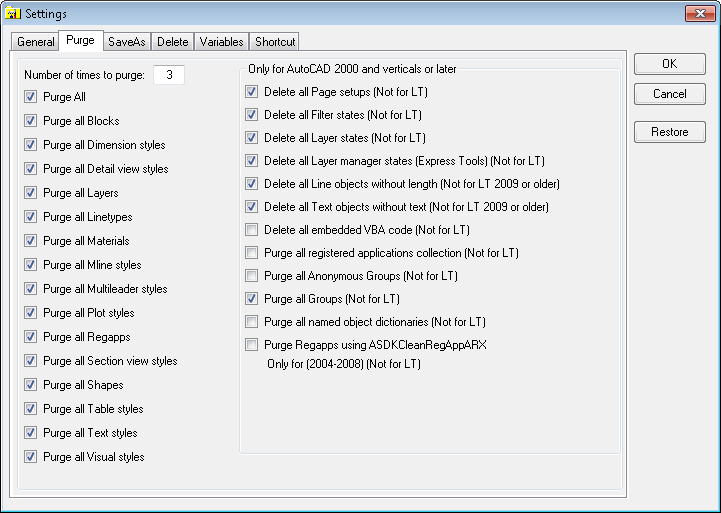
SmartPurger 3.5 released

SmartPurger 3.5 from JTB World is now available both from our product page as well as on Autodesk Exchange Apps. A free trial is available of SmartPurger so you can give it a try.

SmartPurger not only purges multiple drawings but can also batch process most anything you like if you have any Script or AutoLISP files you want to run on a bunch of DWGs. If you don’t know how we can help to create it so you can automate your manual tasks. An AutoCAD based application is required to run SmartPurger but it can also work with other DWG compatible CAD applications.

These are the bug fixes for this release:

-Fixed a bug where accoreconsole did not save to specified DWG version
-Purge multileader styles bug fixed where it did not always purge these styles.
-Handle dialog box about VBA not installed
-Fixed bug where Educational Version - Terminated sometimes show up in status column even though the drawing is not educational

If you are interested in other useful AutoCAD helper functions take a look at JTB Sheet Set Creator, DigSigStamp,Batch Publish for AutoCAD, DimensionPatrol, TransTips or OffsetInXref.

If you need any custom app created, small or large, for AutoCAD or Revit you are welcome to contact us.

Tuesday, January 7, 2014

AutoCAD P&ID 2014 Service Pack 1, Autodesk Beta, News and Hotfixes

Anyone with an Autodesk account can access the entire library of video recordings and class handouts from more than 600 classes from AU 2013 in Las Vegas—for free at the AU website, login and click on Classes on Demand.

Autodesk Completes Acquisition of Circuits.io (Autodesk 123D Circuits) - press release

Autodesk Beta Season is in Full Swing - Do you want to test & help improve the next versions of Autodesk products? https://beta.autodesk.com/. If history is followed future products can be AutoCAD 2015, Revit 2015 and so on.

Inventor 2014 SP1 crash on Start-up Windows 8.1 with Intel HD Graphics 4000 - Up and Ready

Working with Inventor and antivirus software - TS22811064
When you work with Inventor and there is antivirus software active on your machine, you may experience slow performance. For example, you may have slow response times while using Inventor and the refresh of Inventor UI may be slow. This is caused by antivirus software and you would like to optimize your performance.

Hotfix: Fix Fillet Translation, Punch Note Untranslation in Inventor 2013/2014 - DL22823934

Hotfix: Correct issue with “Cut” feature which cannot be selected in a “Pattern” operation in Inventor 2014 - DL22823063

Hotfix: Fix incorrect hotkey issue for command “Delete” in context menu in Inventor 2013 - DL22823494

Hotfix: Correct untranslation of column headers in sheet metal column headers in Inventor 2012/2013 - DL22823919

Sites disappear, but feature lines remain until audit in AutoCAD Civil 3D 2014 - TS22811035
Sites are disappearing from the drawing, but the Feature Lines remain. When you run AUDIT or RECOVER, the Feature Lines then disappear.

Direction in Object Viewer does not match UCS in AutoCAD Civil 3D - TS22813499

Xrefed survey figures plot with the wrong plot style in Civil 3D 2013 - TS22814640

Error: "Please wait while Windows configures AutoCAD Raster Design" - TS22817946

Wipeout draw order is not working with viewports - TS22817919

Error: "Not enough free RAM for HIDE--some lines will be hidden incorrectly" - TS22824497

AutoCAD P&ID 2014 Service Pack 1 - DL22757675
This Service Pack does not apply to AutoCAD Plant 3D 2014 Extensions 1 or 2 (Subscription). The updates in this Service Pack are included in Extension 2. AutoCAD 2014 Service Pack 1 is included in this service pack.

Issues fixed with this Service Pack:

P&ID Drawings

  • A new slregroup command has been added to make it easier to manage line groups. For more information, see About P&ID Line (SLINE) Grouping.
  • The Edit Sline Group... command was not available in the shortcut menu.
  • Control valve substitution did not work. If the substitution palette does not display correctly, you can erase and replace the control valve.

Customer Reported (CER) Defects

3D Model

  • File open command would fail when a drawing is opened that contains custom entities with embedded 3D solids.
  • Return bends would not always align with routed pipe.
  • Parts created with plantpartconvert could not be selected in the Spec Editor.
  • Ladders and structure did not always display correctly in an Ortho view.
  • Butterfly valves placed into a short pipe segment could cause the program to shut down unexpectedly.

Isometric Drawings

  • Splitting at a branch would sometimes place components outside the draw-area.
  • Tap weld was assigned to the same line number as the olet.
  • Improvements to isometric drawings including annotation and dimension placement.

Spec Editor

  • Flange thickness in inches did not update correctly for metric projects.

Tuesday, December 17, 2013

How to recover and fix problematic or corrupt DWGs in AutoCAD

This is a great resource for AutoCAD users. Troubleshooting corrupt DWG files - TS22753433

Usually there is a way to correct drawings with technical problems.

Issue
An AutoCAD DWG file cannot be opened and causes AutoCAD to show error messages or alerts, or to freeze or crash.

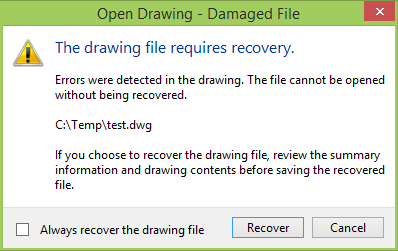
Open Drawing - Damaged File - The drawing file requires recovery. Errors were detected in the drawing. The file cannot be opened without being recovered.

The drawing file requires recovery.

Drawing file is not valid.

Drawing file is not valid.

Cause
Possible causes of file corruption:

  • Network (transmission errors, file locking, latent writing of data)
  • Storage media degradation (bad sectors on a hard drive)
  • Defective or failing RAM
  • Operating system issues
  • Power surges
  • 3rd - party applications running inside the Autodesk product
  • DWGs created or saved by non-Autodesk non-RealDWG products
  • AutoCAD terminated while saving DWG (less frequent)

Recommendation: Audit and purge before saving

Solution
If a file cannot be opened, take the following steps:

  • RECOVER command
    --Recovers a selected drawing file
    --If successful, open and run AUDIT command
    --Evaluates drawing integrity and possibly more error correction
    --Set system variable AUDITCTL=1 to create a report of audit results

The drawing file was recovered.

  • RECOVERALL command (introduced in AutoCAD 2008)
    --Recovers a selected drawing file
    --Attached and nested xrefs are also opened, repaired, resaved, and closed
  • INSERT and EXPLODE
  • Start a new DWG with no template
    --Run INSERT and selected the corrupted drawing
    --Check the “Explode” option

If a file can be opened but still shows signs of corruption, take the following steps:

  • RECOVER and AUDIT
  • PURGE command
  • Copy and Paste into a new drawing
  • AECTOACAD (-EXPORTTOAUTOCAD)
    --Exports to a pure AutoCAD file in selected drawing version
    --Strips potentially corrupt custom objects
  • WBLOCK command
    --Set all layers ON, THAWED and UNLOCKED
  • WBLOCK all objects in the drawing to an external block file
  • INSERT the resulting file as block into a new drawing (check the “Explode” option or EXPLODE the block after inserting)
  • AUDIT and PURGE
  • DXFOUT/DXFIN
    --DXFOUT to create a new .dxf file
    --Start new drawing and DXFIN to import the new .dxf file
    --Also try exporting as AutoCAD 12 DXF
  • XREF into a new drawing and BIND

See also Recover damaged drawing when RECOVER command not successful - TS19369

  • Using Windows Explorer or the Windows Find feature, search the entire hard disk for autosave (SV$) files or backup (BAK) files with the same name as the drawing. Rename those files so that they have a DWG extension, and you may be able to open them. (By default, SV$ files are in the %TEMP% folder and BAK files are in the same directory as the DWG file.)
  • Use WBLOCK command to insert the corrupt drawing into a new drawing. Insert at the 0,0,0 coordinate.
  • Open the drawing in a previous release of the software, if available (AutoCAD only).
  • Export the drawing as a DXF™ file, then import the DXF file.
  • If the drawing was last saved in an older format, try using partial open to load the drawing one layer at a time until you find a layer containing an error. Then repeat, skipping that layer next time. See related documents for instructions on using the partial open feature (AutoCAD only).

Drawing Recovery Manager (command DRAWINGRECOVERY)
Displays a list of all drawing files that were open at the time of a program or system failure. You can preview and open each drawing or backup file to choose which one should be saved as the primary DWG file. After a program or system failure, the Drawing Recovery Manager opens the next time you start the application. Drawing Recovery Manager displays a list of all drawing files that were open. The System Variable RECOVERYMODE controls whether drawing recovery information is recorded after a system failure and whether to show the Drawing Recovery Manager or not.

If you want to help yourself, Autodesk and other AutoCAD users make sure to send in any errors to Autodesk when you see the Customer Error Report dialog box (CER).

Finally a solution that sometimes helps if AutoCAD cannot fix the problem is to try to fix the drawing in another program that can open and save DWG files. The more users having the similar problem the better chance it will be fixed in a service pack or future version. Eventually you might get an email saying the problem is fixed.

You may find JTB World’s SmartPurger useful to batch process drawings that needs to be fixed. It includes Audit and Purge functionality as well as a lot more.

Friday, December 13, 2013

Autodesk tips, tricks and news like the AEC Feed

AEC Feed keeps you up-to-date on AEC industry news, trends and the latest updates from your favorite Autodesk AEC software products. You can download the app from Apple App Store (note: iPad 6.0 or higher required). Via Beyond Design

Autodesk University 2013 has ended and the Recorded streams of keynotes, forums and some classes are available if you missed it live or online.

FLEXnet Licensing error:-15,10 when performing Status inquiry on LMtools - TS22754152
Issue: FLEXnet Licensing error:-15,10. System Error: 10049 "WinSock: Invalid address" When performing Status Inquiry on LMtools.
Windows firewall interfering with license server

Educational Watermarks [Plot Stamp] + AutoCAD 2014 SP1. Please be very cautious when using an Educational version of AutoCAD 2014 SP1.  There is a STILL an EDU watermark [plot stamp] but the warning is now suppressed in SP1. - via Up and Ready
Check also out EduFinder by JTB World to find and identify AutoCAD drawings (DWG) that contain the educational stamp.

Stability issues and unexpected exit when you click on a command in the contextual ribbon tab in Autodesk Revit - TS22753368
Customers have been able to solve this issue by updating the WACOM drivers installed on the system.

Some map features are not labeled - TS22745944
Although you've created labels in the Style Editor, many features do not display their labels. Applies to AutoCAD Map 3D and AutoCAD Utility Design.

QSAVE does not work because AutoCAD considers the drawing to be read-only - TS22745933
Suddenly you are unable to save an open drawing because AutoCAD considers the file as read-only. The drawing you are working with is saved on a network. Applies to: AutoCAD Map 3D 2014

Extraneous spatial data types showing in Style Editor in AutoCAD Map 3D/AutoCAD Civil 3D - TS22757634

Cannot select schema in Bulk Copy target field in AutoCAD Map 3D - TS22754136

FDO connection still shows Oracle feature classes in Map 3D that were removed - TS22754647

Error: "Failed to create the Data Source file" when trying to Attach Access Database in Map 3D - TS22754416

Dialog box for Define Query does not appear in Map 3D (ADEQUERY command) - TS22753406

Productstream Professional 2011 Client Update for Windows Internet Explorer 10 - DL22757907

Strange graphics behavior and frequent crashing on launch of AutoCAD - TS22754147
Issue: Your AutoCAD-based product either crashes while launching, or when AutoCAD loads,or you notice abnormal behavior in the user interface.
Symptoms: AutoCAD launches but then immediately crashes.
The AutoCAD dmpuserinfo.xml file shows "32-bit" within the <DisplayMode> tag, even though your system is 64-bit.
If AutoCAD launches successfully, and you switch to a Classic workspace, some of the tools and tabs disappear from the user interface.
A repair and/or reinstall of AutoCAD has not resolved the issue.

When I try to install I get an Internal Error 2738 (this can apply to many different Autodesk products) - GS22754600

Objects not visible after zoom extents in AutoCAD - TS22757632
In paper space, the xref and other drawn entities are shown. While in the model space, none of the objects are visible. Performing a zoom extents results in multiple small dots appearing. While trying to zoom to one of these dots, nothing is showing and you cannot see the xref or other drawn entities.
Cause: Objects in the drawing were grouped far away.

Zero upstream distance error for Culvert model in River and Flood Analysis in AutoCAD Civil 3D 2014 - TS22757720

Zoom to profile view does not work in River and Flood Analysis Module in AutoCAD Civil 3D 2014 - TS22757610

Thursday, December 5, 2013

Autodesk Structural Bridge Design and other Autodesk news

Here’s some recent Autodesk news:

  • Autodesk Dynamo and Autodesk FormIt Updates– For building designers, Autodesk announced a major update for computational design with the merger of Autodesk Dynamo and Autodesk DesignScript. Dynamo is an open source visual programming environment for BIM. It can be used stand-alone, or allows users to extend the parametric capabilities of Autodesk Revit software products. Autodesk DesignScript is a unique programming language, intended to help designers build and analyze complex geometric models that would be difficult to model with interactive techniques. Now both are coming together in Dynamo to deliver a clear confluence of the best of both worlds: a clean and modern UI that combines DesignScript responsiveness and visual feedback with Dynamo's tight integration with Revit.


    Also today, Autodesk announced that the BIM-based conceptual design tool, Autodesk FormIt, now includes a web-based application that runs on a choice of browsers for Windows and Mac (currently available in beta at autodeskformit.com). On all platforms – including previously released iPad and Android versions – Autodesk FormIt gives architects and designers easy-to-use tools to create, collaborate and share early-stage design ideas and continue their BIM process by taking models straight into Autodesk Revit. FormIt for iPad has been updated to take advantage of iOS 7 and also includes new energy analysis features that enable users to get simple indications of potential building performance – valuable insight at the beginning of the BIM process that can reduce rework later.
    Looking ahead, Autodesk demonstrated a forthcoming feature in the FormIt family of applications that supports real-time collaboration, enabling future designers to simultaneously access and collaborate on design models using their FormIt application of choice.
    For more on the Dynamo and FormIt updates, please see a related blog post here.

  • Graitec Acquisition – Expanding its capabilities in the structural detailing stages of BIM, Autodesk also today announced the close of its acquisition of Graitec’s Advance Steel and Advance Concrete product lines and associated employees. Building on Autodesk’s current portfolio for structural engineering, the acquired product lines offer modeling, detailing, and fabrication solutions to support BIM-based steel and reinforced concrete workflows.

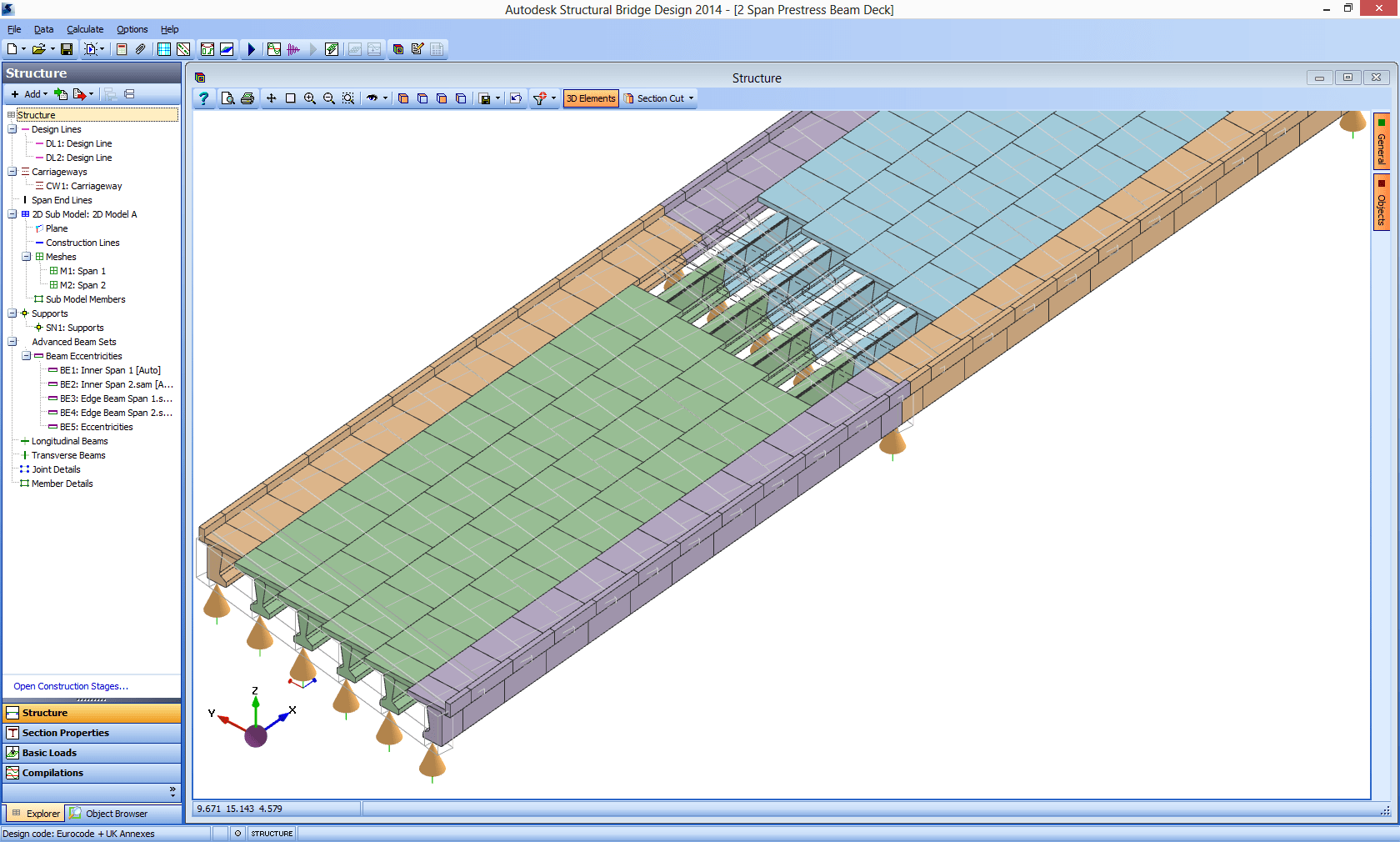
  • Autodesk Structural Bridge Design - For bridge designers and engineers, Autodesk recently launched Autodesk Structural Bridge Design. Resulting from the August acquisition of technology assets from UK-based Bestech Systems, the new software is an important addition to the Autodesk BIM for infrastructure portfolio. Autodesk Structural Bridge Design gives engineers greater flexibility and efficiency in their small- to medium-span bridge design processes by integrating loading, analysis and code checking in a single environment. By using this unique approach, more consistent data can be used throughout the bridge design process allowing projects to be more quickly and accurately brought to completion. For more on Autodesk Structural Bridge Design, please see a related blog post here.

    Autodesk Structural Bridge Design

  • Azalient Technology Acquisition - Also today Autodesk announced the acquisition of technology assets from UK-based Azalient Ltd. The acquisition helps support the evolution to BIM-based design workflows among traffic engineers and transportation planners working on roads, highways and railway projects. The acquired traffic analysis technology enables designers to simulate how people travel - whether by automobiles, busses or trains - in isolation and in series. It also provides transportation customers with tools to help predict demand for new infrastructure projects, forecast how to handle future demand and predict traffic disruptions caused during construction, with the addition of cost and benefit analysis of alternative infrastructure designs. Terms of the acquisition were not disclosed.

  • Topcon Collaboration – Building upon Autodesk's existing collaboration with Topcon, the two companies are working together to further improve the integration of BIM workflows and field layout to support greater predictability, productivity and profitability. Autodesk is developing a new BIM 360 mobile app for iPad that further simplifies the process of precisely locating BIM coordinates on a construction site. Designed for general contractors and MEP trades, the app controls a robotic total station – as well as the new LN-100 3D positioning system from Topcon announced yesterday - that can accurately position control and layout points on the construction site, and as-built data can be fed back into the design model via BIM 360 for quality assurance.

And finally a workaround tip: Performance issue and flickering in AutoCAD LT 2014 when panning and zooming - TS22742730
While working with certain drawings in AutoCAD® LT 2014, the program runs slow and the status bar flickers, especially with multiple files open, even with basic commands such as panning and zooming.

Tuesday, December 3, 2013

Autodesk University 2013, Autodesk CAM 360 and other Autodesk news

Autodesk University 2013 has started now and the Keynote Address: The Answer Is Outside is recorded if you missed it live or online. You may also check out the posts on It’s Alive in the Lab on this: #au2013 keynote: The answer is outside and #au2013 keynote: customers who have looked outside.

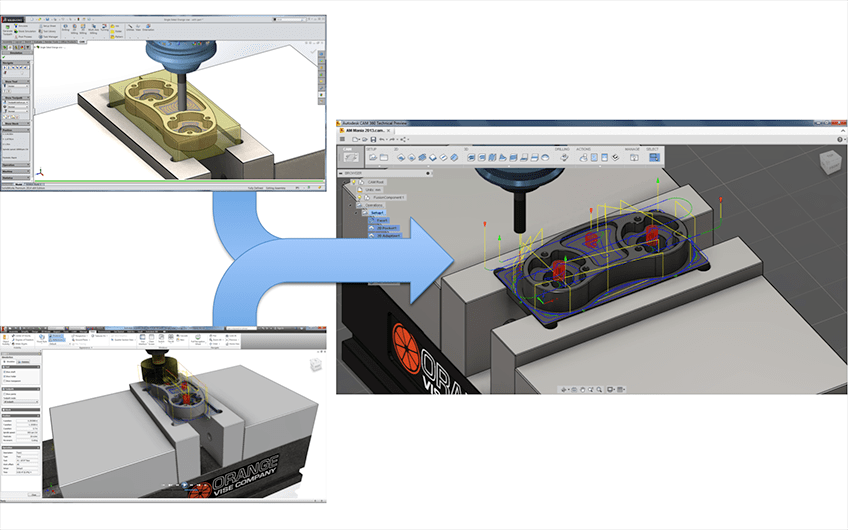
Autodesk, Inc. today unveiled Autodesk CAM 360—the industry’s first cloud-based solution for computer-aided manufacturing (CAM). http://cam.autodesk.com

Hotfix for AutoCAD MEP 2014 - True/False Localization Hotfix for Russian - DL22716991

Civil 3D 2014 Fatal error: Unhandled access violation writing 0x006c exception at f3256d5ah - Up and Ready

Marking Menu Hotfix for AutoCAD Electrical 2014 - DL22730324

Terminal Strip Editor Hotfix for AutoCAD Electrical 2014 - DL22730368
This hotfix resolves a performance issue with Terminal Strip Editor. For some projects, Terminal Strip Selection dialog box takes significant time to launch.

Map query causes drawing to lock (AutoCAD Civil 3D or AutoCAD Map 3D) - TS22736443

Inventor menu browser does not work in Parallels Desktop - TS22736367

Monday, November 25, 2013

Autodesk support for Windows XP ends in 2014 and other Autodesk news

Here’s some recent news from Autodesk:

Autodesk Community has been updated. Check it out the new look.

123D Catch 2.0 for iOS makes 3D photography and model creation epically better.
Guided capture tools give you dynamic feedback as you take your photos.
The new gallery provides a streaming showcase of captures from around the world.
And underneath the hood is an entirely new pipeline that makes better, faster, more amazing 3D models. More here.

Microsoft Windows XP support for AutoCAD products FAQ - GS22683753
Autodesk support for the Microsoft Windows XP operating system ends on January 1, 2014 for all new and upgraded versions of AutoCAD products released in 2014 and later. Versions of AutoCAD products (AutoCAD, AutoCAD LT, AutoCAD Architecture, AutoCAD Electrical, AutoCAD Map 3D, AutoCAD Mechanical, AutoCAD MEP) released prior to January 1, 2014 will continue to be supported on the Windows XP operating system.

The Revit 2014 Daylighting Analysis (RDA) plug-in uses the Autodesk 360 Rendering cloud service to perform very fast and physically accurate daylighting analyses from within Revit. More here.

Hotfix - Autodesk Inventor 2014 (Polish only) Flat pattern text parameters missing - DL22712527

Revit LT 2014 Update Release 2 - DL22607186

Tuesday, November 19, 2013

DWG Columns 2.0 now with DXF support

DWG Columns by JTB World has been updated to version 2.0.

The main news is the support for DXF files. DXF version 2004 and newer can hold drawing properties and are supported. Older DXF versions will only show the drawing version. Both ASCII and binary DXF files are supported.

InfoTip/ToolTip can also be seen when hovering over a DWG or DXF (even for BAK, DWT, DWS, SW$ files).

The Details Pane in Explorer will also show the properties.

Finally a 30-day trial has been made available so you can try DWG Columns with full functionality in your environment before purchasing.

DWG Columns works with DWG and DXF files edited or created with applications like AutoCAD, Dassault Systemes DraftSight, Caddie, progeCAD, Bricsys BricsCAD, IMSI TurboCAD, GRAPHISOFT ArchiCAD, nanoCAD, MicroStation, ZWCAD+ and others. In AutoCAD DWGPROPS command is used to edit the drawing properties.

Get the trial or purchase on the DWG Columns page.

See also our PROPULATE tutorial that shows how the properties can be updated based on title block data found in block attributes.

Some of the latest blog posts

Subscribe to RSS headline updates from:
Powered by FeedBurner

Contact Us | About JTB World | Website General Terms of Use | Privacy Policy
^ Top of page

© 2004- JTB World. All rights reserved.