I posted about ADT/ABS List Definition freeware a while ago as well as the ADT/ABS List Definition freeware tip and today when I was reading through AUGI I found that it was the Tip of the Month. Thanks! Not sure what month but that doesn't matter. If I don't forget it I will post an updated one that will work even better for ACA 2008 and AMEP 2008 as well as something about how I did it using VB.NET. I will also make use of a new thing in the API for ACA 2008 that was missing in the API for ADT 2007. Feel free to remind me if I forget it.
Thursday, March 8, 2007


AutoCAD 2008 and AutoCAD Architecture 2008 discussion groups
I noticed yesterday that two new Autodesk discussion groups have been added.

AutoCAD 2008 Web Browser News Reader
AutoCAD Architecture 2008 Web Browser News Reader
Don't worry the new software is soon to arrive.
More about AutoCAD 2008 (AC 2008).
More about AutoCAD Architecture 2008 (ACA 2008).
AutoCAD 2008 Web Browser News Reader
AutoCAD Architecture 2008 Web Browser News Reader
Don't worry the new software is soon to arrive.
More about AutoCAD 2008 (AC 2008).
More about AutoCAD Architecture 2008 (ACA 2008).
Posted by: Discussion Group Admin
Date: Mar/07/07 - 23:34 (GMT)
Welcome to the new AutoCAD Architecture Forums. We have reorganized the categories to make if faster and easier to find the information you need, and think this will be a more effective way for you to communicate with fellow users on a variety of topics.
New Groups:
- AutoCAD Architecture 2008: This area is for general discussions on the new 2008 product
- Architectural Desktop 2007 & Prior: This area is for general discussions on the 2007 or earlier releases. Please add the software version in Subject when posing to this group.
- AutoCAD Architecture Wishes: All releases: Post all wish list items focused on adding to or enhancing AutoCAD Architecture
- AutoCAD Architecture Customer Gallery: All releases: Posting for drawings or renderings you would like to share with Autodesk and others:
- AutoCAD Architecture Customization: All releases: Discussions focused on customization of the application
- AutoCAD Architecture Content: All releases: focused on adding to or improving content
- AutoCAD Architecture Visualization: All releases: Place to discuss all visualization related questions.
Wednesday, March 7, 2007
Have you lost your .EXE file extension association in Windows Vista?
"I have problems to start all programs that has the .EXE extension!" "My programs are broken!" "What happened to my .exe file extensions?" "I cannot run Regedit or do a System Restore!" "I'm unable to launch..." "I have an EXE file problem, the EXE does not execute"
You have probably tried to open an .EXE file with something like Adobe Reader, Internet Explorer, Notepad or the like. This results in having the .EXE file extension corrupted.

Now you really have problems since most every program requires access the exe file association to work. But there is no need to panic.
If you have this problem the solution is not the same as in previous Windows versions. Below you can see what have been added to the registry after Acrobat Reader (AcroRD32.exe) has been associated with .exe files. They need to be removed but since you cannot run regedit.exe you need to use a .reg file like one of those below.
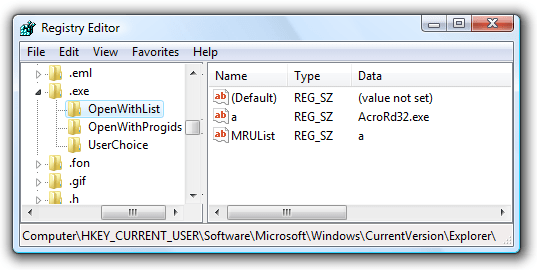
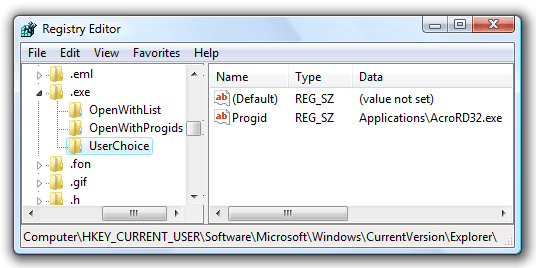
Solution (only compatible with Windows Vista)
Here are some registry files that should be able to fix this problem. Download one of them and save it locally. Double click on the file and when asked "Windows needs your permission to continue" "Registry Editor" it is to give permission to start regedit.exe. Click on Continue. Then the Registry Editor will warn you again and click on Yes to add or merge the content of the reg file to the registry. You need to be an administrator to apply these fixes.
Here is the content of the above file. Copy the three rows below to Notepad and save to a file with the file extension reg.
Windows Registry Editor Version 5.00
[-HKEY_CURRENT_USER\Software\Microsoft\Windows\CurrentVersion\Explorer\FileExts\.exe\OpenWithList]
[-HKEY_CURRENT_USER\Software\Microsoft\Windows\CurrentVersion\Explorer\FileExts\.exe\UserChoice]
Here is the content of the above file. Copy the five rows below to Notepad and save to a file with the file extension reg.
Windows Registry Editor Version 5.00
[-HKEY_CURRENT_USER\Software\Microsoft\Windows\CurrentVersion\Explorer\FileExts\.exe]
[HKEY_CURRENT_USER\Software\Microsoft\Windows\CurrentVersion\Explorer\FileExts\.exe]
[HKEY_CURRENT_USER\Software\Microsoft\Windows\CurrentVersion\Explorer\FileExts\.exe\OpenWithProgids]
"exefile"=hex(0):
If the above ones does not help here is a more thorough one.
And if nothing else works you can try this one.
To see the change of the icons you might need to log out or restart the computer. But the file association should work directly.
If you want to reproduce the error save the below rows using Notepad to a .reg file.
Windows Registry Editor Version 5.00
[HKEY_CURRENT_USER\Software\Microsoft\Windows\CurrentVersion\Explorer\FileExts\.exe]
[HKEY_CURRENT_USER\Software\Microsoft\Windows\CurrentVersion\Explorer\FileExts\.exe\OpenWithList]
"a"="AcroRd32.exe"
"MRUList"="a"
[HKEY_CURRENT_USER\Software\Microsoft\Windows\CurrentVersion\Explorer\FileExts\.exe\OpenWithProgids]
"exefile"=hex(0):
[HKEY_CURRENT_USER\Software\Microsoft\Windows\CurrentVersion\Explorer\FileExts\.exe\UserChoice]
"Progid"="Applications\\AcroRD32.exe"
If You Are Unable to Start a Program with an .exe File Extension in Windows XP take a look at this knowledge base article from Microsoft. In this case a virus is the cause of the problem.
When you attempt to start a program that has an .exe file extension, the program may not start, and you may receive one of the following error messages:
- Windows cannot find FILES32.VXD. This program is needed for opening files of type "Application".
- Path to program is not a valid Windows application
Your desktop may appear to be blank. Also, the problem occurs many times when you restart your computer. Even after an anti-virus program has indicated it has cleaned the virus, the registry entry described in the "Resolution" section of this article is still in the registry.
Another KB is also for Windows 2000.
When you try to start a program that has an .exe file name extension, you receive one of the following error messages:
- Windows cannot find FileName.exe
- Windows cannot find ProgramName. Make sure you typed the name correctly
- Windows cannot find FileName.exe. This program is needed for opening files of type "ProgramName".
This problem probably can happen also in Windows 7.
Tuesday, March 6, 2007
Kean Walmsley's presentation on Autodesk Component Technologies
This webcast is covering AutoCAD, DWG Data, DWG TrueView, RealDWG+HOOPS, AutoCAD OEM, DWF Publishing, DWF Toolkit, DWF Viewer and Project Freewheel.
Helps to select the technology for your purpose.
RSS Bandit released but I'm using Google Reader for now
I have used RSS Bandit as a feed reader for many years and before that Bloglines. But due to some long standing bugs in the previous version I gave Google Reader a fair try and I must say that it is really good.
Now RSS Bandit v1.5.0.10 is released and fixed these problems. Getting used to Google Reader I'm not sure I will use RSS Bandit for a while anyway. I've installed it and tried it and it is much better than before.
The biggest thing missing in Google Reader is ability to search. Isn't Google a search company? One little thing I miss in Google Reader is to drag and drop feeds from one folder to another. But I like the keyboard shortcuts. Here are some of them:
| j/k | item down/up | selects the next/previous item in the list |
| space/shift-space | page down/up | moves the page down/up |
| n/p | scan down/up | in list view, selects the next item without opening it |
| enter | open/close item | in list view, expands or collapses the selected item |
| m | mark as read/unread | switches the read state of the selected item |
| v | view original | opens the original source for this article in a new window |
| shift-a | mark all as read | marks all items in the current view as read |
| 1 | expanded view | displays the subscription as expanded items |
| 2 | list view | displays the subscription as a list of headlines |
I also tried the previous version of Attensa for Outlook but did not like it at all for the way I read feeds. There is a new free beta of Attensa for Outlook 2007 but I don't feel like trying it right now.
Monday, March 5, 2007
Show wipeouts in DWG TrueView 2007
Here is a solution to show wipeouts in DWG TrueView 2007. At least for those with AutoCAD 2007. But what for those that does not have AutoCAD 2007? Is it legal or OK to redistribute AcWipeoutObj17.dbx?
Issue
You opened a drawing with DWG TrueView 2007 and noticed that the wipeout objects were not displayed, as they are when you open the drawing in AutoCAD®.
Solution
The ability to display and plot wipeout objects in DWG TrueView 2007 is not available by default.
However, you can add this functionality to DWG TrueView 2007 by copying the AcWipeoutObj17.dbx file from the AutoCAD® programs folder, located at C:\Program Files\AutoCAD 2007, to the DWG TrueView programs folder, C:\Program Files\Autodesk\DWG TrueView.
Preview images in Vista and AutoCAD 2008
Not really Vista WOW but it's great anyway with the AutoCAD 2008 support for these large previews in Vista. DWG as well as DWF has up to 256 x 256 size thumbnails. It's useful to be able to switch to preview to quickly visually find the drawing you look for.
Notice how the DWF also shows Shet Name, Sheet Size and Number of Sheets.
Notice how the DWF also shows Shet Name, Sheet Size and Number of Sheets.
Saturday, March 3, 2007
Live OneCare cleaned something but what and where?
Using Windows Live OneCare on Windows Vista it found a potentially unwanted software. Trojan JS/Redirector.A that it alerts with the severe level. The problem with OneCare here is that it is not much information about the problem. Where is this found and what is it?
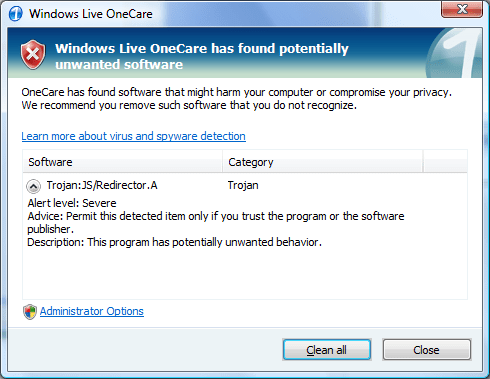
Brave enough I selected Clean all to see what happened. Still clueless as you can see.

I contacted Microsoft Online Support Service and was pointed to Windows Live OneCare Support Log. I had looked for a way to view the log but it seems that it has to be created first.
To create a Windows Live OneCare support log:
- Under Common Tasks (Quick Links), click Change OneCare settings (Change settings).
- On the Logging tab, click Create support log.
Looking at the log file now at least after it is done I know what happened.
Windows Live OneCare found potentially harmful or unwanted software on your computer
Threat Name: Trojan:JS/Redirector.A
Detection Date and Time: 3/2/2007 8:54 PM
File Name: C:\Users\Jimmy\AppData\Local\Microsoft\Windows Live Mail desktop\jtbworld@hotmail.com\Hotmail (jt db2\Junk e-mail\41980368-0000001A.eml
Threat Severity: Severe
Threat Category: Trojan
Contained Object: (SCRIPT0000)
Virus and spyware monitoring found potentially unwanted software: (ANTIVIRUS_ONACCESS)
Threat Status: Removed
So the wish for the next OneCare version is to be able to see what file is affected.

Friday, March 2, 2007
a-squared Free 2.1 found Trace.File.PC Tattletale on Vista

I run a scan using a-squared Free 2.1.0.12 on Windows Vista and found Trace.File.PC Tattletale with the trace: C:\Windows\system32\winload.exe.
The only problem is that winload.exe is the boot loader in Windows Vista and should not be removed just like that.
Windows Vista includes new boot loader components that are designed to load Windows quicker and more securely. The traditional Windows NT boot loader, ntldr, is replaced by three components:
- Windows Boot Manager (Bootmgr.exe)
- Windows operating system loader (Winload.exe)
- Windows resume loader (Winresume.exe)
winload.exe is also the name of a spyware program, PC Tattletale. This program has nothing to do with the Windows Vista startup process.
Thursday, March 1, 2007
ObjectDCL sold
According to an email I got from Andrea Andreetti ObjectDCL has been sold. We will se how it goes with OpenDCL and the efforts to keep it free. www.Ductisoft.com will be up in 2 or 3 week and ObjectDCL will be ready in around June 2007. No price disclosed so far.
Greetings to all,
As you already know by now,
ObjectDCL has been sold.It is a fact.
Martin Leduc P.E. and I, Andrea Andreetti, Are founders of DuctiSOFT inc. and are now owners of all legitimate and legal rights of this product created by M. Chad Wanless, according to the legal agreement signed between the two parties.
This transaction is to ensure the survival and proper operation of ObjectDCL.
www.DuctiSOFT.com will be available shortly and will allow you to download the new official version of ObjectDCL
Thanks again M. Chad Wanless.
Hoping you will enjoy the upcoming version.Sincerly,
Andrea Andreetti
President DuctiSOFT inc.
OpenDCL as well as ObjectDCL is for AutoLISP programmers who want to replace AutoCAD's limited DCL (Dialog Control Language) user interface language with a rich set of modern Windows user interface elements.
InfoCenter Search Results in AutoCAD 2008
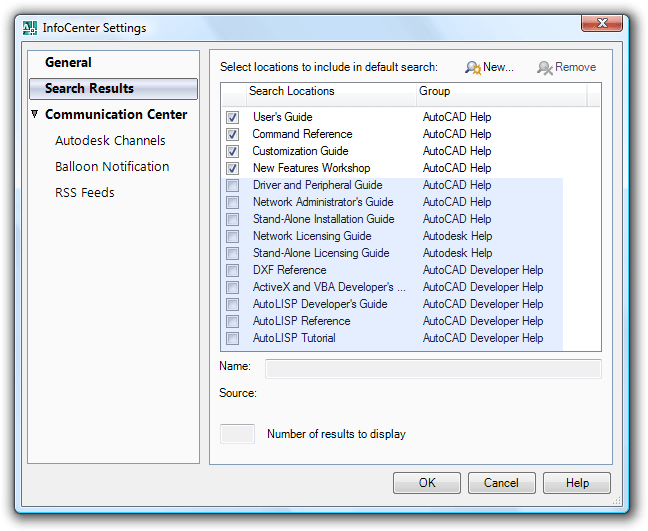
As a CAD Manager, developer or the like notice that you probably want to include some other search locations that are not searched by default like Network Administrator's Guide, AutoLISP Developer's Guide and the like. You access InfoCenter Settings at the top right of AutoCAD 2008.



Usage of CAD in Vista
I run into this report by Pfeiffer Consulting on Windows Vista vs. XP and Mac OS X that among other things mention mouse precision. Something that every CAD user knows how important it is.
As far as Windows Vista was concerned, it was important to conduct the necessary benchmarks to compare the new release with currently installed versions of Windows. In the light of the results, the core recommendation coming out of this research is simple: before deciding on an upgrade to Windows Vista, it seems wise to conduct thorough productivity analysis in a concrete workflow situation to see if User Interface Friction here would negatively impact overall efficiency. This is particularly true in creative industries such as design, publishing and photo retouching, where mouse precision is a major concern. Overall, Mac OS X remains the most fluid environment of the three systems tested.
Mouse precision is obviously essential for any task where precise positioning of the cursor is essential> this is the case in graphic design, CAD, retouching, page layout and web design, among others.
The result below is according to the test report not hardware related.

I've not been using Mac OS X but I don't feel there is any difference between Vista and XP when it comes to the mouse.
Wednesday, February 28, 2007
7-Zip a great WinZip alternative
7-Zip from http://www.7-zip.org/ is a great open source software for handling zip files as well as other formats. One I have found use for is to extract the contents of ISO files.
The main features of 7-Zip
- High compression ratio in new 7z format with LZMA compression
- Supported formats:
- Packing / unpacking: 7z, ZIP, GZIP, BZIP2 and TAR
- Unpacking only: RAR, CAB, ISO, ARJ, LZH, CHM, Z, CPIO, RPM, DEB and NSIS
- For ZIP and GZIP formats 7-Zip provides compression ratio that is 2-10 % better than ratio provided by PKZip and WinZip
- Self-extracting capability for 7z format
- Integration with Windows Shell
- Powerful File Manager
- Powerful command line version
- Plugin for FAR Manager
- Localizations for 63 languages

Tuesday, February 27, 2007
Process Explorer problem in Vista
Process Explorer (procexp.exe) is a great free software and can usually replace the Task Manager but in Windows Vista the following error message comes up when this is done.
C:\Windows\system32\taskmgr.exe
The requested operation requires elevation.
No solution found so far. Please add a comment if you find a solution to this.
Subscribe to:
Posts (Atom)