Showing posts with label Revit. Show all posts

Wednesday, March 26, 2025

Motif Launches Cloud-Based Platform for Seamless AEC Collaboration

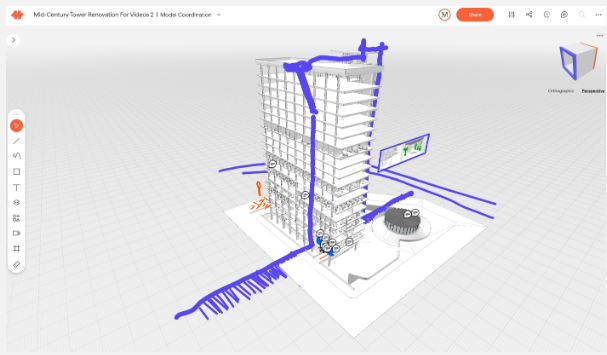
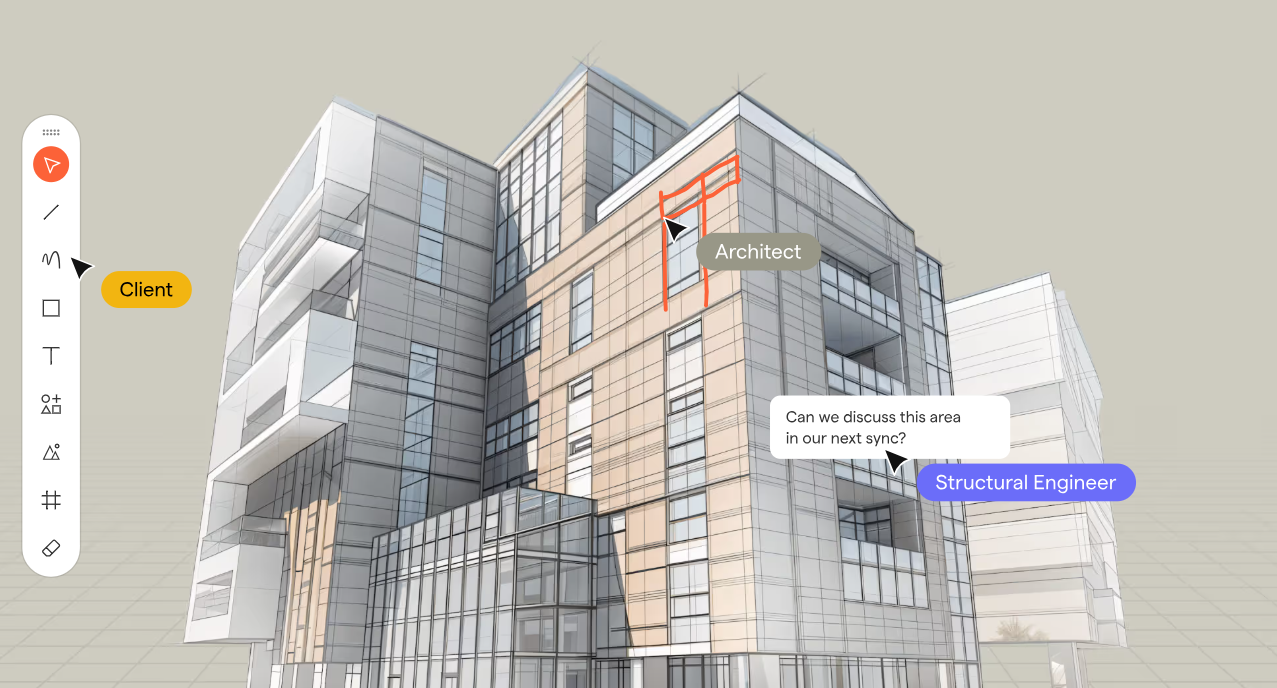
Motif a startup in the architecture, engineering, and construction (AEC) sector, has unveiled its innovative cloud-based platform to revolutionize design collaboration. This platform merges 2D and 3D workflows, offering a unified workspace for architects, engineers, and stakeholders to collaborate in real-time without the limitations of traditional tools.

Motif Hero Image

Key Features of Motif:

  • Unified Collaboration Workspace: An infinite canvas integrating 2D drawings, 3D models, sketches, and specifications in one place.
  • Live Model Streaming & Integration: Real-time updates with Revit and Rhino, eliminating the need for manual re-uploads.
  • 2D & 3D Sketching and Markups: Enables instant commenting and sketching, seamlessly syncing feedback across tools.
  • Smart Presentation Tools: Interactive presentations linked directly to live designs.
  • Web-Based Accessibility: Requires no software installation, ensuring inclusivity for all stakeholders, even those without CAD expertise.
  • Plugins for Revit, Rhino and other BIM/CAD apps allows access to the collaboration both in the native app where the design is done and in Motif.

This eliminates traditional barriers like disconnected tools, fragmented workflows, and accessibility issues, ensuring efficient design reviews and meaningful participation for all team members, architects, designers, engineers, owners, clients, etc.

Motif's debut is more than a collaboration tool; it’s the foundation for an intelligent and connected future for Building Information Modeling (BIM). The company aims to enhance creativity, reduce friction, and harness AI to empower smarter design decisions.

“Today’s AEC workflows are burdened by fragmented data, rigid software, and disconnected collaboration tools that slow down decision-making,” says Amar Hanspal, CEO and Co-Founder of Motif. “Motif is redefining BIM with a focus on being open, intelligent, and collaborative, where BIM isn’t just about managing information—it’s about unlocking intelligence. We’re starting with intelligent collaboration—a platform that bridges gaps between teams, integrates with existing tools, and leverages AI to provide insights that drive better decisions. This is step one of many in building a smarter, more connected BIM future—one that removes friction, enhances creativity, and makes design intelligence truly accessible.”

motif 3D


"Motif simplifies how we collaborate across teams,” said Bill Carney, Design Technology Leader and Principal at DLR Group. “Instead of juggling screenshots, PDFs, and disconnected markups, everything is now in one place—live, structured, and effortless. Instead of creating work-arounds to collaborate we can focus on decisions and feedback in real time. Motif has made coordination faster and eliminated so many back-and-forths."

About: Motif Systems, Inc. is building the next generation software platform for the modern built environment. Founded in 2023 by Amar Hanspal (former Co-CEO and Chief Product Officer at Autodesk) and Brian Mathews (former CTO at Autodesk), along with founding employees of Revit, Motif enables seamless, real-time collaboration for architecture, engineering, and construction professionals.

With early access now open, Motif invites teams of all sizes to experience the next era of design collaboration. Interested professionals can request a free trial at motif.io.

Thursday, October 21, 2021

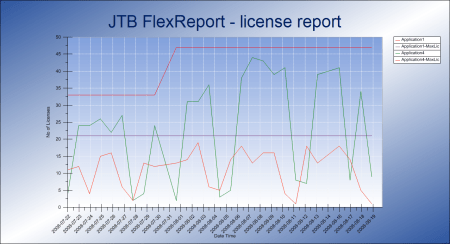
JTB FlexReport 2021.10.0 released - monitor expensive license usage

JTB FlexReport 2021.10.0 is now ready.

We have added and fixed a lot of things in this release. New monitoring options and new reports. Better performance. Works with Windows 11 and Windows Server 2022.

See the version history for all details.

Trial is available if you want to give it a try.

If your maintenance has expired you can try the new version for a few weeks, if you want to keep using it contact us to renew the maintenance. The upgrade is free of charge for customers with active maintenance.

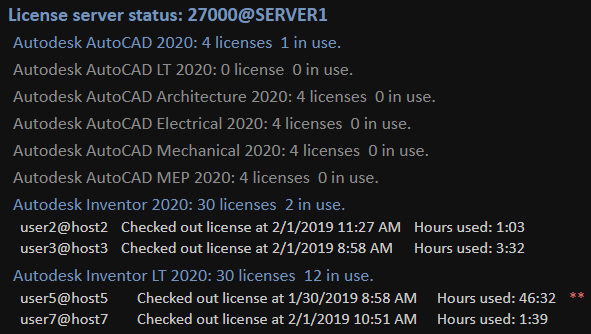
What is JTB FlexReport? JTB FlexReport is a license usage report tool for applications licensed using network license systems like FlexNet (FlexNet), IBM LUM, DSLS, SPLM, Sentinel, LM-X, RLM, EPLAN (ELM), HASP, DPT, Tebis, CodeMeter among others. Track usage over time, hours used and much more. With JTB Process Monitor much more can be monitored like Bentley MicroStation, Autodesk Named User licenses and Autodesk Flex.

If you have FlexNet licenses check out our JTB FlexReport LT freeware. App for AutoCAD available.

Autodesk user? See these posts:

You may still find use for JTB FlexReport together with JTB Process Monitor. We can help analyze your historic usage so you can prepare for the switch.

Monday, October 4, 2021

JTB FlexReport can monitor Autodesk Flex

Autodesk Flex is a new option to pay as you go for occasional product use. While you can get some usage reports from Autodesk they are limited.

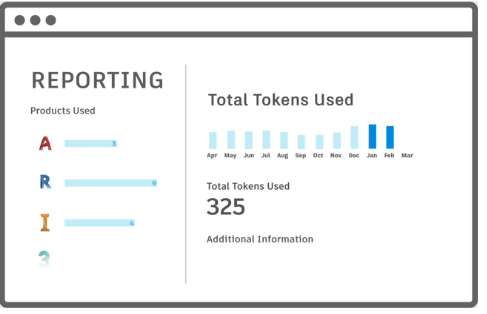
Tokens

When a user opens and signs into an Autodesk product included with Flex, they will be charged a daily rate per product once every 24 hours.

For example, a user opens and signs into AutoCAD from 8am-9am will be charged 7 tokens, same as a user using it the whole day. Even just starting and closing AutoCAD will cause a charge if 7 tokens (around $21). Revit will take 10 tokens.

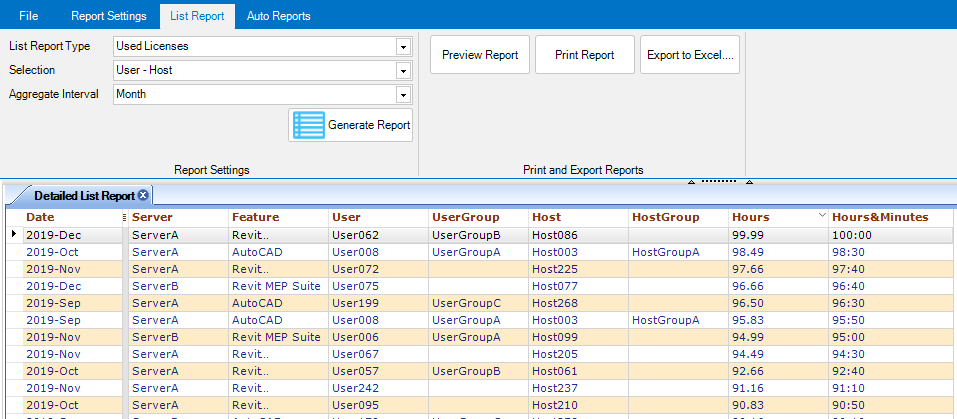
With JTB FlexReport and JTB Process Monitor you can get additional valuable reports to identify users that just use a product a short time per day. You can get the total time the product has been running as well as the active time the user used the product. With this users using the products just a short time can be identified.

Contact us for a free trial or if you have any questions.

Tuesday, July 27, 2021

JTB XClipClean 4.0.0 released

JTB XClipClean 4.0.0 has been released.

  • Upgrade from VBA to .NET improving performance and stability.
  • Remove messages about uninstallation in very-silent installation mode.

If you are using clipped xrefs or blocks you may find this app useful.

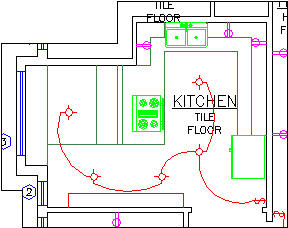
Kitchen with the xclip boundary visible

JTB XClipClean is an Xclip-cutter app for AutoCAD to clean up xrefs or blocks that been clipped so that the information that is outside the clip is removed. This is useful when you need to remove hidden geometry and minimize DWG file size.

AutoCAD allows blocks and xrefs to be clipped using the XCLIP command. Sometimes for different reasons you have to clean up the blocks or xrefs that have been clipped. JTB XClipClean can help you with that by deleting and trimming geometry that is outside the xclip boundary.

Revit does not handle xclipped blocks and xrefs so XClipClean can be useful to run on drawings before taking them into Revit.

Monday, January 18, 2021

JTB FlexReport 2021.1.0 - monitor ZWCAD, ZW3D license usage and more

JTB FlexReport 2021.1.0 is now ready.

We have fixed and improved a few things in this release.

  • JTB FlexReport Core
    • Fixed problem that could cause logging to stop if the c:\Windows\Temp folder was filled with tmp files.
    • Fixed another problem where the FlexNet debug log import could fail to work.
    • Removed saving current usage from FlexNet debug log because it can be incorrect if the imported log is older than a few hours. And if weeks or months old log it can result in very long incorrect usage.
    • Various minor fixes.
  • JTB FlexReport Service/Client
    • Fixed problems when multiple servers or features could not be selected and reported on.
    • Fixed another bug caused by ' character in user and host names.
    • Fixed a problem where dates in exported Excel files could fail to be correct in some countries date formats.
    • Various minor fixes.
  • JTB Process Monitor Service/Client
    • Performance improvements for the Client causing less CPU strain.
    • Various minor fixes.

See the version history for all details.

ZWCAD and ZW3D are among the many products JTB FlexReport can monitor usage of.

Trial is available if you want to give it a try.

If your maintenance has expired you can try the new version for a few weeks, if you want to keep using it contact us to renew the maintenance. The upgrade is free of charge for customers with active maintenance.

What is JTB FlexReport? JTB FlexReport is a license usage report tool for applications licensed using network license systems like FlexNet (FlexNet), IBM LUM, DSLS, SPLM, Sentinel, LM-X, RLM, EPLAN (ELM), HASP, DPT, Tebis, CodeMeter among others. Track usage over time, hours used and much more.

If you have FlexNet licenses check out our JTB FlexReport LT freeware. App for AutoCAD available.

Autodesk user? Take a look at Autodesk Network Licenses RIP, New Named User Plans and Prepare for the switch to Autodesk Named User Licenses. You may still find use for JTB FlexReport together with JTB Process Monitor.

Wednesday, September 9, 2020

Autodesk Named User usage reporting

Are you considering what Autodesk plan for Named Users you will go ahead with, now that there will be no more network licenses?

Product usage reporting with user details comes with the Premium plan and Enterprise plan for Autodesk Named Users at an extra cost compared to the Standard plan. With it you can see which individuals are using each product and version, and their frequency of use.

If the usage reporting sounds compelling you might find that the price is much higher for the Premium or Enterprise plans than if you stay with the Standard plans and add JTB FlexReport that together with JTB Process Monitor will give you great usage reporting of your named user licenses.

You can even monitor both the total usage time and the active usage time. You don’t want to lock up a license for a user using the license for a few hours per week or month.

JTB FlexReport with JTB Process Monitor works fine with any of Autodesk’s plans; Standard, Premium, Enterprise and Education. You can also monitor other software of your choice.

If you’re interested, try JTB FlexReport and JTB Process Monitor for free.

Other blog posts:

Sunday, August 30, 2020

JTB FlexReport 2020.8.0 released

JTB FlexReport 2020.8.0 is now ready.

We have added, improved and fixed things in this release. Some of it:

  • TLM usage monitoring supported. TASKING License Management by Altium.
  • FlexNet licenses with a mix of permanent and temporary (leased) licenses can now be separated. "Feature Expiry" is a new column on the FlexNet tab grid in JTB FlexReport Config to enable this together with specifying the license file to get the number of issued licenses for each.
  • RLM can now be monitored by snapshots as an alternative to the reporlog.
  • Some older versions of Sentinel is added support for. Like SentinelLM 7.0.0 Application Monitor by Rainbow Technologies, Inc.
  • List Report Type "Host Groups" has added "Min Max Avg" as new report option.
  • JTB Process Monitor now with option to log Total usage, Active usage or both.

See the version history for details.

Trial is available if you want to give it a try.

If your maintenance has expired you can try the new version for a few weeks, if you want to keep using it contact us to renew the maintenance. The upgrade is free of charge for customers with active maintenance.

What is JTB FlexReport? JTB FlexReport is a license usage report tool for applications licensed using network license systems like FlexNet, IBM LUM, DSLS, SPLM, Sentinel, LM-X, RLM, EPLAN (ELM), HASP, DPT, Tebis, CodeMeter among others. Track usage over time, hours used and much more.

If you have FlexNet licenses check out our JTB FlexReport LT freeware. App for AutoCAD available.

Autodesk user? Take a look at Autodesk Network Licenses RIP, New Named User Plans and Prepare for the switch to Autodesk Named User Licenses. You may still find use for JTB FlexReport.

Wednesday, April 8, 2020

Lines connected automatically to blocks in AutoCAD

This app automatically link blocks with other block(s) that have the same attribute value by a non-plottable line. Each master block may have many minions. If the attribute value is the same, a line is created automatically linking the master (from insertion point) to the minion (to insertion point). The link will stretch and remain connected to the blocks if the blocks are moved. If the attribute value is changed, the link will disconnect, and reconnect to another similar block if necessary.

If you would like any tailor made app like this one or anything else for your CAD software like AutoCAD, Revit, BricsCAD or the like contact us or take a look at our list of apps.

Tuesday, February 25, 2020

Autodesk Network Licenses RIP, New Named User Plans

Autodesk is retiring plans based on serial numbers and launching new named user plans. No more concurrent usage with network licenses (Autodesk Network License Manager / FLEXlm / FlexNet) allowing multiple users share a license of say AutoCAD, Revit or Inventor.

How will you prepare for the transition to named user plans? At your first renewal date after May 7, 2020 you need to be prepared. Subscriptions with multi-user access and maintenance plans will retire on May 7, 2021 and cannot be renewed after this date. As part of retiring maintenance, the last version of the Design & Creation Suites will be released in April 2020 for customers to download, and the last date to renew Suites will be April 16, 2020.

UPDATE 2020-03-04 by Autodesk: We will extend the ability to purchase new multi-user subscription plans to August 7, 2020 and move their retirement to August 7, 2021. While we communicated that we would begin transitioning customers to named user starting May 7, 2020, we do not want to introduce a change at a time when business-as-usual is hard enough.

Will you guess or ask users how much they use Autodesk products?

Or will you use JTB FlexReport and be better prepared with actual numbers based on usage history?

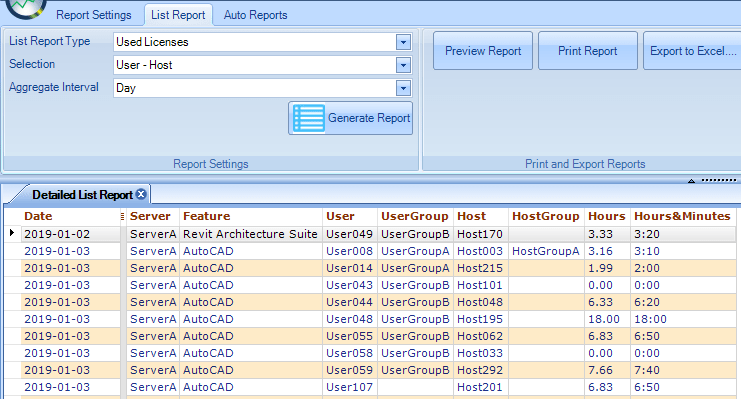
Usage per Feature per Day.


More details on the terms and conditions page. There is an Autodesk forum to discuss and ask about these changes.

Discuss on Facebook group CAD Managers Unite! if you like. 

Donnie Gladfelter has made an extensive post on his blog. “this hypothetical customer would need to invest $24,550/year to maintain the level of access they have today for a cost of $5,925/year. That’s an increase of nearly 315%!”

Time to prepare so you know how to proceed when it is time for renewal. Considering options for users using AutoCAD too little to justify a full license. Maybe AutoCAD LT, a free DWG viewer, BricsCAD or similar.

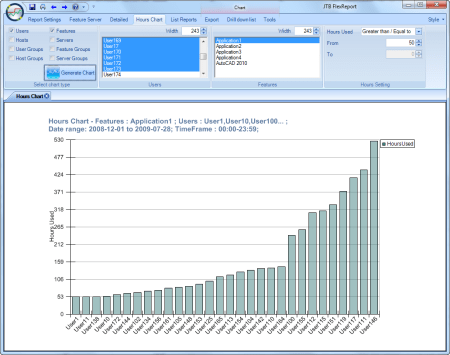
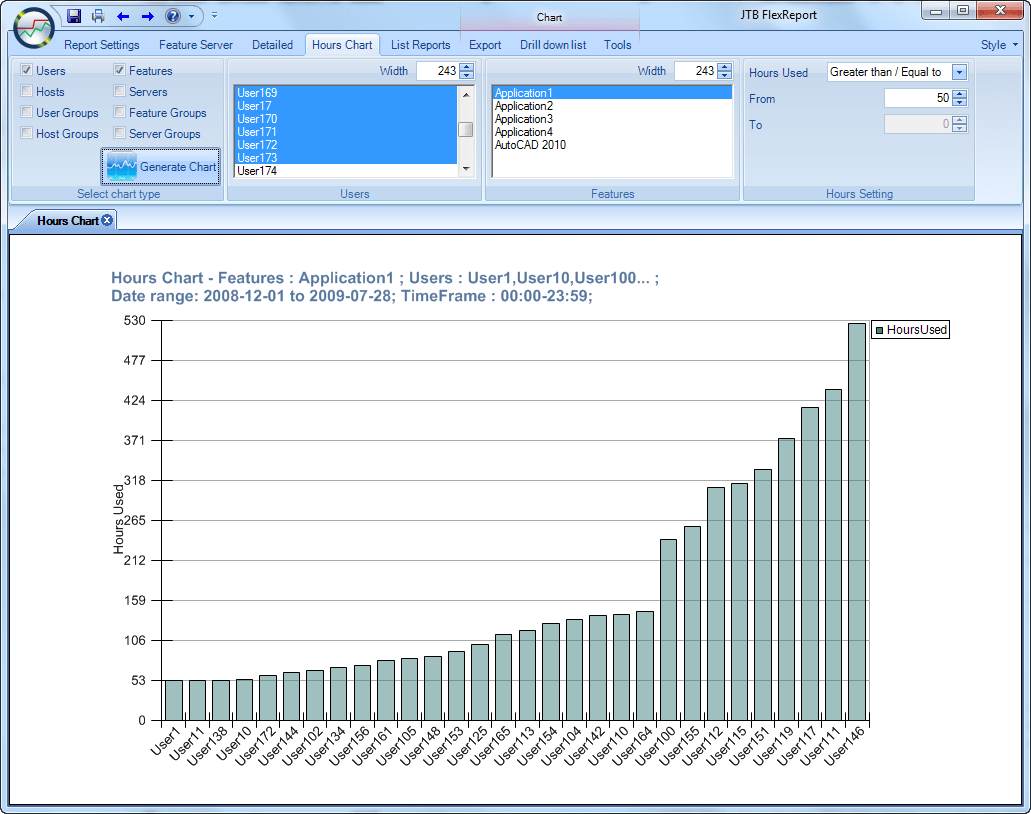
Chart report on how many hours users have been using a feature.

Both now and in the future you might find use of our JTB Process Monitor that works with non-network licenses like the Named User Plans too. You don’t want to keep paying for expenses licenses that hardly are used.

Feel free to contact us to discuss how JTB FlexReport and JTB Process Monitor can help you. Free trial available.

Monday, November 18, 2019

JTB FlexReport 11.7.0 now with dark theme on HTML report

JTB FlexReport 11.7.0 is now ready.

We added a dark theme for the HTML report and by editing the CSS you can customize the design yourself. Compare example of the light and dark theme.

We also added checking for newer version of JTB FlexReport Core, Service and Client. There are some bug fixes too. See the version history for details.

Trial is available if you want to give it a try.

If your maintenance has expired you can try the new version for a few weeks, if you want to keep using it contact us to renew the maintenance. The upgrade is free of charge for customers with active maintenance.

What is JTB FlexReport? JTB FlexReport is a license usage report tool for applications licensed using network license systems like FlexNet, IBM LUM, DSLS, SPLM, Sentinel, LM-X, RLM, EPLAN (ELM) among others. Track usage over time, hours used and much more.

If you have FlexNet licenses check out our JTB FlexReport LT freeware. App for AutoCAD available.

Thursday, August 1, 2019

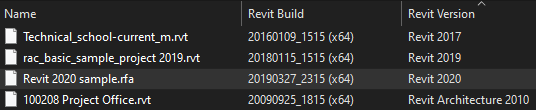
RVT Columns for Explorer supports Revit 2020

RVT Columns for Explorer has been updated to handle Revit 2020 files. With this app you can see the Revit Build and Revit Version on RTE, RVT, RFA and RFT files in Explorer as well as any products that shows Revit files in dialog boxes like Revit’s Open file dialog box.

Thursday, April 12, 2018

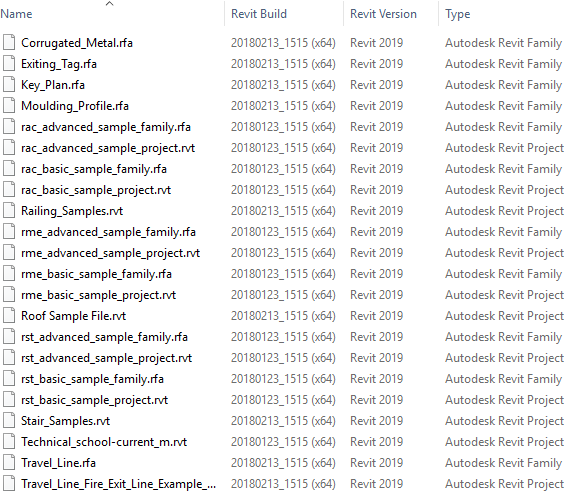
RVT Columns for Explorer supports Revit 2019

RVT Columns for Explorer has been updated to handle the new file format of Revit 2019 files. With this app you can see the Revit Build and Revit Version on RTE, RVT, RFA and RFT files in Explorer as well as any products that shows Revit files in dialog boxes like Revit’s Open file dialog box.

Revit 2019 has got a lot of new features worth exploring. How about the ability to drag views out of the Revit application window to secondary monitors?

Revit 2019 on multiple monitors

Monday, February 19, 2018

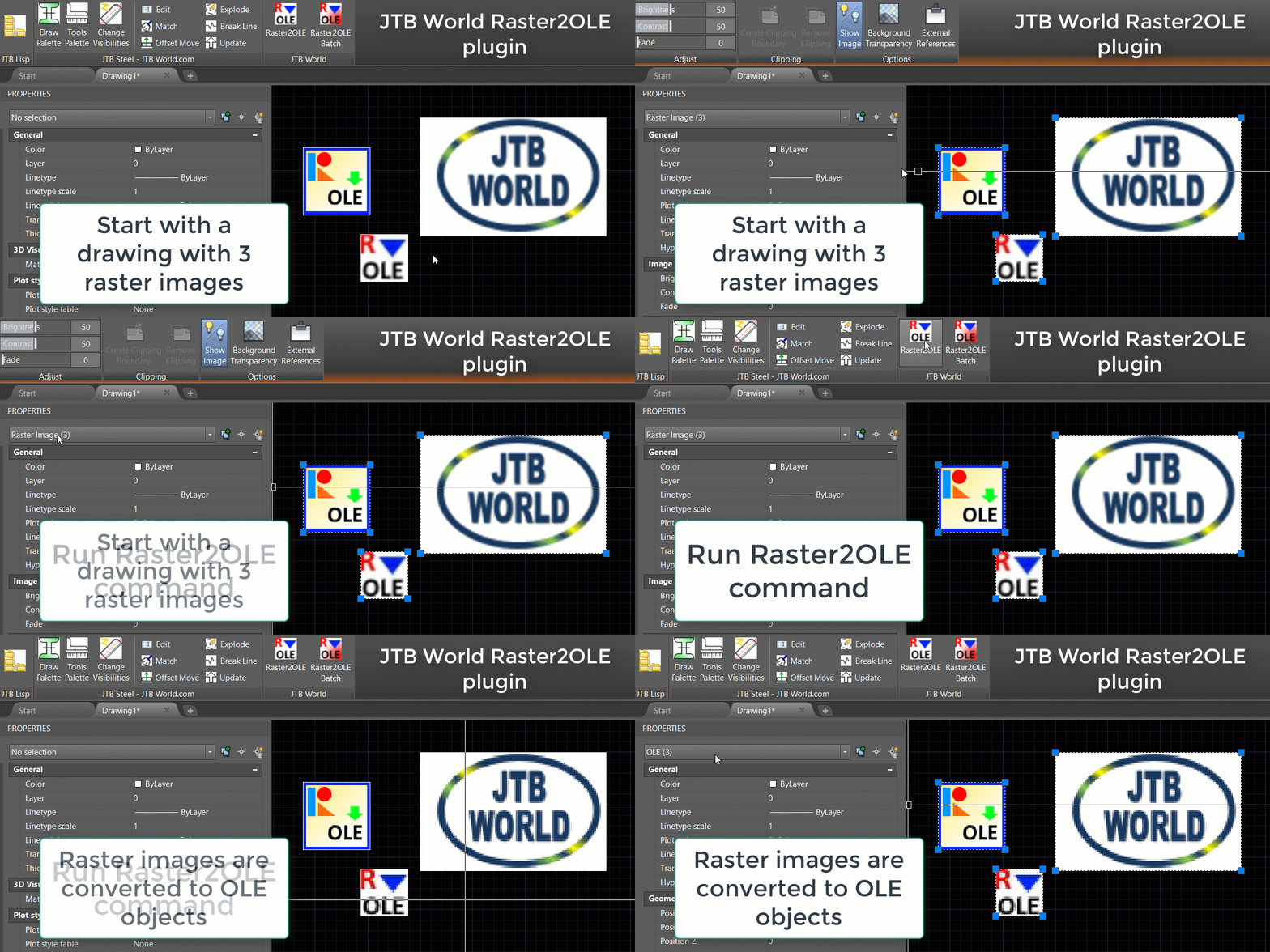
JTB Raster2OLE AutoCAD app to bind raster image files

AutoCAD has no Bind option available to bind raster images to a drawing.

In Revit when exporting to DWG all images are attached to the exported drawing as external references. This may be a problem with logotypes in the title block or other images.

In some projects you need to deliver your drawings without external references.

JTB Raster2OLE app for AutoCAD can help by binding all images in the current drawing or in multiple selected drawings. Free trial available.

Monday, May 8, 2017

RVT Columns for Explorer updated for Autodesk Revit 2018.

RVT Columns for Explorer has been updated to support Autodesk Revit 2018.

Enhance Your User's Experience with RVT Columns for Windows Explorer / File Explorer.

Show the Revit version and Revit build in Explorer columns.

Free trial is available.

Thursday, May 4, 2017

Windows 10 Game Mode for CAD software

I’ve not done any comparable test but it might be worth to give it a try to see if the new Game Mode that comes with Windows 10 Version 1703 (Windows 10 Creators Update) can help you hardware intensive software like CAD. It could be AutoCAD, Revit, Inventor, Navisworks, BricsCAD, CATIA, Siemens NX, Solid Edge, PTC Creo, SolidWorks, etc.

This Windows tool is not limited to games and works for most any software. Running a software in Game Mode tells Windows that you’d like to focus on the software in terms of system resources. Unwanted and non-priority background processes will be stopped automatically or run with lower priority.

First you need to turn Game Mode on in the Windows Settings area, then enable it for each software as well. To do this, open the Windows Game Bar (Windows key + G) with the software running, and check the "Use Game Mode for this game" box. In the Game Mode Bar click on Settings to disable it for the software by unchecking “Remember this as a Game”.

You can also take screenshots and record videos with this tool.

See also Windows 10 Game Mode missing and solution

Friday, January 6, 2017

RVT Columns for Explorer on Autodesk App Store

RVT Columns can now be downloaded as trial from the Autodesk App Store site as well as be purchased from there.

With RVT Columns you can see the Revit Version and Revit Build in Explorer and File browsing dialog boxes.

Monday, December 12, 2016

RVT Columns for Explorer

RVT Columns for Windows Explorer is now available.

With it you can see the Revit version and Revit build in Windows Explorer / File Explorer columns.

Even in file dialog boxes within Revit. Now you can know the Revit version and Revit build before even opening the file.

Sort files in Explorer based on any of the columns available like the Revit version.

InfoTip (ToolTip) with version and build can also be seen when hovering over a file.

Supported extensions and file types are RTE, RVT, RFA and RFT.

Free trial of RVT Columns for Windows Explorer is available.

Saturday, October 4, 2014

Autodesk Revit 2015 Update Release 4

For Revit users there are a bunch of good reasons (see below at Update Enhancement List) to install the 2015 Update Release 4:

Autodesk Revit 2015 Update Release 4

Autodesk Revit Architecture 2015 Update Release 4

Autodesk Revit MEP 2015 Update Release 4

Autodesk Revit Structure 2015 Update Release 4

Autodesk Revit LT 2015 Update Release 4

Note: Once Autodesk Revit 2015 Update Release 4 is installed, Autodesk Revit 2015 R2 for Subscription Customers will not be able to be installed. If you are an Autodesk Subscription Customer, please refer to the Autodesk Revit 2015 R2 subscription download page prior to installing Autodesk Revit Structure 2015 Update Release 4.

Autodesk Revit 2015 R2

Release Date: 2014-09-17

With Autodesk® Revit® 2015 R2, Autodesk Maintenance and Desktop Subscription customers get access now to new features that add powerful capabilities, make Revit perform faster, and can improve modeling productivity. Fully compatible with Revit 2015 releases, Revit 2015 R2 installs without disrupting ongoing work in Revit 2015.
Power: Revit 2015 R2 includes new features that enable you to do more with Revit.

  • Share more accurately predicted energy performance information in custom dashboards with Project Solon integrated into Revit.
  • Use existing geometry in a linked IFC model as a reference for dimensions, alignment, snapping, and hosting of some families in a Revit model.
  • Troubleshoot models better with the Reveal Constraints mode making all dimension alignment constraints in a view visible.
  • Explore visual programming with the Dynamo interface for computational design which now installs with Revit so you can more easily enhance and extend the power of the Revit API.

Performance: Autodesk Revit R2 meets requests for faster software performance with the goal of making your work easier.

  • Edit and regenerate complex toposurfaces, subregions, and building pads.
  • Get better performance of the energy analytical model in Revit, with Revit R2 using less memory when analyzing large models.
  • Experience faster updates to views that contain multiple instances of families.
  • See faster display of Revit links within views.

Productivity: You’ll welcome multiple enhancements in Revit R2 designed to improve your modeling and work productivity.

  • Work in perspective views, making quick adjustments without having to change views with some modeling capabilities now available in perspective views.
  • Save more time by editing multiple wall joins together
  • Find content more quickly with Search capabilities in the Type Selector and all drop-down lists.
  • Navigate PDFs exported from Revit more quickly with hyperlinked views.
  • Experience easier interaction with structural elements through user interface improvements.
  • Improve productivity with more streamlined Rebar modeling and shop drawings creation.


Update Enhancement List

* Indicates an issue that was reported by a Revit user.

** Indicates an issue resolved within the Multi-Category Schedules Hotfix for Autodesk Revit 2015 Update Release 3.

Improvements made in Update Release 4 build (20140903_1530):

Autodesk® Revit® Architecture 2015 Updates

· Updates graphics certification file.

· Improves visual display of filled regions, loss of color and pattern, when view is set to Realistic display style.*

· Improves export of fill patterns on transparent faces.*

· Improves stability when family-related corruption is encountered.*

· Improves transmitting models with multiple external linked files stored on Revit Server when using eTransmit.*

· Improves stability while tab-selecting into an element to add detail lines using the Pick Lines option.

· Improves stability when using names longer than 128 characters in the Family Types dialog.

· Improves stability when deleting an element that is in an invalid state.

· Improves stability when clicking the door type preview button in some upgraded models.

· Improves visual fidelity with surface types which contain singularities.

· Improves stability when using file upgrade operations.*

· Ensures the file name is populated within the upgrade dialog box.*

· Improves stability when splitting a wall with an edited elevation profile.

· Improves stability when iterating different wall join configurations.

· Improves stability when splitting a wall.

· Improves data integrity with Multi-Category schedules which include elements from a linked file.**

· Improves stability when trying to rotate a view during the placement of the view on a sheet.

· Improves stability when trying to Tag All in a view of a workshared model that is owned by another user.*

· Improves stability when a user edited a wall structure with the preview window open.

· Improves stability when placing a wall in files upgraded to Revit 2015.

· Improves stability when multiple users try to modify the same family in a workshared environment.

· Corrects the abundance of standard materials being created when repeatedly loading a family.

· Improves stability when editing wall joins.

· Improves stability when cancelling an IFC Link during the insertion of new IFC links.*

· Corrects the behavior of placing families in a project when the family type selector is expanded.

· Improves stability when adding a family to a design option set when the family type selector is expanded.

· Improves the visual fidelity of point clouds sections which have Far Clipping set to "Clip with Line."*

· Corrects the placement of an image or any element containing an image (such as a schedule) on a sheet when Autodesk Revit is installed on Windows 8.1.

· Improves stability when exporting to IFC with the second level space boundaries option enabled.*

· Improves visual fidelity of level head symbol within a legend view after file upgrade.*

· Improves stability when pressing Ctrl+Tab in the Material dialog.

· Improves stability when loading the layer export setting from a file.*

· Improves stability if the model was missing its revisions settings data.*

· Improves data integrity after saving a workshared model in Revit LT.*

· Improves visual fidelity of Space Tags placed on linked files after reopening a model.*

· Improves stability when reloading a circular nested family.

· Improves stability for WARP device.

· Improves visual fidelity of point clouds.*

· Improves exports with include images.

· Improves stability when modifying wall type layers of large thickness.

· Improves data integrity during worksharing Reload Latest when one user places the first instance of a family and another user renames the family.

Autodesk® Revit® MEP 2015 Updates

· Improves stability when running Heating Cooling Loads.

· Improves printing and exporting electrical families when the project base point is covered.*

· Improves visual fidelity for flex duct and flex pipe when rotating the view true north.*

· Improves data integrity for Duct Radius Elbow/Taps velocity parameter in Properties Palette and within Tags.*

· Corrects the length value of a beveled tap when it is calculated by a formula.*

· Improves MEP fitting sizing when based upon content settings.*

· Improves stability when changing system types.

· Improves display of selected electrical equipment families within the type selector.*

Autodesk® Revit® Structure 2015 Updates

· Improves stability when upgrading a project with the structural setting Check for Member Supports enabled.*

· Improves stability when creating an automatic beam system which results in short Joist elements.*

· Improves data integrity of column families location when a Revit model is inserted as a group.

· Improves stability when editing the base offset of a column.

· Improves stability when placing a structural column using improper family parameters.

· Improves stability when changing a variable floor layer to use the function ‘Structural Deck’.

Autodesk® Revit® API 2015 Updates

· Improves reliability of retrieving the current selection in an API Dockable Pane.*

· Restricts the deletion of the drafting solid fill pattern from a model by any method, including the API.*

· Improves API behavior to reflect the user interface by enabling the API user to 1) open a local model when ignorable worksharing exceptions occur, such as a central model missing; and 2) open a host model (local or central) when ignorable worksharing exceptions occur on loading the linked model, such as a linked model missing.*

· Improves stability when errors are posted during calling API Document.SynchronizeWithCentral by addons.*

· Corrects the API by changing the exception from SEHException to OperationCanceledException for API Selection.PickBox.*

· Improves stability when the Pick Points API was invoked from within a Dockable Frame.*

Improvements made in Update Release 3 build (20140606_1530):

Autodesk® Revit® Architecture 2015 Updates

· Improves performance when placing a large number of adaptive components.

· Updates graphics certification file.

· Improves multi-reference annotation tag grouping when tags contains more than one label.

· Improves preview image retention when families are saved in Project Browser.

· Improves stability of Revit user interface.

· Improves stability when opening Revit project by double-clicking RVT files in Windows Explorer.

· Enables display of project names containing apostrophes in Energy Simulation dialog.

· Improves stability of Energy Simulation when project includes sandwiched Revit elements.*

· Improves stability of rendering in the cloud when the selected view is missing light group data.

· Improves stability of Suite Workflows after double-clicking Workflow Manager.

· Improves rendering results when adaptive components are rendered in the cloud.

· Improves stability when upgrading legacy Revit projects.*

· Improves data integrity when copying or reloading groups that contain shared nested families between projects.

· Improves stability when loading a family while adding a Family Type parameter.

· Improves stability when editing a filter that is owned by another user.

· Improves performance when saving new central file to Revit Server.

· Improves data integrity in projects that contain large elements, such as ImageHolders.*

· Improves stability while opening IFC files.*

· Improves performance when editing masses with applied divided surfaces.

· Improves stability when exporting to SAT format with projects that contain linked files.

· Improves stability during use of the Paste command.

· Improves stability when opening IFC files and modifying Phasing settings.*

· Improves data integrity when swept surfaces are exported to SAT format.*

· Improves stability while exporting to ODBC database when project is missing assembly code settings.

· Improves data integrity in projects created from UK templates.

· Improves stability when canceling out of worksharing permission error while in Design Options.

· Improves stability when closing the Rendering dialog.

· Improves data integrity when closing a local file without synchronizing with central.

· Improves stability when creating material takeoff and then adding parameters.

· Improves stability when exiting Revit.

· Allows proper display of schedules on sheets when fields are sorted or grouped.*

· Allows proper display of selected elements when shadows are enabled in view.

· Improves stability when opening projects that include corrupt families.

· Improves data integrity when copying elements between projects.

· Improves stability when deleting family types from Project Browser.

· Improves stability when working with workshared files.

· Improves results when angular equality constraint

· Improves data integrity when default material for a host that is used by families is deleted.

· Improves stability when importing DWG files.

· Improves stability when exiting Revit while Ray Trace visual style is active.

· Improves stability when working with point clouds.

· Improves stability when loading nested families while in Family Editor.

· Improves stability when editing groups.

· Improves regeneration of families that include a reporting parameter.

Autodesk® Revit® MEP 2015 Updates

· Improves calculated airflow results when using a combination of imperial and metric units.

· Improves performance when working with mechanical and piping systems.

· Allows ducts to retain proper alignment after elevation of levels is modified.*

· Improves data integrity when using the Pipe Sizing tool.

· Improves consistency of undo/redo commands while editing a panel schedule template.

· Improves stability when generating pipe layouts.

· Improves data integrity of piping systems when calculation level is set to volume only.

· Allows proper updating of circuit numbers after circuits are moved in panel schedule.

· Allows proper assigning of ASHRAE tables to duct fittings.

· Allows proper display of 3-pole circuits in panel schedules.

· Allows proper retention of circuit loads after assigning a space circuit in a panel schedule.*

· Allows proper retention of circuit assignment after synchronizing with central.*

· Allows taps to remain connected to main duct when taps and ducts reside on different levels and then levels are modified.

· Allows proper updating of electrical fixture parameters when dependent on volts/poles instance parameters.

· Allows duct transitions to remain connected after changing the duct size.*

· Improves stability when dragging cable tray and/or conduit.

· Allows proper connection between circuit and panels to be retained when editing circuit information and panel schedules.

· Improves stability when creating in-place masses while System Browser is open.

Autodesk® Revit® Structure 2015 Updates

· Improves retention of beam annotation settings in projects that were not created from a template.*

· Improves results when mirroring rotated beams and columns.*

· Improves appearance of intersections between concrete beams and walls.*

· Improves stability when editing slanted columns.

· Improves stability when moving shape handles on bar joists while in a section view after disallowing joining.

· Improves stability when using the beam Change Reference tool.

· Improves results when modifying the cross-section rotation of vertical braces.

Autodesk® Revit® API 2015 Updates

· Improves retention of device connections when using Wire.Create to create new wire connecting to a device.

· Improves display of wire connection points when using Wire.ConnectTo and Connector.Connect.

· Enable changes to MEPSystemType.CalculationLevel via public API.

· Level parameter correctly set when elements are placed via NewFamilyInstance().

· Improves retention of parameters in line boundary condition objects.

· Improves stability when using CompoundStructure.SetLayers.*

· Allows proper assignment of a Phase Created value when using DirectShapes.

· Improves alignment of text created via API.

· Improves stability when the API is in Automatic TransactionMode.

Improvements made in Security Release build (20140323_1530):

· Addresses Heartbleed vulnerability - a security bug in the open-source OpenSSL cryptography library. Heartbleed is registered in the Common Vulnerabilities and Exposures system as CVE-2014-0160.

For more information, please visit the CVE dictionary at http://cve.mitre.org

Improvements made in Update Release 1 build (20140322_1515):

Autodesk® Revit® Platform 2015 Updates

· Improves data integrity when editing nested families.

· Improves stability when editing nested families.

· Improves stability when editing when expanding schedule columns.

· Improves upgrade of projects which contain rebar elements.

· Removes format constraints for assembly codes.

· Improves data collection when Customer Involvement Program is enabled.
Thursday, July 24, 2014

Slow to license and start Revit

A customer run into this issue: “It takes approximately 90 seconds or longer to license Revit 2013/2014, even though our Flex licensing server is on the LAN. It only takes 20 seconds to license AutoCAD, but 7x longer for Revit.”

I was not able to find the solution but eventually the customer found out that “we discovered that we were running an antiquated version of the FlexLM server. When we set up our new server, we used the latest version. This solved the Revit licensing delays. It just takes 10 seconds for all versions of Revit to license.”

So in case you also run into this kind of slow startup of Revit or possibly other programs try to upgrade the FlexNet license manager/Autodesk network license manager.

Tuesday, July 1, 2014

Autodesk Revit 2015 Update Release 3

Autodesk Revit 2015 Update Release 3 can be download here. There are many fixes, stability and performance improvements making this an update you for sure want to apply.

The number of updates are:
Architecture: 45
MEP: 18
Structure 7
API: 9

JTB World has many years of experience programming for Revit for customers with both small and large complex projects so if you have anything you need to automate in Revit please feel free to contact us.

Some of the latest blog posts

Subscribe to RSS headline updates from:
Powered by FeedBurner

Contact Us | About JTB World | Website General Terms of Use | Privacy Policy
^ Top of page

© 2004- JTB World. All rights reserved.