Showing posts with label AutoCAD. Show all posts

Monday, April 7, 2025

How to change Camera and Target on the current view

Using the VIEW command in AutoCAD opens up the View Manager and there are properties like Camera X, Camera Y, Camera Z, Target X, Target Y, Target Z that are greyed out so you can't edit them.

view manager

In BricsCAD these can easily be edited though.

BricsCAD Drawing Explorer Current View

Here is a tips on how to change these coordinates using the DVIEW command I AutoCAD.

Command:
DVIEW
Select objects or <use DVIEWBLOCK>:     <- press Enter here
Enter option
[CAmera/TArget/Distance/POints/PAn/Zoom/TWist/CLip/Hide/Off/Undo]: PO
Specify target point <30000.76, -16728.59, 2587.63>: 0,0,0
Specify camera point <30000.76, -16728.59, 2588.63>: 0,0,1
Enter option
[CAmera/TArget/Distance/POints/PAn/Zoom/TWist/CLip/Hide/Off/Undo]:     <- press Enter here
Regenerating model.

Or using AutoLISP (command "._DVIEW" "" "_PO" "0,0,0" "0,0,1" "")

In some older AutoCAD versions the above does not work due to an AutoCAD bug, as seen here:

Command: _DVIEW
Select objects or <use DVIEWBLOCK>:
Enter option
[CAmera/TArget/Distance/POints/PAn/Zoom/TWist/CLip/Hide/Off/Undo]: _PO
Specify target point <114577.93, 19107.27, 4087.49>: 0,0,0
Specify camera point <114576.93, 19106.27, 4088.49>: 0,0,1
Camera and Target may not be coincident

I found that this variant did work as it should.

(command "._DVIEW" "" "_PO" (list 0 0 0) (list 0 0 1) "")

Wednesday, March 26, 2025

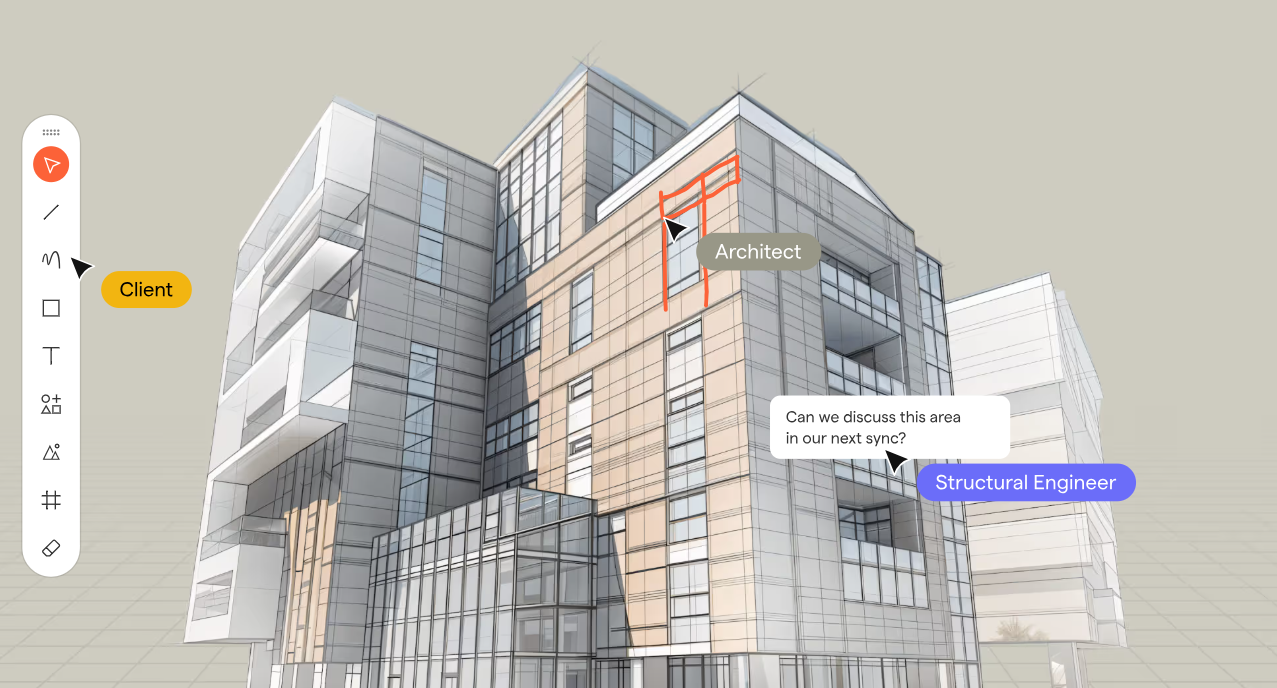
Motif Launches Cloud-Based Platform for Seamless AEC Collaboration

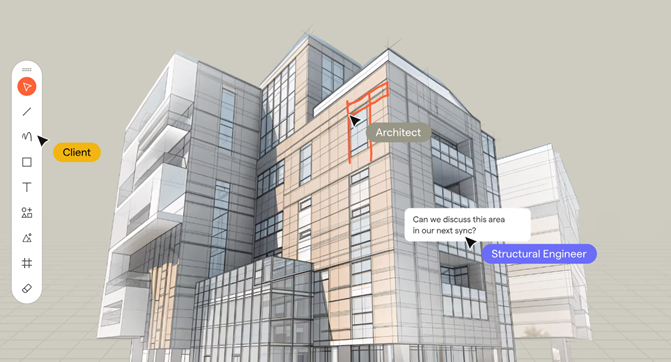
Motif a startup in the architecture, engineering, and construction (AEC) sector, has unveiled its innovative cloud-based platform to revolutionize design collaboration. This platform merges 2D and 3D workflows, offering a unified workspace for architects, engineers, and stakeholders to collaborate in real-time without the limitations of traditional tools.
Motif Hero Image

Key Features of Motif:

  • Unified Collaboration Workspace: An infinite canvas integrating 2D drawings, 3D models, sketches, and specifications in one place.
  • Live Model Streaming & Integration: Real-time updates with Revit and Rhino, eliminating the need for manual re-uploads.
  • 2D & 3D Sketching and Markups: Enables instant commenting and sketching, seamlessly syncing feedback across tools.
  • Smart Presentation Tools: Interactive presentations linked directly to live designs.
  • Web-Based Accessibility: Requires no software installation, ensuring inclusivity for all stakeholders, even those without CAD expertise.
  • Plugins for Revit, Rhino and other BIM/CAD apps allows access to the collaboration both in the native app where the design is done and in Motif.

This eliminates traditional barriers like disconnected tools, fragmented workflows, and accessibility issues, ensuring efficient design reviews and meaningful participation for all team members, architects, designers, engineers, owners, clients, etc.

Motif's debut is more than a collaboration tool; it’s the foundation for an intelligent and connected future for Building Information Modeling (BIM). The company aims to enhance creativity, reduce friction, and harness AI to empower smarter design decisions.

“Today’s AEC workflows are burdened by fragmented data, rigid software, and disconnected collaboration tools that slow down decision-making,” says Amar Hanspal, CEO and Co-Founder of Motif. “Motif is redefining BIM with a focus on being open, intelligent, and collaborative, where BIM isn’t just about managing information—it’s about unlocking intelligence. We’re starting with intelligent collaboration—a platform that bridges gaps between teams, integrates with existing tools, and leverages AI to provide insights that drive better decisions. This is step one of many in building a smarter, more connected BIM future—one that removes friction, enhances creativity, and makes design intelligence truly accessible.”
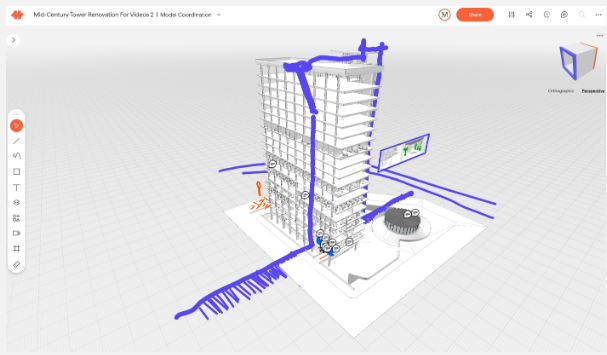
motif 3D


"Motif simplifies how we collaborate across teams,” said Bill Carney, Design Technology Leader and Principal at DLR Group. “Instead of juggling screenshots, PDFs, and disconnected markups, everything is now in one place—live, structured, and effortless. Instead of creating work-arounds to collaborate we can focus on decisions and feedback in real time. Motif has made coordination faster and eliminated so many back-and-forths."

About: Motif Systems, Inc. is building the next generation software platform for the modern built environment. Founded in 2023 by Amar Hanspal (former Co-CEO and Chief Product Officer at Autodesk) and Brian Mathews (former CTO at Autodesk), along with founding employees of Revit, Motif enables seamless, real-time collaboration for architecture, engineering, and construction professionals.

With early access now open, Motif invites teams of all sizes to experience the next era of design collaboration. Interested professionals can request a free trial at motif.io.

Wednesday, December 18, 2024

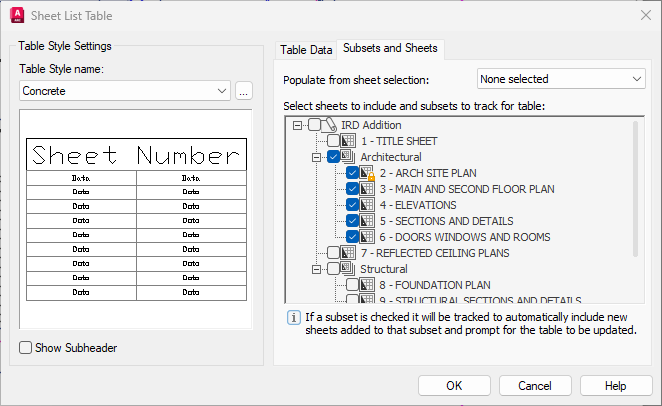
Subsets and Sheets in a Sheet List Table

Creating a Sheet List Table in AutoCAD can be a powerful way to organize and manage your drawing sheets. You can create a Sheet List Table by right-clicking on a Subset but there is a limitation that is still there in AutoCAD 2025. It says: "If a subset is checked it will be tracked to automatically include new sheets added to that subset and prompt for the table to be updated."

It does not mention about moved sheets between subsets and as you might see it doesn't work.

Removing sheets from the Sheet Set and relocating Sheets within the Subset works.

BricsCAD V25 also has this limitation.

You might even look to condense or aggregate a long Sheet List for example based on the Sheet Description and show all Sheets with same Sheet Description on one row and just show what Sheet Numbers there are with their description like this example "3,5,7-9" "ELEVATIONS".

If these limitations are impacting your workflow, feel free to contact us for a custom solution.

Sheet List Subset Table

Wednesday, November 20, 2024

Solution to error: no function definition: ACET-LOAD-EXPRESSTOOLS

If you are using an AutoLISP function like (acet-tjust (ssget "_L") "TC") it needs Express Tools to be installed but in AutoCAD 2025 it still doesn't work.

Command: (acet-tjust (ssget "_L") "TC")
; error: no function definition: ACET-TJUST

The reason is that the Express Tools Utility functions are no initialized automatically.

For this reason you need to use the new function (acet-load-expresstools). If the Express Tools Utility functions are already loaded, acet-load-expresstools does nothing. Use it just like (vl-load-com).

But if you share code between AutoCAD 2025 and older versions the older versions can show errors like

; error: no function definition: ACET-LOAD-EXPRESSTOOLS

or in the case of BricsCAD

----- Error around expression -----
; (ACET-LOAD-EXPRESSTOOLS)
;
; error : no function definition <ACET-LOAD-EXPRESSTOOLS> ; expected FUNCTION at [eval]

What I use is this solution.

(if (findfile "acetutil.arx") (load "acetutil"))
(if (boundp 'acet-load-expresstools) (acet-load-expresstools))

If you try to find acet-tjust in AutoCAD's dev doc you will be out of luck as it is undocumented, but BricsCAD has you covered as seen here.

These "ExpressTools" API functions are currently provided by BricsCAD and are identical to AutoCAD's:

Blocks (acet-block-xxx)

Calculations (acet-calc)

Diskfile-Init functions

Dictionary (acet-dict-xxx)

Entity (acet-ent-xxx)

Entity-Groups (acet-group-xxx)

Error (acet-error-xxx)

Files (acet-file-xxx)

Filenames (acet-filename-xxx)

Geometry (acet-geom-xxx)

GeneralProperties (acet-general)

Layer (acet-layer-xxx)

Lists (acet-list-xxx)

Polyline (acet-pline-xxx)

Registry (acet-reg-xxx)

SelectionSets (acet-ss-xxx)

Strings (acet-str-xxx)

System (acet-sys-xxx)

SystemVariables (acet-sysvar-xxx)

Ucs (acet-ucs-xxx)

UserInterface (acet-ui-xxx)

Viewport (aced-viewport-xxx)

XData (aced-xdata-xxx)

Common Utilities (acet-xxx)

Insert+Atrributes Functions

SymbolTable Functions

Additionally, a number of general and special purpose (acet::xxx) utility functions are provided.

Tuesday, September 3, 2024

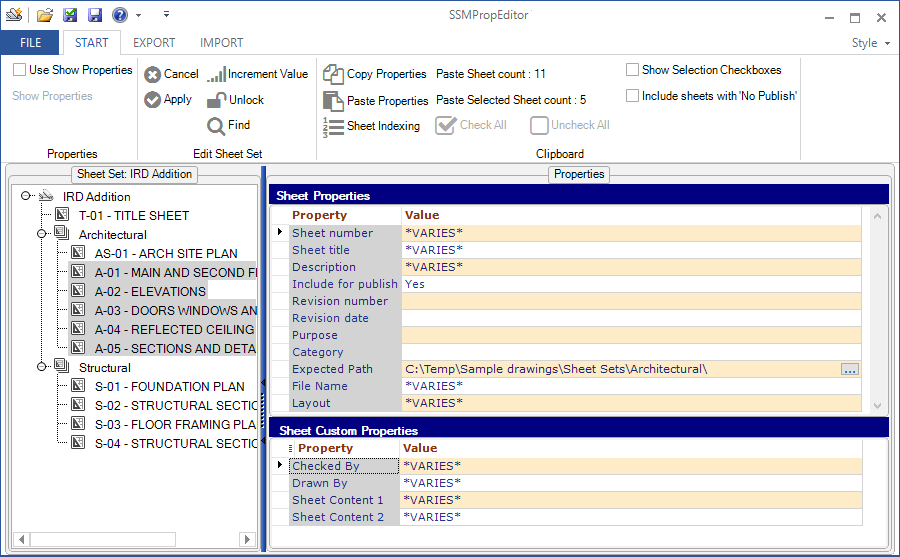
JTB SSMPropEditor 2024.8.0 released

JTB SSMPropEditor 2024.8.0 has been released and comes with some improvements and fixes.  

Recent updates in versions after 2024.3.0:

  • Bug fix: Sorting by sheet number giving unexpected results.
  • Paste sheet count improved and bugs fixed.
  • Improved way to enter license activation key.
  • Fixed empty tree view bugs.
  • Fixed import bug.
  • Timeout for layout renaming increased to 5 minutes for cases with very large DWG files.
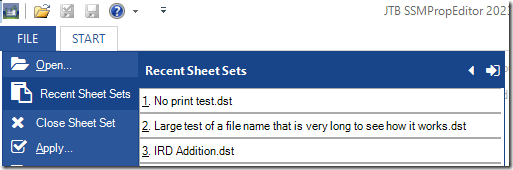
  • Improved Recent Sheet Sets with remove option of non-existing Sheet Sets.
  • Layout renaming bugs fixed.
  • File Name renaming bugs fixed.
  • Sheet indexing. If no sheet is selected Sheet Number is default.
  • Sheet indexing bug fixed.
  • Removed Show Properties as it no longer is needed.
  • Improved dialog boxes when closing and exiting.

Are you using the Sheet Set Manager in AutoCAD, GstarCAD and BricsCAD, NanoCAD Plus/Pro, Graebert's ARES Commander 2022 and newer, DraftSight 2021 and newer, ZWCAD 2023 or newer, or AutoCAD Architecture's Project Navigator (PN) Sheet Set View? If you do, then SSMPropEditor will help a lot, save time and effort updating sheet properties and sheet custom properties across multiple sheets with its DST editing capabilities.

Free trial of JTB SSMPropEditor available.

Friday, December 22, 2023

JTB SSMPropEditor 2023.12.0 released (Sheet Set Manager Editor)

JTB SSMPropEditor 2023.12.0 has been released and comes with some improvements and fixes.

  • Several Find and Replace dialog bugs fixed.
  • Performance bug fixed while opening and operating certain Sheet Sets with no existing UNC paths.
  • Bugs fixed related to renaming of actual DWG files.
  • Import bug fixed for renaming and sheet number issue with extra space added.
  • Selecting one or more properties and don’t use checkboxes, it's now possible to use copy to clipboard.
  • Added tool tip to Recent Sheet Sets that shows the folder of the Sheet Set.
  • Tool tips added for QAT buttons.
  • Sheet Tool Tips has more info.
  • Close a Sheet Set showing "Do you want to save the changes to the Sheet Set?" adds a Cancel button and fixes a bug where No still saved changes.
  • Exit the app may show "Do you want to close JTB SSMPropEditor?". Cancel button has been added.
  • "Use Show Properties" checkbox now retains its setting.
  • Bug fixed where backup settings is not saved and restored.
  • Height of Sheet Set and project control areas increased a bit so the vertical scrollbar is not showed by default.
  • Backup of renamed or moved DWG files copied to %temp% folder as an extra precaution.

Are you using the Sheet Set Manager in AutoCAD, GstarCAD and BricsCAD, NanoCAD Plus/Pro, Graebert's ARES Commander 2022 and newer, DraftSight 2021 and newer, ZWCAD 2023 or newer, or AutoCAD Architecture's Project Navigator (PN) Sheet Set View? If you do, then SSMPropEditor will help a lot, save time and effort updating sheet properties and sheet custom properties across multiple sheets with its DST editing capabilities.

Free trial of JTB SSMPropEditor available.

Tuesday, June 20, 2023

JTB SSMPropEditor 2023.6.0 released (Sheet Set Manager Editor)

JTB SSMPropEditor 2023.6.0 has been released and comes with some improvements and fixes. Here are some from the last 2 versions:

  • File menu now resizable.    
    image
  • New tooltips while hovering over sheets.
  • Improved colors so it is easier to read text that is edited.
  • Fixed callout block bugs.
  • Added support for AutoCAD 2024.
  • Performance issues fixed.
  • Vault performance issues fixed.
  • Fixed bug where sorting was not saved as expected.
  • Fixed import bugs.
  • Other minor bug fixes.

Are you using the Sheet Set Manager in AutoCAD, GstarCAD and BricsCAD, NanoCAD Plus/Pro, Graebert's ARES Commander 2022 and newer, DraftSight 2021 and newer, ZWCAD 2023 or newer, or AutoCAD Architecture's Project Navigator (PN) Sheet Set View? If you do, then SSMPropEditor will help a lot, save time and effort updating sheet properties and sheet custom properties across multiple sheets with its DST editing capabilities.

Free trial of JTB SSMPropEditor available.

Monday, January 30, 2023

JTB SSMPropEditor 2023.1.0 released (the Sheet Set Manager Editor)

JTB SSMPropEditor 2023.1.0 has been released and comes with some improvements and fixes.

Are you using the Sheet Set Manager in AutoCAD, GstarCAD and BricsCAD, NanoCAD Plus/Pro, Graebert's ARES Commander 2022 and newer, DraftSight 2021 and newer, ZWCAD 2023 or newer, or AutoCAD Architecture's Project Navigator (PN) Sheet Set View? If you do, then SSMPropEditor will help a lot, save time and effort updating sheet properties and sheet custom properties across multiple sheets with its DST editing capabilities.

Free trial of JTB SSMPropEditor available.

Friday, December 23, 2022

JTB Sheet Set Creator 3.1.0 released

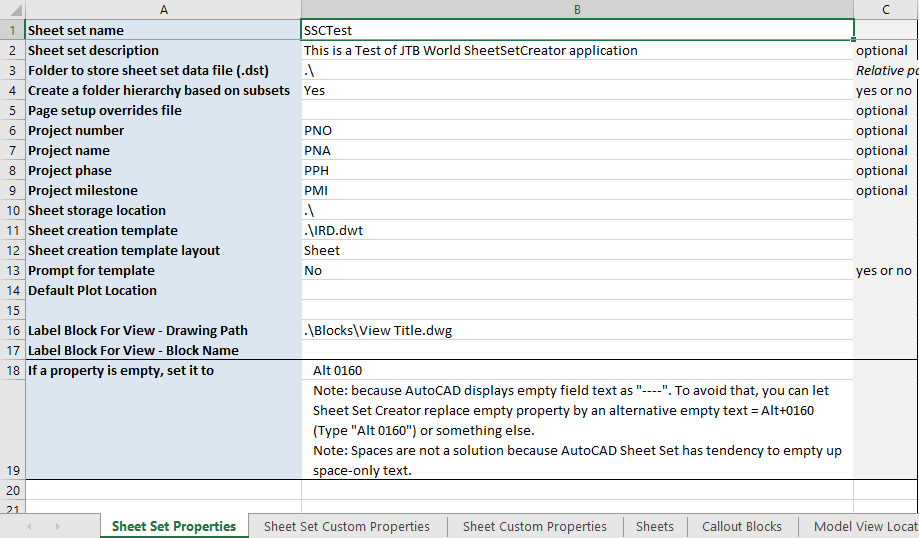
JTB Sheet Set Creator 3.1.0 is released and lately we added support for adding sheet and custom properties to existing Sheet Sets with a merging functionality. It is also a command line interface available.

JTB Sheet Set Creator is an app for AutoCAD that creates new Sheet Sets and Sheets with all properties based on an Excel template.

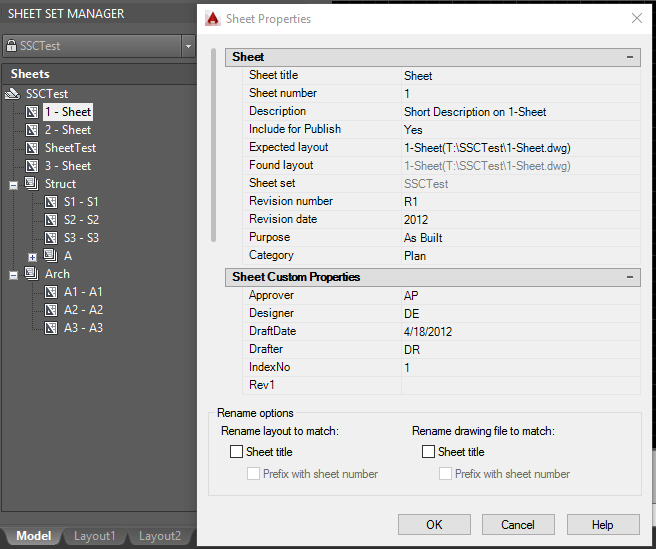
Don't know what the Sheet Set Manager is? The Sheet Set Manager in AutoCAD is a great tool for organizing and managing large sets of drawings, particularly in the architecture, engineering, and construction (AEC) industry. It allows users to create a logical and structured organization of their drawings, making it easier to find and access specific drawings when needed.

One of the key benefits of the Sheet Set Manager is its ability to create a sheet index, which serves as a table of contents for the entire set of drawings. This index can be customized to include information such as the drawing title, sheet number, and revision status, making it easy to quickly identify and access the desired drawing.

In addition to the sheet index, the Sheet Set Manager also allows users to create drawing lists, which are essentially sub-sets of drawings that are organized based on specific criteria, such as discipline or phase. This can be particularly useful for project managers who need to quickly access a specific group of drawings for a particular task or for team members who need to focus on a specific aspect of the project.

Overall, the Sheet Set Manager is a valuable tool for anyone working with large sets of drawings in AutoCAD, as it helps to streamline the organization and management of these drawings, saving time and reducing the risk of errors.

Download the upgrade or try it. JTB Sheet Set Creator

If you are using the Sheet Set Manager you can make batch edits of properties with JTB SSMPropEditor or make merge, purge and convert with JTB DST Tool or publish with JTB Batch Publish.

Monday, December 19, 2022

JTB Batch Publish 5.1.0 released

JTB Batch Publish 5.1.0 has been released. Background publishing for better performance and reliability is available and improvements when using Sheet Sets are some recent additions.

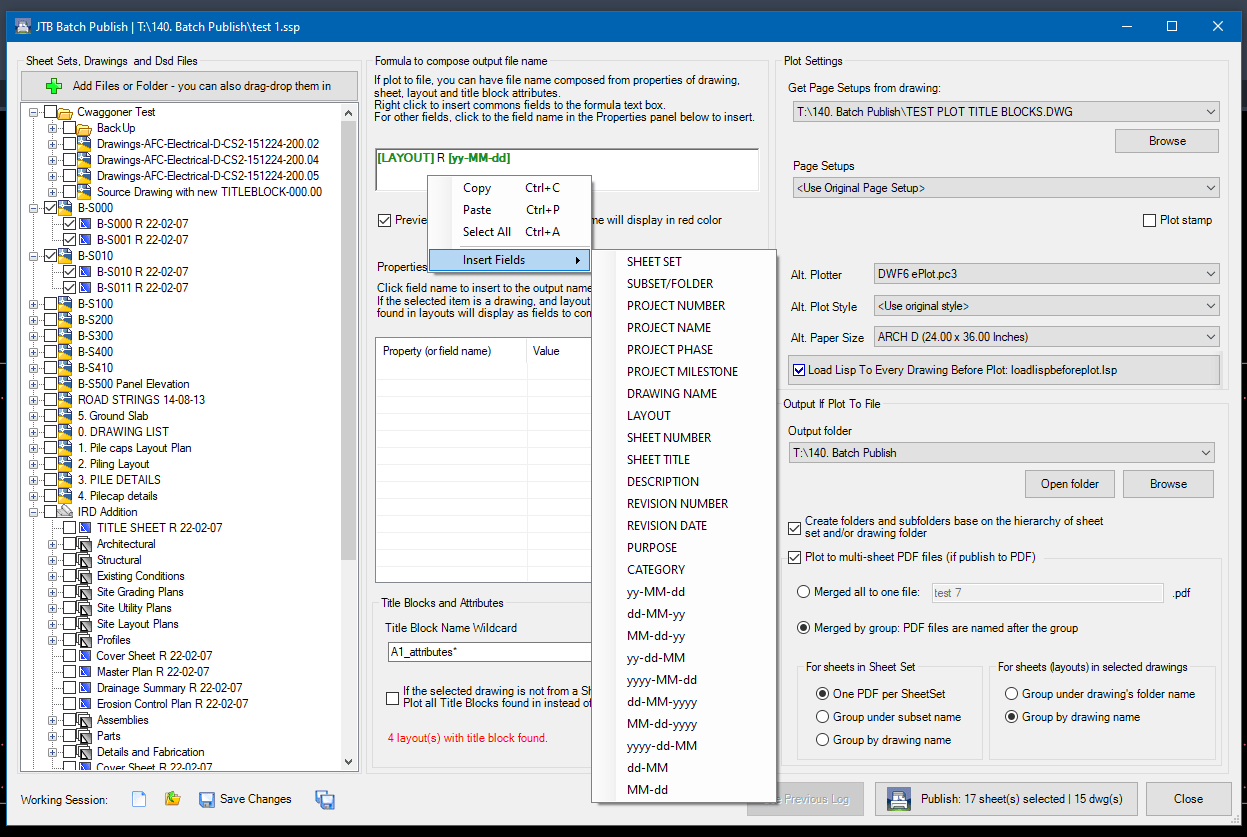
JTB Batch Publish is an app for AutoCAD and BricsCAD that publishes sheets in Sheet Sets, layouts in other drawings, folders or drawings in DSD files to files like PDF and DWF or images like PNG. The files created are named as you want based on a naming formula that you specify. Use date fields and/or sheet properties of your choice to build up the output filename.

Download is here as well as trial.


Tuesday, December 13, 2022

JTB ACA Tools for AutoCAD Architecture based toolsets

JTB ACA Tools comes with editing Tools for Property Sets, Classifications and List Definitions for AutoCAD Architecture (ACA) based products including MEP, Map 3D and Civil 3D.

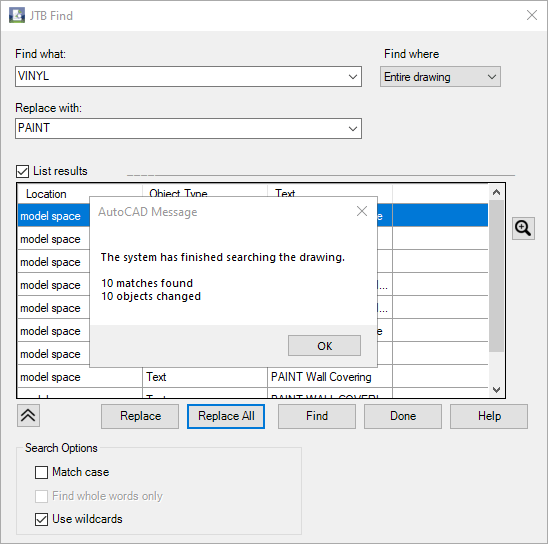
With JTB Find, you are able to find and replace text in Extended Data tab in Properties, specifically for Property Sets and their Property Definition values.

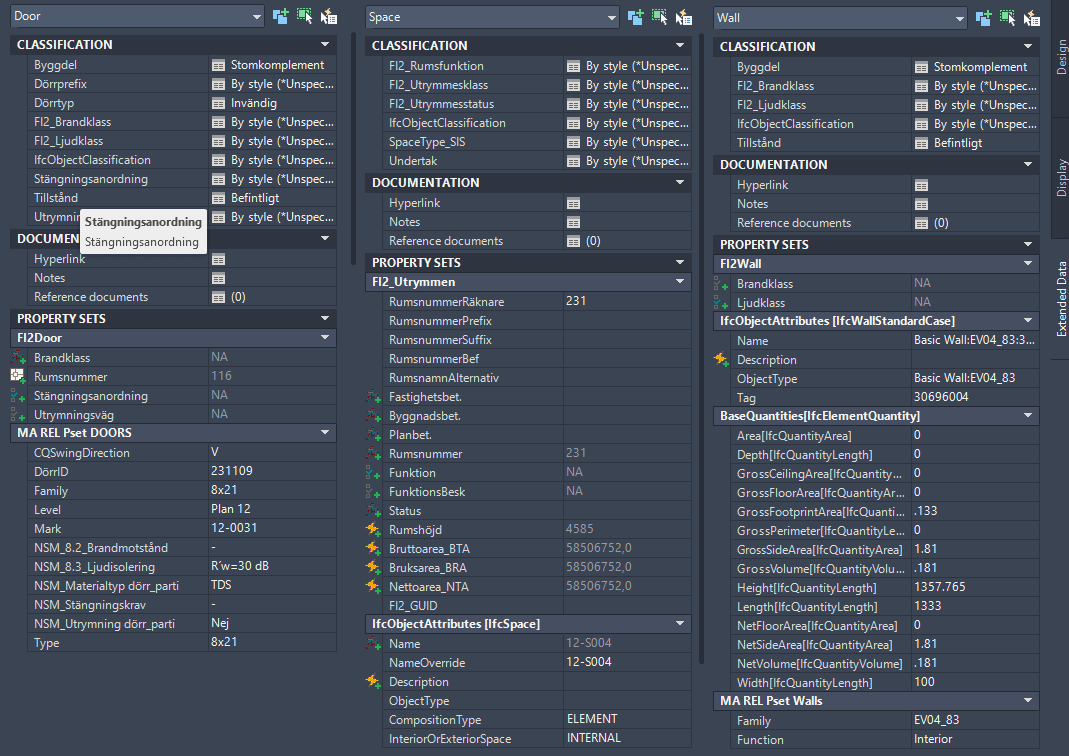
With JTB PropsClassMapping, you are able to change Property Set values, Classification values of SPACE, WALL and DOOR according to the values of their other Property Set.

With ClassificationDefinition tools, you can import export AutoCAD Architecture Classification Definitions, avoid the need to type everything manually.

With ADTListDefinition tools, you can import, create and export ListDefinitions quick and easy.

JTB ACA Tools provides some useful lisp functions for AutoLISP programmers to modify property set and/or classification properties.

Free trial of JTB ACA Tools is available.

Monday, December 12, 2022

JTB FixRefs for BricsCAD

JTB FixRefs is now working on BricsCAD as well as previously supported AutoCAD.

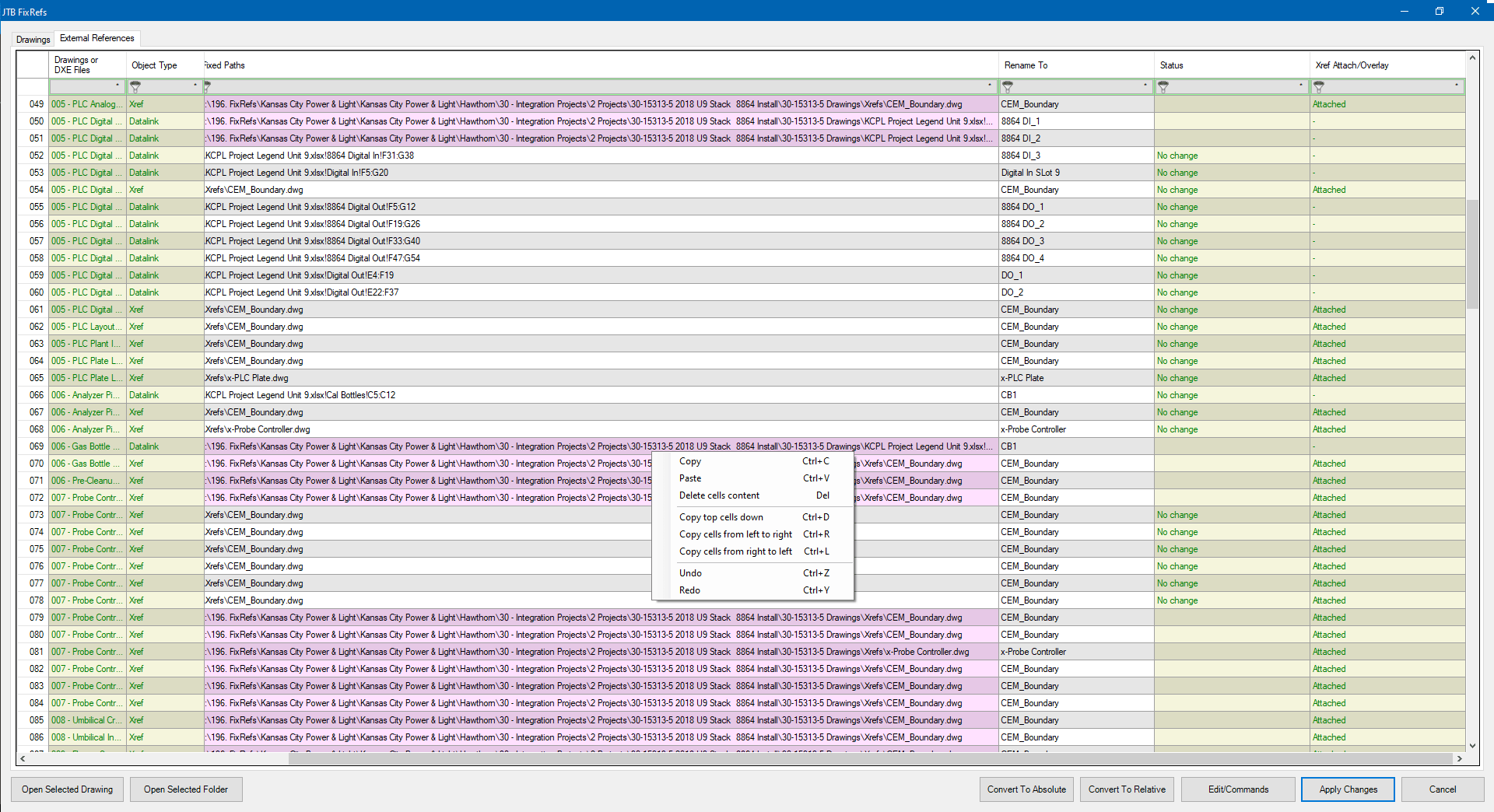
Select drawings, or all drawings in a folder and/or subfolders. A spreadsheet will bring up and list all your reference files in all your drawings, including Xrefs, Datalinks, Raster Images, PDFs, DWFs, and DGNs.

Click for larger image 

  • Convert file paths from absolute paths to relative paths and vice versa.
  • Rename the reference objects.
  • Detach, Unload, Reload. 
  • Bind xrefs. 
  • Option to retain date modified after saving.

Give JTB FixRefs a try.

Wednesday, August 17, 2022

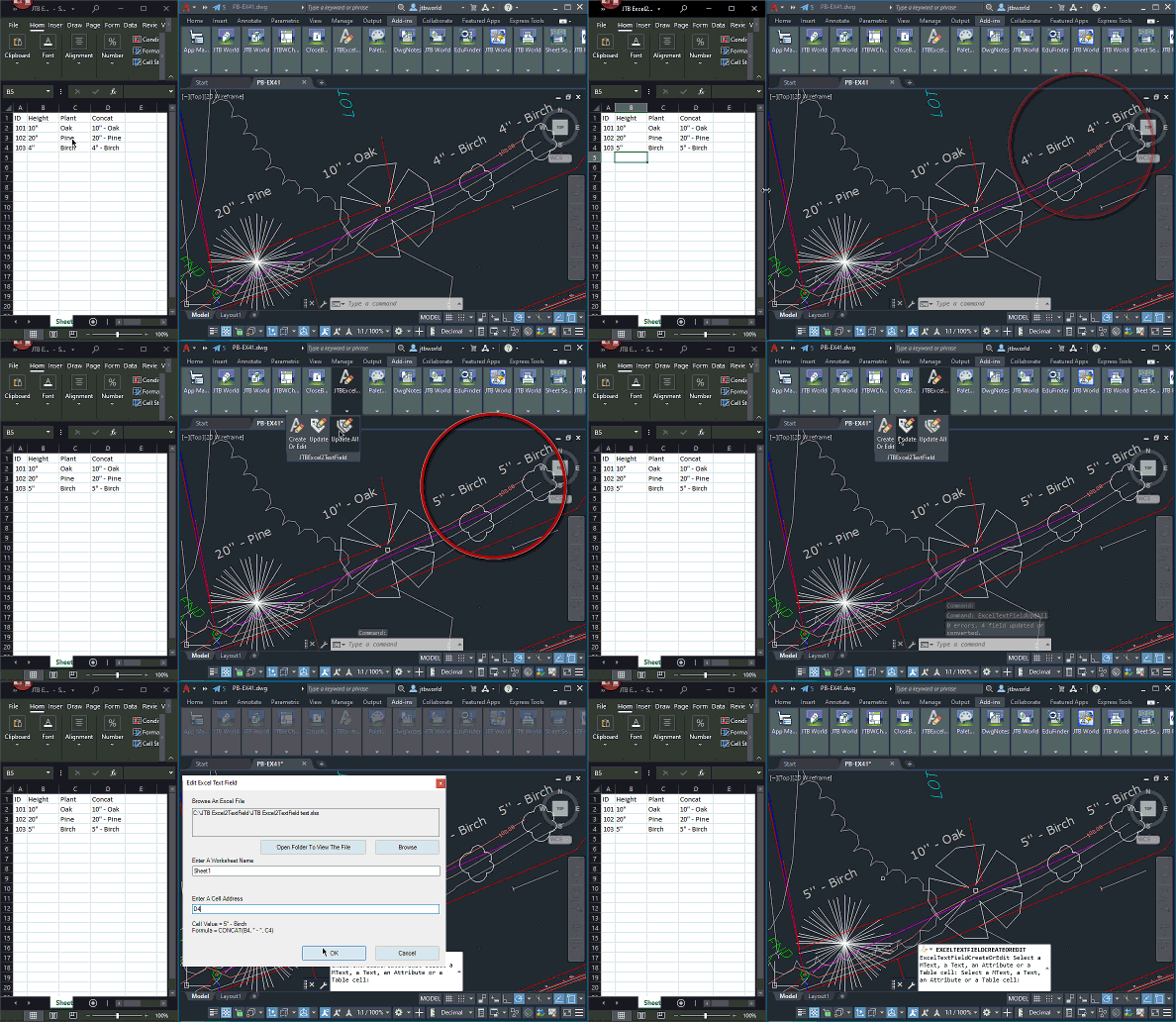
JTB Excel2TextField 2.0.0 link Excel to AutoCAD

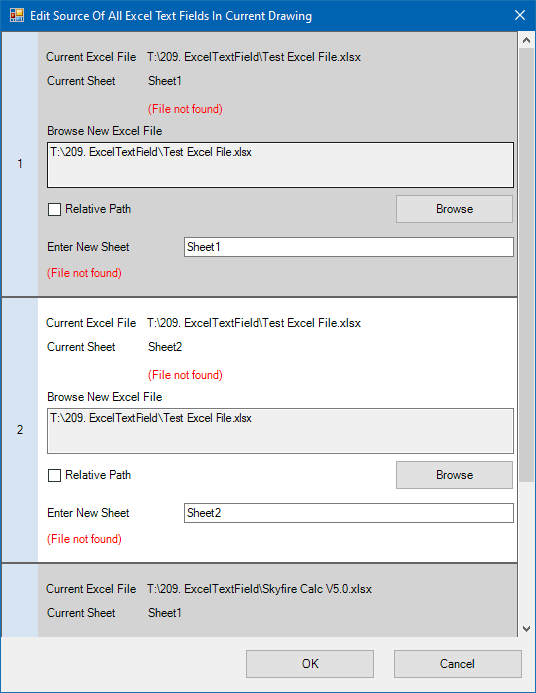
JTB Excel2TextField 2.0.0 is released and now allow you to easily update references that been moved or renamed.

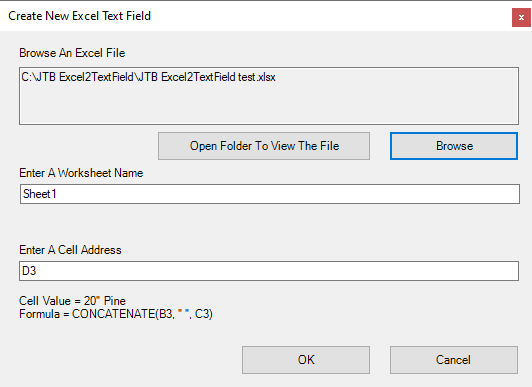
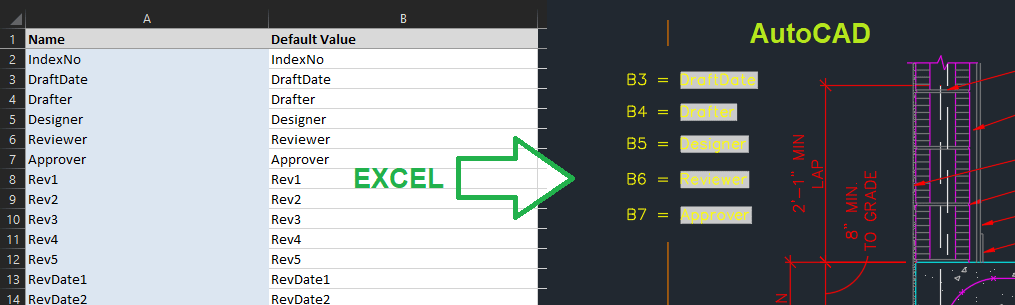
The app lets you connect fields in AutoCAD to Excel cell values. You can have Excel as the main source and when it is updated your drawings will be updated too. You can place fields in texts, mtexts, tables and/or block attributes.

Have your Excel updates to reflect in the drawing.

Animation of usage below by clicking on the image.

The FixExcelTextFields command will collect all source excel files and source worksheets, then show them all in an edit window. Useful if locations or names been changed.

Free trial at JTB Excel2TextField.

Wednesday, April 20, 2022

JTB FlexReport 2022.4.0 released - FlexNet monitoring and more

JTB FlexReport 2022.4.0 is now ready.

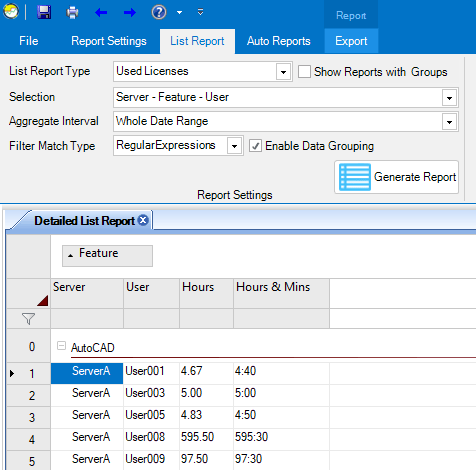
Try filter and data grouping in the list reports.

See the version history for all details.

Trial is available if you want to give it a try.

If your maintenance has expired you can try the new version for a few weeks, if you want to keep using it contact us to renew the maintenance. The upgrade is free of charge for customers with active maintenance.

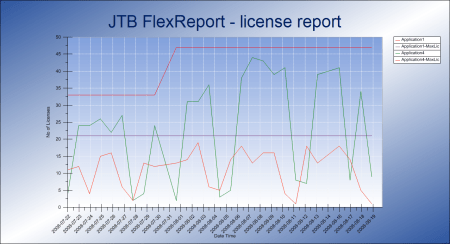
What is JTB FlexReport? JTB FlexReport is a license usage report tool for applications licensed using network license systems like FlexNet (FlexNet), IBM LUM, DSLS, SPLM, Sentinel, LM-X, RLM, EPLAN (ELM), HASP, DPT, Tebis, CodeMeter among others. Track usage over time, hours used and much more. With JTB Process Monitor much more can be monitored like Bentley MicroStation, Autodesk Named User licenses and Autodesk Flex.

If you have FlexNet licenses check out our JTB FlexReport LT freeware. App for AutoCAD available.

Autodesk user? See these posts:

You may still find use for JTB FlexReport together with JTB Process Monitor. We can help analyze your historic usage so you can prepare for the switch.

Thursday, October 28, 2021

Autodesk Network License Manager update needed for Autodesk 2020 and 2021

Autodesk Customers with Multi-user subscription or Token-flex implementation using Autodesk Network License Manager (NLM) are required to upgrade the Network License Manager to the latest version v11.18.x to support Autodesk 2020 and newer version products on and after April 1st, 2022. ref

To report on Autodesk Network License Manager, Named User or Autodesk Flex usage try our JTB FlexReport.

Tuesday, October 26, 2021

JTB Excel2TextField links Excel cell to AutoCAD field

JTB Excel2TextField lets you connect fields in AutoCAD to Excel cell values. You can have Excel as the main source and when it is updated your drawings will be updated too. You can place fields in texts, mtexts, tables and/or block attributes.

Have your Excel updates to reflect in the drawing.

Animation of usage below by coding on the image.

Free trial at JTB Excel2TextField.

Thursday, October 21, 2021

JTB FlexReport 2021.10.0 released - monitor expensive license usage

JTB FlexReport 2021.10.0 is now ready.

We have added and fixed a lot of things in this release. New monitoring options and new reports. Better performance. Works with Windows 11 and Windows Server 2022.

See the version history for all details.

Trial is available if you want to give it a try.

If your maintenance has expired you can try the new version for a few weeks, if you want to keep using it contact us to renew the maintenance. The upgrade is free of charge for customers with active maintenance.

What is JTB FlexReport? JTB FlexReport is a license usage report tool for applications licensed using network license systems like FlexNet (FlexNet), IBM LUM, DSLS, SPLM, Sentinel, LM-X, RLM, EPLAN (ELM), HASP, DPT, Tebis, CodeMeter among others. Track usage over time, hours used and much more. With JTB Process Monitor much more can be monitored like Bentley MicroStation, Autodesk Named User licenses and Autodesk Flex.

If you have FlexNet licenses check out our JTB FlexReport LT freeware. App for AutoCAD available.

Autodesk user? See these posts:

You may still find use for JTB FlexReport together with JTB Process Monitor. We can help analyze your historic usage so you can prepare for the switch.

Wednesday, October 6, 2021

Change attribute order of block in many CAD drawings

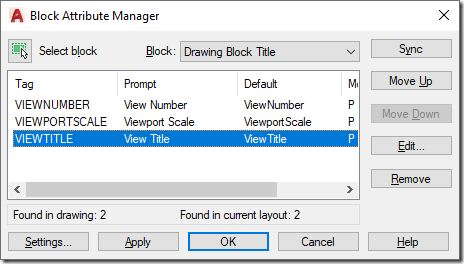
To change attribute tag order in one drawing use BATTORDER (AutoCAD) or BATTMAN (AutoCAD and BricsCAD). With it you can update the block definition of the block.

battman


Then wblock out the block to a separate DWG file. In the example below it us C:\temp\TITLEBLOCK.dwg

In below example the block is named TITLEBLOCK so you will need to modify the name and path (separate folders with double backslashes). Save the AutoLISP code to an LSP file.

; redefine block with or without attributes from an external DWG block

(setq blockname " TITLEBLOCK")

(setq fullpath "C:\\temp\\TITLEBLOCK.dwg")

(if (tblsearch "block" blockname)

  (progn

    (command "_.-insert" (strcat blockname "=" fullpath) "_Y")

    (command)

    (command "_.attsync" "_N" blockname)

  )

)

Then you can use JTB SmartBatch to update all drawings with this LSP. Specify the use of the LSP in JTB SmartBatch Settings > Script/lisp file. Now add all drawings to be updated and you’ll have all title blocks or other blocks of your choice updated.

Monday, October 4, 2021

JTB FlexReport can monitor Autodesk Flex

Autodesk Flex is a new option to pay as you go for occasional product use. While you can get some usage reports from Autodesk they are limited.

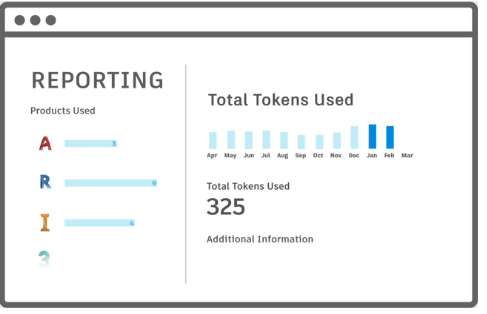
Tokens

When a user opens and signs into an Autodesk product included with Flex, they will be charged a daily rate per product once every 24 hours.

For example, a user opens and signs into AutoCAD from 8am-9am will be charged 7 tokens, same as a user using it the whole day. Even just starting and closing AutoCAD will cause a charge if 7 tokens (around $21). Revit will take 10 tokens.

With JTB FlexReport and JTB Process Monitor you can get additional valuable reports to identify users that just use a product a short time per day. You can get the total time the product has been running as well as the active time the user used the product. With this users using the products just a short time can be identified.

Contact us for a free trial or if you have any questions.

Monday, September 13, 2021

JTB BatchAttEdit 4.5.0 - Batch edit block attributes in BricsCAD or AutoCAD

JTB BatchAttEdit 4.5.0 has been released.

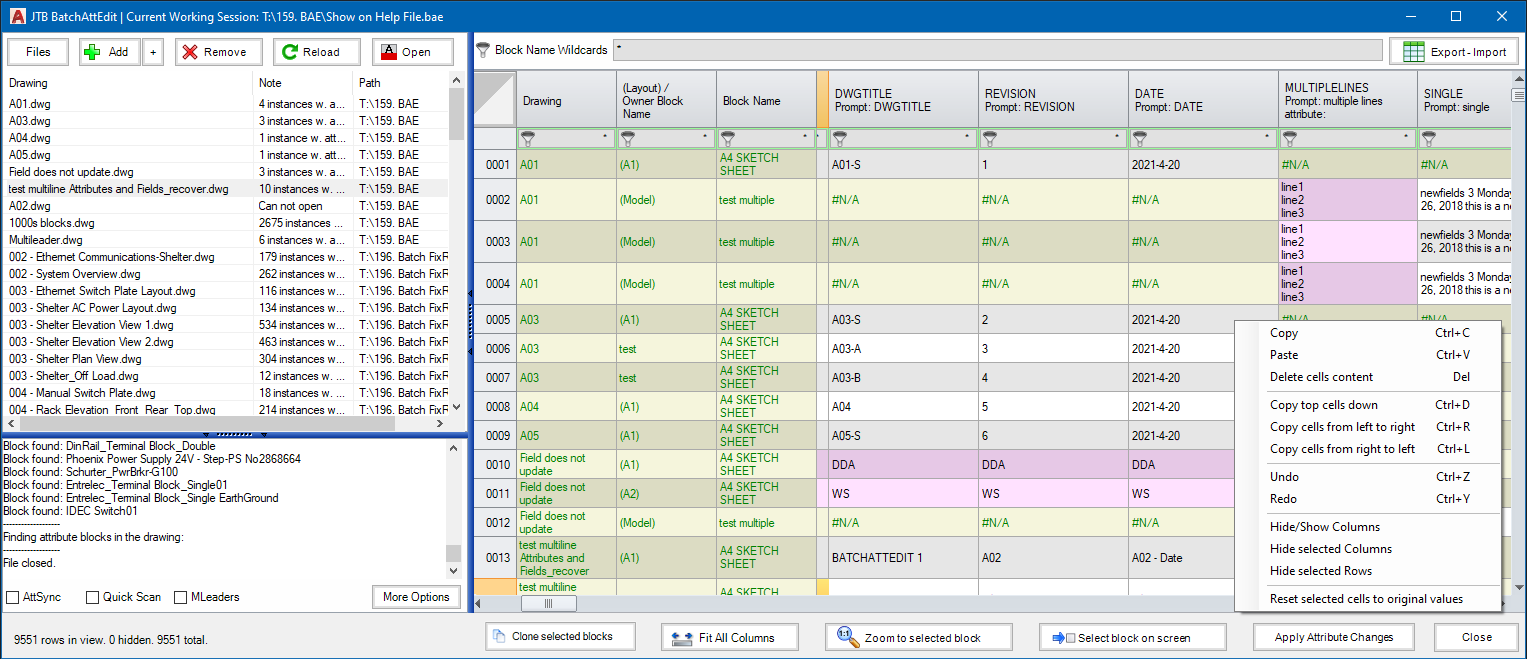
In this version we added a "Clone selected blocks" command and other improvements.

This batch attribute editor app for BricsCAD and AutoCAD gathers attributes in all blocks of specified name patterns in multiple drawings and display in a spreadsheet. You can edit attribute texts just like in Excel. When ready, click "Apply Attribute Changes" to update values to drawings.

JTB BatchAttEdit

This is a great app to edit title block attributes across many drawings instead of having to do it one drawing at a time. How do you edit all title block data?

Dynamic block properties can be edited too.

If you want to export the attributes to Excel use the "Export - Import" button. Optionally you can make modifications in Excel for example with help of functions and formulas and then import back.

Try it for free by downloading from JTB BatchAttEdit.

For more of JTB World’s software that you might find useful visit our software list and our apps available on Autodesk App Store. We also offer custom programming services and can help you with both small and large projects where we specialize on the AutoCAD, AutoCAD Architecture, Revit, BricsCAD, ZWCAD and other CAD platforms.

Some of the latest blog posts

Subscribe to RSS headline updates from:
Powered by FeedBurner

Contact Us | About JTB World | Website General Terms of Use | Privacy Policy
^ Top of page

© 2004- JTB World. All rights reserved.