Showing posts with label GstarCAD. Show all posts

Tuesday, September 3, 2024

JTB SSMPropEditor 2024.8.0 released

JTB SSMPropEditor 2024.8.0 has been released and comes with some improvements and fixes.  

Recent updates in versions after 2024.3.0:

  • Bug fix: Sorting by sheet number giving unexpected results.
  • Paste sheet count improved and bugs fixed.
  • Improved way to enter license activation key.
  • Fixed empty tree view bugs.
  • Fixed import bug.
  • Timeout for layout renaming increased to 5 minutes for cases with very large DWG files.
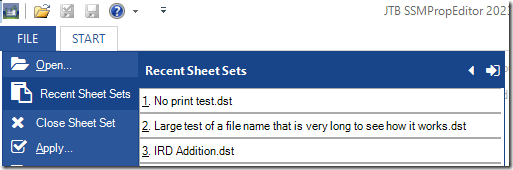
  • Improved Recent Sheet Sets with remove option of non-existing Sheet Sets.
  • Layout renaming bugs fixed.
  • File Name renaming bugs fixed.
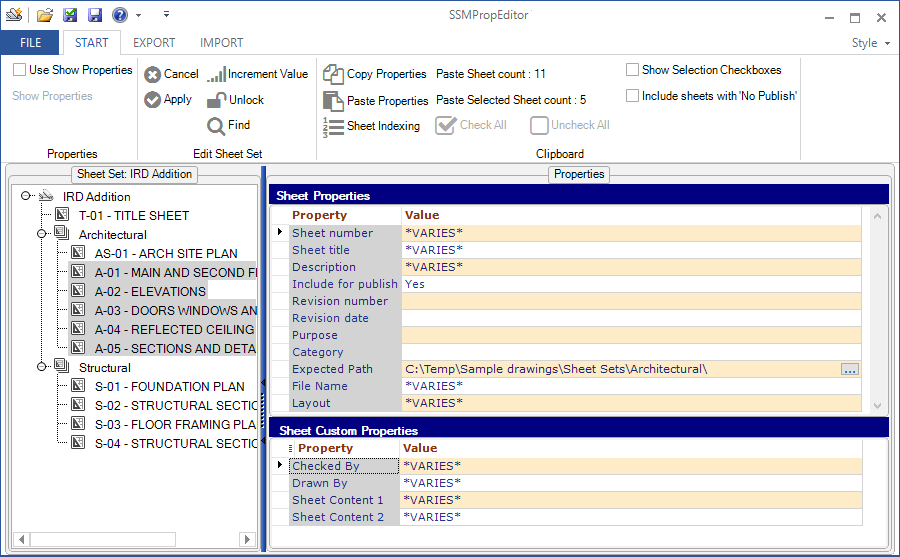
  • Sheet indexing. If no sheet is selected Sheet Number is default.
  • Sheet indexing bug fixed.
  • Removed Show Properties as it no longer is needed.
  • Improved dialog boxes when closing and exiting.

Are you using the Sheet Set Manager in AutoCAD, GstarCAD and BricsCAD, NanoCAD Plus/Pro, Graebert's ARES Commander 2022 and newer, DraftSight 2021 and newer, ZWCAD 2023 or newer, or AutoCAD Architecture's Project Navigator (PN) Sheet Set View? If you do, then SSMPropEditor will help a lot, save time and effort updating sheet properties and sheet custom properties across multiple sheets with its DST editing capabilities.

Free trial of JTB SSMPropEditor available.
Friday, December 22, 2023

JTB SSMPropEditor 2023.12.0 released (Sheet Set Manager Editor)

JTB SSMPropEditor 2023.12.0 has been released and comes with some improvements and fixes.

  • Several Find and Replace dialog bugs fixed.
  • Performance bug fixed while opening and operating certain Sheet Sets with no existing UNC paths.
  • Bugs fixed related to renaming of actual DWG files.
  • Import bug fixed for renaming and sheet number issue with extra space added.
  • Selecting one or more properties and don’t use checkboxes, it's now possible to use copy to clipboard.
  • Added tool tip to Recent Sheet Sets that shows the folder of the Sheet Set.
  • Tool tips added for QAT buttons.
  • Sheet Tool Tips has more info.
  • Close a Sheet Set showing "Do you want to save the changes to the Sheet Set?" adds a Cancel button and fixes a bug where No still saved changes.
  • Exit the app may show "Do you want to close JTB SSMPropEditor?". Cancel button has been added.
  • "Use Show Properties" checkbox now retains its setting.
  • Bug fixed where backup settings is not saved and restored.
  • Height of Sheet Set and project control areas increased a bit so the vertical scrollbar is not showed by default.
  • Backup of renamed or moved DWG files copied to %temp% folder as an extra precaution.

Are you using the Sheet Set Manager in AutoCAD, GstarCAD and BricsCAD, NanoCAD Plus/Pro, Graebert's ARES Commander 2022 and newer, DraftSight 2021 and newer, ZWCAD 2023 or newer, or AutoCAD Architecture's Project Navigator (PN) Sheet Set View? If you do, then SSMPropEditor will help a lot, save time and effort updating sheet properties and sheet custom properties across multiple sheets with its DST editing capabilities.

Free trial of JTB SSMPropEditor available.

Tuesday, June 20, 2023

JTB SSMPropEditor 2023.6.0 released (Sheet Set Manager Editor)

JTB SSMPropEditor 2023.6.0 has been released and comes with some improvements and fixes. Here are some from the last 2 versions:

  • File menu now resizable.    
    image
  • New tooltips while hovering over sheets.
  • Improved colors so it is easier to read text that is edited.
  • Fixed callout block bugs.
  • Added support for AutoCAD 2024.
  • Performance issues fixed.
  • Vault performance issues fixed.
  • Fixed bug where sorting was not saved as expected.
  • Fixed import bugs.
  • Other minor bug fixes.

Are you using the Sheet Set Manager in AutoCAD, GstarCAD and BricsCAD, NanoCAD Plus/Pro, Graebert's ARES Commander 2022 and newer, DraftSight 2021 and newer, ZWCAD 2023 or newer, or AutoCAD Architecture's Project Navigator (PN) Sheet Set View? If you do, then SSMPropEditor will help a lot, save time and effort updating sheet properties and sheet custom properties across multiple sheets with its DST editing capabilities.

Free trial of JTB SSMPropEditor available.

Monday, January 30, 2023

JTB SSMPropEditor 2023.1.0 released (the Sheet Set Manager Editor)

JTB SSMPropEditor 2023.1.0 has been released and comes with some improvements and fixes.

Are you using the Sheet Set Manager in AutoCAD, GstarCAD and BricsCAD, NanoCAD Plus/Pro, Graebert's ARES Commander 2022 and newer, DraftSight 2021 and newer, ZWCAD 2023 or newer, or AutoCAD Architecture's Project Navigator (PN) Sheet Set View? If you do, then SSMPropEditor will help a lot, save time and effort updating sheet properties and sheet custom properties across multiple sheets with its DST editing capabilities.

Free trial of JTB SSMPropEditor available.
Thursday, October 21, 2021

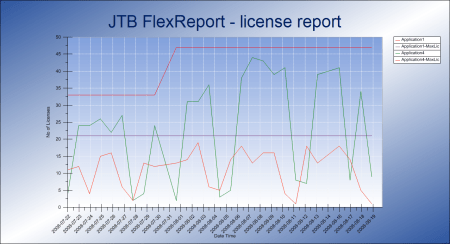
JTB FlexReport 2021.10.0 released - monitor expensive license usage

JTB FlexReport 2021.10.0 is now ready.

We have added and fixed a lot of things in this release. New monitoring options and new reports. Better performance. Works with Windows 11 and Windows Server 2022.

See the version history for all details.

Trial is available if you want to give it a try.

If your maintenance has expired you can try the new version for a few weeks, if you want to keep using it contact us to renew the maintenance. The upgrade is free of charge for customers with active maintenance.

What is JTB FlexReport? JTB FlexReport is a license usage report tool for applications licensed using network license systems like FlexNet (FlexNet), IBM LUM, DSLS, SPLM, Sentinel, LM-X, RLM, EPLAN (ELM), HASP, DPT, Tebis, CodeMeter among others. Track usage over time, hours used and much more. With JTB Process Monitor much more can be monitored like Bentley MicroStation, Autodesk Named User licenses and Autodesk Flex.

If you have FlexNet licenses check out our JTB FlexReport LT freeware. App for AutoCAD available.

Autodesk user? See these posts:

You may still find use for JTB FlexReport together with JTB Process Monitor. We can help analyze your historic usage so you can prepare for the switch.

Sunday, May 9, 2021

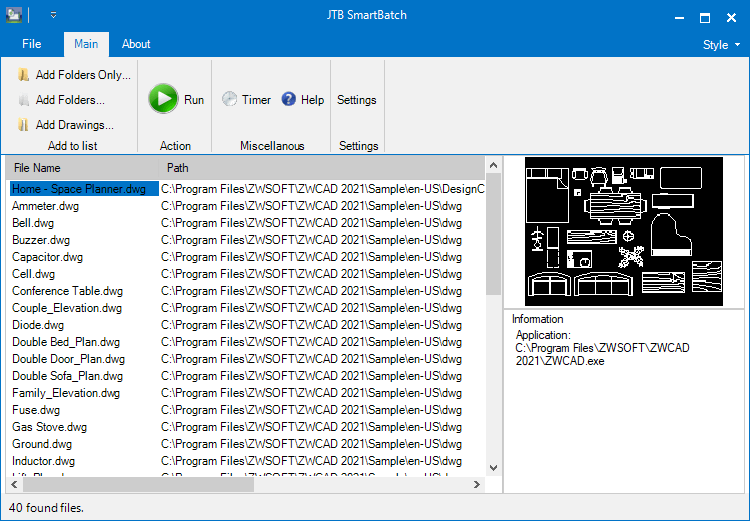
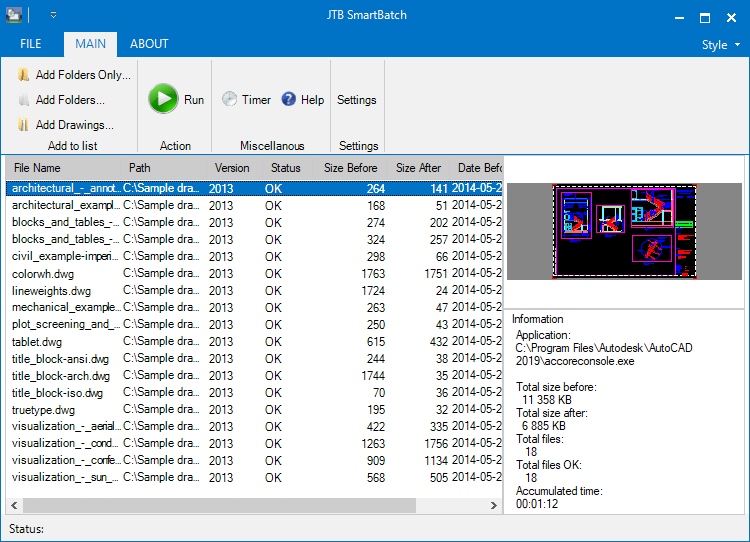
Batch scripting for DraftSight with JTB SmartBatch

JTB SmartBatch 5.5.0 is released made it compatible with DraftSight and before that with AutoCAD 2022.

Download here. Purchase a new license or upgrade here.

JTB SmartBatch is a batch and script utility for processing multiple DWG drawings with full control with AutoCAD, BricsCAD, ZWCAD, DraftSight or GstarCAD.

JTB SmartBatch closes dialog boxes that might otherwise stop batch processing like for example dialog box showing missing fonts. Execute LSP or SCR files on multiple drawings. JTB SmartBatch handles crashes so the CAD batch processing continues to the end and leaves bad drawings to be corrected manually. Many purge and cleanup settings available. Useful before backups and distribution of drawings. The file's modified time stamp can be restored.

ZWCAD batch scripting

The free trial without license file is fully functional except that you can only batch process 10 drawings per session to give you the chance to confirm that the program works as expected. When you purchase you can use JTB SmartBatch with no limitations.

Monday, February 8, 2021

DST merging with JTB DST Tool 2.1.0

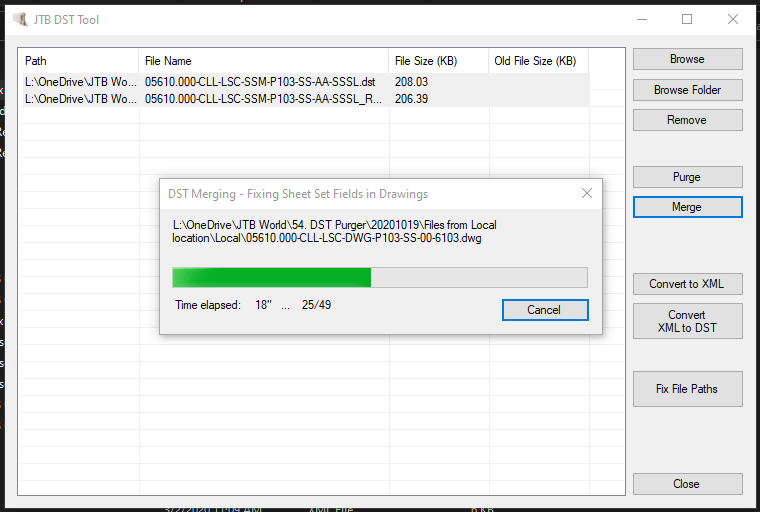
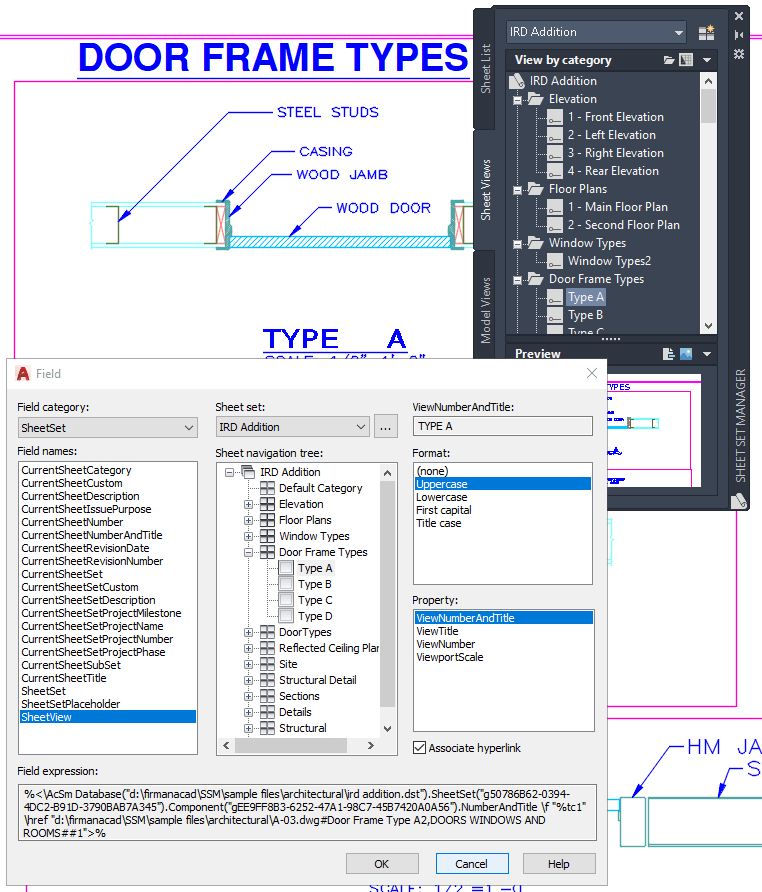
JTB DST Tool can merge Sheet Sets containing Sheet Views and their fields in the drawings. For this specific functionality full AutoCAD is needed. Otherwise the app works without the need of any CAD installed.

You can also purge, convert and fix paths for Sheet Set DST files for AutoCAD, BricsCAD, GstarCAD, NanoCAD Plus/Pro, Graebert's ARES Commander 2022 and newer, and any other CAD software using Sheet Set DST files.

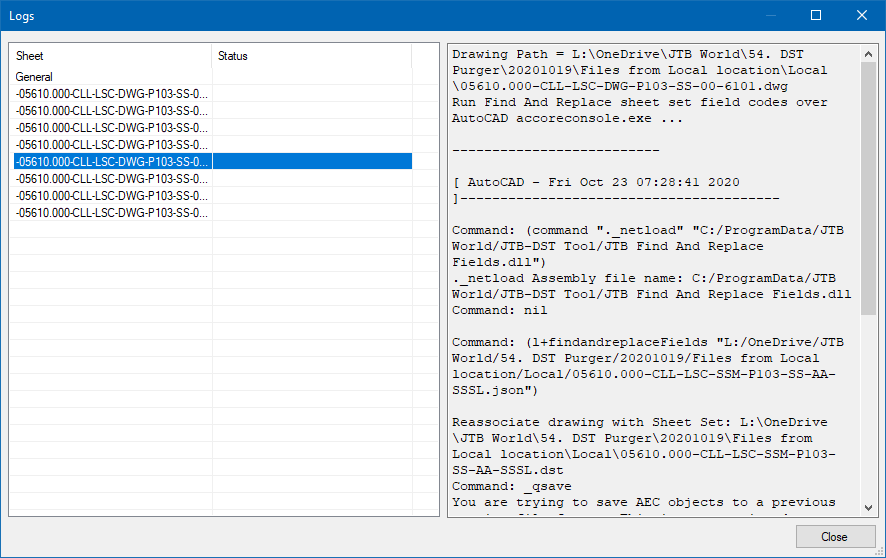
When ready a detailed status log is showed for all processed sheets.

Fields get updated so they point to the merged Sheet Set DST file.

More about the app at JTB DST Tool.

Thursday, January 28, 2021

Batch scripting for ZWCAD with JTB SmartBatch

JTB SmartBatch 5.3 is released.

Download the update either as a customer or if you want a trial. Purchase a new license or upgrade here if previous purchase was before 2019.

JTB SmartBatch is a batch and script utility for processing multiple DWG drawings with full control with AutoCAD, BricsCAD, ZWCAD or GstarCAD.

JTB SmartBatch closes dialog boxes that might otherwise stop batch processing like for example dialog box showing missing fonts. Execute LSP or SCR files on multiple drawings. JTB SmartBatch handles crashes so the CAD batch processing continues to the end and leaves bad drawings to be corrected manually. Many purge and cleanup settings available. Useful before backups and distribution of drawings. The file's modified time stamp can be restored.

ZWCAD batch scripting

The free trial without license file is fully functional except that you can only batch process 10 drawings per session to give you the chance to confirm that the program works as expected. When you purchase you can use JTB SmartBatch with no limitations.

Thursday, January 14, 2021

What is Line Space Style in mtext in CAD?

Some users have run into some odd behavior with multiline text (mtext) in DWG editors like AutoCAD, BricsCAD, GstarCAD and ZWCAD. What helped in these cases was to change the Line Space Style.

What is mtext Line Space Style?

There are two styles:

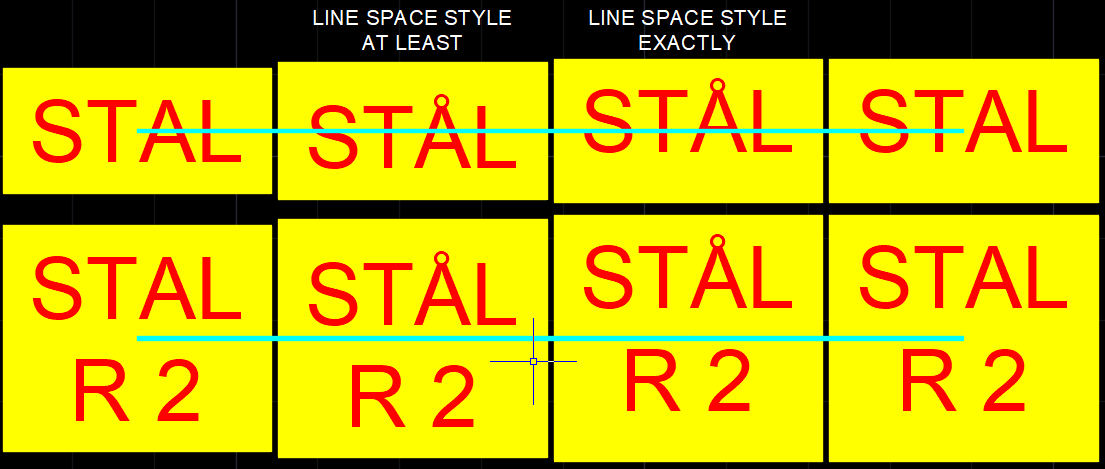
  • At Least. Adjusts lines of text automatically based on the height of the largest character in the line. More space is added between lines of text with taller characters. This is the default setting.
  • Exactly. Forces the line spacing to be the same size for all lines of text regardless of format differences such as font or text height Useful to line up text in tables.

To ensure that line spacing is identical in multiple multiline text objects, use Exactly and set the Line Space Factor to the same value in each multiline text object.

Note: Using Exactly can cause text in lines located above or below lines with large font characters (commonly used in Asian languages) to overlap the larger characters.

I run into this several times being Swedish and having accented letters like Å, Ä and Ö that are higher than most characters.

If you use Justify like Middle center you can see how the insertion point is at different heights related to the text and also affects the Background mask and Text frame. The cyan line shows the insertion point.

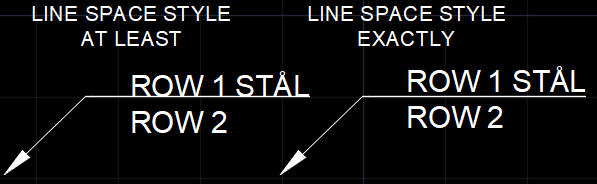
Multiline text placement on a leader can also be affected as seen below.

Multiline text with 4 columns below.

Sample DWG to download.

Tuesday, December 8, 2020

JTB LayoutsToDwgs 2.0 AutoCAD freeware

JTB LayoutsToDwgs 2.0 adds the a new command that purges and bind xrefs before splitting out each layout to a separate drawing.

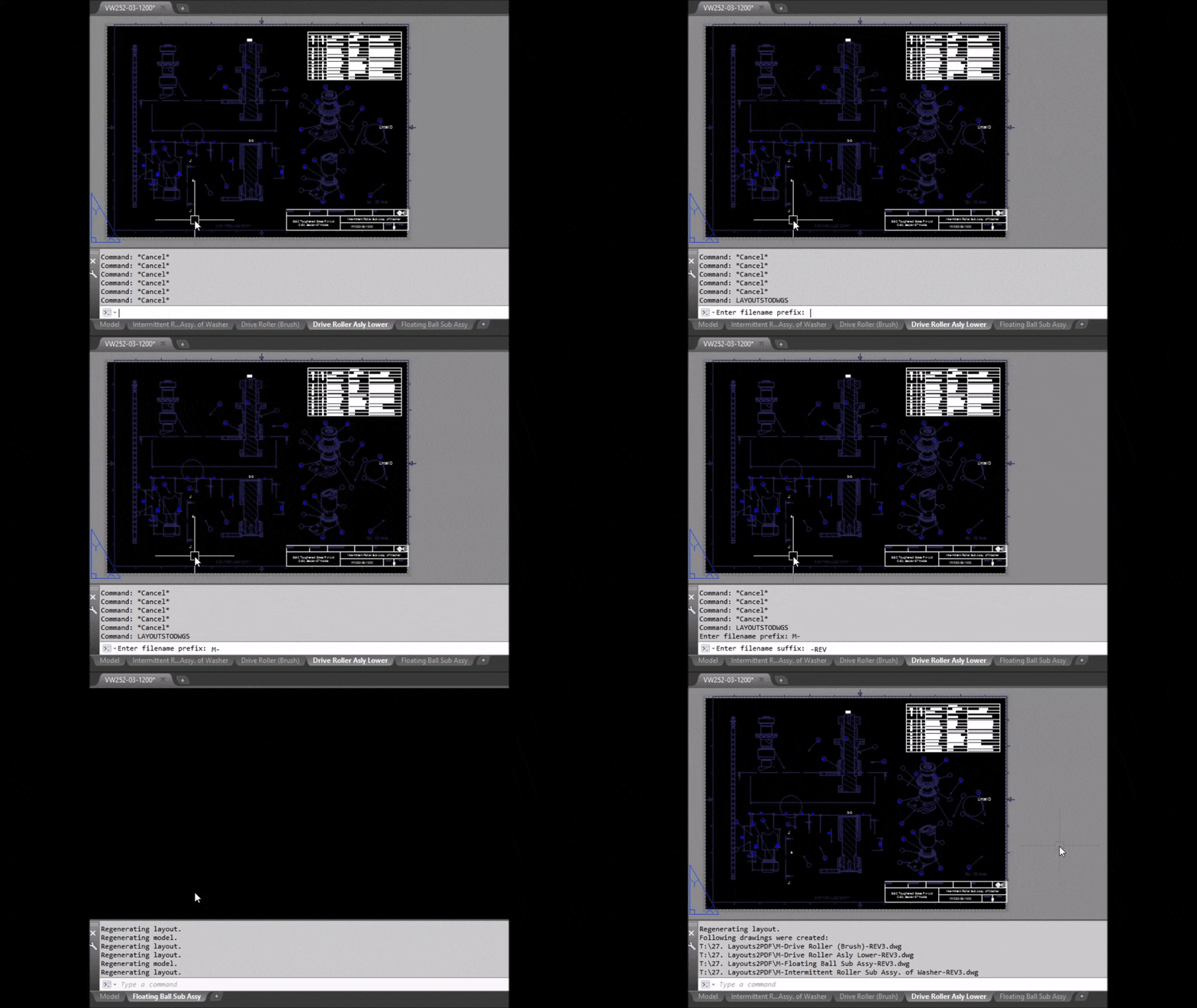
The app will save each of your layouts to a single-layout drawing. Model space is copied as is.

New drawings are named after the layouts, with a prefix and a suffix specified by you. Drawings are saved in source drawing folder.

You will be asked to use WBLOCK or SAVEAS command to proceed. Use SAVEAS command to keep current drawing properties, page setups and other settings in the new drawing(s). Use WBLOCK command for better performance.

Then, you enter a prefix and a suffix text to name target drawings. Hit enter and drawings will be created from all layouts, saved in the current folder.

Batch process multiple drawings with JTB SmartBatch.

JTB LayoutsToDwgs

Do you need it for BricsCAD, ZWCAD or any other CAD app let us know.

Monday, November 30, 2020

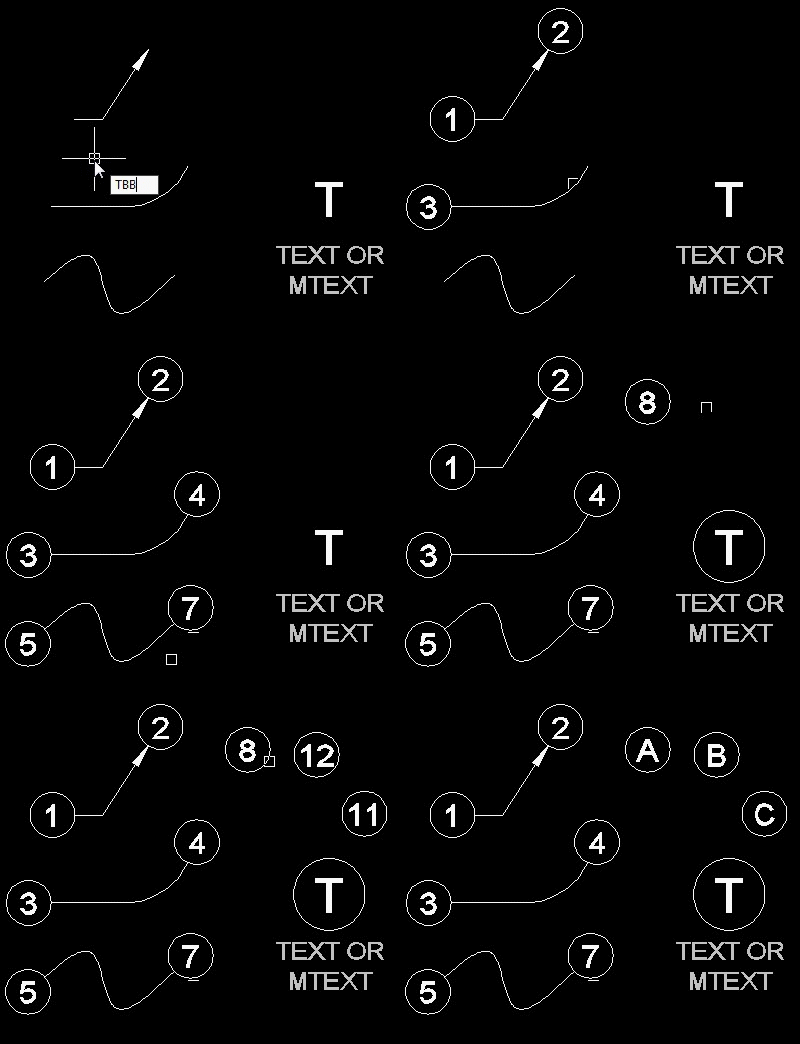
Keynote list with symbol around the number with JTB Text Bubble Plus

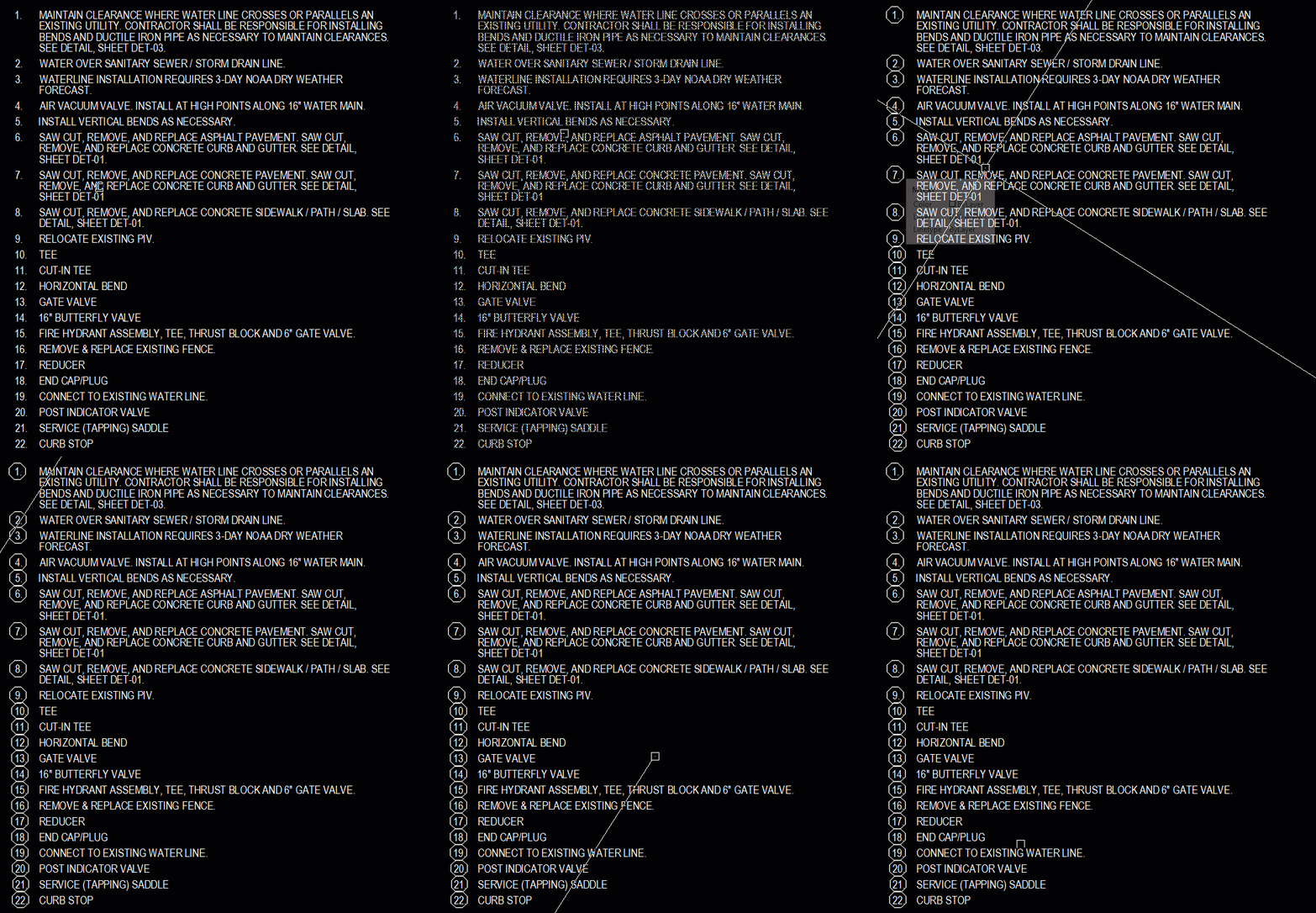
JTB Text Bubble Plus 3.4 has this feature added. Use TBBCV command to convert numbers in a MTEXT list by adding a circle, triangle, square, hexagon or other block around the numbers. It is common drafting standard that the keynote list matches the symbol used for the leader.

With the Text Bubble Plus you can insert text bubbles to lines, curves, or draw leaders with it, or quickly make a schedule from text bubbles and/or other blocks. Incrementing of numbers or letters is done automatically. Works with AutoCAD, BricsCAD and GstarCAD. Do you want this for ZWCAD or any other CAD software let us know.

Free trial of JTB Text Bubble Plus is available.

Monday, November 23, 2020

Merge Sheet Sets with JTB DST Tool 2.0.0

JTB DST Tool can now fully merge Sheet Sets containing Sheet Views and their fields in the drawings. For this specific functionality full AutoCAD is needed. Otherwise the app works without the need of any CAD installed.

When ready a detailed status log is showed for all processed sheets.

Fields get updated so they point to the merged Sheet Set DST file.

You can also purge, convert and fix paths for Sheet Set DST files for AutoCAD, BricsCAD, GstarCAD, NanoCAD Plus/Pro and any other CAD software using Sheet Set DST files. More about the app at JTB DST Tool.

Wednesday, September 30, 2020

Edit CAD Sheet Sets without CAD with JTB SSMPropEditor

JTB SSMPropEditor 2020.9.0 has been released and comes with a some improvements and fixes.

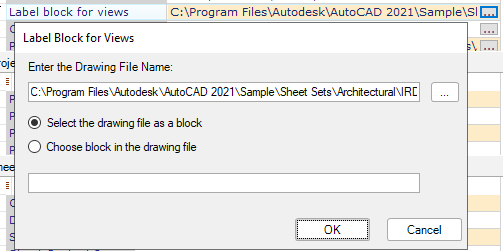
  • More editing functionality for Label block for views, Callout blocks, Page setup overrides file, Sheet storage location and Sheet creation template.
  • Silent command line installation is now also uninstalling previous version unattended.
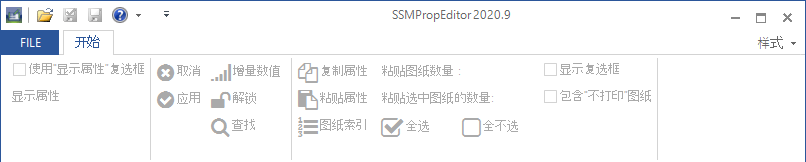
  • Chinese localization. 图纸集管理器
  • Graphical issues fixed that could happen in some systems due to text scaling and DPI.

Are you using Sheet Set Manager in AutoCAD, BricsCAD, GstarCAD or NanoCAD? If you do, then SSMPropEditor will help a lot, save time and effort updating properties across sheets. Free trial of JTB SSMPropEditor available.
Monday, June 15, 2020

Sheet Set Manager productivity with SSMPropEditor

SSMPropEditor 7.4.3 has been released and comes with a few minor fixes. Are you using Sheet Set Manager in AutoCAD, BricsCAD, GstarCAD or NanoCAD? If you do, then SSMPropEditor will help a lot, save time and effort updating properties across sheets. Free trial available.

Monday, April 27, 2020

Boost Sheet Set Manager with SSMPropEditor

SSMPropEditor 7.4 has been released and comes with support for AutoCAD 2021 and Vault 2021. Are you using Sheet Set Manager in AutoCAD, BricsCAD, GstarCAD or NanoCAD? If you do, then SSMPropEditor will help a lot, save time and effort updating properties across sheets. Free trial available.

Monday, August 19, 2019

SSMPropEditor 7.3

Your best app as a Sheet Set user, SSMPropEditor, has been improved and got some new features and bug fixes. How about drag and drop to relocate sheets and subsets?

For details on this release and previous releases see the revision history.

You find the download here. If you purchased on or after November 1, 2017 the upgrade is free of charge. Trial for 30 days is available.

Edit properties on multiple sheets belonging to Sheet Set Manager (SSM) for AutoCAD, GstarCAD and BricsCAD, NanoCAD Plus/Pro or AutoCAD Architecture's Project Navigator (PN) Sheet Set View with ease. If you want to change properties like a revision, date or name on two or more sheets at the same time SSMPropEditor is for you. Your productivity will increase and you will save time avoiding a lot of manual work.

Sheet Set Properties, Sheet Set Custom Properties, Sheet Properties and Sheet Custom Properties can be edited and batch updated either directly within the app or by exporting to Excel, make edits and import back.

If you are using Sheet Sets you can create new Sheet Sets including drawings based on an Excel template with our JTB Sheet Set Creator or make merge, purge and convert of Sheet Sets with JTB DST Tool, DST Converter, or publish with JTB Sheet Set Publish.

If you have any other time consuming or boring task you want automated we can help. Contact us.

Apps for AutoCAD and/or BricsCAD updated

Several apps by JTB World have been updated recently.

  • 2019-08-19 JTB Find 1.0.1 released, finally users of AutoCAD Architecture (ACA) based products including MEP, Map 3D and Civil 3D can find and replace text in the Extended Data tab in Properties, specifically for Property Sets and their Property Definition values (PSD).
  • 2019-08-19 ACAD_db 4.0.5 released
  • 2019-08-19 XClipClean 2.5.1 released
  • 2019-08-12 JTB Align Plus 4.2.1 released
  • 2019-08-12 JTB Sort Table 2.0.3 released
  • 2019-08-12 JTB Text Bubble Plus 3.2.1 released
  • 2019-08-12 JTB Sheet Set Publish 2.5.0 released

Trial is available for most of our apps.

Friday, April 5, 2019

JTB World apps updated for AutoCAD 2020

Most of our apps have been updated recently.

We have apps for many purposes and if you can't find what you need please feel free to contact us.

AutoCAD 2020 and other Autodesk products have been released and others like Revit will soon be,  so we have updated our apps for them as well as for other CAD products like BricsCAD and GstarCAD.

Trial is available to download for most of our apps.

Batch and scripting apps:

Sheet Set Manager apps:

Windows Explorer apps:

Plot and publish apps:

Database DWG sync apps:

Other productivity, drafting and freeware apps:


For more of JTB World’s software that you might find useful visit our software list and our apps available on Autodesk App Store. We also offer custom programming services and can help you with both small and large projects where we specialize on the AutoCAD, Revit and BricsCAD platforms.

You can subscribe to our newsletters if you like.

Monday, February 25, 2019

SSMPropEditor 7.2 released

SSMPropEditor 7.2 is now available. SSMPropEditor can speed up your usage of the Sheet Set Manager.

Drag and drop a DST into the app has had some issues that now are fixed.

For details on this release and previous releases see the revision history.

You find the download here. If you purchased on or after November 1, 2017 the upgrade is free of charge. Trial for 30 days is available.

Edit properties on multiple sheets belonging to Sheet Set Manager (SSM) for AutoCAD, GstarCAD and BricsCAD, NanoCAD Plus/Pro or AutoCAD Architecture's Project Navigator (PN) Sheet Set View with ease. If you want to change properties like a revision, date or name on two or more sheets at the same time SSMPropEditor is for you. Your productivity will increase and you will save time avoiding a lot of manual work.

Sheet Set Properties, Sheet Set Custom Properties, Sheet Properties and Sheet Custom Properties can be edited and batch updated either directly within the app or by exporting to Excel, make edits and import back.

If you are using Sheet Sets you can create new Sheet Sets including drawings based on an Excel template with our JTB Sheet Set Creator or make merge, purge and convert with JTB DST Tool, DST Converter, or publish with JTB Sheet Set Publish.

If you have any other tedious task you want automated we can help. Contact us.

Wednesday, February 6, 2019

JTB SmartBatch 5.0 released (aka SmartPurger)

JTB SmartBatch 5.0 is released.

  • New licensing system with support for network licenses
  • Refreshed UI
  • Fixed problem to browse for folder on Settings>SaveAs
  • Fixed problem to Check for Update
  • Improved functionality to close dialog boxes
  • .NET Framework 4.6.1 or later needed
  • SmartPurger renamed to JTB SmartBatch to better reflect that it is more of a Batch app than a Purge app

Download the update either as a customer or if you want a trial. Purchase a new license or upgrade here if previous purchase was before 2018.

JTB SmartBatch (aka SmartPurger) is a batch and script utility for processing multiple DWG drawings with full control with AutoCAD, BricsCAD or GstarCAD.

JTB SmartBatch closes dialog boxes that might otherwise stop batch processing like for example dialog box showing missing fonts. Execute LSP or SCR files on multiple drawings. JTB SmartBatch handles crashes so the AutoCAD batch processing continues to the end and leaves bad drawings to be corrected manually. Many purge and cleanup settings available. Useful before backups and distribution of drawings. The file's modified time stamp can be restored.

The free trial without license file is fully functional except that you can only batch process 10 drawings per session to give you the chance to confirm that the program works as expected. When you purchase you can use JTB SmartBatch with no limitations.

Some of the latest blog posts

Subscribe to RSS headline updates from:
Powered by FeedBurner

Contact Us | About JTB World | Website General Terms of Use | Privacy Policy
^ Top of page

© 2004- JTB World. All rights reserved.