Showing posts with label AutoCAD Architecture. Show all posts

Wednesday, March 26, 2025

Motif Launches Cloud-Based Platform for Seamless AEC Collaboration

Motif a startup in the architecture, engineering, and construction (AEC) sector, has unveiled its innovative cloud-based platform to revolutionize design collaboration. This platform merges 2D and 3D workflows, offering a unified workspace for architects, engineers, and stakeholders to collaborate in real-time without the limitations of traditional tools.
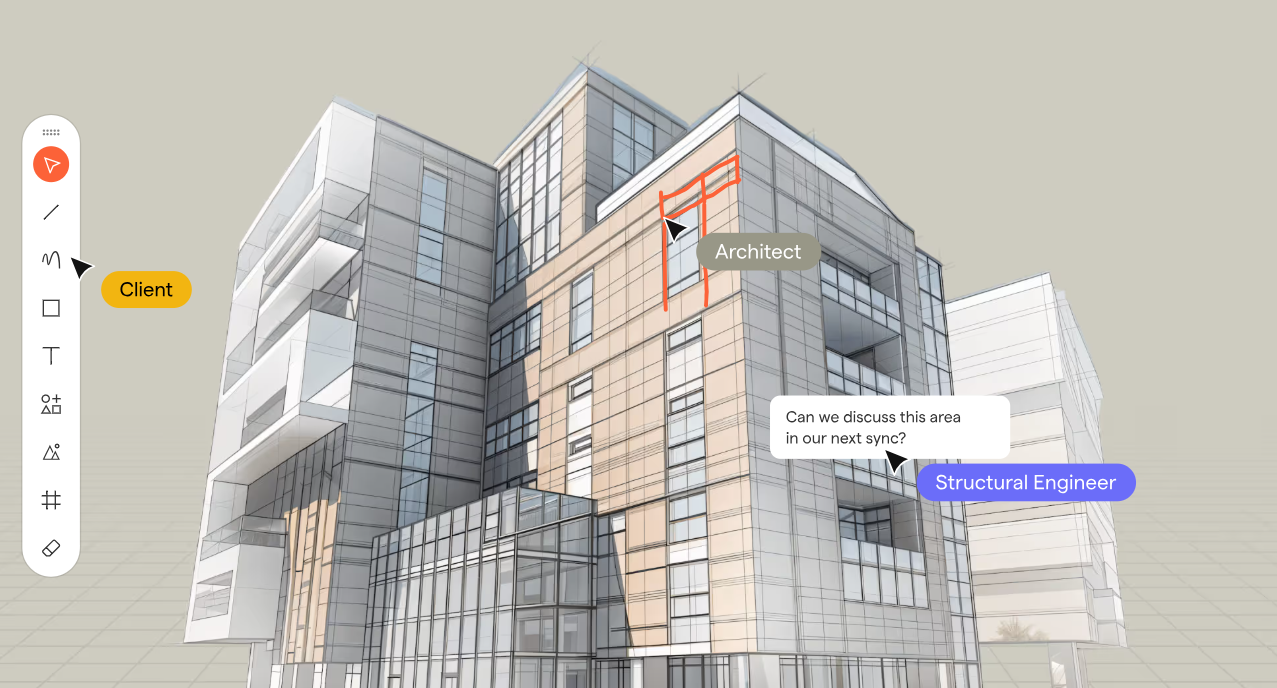
Motif Hero Image

Key Features of Motif:

  • Unified Collaboration Workspace: An infinite canvas integrating 2D drawings, 3D models, sketches, and specifications in one place.
  • Live Model Streaming & Integration: Real-time updates with Revit and Rhino, eliminating the need for manual re-uploads.
  • 2D & 3D Sketching and Markups: Enables instant commenting and sketching, seamlessly syncing feedback across tools.
  • Smart Presentation Tools: Interactive presentations linked directly to live designs.
  • Web-Based Accessibility: Requires no software installation, ensuring inclusivity for all stakeholders, even those without CAD expertise.
  • Plugins for Revit, Rhino and other BIM/CAD apps allows access to the collaboration both in the native app where the design is done and in Motif.

This eliminates traditional barriers like disconnected tools, fragmented workflows, and accessibility issues, ensuring efficient design reviews and meaningful participation for all team members, architects, designers, engineers, owners, clients, etc.

Motif's debut is more than a collaboration tool; it’s the foundation for an intelligent and connected future for Building Information Modeling (BIM). The company aims to enhance creativity, reduce friction, and harness AI to empower smarter design decisions.

“Today’s AEC workflows are burdened by fragmented data, rigid software, and disconnected collaboration tools that slow down decision-making,” says Amar Hanspal, CEO and Co-Founder of Motif. “Motif is redefining BIM with a focus on being open, intelligent, and collaborative, where BIM isn’t just about managing information—it’s about unlocking intelligence. We’re starting with intelligent collaboration—a platform that bridges gaps between teams, integrates with existing tools, and leverages AI to provide insights that drive better decisions. This is step one of many in building a smarter, more connected BIM future—one that removes friction, enhances creativity, and makes design intelligence truly accessible.”
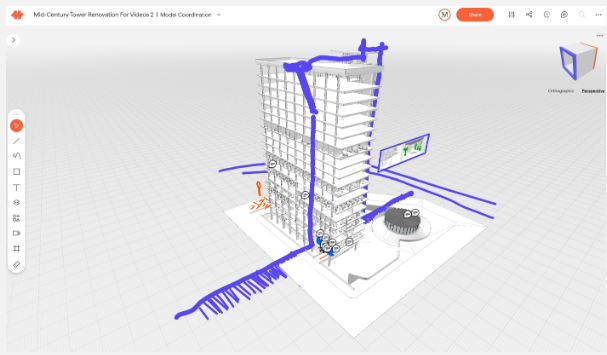
motif 3D


"Motif simplifies how we collaborate across teams,” said Bill Carney, Design Technology Leader and Principal at DLR Group. “Instead of juggling screenshots, PDFs, and disconnected markups, everything is now in one place—live, structured, and effortless. Instead of creating work-arounds to collaborate we can focus on decisions and feedback in real time. Motif has made coordination faster and eliminated so many back-and-forths."

About: Motif Systems, Inc. is building the next generation software platform for the modern built environment. Founded in 2023 by Amar Hanspal (former Co-CEO and Chief Product Officer at Autodesk) and Brian Mathews (former CTO at Autodesk), along with founding employees of Revit, Motif enables seamless, real-time collaboration for architecture, engineering, and construction professionals.

With early access now open, Motif invites teams of all sizes to experience the next era of design collaboration. Interested professionals can request a free trial at motif.io.

Monday, January 30, 2023

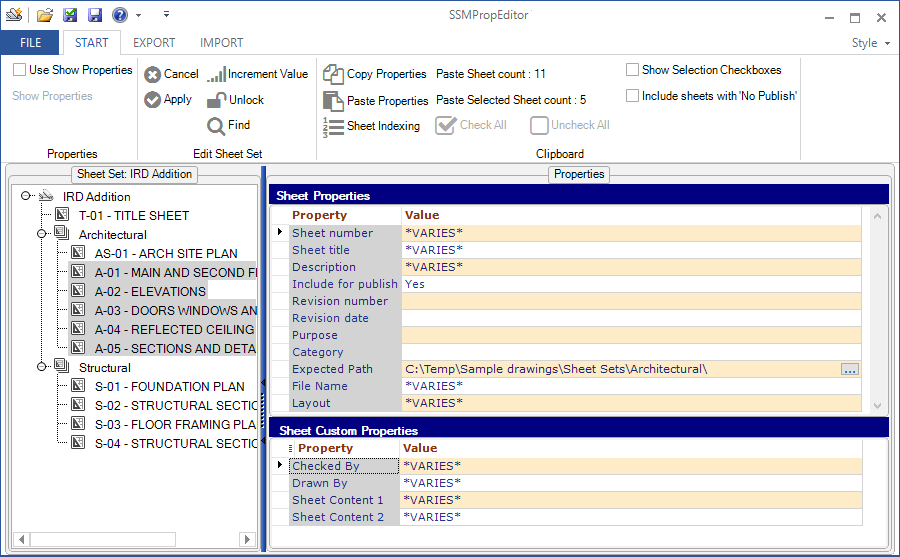
JTB SSMPropEditor 2023.1.0 released (the Sheet Set Manager Editor)

JTB SSMPropEditor 2023.1.0 has been released and comes with some improvements and fixes.

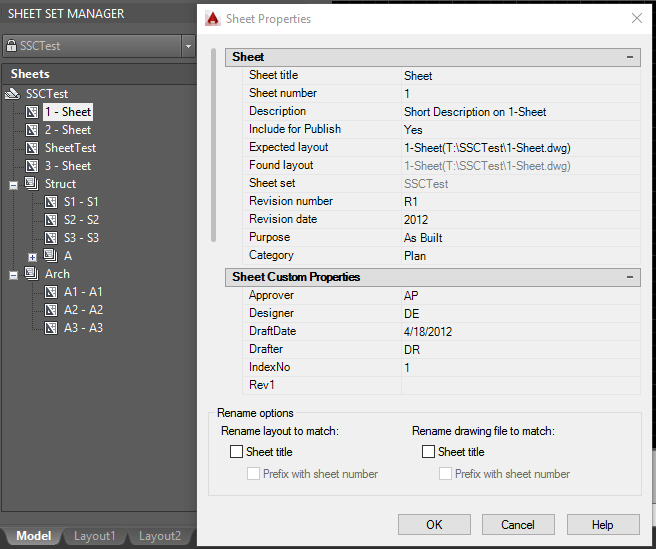
Are you using the Sheet Set Manager in AutoCAD, GstarCAD and BricsCAD, NanoCAD Plus/Pro, Graebert's ARES Commander 2022 and newer, DraftSight 2021 and newer, ZWCAD 2023 or newer, or AutoCAD Architecture's Project Navigator (PN) Sheet Set View? If you do, then SSMPropEditor will help a lot, save time and effort updating sheet properties and sheet custom properties across multiple sheets with its DST editing capabilities.

Free trial of JTB SSMPropEditor available.

Tuesday, December 13, 2022

JTB ACA Tools for AutoCAD Architecture based toolsets

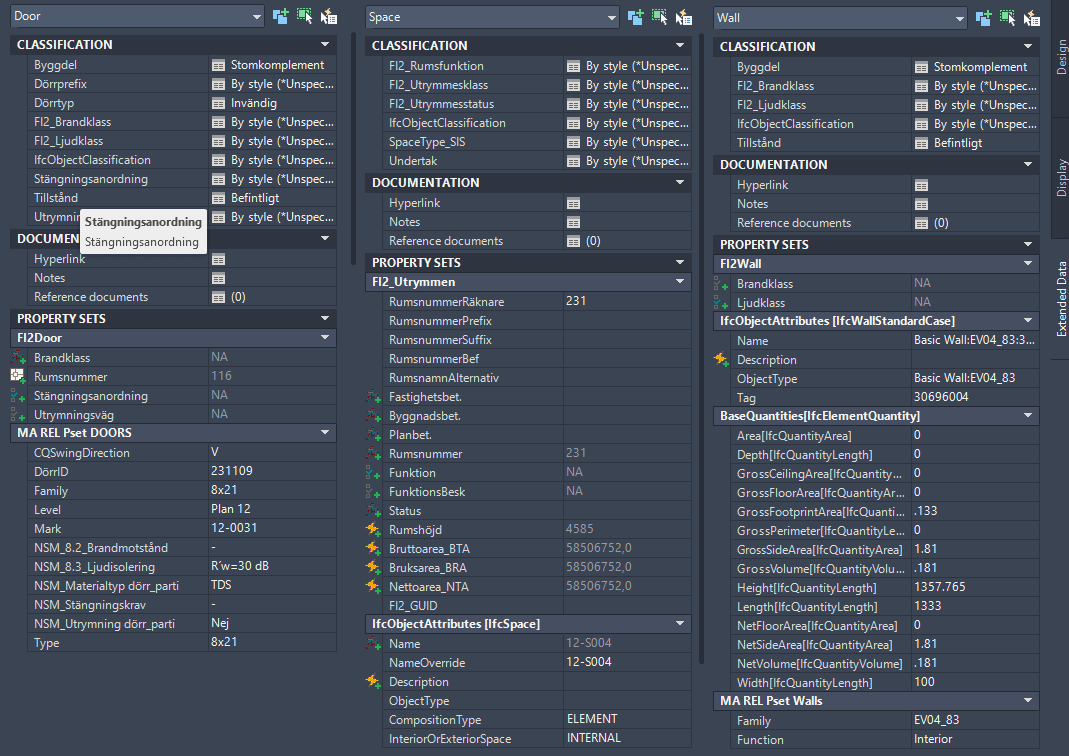
JTB ACA Tools comes with editing Tools for Property Sets, Classifications and List Definitions for AutoCAD Architecture (ACA) based products including MEP, Map 3D and Civil 3D.

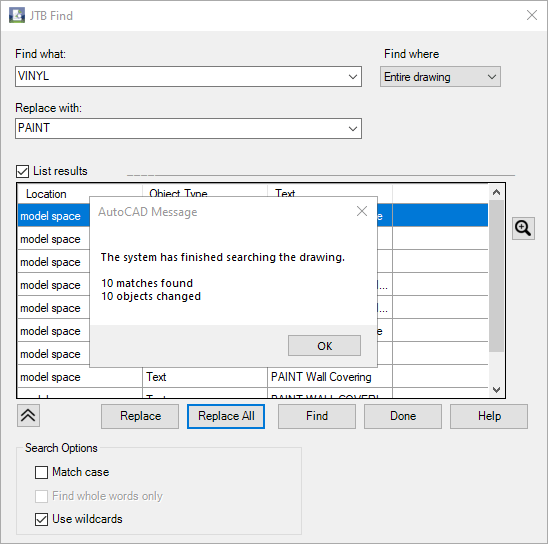
With JTB Find, you are able to find and replace text in Extended Data tab in Properties, specifically for Property Sets and their Property Definition values.

With JTB PropsClassMapping, you are able to change Property Set values, Classification values of SPACE, WALL and DOOR according to the values of their other Property Set.

With ClassificationDefinition tools, you can import export AutoCAD Architecture Classification Definitions, avoid the need to type everything manually.

With ADTListDefinition tools, you can import, create and export ListDefinitions quick and easy.

JTB ACA Tools provides some useful lisp functions for AutoLISP programmers to modify property set and/or classification properties.

Free trial of JTB ACA Tools is available.

Monday, May 10, 2021

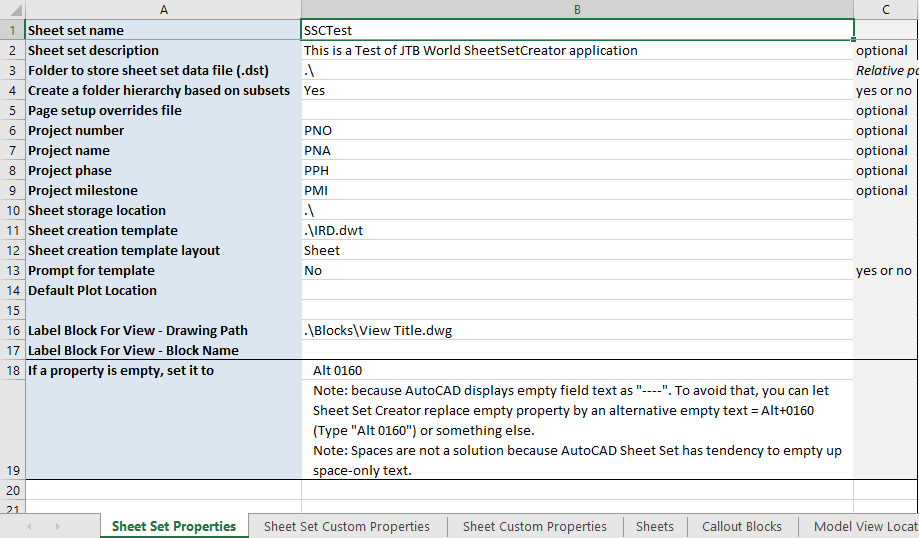
JTB Sheet Set Creator 2.8.2 released

JTB Sheet Set Creator 2.8.2 got a bug fixed and in previous version, AutoCAD 2022 was added support for.

JTB Sheet Set Creator is an app for AutoCAD that creates new Sheet Sets and Sheets with all properties based on an Excel template.

Download the upgrade or try it. JTB Sheet Set Creator

If you are using Sheet Sets you can make batch edits of properties with JTB SMPropEditor or make merge, purge and convert with JTB DST Tool or publish with JTB Batch Publish.

Wednesday, July 17, 2019

JTB Find new app to find and replace text in Property Set Data

With our new app JTB Find you can find and replace text in Property Sets and their Property Definition values (PSD).

JTB Find is an app for AutoCAD Architecture (ACA) based products including MEP, Map 3D and Civil 3D. If you want to try it we have a free trial available.

Do you need any custom development for AutoCAD verticals/toolsets like AutoCAD Architecture, AutoCAD MEP, AutoCAD Map3D and AutoCAD Civil 3D we can help with that too.

Friday, May 25, 2018

AutoCAD 2019 User Data Hotfix - GDPR

AutoCAD 2019 User Data Hotfix can be downloaded here.

“To improve user data privacy in compliance with GDPR requirements, we’re providing this hotfix to eliminate the transmission of user serial numbers when using an Autodesk program to access an Autodesk download site.”

Similar GDPR hotfixes are available for other products and versions. Currently I found these:

AutoCAD Architecture and AutoCAD Mechanical 2017 User ID Hotfix

AutoCAD Architecture 2016 User ID Hotfix

Thursday, April 12, 2018

AutoCAD Architecture 2019 and AutoCAD toolsets released

More of the AutoCAD 2019 toolsets are now released like the Architecture toolset. Right after installing AutoCAD Architecture 2019 I noticed that AutoCAD Architecture 2019.0.1 Update was available. See readme.

What’s new in AutoCAD Architecture 2019? I don’t think there is anything other than what comes as part of vanilla AutoCAD.

See also the blog post about AutoCAD 2019

Friday, March 23, 2018

AutoCAD 2019

The newest release of AutoCAD is AutoCAD 2019, codenamed "Pi" with official release March 22, 2018. This is the 33nd version of AutoCAD.

For all or at least most about this release visit our page about AutoCAD 2019.

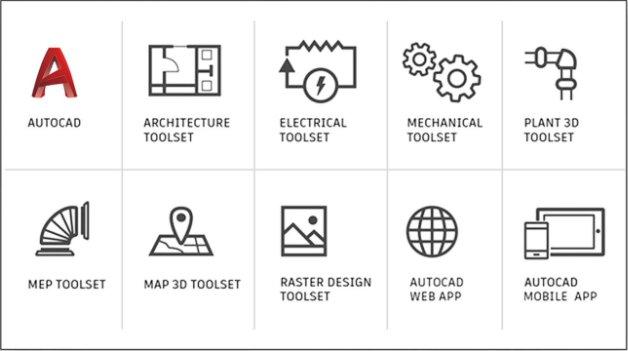
As of March 22nd, 2018 subscribers will no longer have to access AutoCAD vertical functionality through separate offerings – by subscribing to AutoCAD, customers will now have access to the capabilities of multiple AutoCAD vertical toolsets in one AutoCAD.

Remember AutoCAD Architecture, AutoCAD Map 3D, etc?

Missing in above is Civil 3D. Question is how many customers will find this worth the increase in cost. If you had Mechanical before, do you have a need for Architecture?

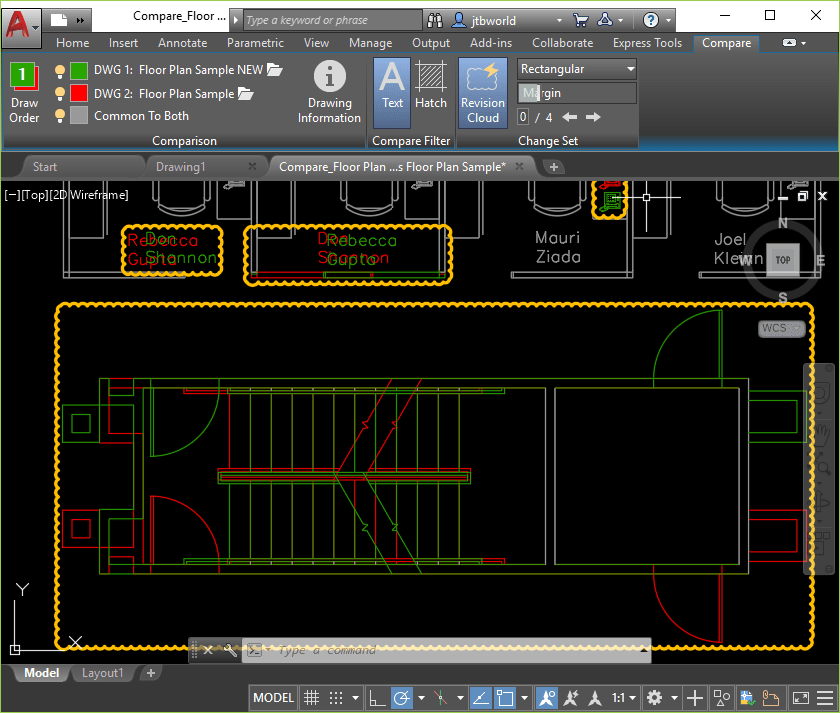
The only big new feature is DWG Compare.

The green and red graphics highlight the differences between the first version of the drawing (green) and the second version (red). All unchanged elements are shown in grey.

Shared Views replaces the Design Feed as Autodesk A360 has been deprecated.

Most of our JTB World apps have been updated to work with AutoCAD 2019 and more will follow. Contact us if you have an app that you want to be prioritized to be ready for AutoCAD 2019.

Monday, October 2, 2017

AutoCAD Architecture 2018.0.3 Update

Another update for AutoCAD Architecture 2018 is released Sept 29, 2017. Get it via Autodesk Desktop App or from the Autodesk Account website. It’s not on the Autodesk Knowledge Network so it’s only for those on maintenance/subscription.

AutoCAD Architecture 2018

Issues fixed in 2018.0.3 according to the readme:

Project Navigator

  • Creating a new view from the Project Navigator in a zero doc state crashes the application.

Dialog Box

  • Detail Component Manager dialog box does not remember size and location.
  • Wall Style Properties dialog box does not remember size and location.

Security

  • LandXMLSDK.Aec.dll has been rebuilt with compiler security flags.

Export To AutoCAD

  • ExporttoAutoCAD using bind option does not migrate all architecture specific layers.
  • AutoCAD 2018 file format is missing in the application menu.

Section

  • BLDGSECTIONLINEGENERATE and 2DSECTIONRESULTREFRESH produces unexpected results when geometry is added to a building.
  • When section is generated on solids, some geometry is not shown in the section result.

User Interface

  • Wall objects are not displayed in 3D realistic view for some drawings.

In the About dialog box we can find the Product Version: 8.0.73.0 and if you want to find it using AutoLISP here’s how: How to know what service pack is installed for AutoCAD

Some other updates you may want to take a look at are AutoCAD MEP 2018.0.2 Update, Vehicle Tracking 2018.1 Update and AutoCAD Civil 3D 2018.1 Update.

Previous update AutoCAD Architecture 2018.0.2 Update and latest AutoCAD update AutoCAD 2018.1.1 Update.

Tuesday, August 15, 2017

How to fix problem with multiple ribbon tabs for apps in AutoCAD

Have you run into the problem with apps (plug-ins or add-ins) showing up in separate ribbon tabs? AutoCAD, AutoCAD Architecture, AutoCAD Civil 3D, AutoCAD Electrical, AutoCAD MEP, AutoCAD Map 3D, AutoCAD Mechanical, AutoCAD P&ID, AutoCAD Plant 3D and possibly other AutoCAD verticals have this problem.

I noticed this problem in also AutoCAD Architecture 2018. Note even the updates have fixed this.

Steps to solve this were found here.

(Note that Steps 2-4 are not necessary for 2015 and newer, though you may just want to check that the alias is there.)

1. Open the Customize User Interface (CUI) dialogue box by typing the CUI command (or choose Customize from the Workspace drop down list)

2. Under Customizations in All Files, and All Customization Files, expand Ribbon > Tabs and select Add-Ins

3. Under Properties > Advanced, click on the [...] that appears next to Aliases

4. Type ID_ADDINSTAB in the Aliases dialogue box, then click OK

5. Under Customizations in All Files, expand Workspaces and select [Your Workspace]

6. Under Workspace Contents, click on Customize Workspace (the Workspace Contents values should turn blue)

7. Under Customizations in All Files, scroll down and check the box next to "Add-Ins" (under Ribbon > Tabs)

8. Under Workspace Contents, click Done

9. Under Customizations in All Files, expand Partial Customization Files

10. Right-click each plug-in .CUIX that you have and choose "Unload..." (examples of plug-ins are: SKETCHUPIMPORTSKP, CHRONICLE, APPMANAGER

11. Click OK at the bottom of the CUI dialogue box

12. Make sure to select Add-ins from the left pane and change Show to Yes

13. Restart AutoCAD

Much better:

Saturday, August 5, 2017

AutoCAD Architecture 2018.0.2 Update

AutoCAD Architecture 2018.0.2 Update was released Aug 1, 2017 and comes with these fixes. Get it via Autodesk Desktop App or from the Autodesk Account website. It’s not on the Autodesk Knowledge Network so it’s probably only for those on maintenance/subscription.

  • Fatal error caused due to unwanted increase in windows graphic objects during AEC object insertion.
  • The viewport layers do not stay frozen on MVBlocks. Related to External References.
  • AEC Objects in Xref with display override frozen in viewport still plot.

Readme

In the About dialog box we can find the Product Version: 8.0.60.0 and if you want to find it using AutoLISP here’s how: How to know what service pack is installed for AutoCAD

See also AutoCAD Architecture and MEP 2018.0.1 Update and AutoCAD 2018.1 Update.

Friday, June 2, 2017

AutoCAD Architecture and MEP 2018.0.1 Update

The following defects have been fixed in AutoCAD Architecture 2018 and AutoCAD MEP 2018 according to the readme:

External Reference

  • Architecture object components set to display ByLayer, displays the Xref layer properties instead of the parent file layer properties.
  • Multi-View Blocks in external reference file display in color while plotting.

Migration

  • Few contextual tabs like Block Editor or Text Editor are missing from the Ribbon and CUI after migrating from previous release.

Object Enabler

  • Fixes file version issues for Object Enabler in AutoCAD Architecture and AutoCAD MEP 2018 non-English products and AutoCAD Architecture and AutoCAD MEP installed as part of Autodesk Suites."

In the About dialog box we can find the Product Version: 8.0.53.0 and if you want to find it using AutoLISP here’s how: How to know what service pack is installed for AutoCAD

The bug with the Ribbon tabs for apps is not solved.

Monday, May 8, 2017

TimberTool updated for AutoCAD Architecture 2018

TimberTool 2.0 supports AutoCAD Architecture 2018.

TimberTool makes it easy to convert closed polylines into mass elements and makes the bounding box width and depth correct for scheduling purposes. The product was initially created for usage with timber but works with lumber, structural steel or concrete shapes.

Classification Definition Tools updated for AutoCAD Architecture 2018

JTB World’s Classification Definition Tools has been updated for AutoCAD Architecture 2018 and AutoCAD MEP 2018.

  • AutoCAD Architecture Classification Definitions cannot be exported or imported. With the help of this app this is possible.
  • Some classification structures can be very large and complicated and this tool can help to avoid the need to type everything manually.

Wednesday, April 26, 2017

Workaround for the Ribbon bug in AutoCAD Architecture 2018

After I reported about the bug in the post AutoCAD Architecture 2018 and AutoCAD MEP 2018 New Feature Summary I got a workaround from Autodesk that I wanted to share:

Please see below workaround for the issue, suggested by our engineering team.  You can enable the “Add-ins” Tab in the CUI and all the apps will be installed under this tab.

  1. Uninstall all apps (including Autodesk Apps)
  2. Launch AutoCAD Architecture>>CUI>>Right click on the default workspace>>Customize Workspace
  3. Ribbon>>Tabs>>Enable “Add-ins”>>click “Done” on the Right pane>>OK
  4. Right Click on any tab>>Enable “Add-ins” Tab to be shown in the Ribbon.
  5. Install the apps now and should be seen under Add-ins tab.

Monday, April 24, 2017

AutoCAD Architecture 2018 and AutoCAD MEP 2018 New Feature Summary

It’s a really short one. Even AutoCAD 2018 had a quite short one, at least anything in AutoCAD 2018 is of course included for AutoCAD Architecture 2018 and AutoCAD MEP 2018.

With the new DWG 2018 drawing file format be careful about if and when to upgrade and how it affects others involved, but in your team and customers.

Based on the “news” it seems like there’s only one developer left working for these products. Question is how long AutoCAD Architecture and AutoCAD MEP will be around?

A bug managed to be introduced. It’s been in AutoCAD Architecture before. In the example below I have multiple apps installed and each app gets one tab named either Plug-ins or Add-ins.

Design Center has not been updated even though Autodesk Seek is no longer available. See image below. Not so much a vertical issue but rather an issue in vanilla AutoCAD.

Here are the “news” and it’s always nice to see some bugs to be fixed:

Content

Approximately 400 new MVBlocks and block references are added to the metric content in the Design Center. The content includes lighting, furnishing, elevators, escalators, and electrical services.

Design Center

High Resolution (4K) Monitor Support

Most AutoCAD Architecture and AutoCAD MEP user interfaces are now optimized to work with high resolution monitors. As a result, dialog boxes such as the Style Manager and Display Manager dialog boxes, and palettes such as the Tool palettes and Styles Browser, scale correctly when you increase the text size in Windows display properties.

Performance Improvements

The value of the HPMAXLINES system variable has been optimized to reduce the time taken to open drawing files. The occasional crashes that occurred when opening and saving files, as well as when mirroring drawings containing Architecture entities are addressed.

Seamless Updates

Whenever an update is installed on AutoCAD Architecture 2018 or AutoCAD MEP 2018, the ribbon highlights the feature that was updated.

Product Quality Improvement

Projects addressing product reliability have resulted the following improvements:

  • Exporting and converting schedule tables to Excel produces correct results under conditions it would not in previous releases.
  • Transparency values are retained when set through the Display Properties dialog.
  • Isolate Objects now correctly retain divided spaces when one of the spaces is isolated.
  • It is no longer necessary to refresh a project to display new sheets in the Project Navigator.
  • The Manage Content Library dialog is no longer suppressed when launched from the Style Browser, soon after migrating from a previous release.
  • Issues with PDF drawings that did not import correctly in previous releases have been identified and rectified.
  • The EXPORTTOAUTOCAD command no longer results in a system crash when exporting drawing files containing Open Light entities.
  • Product Updates are now visible in network deployment when added through the Add Updates option.
  • 2D block references will no longer participate in section creation operations.
  • You can now split or trim mass elements when using non-default UCS.

System requirements found here.

JTB World’s apps ACA_db and Timber Tool have been updated to work with the 2018 version of AutoCAD Architecture and AutoCAD MEP.

Friday, January 20, 2017

SSMPropEditor 6.4 available - Sheet Set Manager Editor

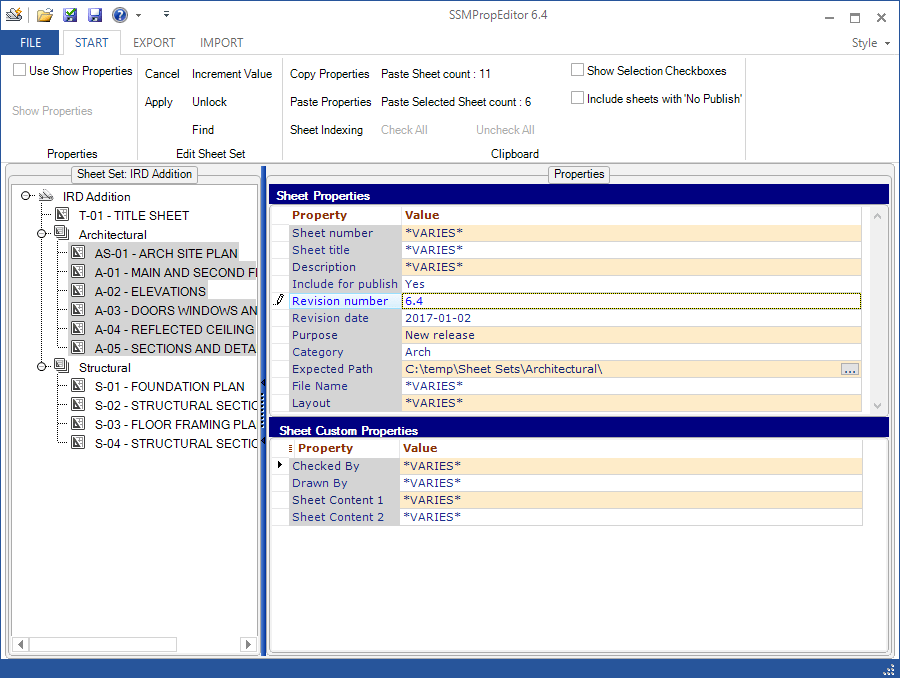
SSMPropEditor 6.4 is now available. Are you using the Sheet Set Manager then you will save a lot of time, frustration and money with JTB World’s SSMPropEditor.

Here are the main news:

  • Export and Import to Excel files does not require Excel to be installed. This makes it work with other software that can edit XLSX files.
  • Natural sorting implemented for sorting of sheets in the tree view. Before it was for example sorted like S-001, S-1001, S-101 but now as S-001, S-101, S-1001.

Version 6.4 has some known Vault issues that makes it not work in all environments. Work is being done to fix it ASAP.

For all details on this release see the revision history.

Downloads are available here and works in trial mode for 30 days. Existing customers can upgrade for free and use their existing license file.

More from JTB World: Create new Sheet Sets including drawings based on an Excel template with our JTB Sheet Set Creator or make merge, purge and convert with JTB DST Tool.

If you would need help to develop any custom app or program we can help. We specializes on AutoCAD and Revit but also do work for other CAD platforms as well as pure Windows apps. You are welcome to contact us.

Monday, October 3, 2016

JTB DST Tool is a new Sheet Set Manager app from JTB World

JTB DST Tool can merge, purge and convert Sheet Set DST files for AutoCAD, BricsCAD and any other CAD software using Sheet Set DST files. For example AutoCAD's Sheet Set Manager (SSM) or AutoCAD Architecture's Project Navigator (PN) Sheet Set View.

  • Merge one or more sheet sets.
  • The purging is useful for IT or CAD Managers to correct performance problems with SSM Sheet Sets that started to perform badly. Sometimes the DST file can grow unreasonable large and the purging can help.
  • Convert to XML for more advanced editing and convert back to DST again.

If you work with the Sheet Set Manager and want to edit Sheet Sets see our SSMPropEditor app or if you want to create Sheet Sets and their properties in an automated manner take a look at our JTB Sheet Set Creator.

Thursday, July 28, 2016

AutoCAD Architecture 2017 SP1

You might have noticed that verticals like AutoCAD Architecture 2017 are getting service packs. Either download via Autodesk Desktop App or from here: AutoCAD Architecture 2017 Service Pack 1.

Unlike the previous service packs, this service pack DOES NOT include AutoCAD 2017 Service Pack 1. Autodesk recommends that you install AutoCAD 2017 Service Pack 1 before installing AutoCAD Architecture 2017 Service Pack 1. Refer to the AutoCAD 2017 Service Pack 1 readme for more information. Installing AutoCAD Architecture 2017 Service Pack 1 without installing AutoCAD 2017 Service Pack 1 can cause unexpected issues. Some Architecture defect fixes require AutoCAD Service pack 1 to be installed.

Here’s from the readme:

Problems Reported with the Customer Error Reporting Utility

As a result of the detailed information that we received from customers who used the Customer Error Reporting Utility, we were able to identify and fix a number of problems. Updates were made to the following commands and features:

Project Navigator

  • There were occasional crashes when opening a drawing which has camera view from Sheets tab in Project Navigator.

General Service Pack Updates

The following defects have been fixed:

AutoCAD Integration

  • Application hangs when switching between Model Space and Layout in some drawings.

Section

  • Application hangs when a drawing is saved in Front view after creating a Section line.
  • Section line is seen as continuous linetype in Front view.

Project Navigator

  • New sheets created in Project Navigator do not appear until project is refreshed.

Display Representation

  • In some drawings the display is corrected.
  • In the "Display Properties" dialog box, transparency settings are not saved.

Migration

  • "Migrate from previous Release" option will suppress "Manage content Library" dialog in the Styles Browser.

Mass Element

  • Trimming or Splitting of mass elements does not work in non-default UCS.

Schedule Tables

  • Schedule table has incorrect results when converted or exported to an excel table.

See also

Wednesday, March 30, 2016

Autodesk AutoCAD Architecture 2017 is here

I got an email from Autodesk: “Your Autodesk software just got better. A new version is now available.”

Autodesk AutoCAD Architecture 2017 is here so I downloaded and installed it.

The following is an overview of the changes made to AutoCAD Architecture 2017:

Edit Roof Outline Using Grips

You can edit the roof outline using grips. When a vertex is added to the roof, both edges will have the same properties as the initial edge. When a vertex is removed, the properties of the lower numbered edge will be used on the resulting edge. The Edges/Faces worksheet, launched from the Properties palette, shows the number of each edge.

Styles Browser - Add Directory

The Manage Content Library dialog allows you to add a directory to the Content Library. There is also a checkbox to include all subdirectories.

Note: Using a large number of drawings may cause slow response of the Styles Browser during the creation of preview images.

Styles Browser - A360

A360 has been added to the Select Drawings dialog for the Content Library. This allows styles to be shared among geographically dispersed teams.

Styles Browser Palette State and Close Command

You can check the status of the Styles Browser palette using the AECSTYLESBROWSERSTATE system variable. You can close the Style Browser palette using STYLESBROWSERCLOSE command.

Section Result - Refresh on Open

A new setting in the Properties for the 2D Section/Elevation result will force it to refresh when the drawing is opened.

Edit Live Section - Xref Support

Creates a live section view matching the 2D section to allow editing of objects within the section result. All objects within the section result can be edited, even if they reside in nested external references or blocks.

Modify Section Defining Line

Grip states have been added to the Section line to allow it to be modified without having to recreate it. You can now add a vertex or a parallel jog using the midpoint grip of a segment, or remove a vertex with its endpoint grip. The start and end points can only be moved.

Addition of Shape Option when Adding Objects

When using the command line to add or draw the following objects, you will see a new option, SHape.

  • Wall
  • Curtain Wall
  • Railing
  • Slab
  • Roof Slab
  • Roof - The option name is Create Type because there is already a Shape option

This options allows you to to easily create shapes like rectangle, circle, polygon and polyline for these objects. You can draw regular polygon shape boundaries much faster and with greater accuracy. For example, you can add curves in objects that do not support an Arc option in the usual drawing process, such as Railings. It is also much easier to create tangential curves for objects like walls.

New commands are:

2DSECTIONEDITLIVE - Edit the section result to make changes to the model. When you need to modify a specific area in a large model, you can create a section view of the area, select the resultant 2D section result and make your changes in it. You can even edit external references that may be included in the section result. Changes made in section result edit view are automatically updated in the model.

STYLESBROWSERCLOSE - Closes the Styles Browser palette.

New System Variable is:

AECSTYLESBROWSERSTATE - Indicates whether the Styles Browser palette is open or closed.

AutoCAD MEP 2017 has some improvements to the Styles Browser, CIRCUITASSIGN helps in assigning an electrical circuit to one or more selected devices directly using the command line. Parallel routing can now be used to have multiple objects follow the same routing preference and make connections automatically.

New features in AutoCAD 2017 are also available in AutoCAD Architecture 2017.

Some of the latest blog posts

Subscribe to RSS headline updates from:
Powered by FeedBurner

Contact Us | About JTB World | Website General Terms of Use | Privacy Policy
^ Top of page

© 2004- JTB World. All rights reserved.