HVACPAC AutoCAD app for HVAC and Piping work is now available with AutoCAD 2017 support.


HVACPAC includes all In-line duct fittings and equipment, air terminals and HVAC associated pipe work.

Free trial is available for HVACPAC.
HVACPAC AutoCAD app for HVAC and Piping work is now available with AutoCAD 2017 support.
HVACPAC includes all In-line duct fittings and equipment, air terminals and HVAC associated pipe work.
Free trial is available for HVACPAC.
SmartPurger 3.8 is now released.
SmartPurger is a batch and script utility for processing multiple AutoCAD drawings with full control. Execute LSP or SCR files on multiple drawings. SmartPurger handles crashes so the AutoCAD batch processing continues to the end and leaves bad drawings to be corrected manually. Many purge and cleanup settings available.
SmartPurger can make use of AutoCAD Core Console that was introduced in AutoCAD 2013 making the scripting process faster then ever as the Core Console takes less than a second to open per drawing.
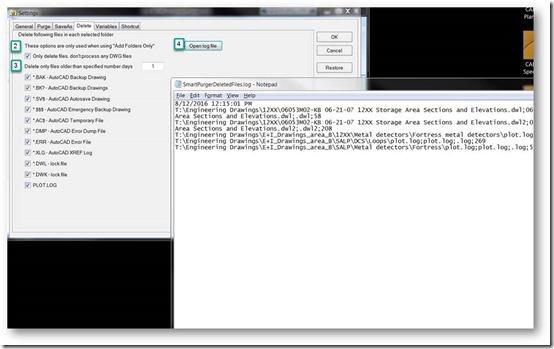
-With this version it’s possible to only delete certain “garbage” files without having to also run AutoCAD to purge and process custom scripts. See the “Only delete files, don’t process any DWG files” checkbox on Delete tab in Settings.
-Quick access to deleted files log file through new button on Delete tab.
-Minor bug fixes related to usage with AutoCAD 2017
I received below screenshots and statement from Clinton Hill at Innophos. This functionality was added based on his wishes.
“You provided an excellent product in “SmartPurger”. This application suits us perfectly.”
These are the steps to take to only delete specified files with extensions like .BAK, .BK?, .SV$, .$$$, .AC$, .DMP, .ERR, .XLG, .DWL, .DWK or PLOT.LOG.
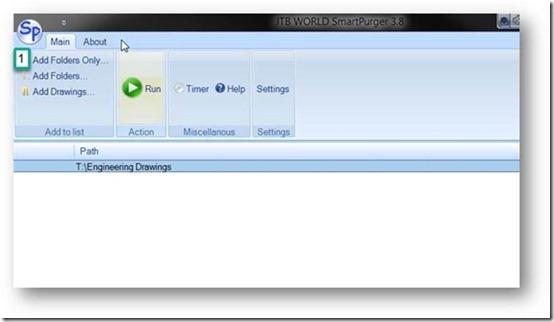
First click on Add Folders Only and select one or many folders. Sub folders will also be processed.
Next click on Settings and on the Delete tab check the “Only delete files, don’t process any DWG files” checkbox as well as what type of files you want to delete.
Now go back and click on the Run button.
When ready go back to Settings and click on Open log file to see what files were deleted.
Download the updated version or a free trial here. The upgrade is free if you already have purchased a license.
JTB Layouts2PDF for AutoCAD helps you print selected layouts with selected plot style to one pdf file. Your current Page Setup on each layout will be used. Free trial available.
Here’s the app in action:
JTB Spot Elevation is an app to insert surveying Spot Elevation blocks and manage them on an Edit Properties spreadsheet.
Run SPINSERT command to insert Spot Elevation block. You can enter elevation value at command prompt or via a dialog window.
If your drawing have these spot elevation already drawn by lines and texts, you can run SPCONVERT command to convert these lines and texts to standard Spot Elevation blocks.
Run SPEDPROPS command to open a design spreadsheet window for editing many Spot Elevations all at once. On this spreadsheet, you can renumber Spot Elevations in increasing order, adjust their elevations by a specified distance, change their colors, scales, unit settings, and many more. This is a powerful command to manage Spot Elevation properties.
The free Trial version usage is limited to drawing file size of less than 700 objects only.
JTB Spot Elevation is available as an AutoCAD app on the Plug-ins or Add-ins tab.
More about and download for JTB Spot Elevation here.
Have you got this error in AutoCAD running some command or app that is AutoLISP based?
First thing to ensure is that Visual LISP is loaded so run (vl-load-com).
Below shows a result that is expected and all is working. Note that the drawing needs to have at least one object in it.
Command: (vl-load-com)
Command: (vlax-ename->vla-object(entlast))
#<VLA-OBJECT IAcadLine 0000005ce02af728>
If you get below result then something is broken in AutoCAD.
Command: (vlax-ename->vla-object(entlast))
; error: no function definition: VLAX-ENAME->VLA-OBJECT
I have not got this problem myself but a repair or reinstallation of AutoCAD has helped a couple of customers, one with AutoCAD 2016 and another with AutoCAD 2017. Suspected cause of this could be having run some registry cleaner or anti-virus that deleted vital registry settings that AutoCAD needs. One had run Malwarebytes the day earlier.
There might be an easier remedy but until this is found you know what to do to solve this problem. If you haven’t install any recent service pack or hotfix (that comes with an installer) this might also be a solution.
Update, solution found in this article.
JTB Batch Change 1.4 is now released.
Updates in version 1.4:
In version 1.3 this was fixed and added:
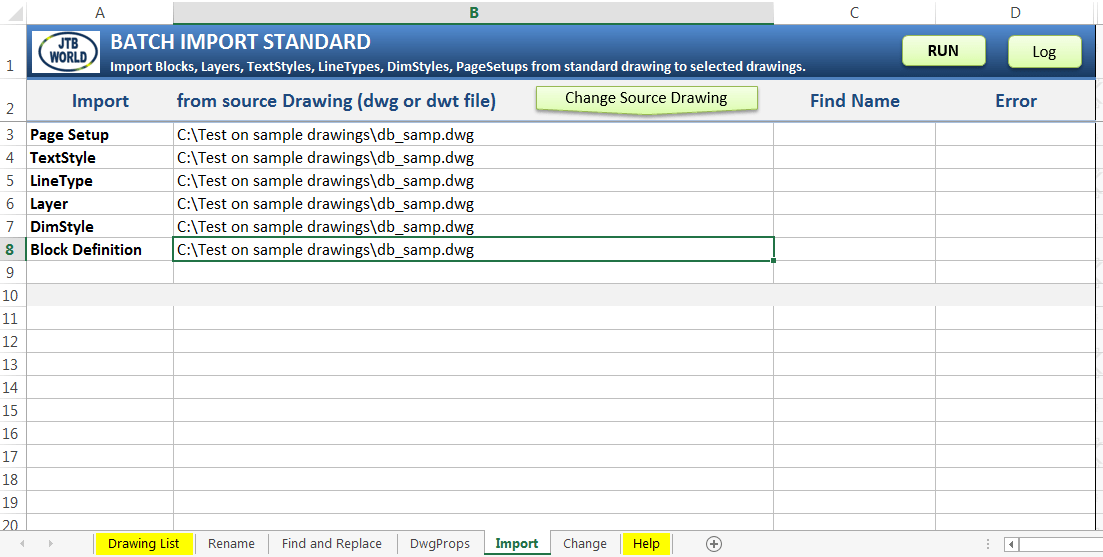
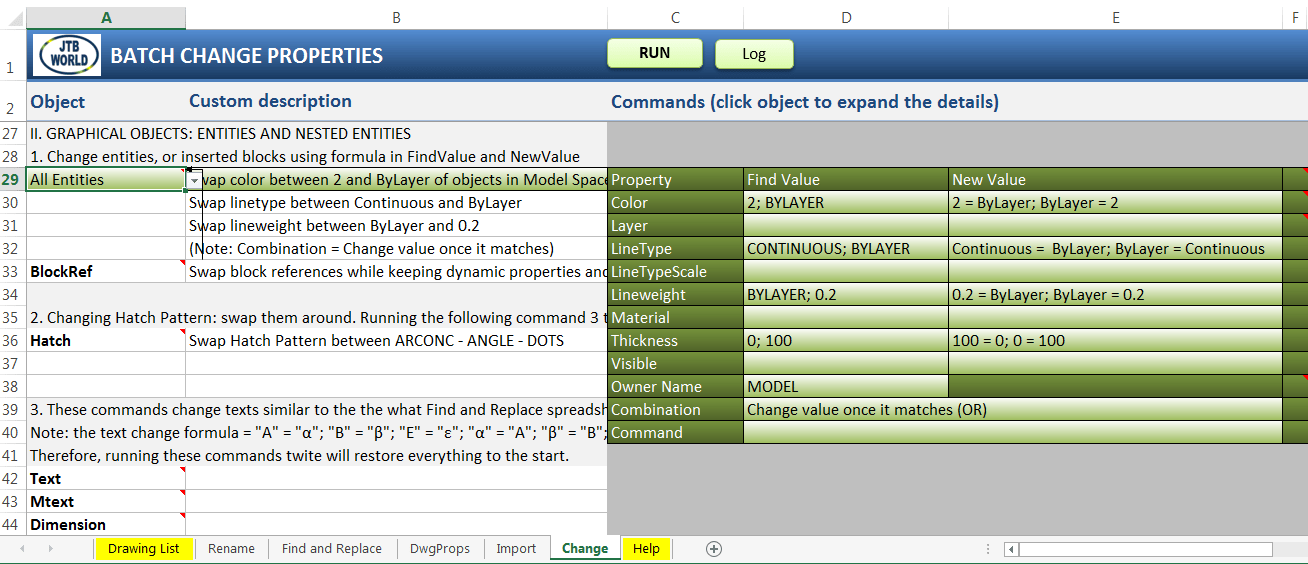
JTB Batch Change allows you to automate and batch process AutoCAD through Excel. Some examples of usage are:
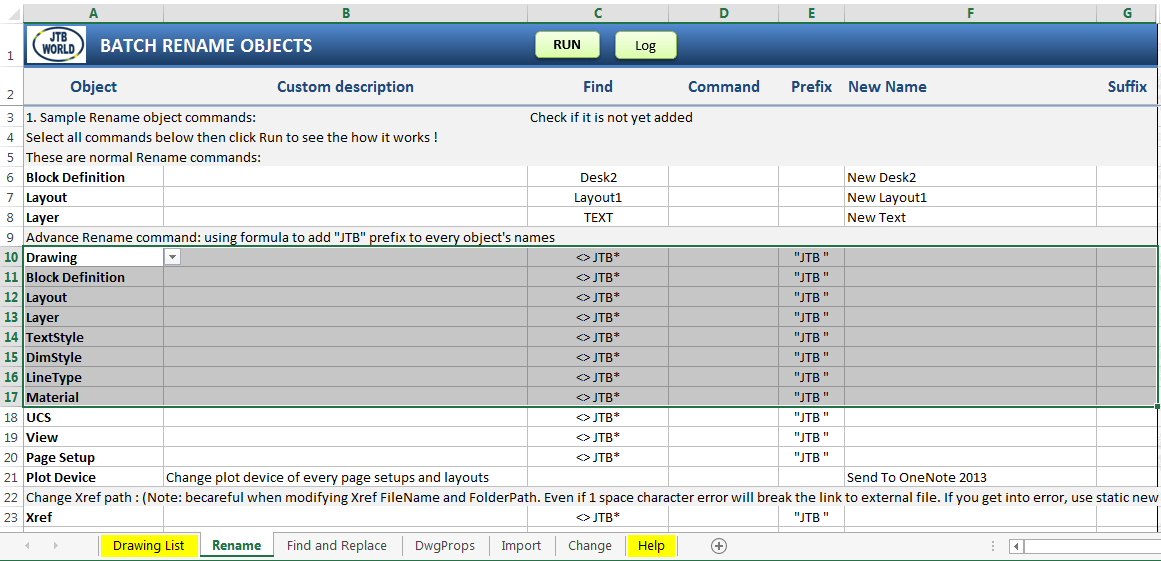
With Batch Rename Objects you can rename layers in hundreds of drawing by substituting text "Concrete" with "CONC", or add a prefix of "AC " to each layer's name
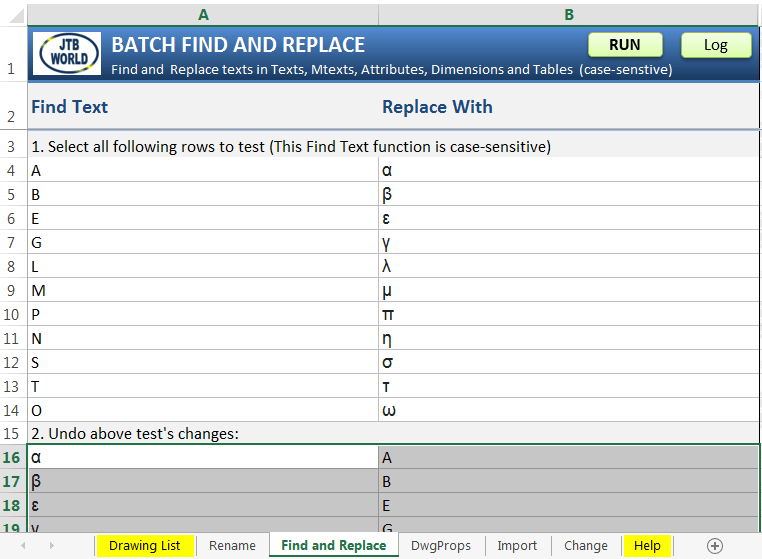
With Batch Find and Replace you can find and replace text on multiple drawings.
You can import and update all blocks from a standard drawing to hundreds of other drawings.
You can replace all inserted blocks "DOOR-BD3" in layer "Archs" with block "DOOR-AC1", and move them to layer "ARCH-FURN"
You can change all texts whose styles are not prefixed with "ELEC" to "ELEC Standard" style, then change all block's attributes whose tag is "DATE" to current date.
You can convert all your inserted blocks from dynamic to static, or to anonymous blocks.
You can flatten all your drawing objects by setting all Z coordinates to 0.
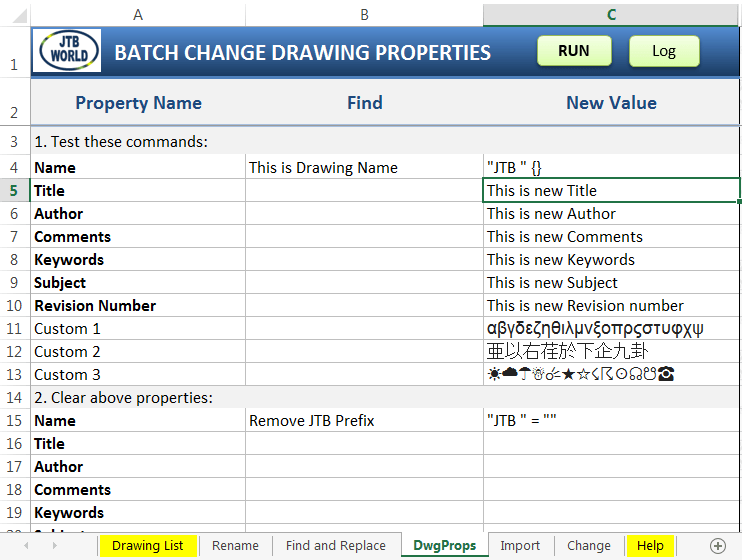
Batch change drawing properties
Additionally, you can perform Batch Audit and Purge as well as much more.
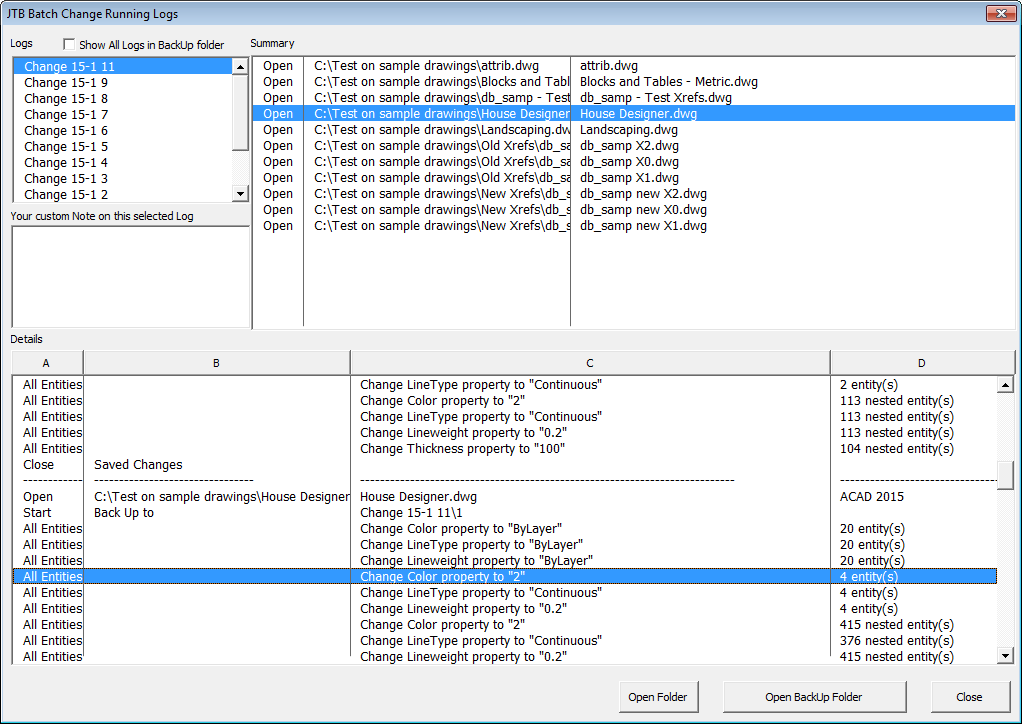
When done with a batch processing you can see what has been processed in the log.
This is a great tool in the hands of AutoCAD users or CAD managers that want to save time doing manual work doing updates on many drawings.
JTB Batch Change is available as a trial.
You might have noticed that verticals like AutoCAD Architecture 2017 are getting service packs. Either download via Autodesk Desktop App or from here: AutoCAD Architecture 2017 Service Pack 1.
Unlike the previous service packs, this service pack DOES NOT include AutoCAD 2017 Service Pack 1. Autodesk recommends that you install AutoCAD 2017 Service Pack 1 before installing AutoCAD Architecture 2017 Service Pack 1. Refer to the AutoCAD 2017 Service Pack 1 readme for more information. Installing AutoCAD Architecture 2017 Service Pack 1 without installing AutoCAD 2017 Service Pack 1 can cause unexpected issues. Some Architecture defect fixes require AutoCAD Service pack 1 to be installed.
Here’s from the readme:
Problems Reported with the Customer Error Reporting Utility
As a result of the detailed information that we received from customers who used the Customer Error Reporting Utility, we were able to identify and fix a number of problems. Updates were made to the following commands and features:
Project Navigator
- There were occasional crashes when opening a drawing which has camera view from Sheets tab in Project Navigator.
General Service Pack Updates
The following defects have been fixed:
AutoCAD Integration
- Application hangs when switching between Model Space and Layout in some drawings.
Section
- Application hangs when a drawing is saved in Front view after creating a Section line.
- Section line is seen as continuous linetype in Front view.
Project Navigator
- New sheets created in Project Navigator do not appear until project is refreshed.
Display Representation
- In some drawings the display is corrected.
- In the "Display Properties" dialog box, transparency settings are not saved.
Migration
- "Migrate from previous Release" option will suppress "Manage content Library" dialog in the Styles Browser.
Mass Element
- Trimming or Splitting of mass elements does not work in non-default UCS.
Schedule Tables
- Schedule table has incorrect results when converted or exported to an excel table.
See also
AutoCAD 2017 SP1 introduced an issue that caused many AutoCAD apps to not work, among them many of JTB World’s apps both on Autodesk App Store and on our website. As it will take a while for Autodesk to publish this hotfix I was allowed to make it available.
Download: AutoCAD 2017 Exchange App Autoloader Hotfix.zip from JTB World.
UPDATE: Autodesk has made the download available at their Autodesk Knowledge Network. Autodesk® AutoCAD® 2017 Exchange App Autoloader Hotfix
You can verify that this is a valid file from Autodesk by right-clicking on it and select properties and look at the Digital Signatures tab.
From the Autodesk® AutoCAD® 2017 Exchange App Autoloader Hotfix readme:
This Hotfix addresses a problem with Exchange Apps that target the AutoCAD 2017-based products.
Description of Problem
Exchange Apps may not display on the Add In tab after installing the AutoCAD 2017 Service Pack 1 if settings are reset. Commands for Exchange Apps may no longer work. Newly installed Exchange Apps might not load.
Affected Products
The following products are affected after installing the Service Pack 1 for AutoCAD-based products:
Installation Instructions
To install this Hotfix
You must have administrative privileges on your Microsoft® Windows® operating system to complete the installation process. For your security, it is strongly recommended that after you install this Hotfix, you restore your previous security setting rather than running under Administrative privileges.
This installation process requires you to modify an installed product, which may cause Windows security warnings to appear. For all Windows security warnings that appear during installation, click Continue.
We recommend that you update your Autodesk applications with the latest service packs or updates.
C:\Program Files\Autodesk\AutoCAD 2017
To remove this Hotfix
C:\Program Files\Autodesk\AutoCAD 2017
Warning! This service pack breaks the loading of certain AutoCAD apps that are using the plug-in auto loader mechanism (among others used by apps in the Autodesk App Store). If you notice that some commands are not available, typically from the Add-ins Ribbon tab you can uninstall SP1 if already installed to restore functionality and then wait for a fix from Autodesk.
UPDATE 1: The problem with apps not loaded is only happening in vanilla AutoCAD and not in verticals like AutoCAD Architecture. A workaround is to remove the SeriesMax entry from the PackageContents.xml. For example: xmlSeriesMax="R21.0". Or to change it to xmlSeriesMax="R21.1".
UPDATE 2: See AutoCAD 2017 App Autoloader Hotfix
This Service Pack 1 can be applied to Autodesk AutoCAD 2017 installed as a standalone application, AutoCAD-based Vertical products, and the Autodesk Design Suites listed in the readme.
Download it at this point available via Autodesk Desktop App and soon on the download page. Update: Direct link to SP1.
According to the readme:
AutoCAD service packs are now separate and independent of the service packs for AutoCAD-based vertical products. From now on, you will need to install the AutoCAD service pack in addition to any applicable service pack for your vertical products.
This change enables Autodesk to release service packs in a more timely fashion.
Problems Reported with the Customer Error Reporting Utility
As a result of the detailed information that we received from customers who used the Customer Error Reporting Utility, we were able to identify and fix the problems listed below:
Blocks
- There were occasional crashes when inserting some blocks a second time.
Graphics
- There were occasional crashes when zooming out of a drawing following the 3D orbit command.
Purge
- There were occasional crashes when purging DXF drawing files.
Web and Cloud
- There were occasional crashes when modifying the Online Options settings and signing in to Autodesk A360 from InfoCenter.
General
- There were occasional crashes when launching AutoCAD in Windows 10.
- There were occasional crashes when inputting the system time in long string format, and then using the DIM command.
- There were occasional crashes when switching layouts.
- There were occasional crashes when performing a 3D rotate in drawings containing a point cloud.
- There were occasional crashes when plotting to PDF using AccoreConsole.exe.
- There were occasional crashes when performing an Undo after detaching a reference using the External References palette.
- There were occasional crashes when PNG images were specified in a CUI resource file.
General Service Pack Updates
The following defects have been fixed:
Display
- Xrefs on a frozen viewport layer would still be plotted.
- AutoCAD in Citrix might not default to the primary display adapter.
Open and Save
- Opening a drawing file using an Excel hyperlink was repositioning the AutoCAD application window.
PDF Import
- Importing a PDF Underlay that was attached with relative path could fail.
Xref
- The Xref status incorrectly displays the "Needs reloading" message when the dataset is opened from a UNC path to a shared folder.
General
- When opening drawings created with AutoCAD Architecture, AutoCAD might crash if the drawing was saved again.
- Plotting with certain visual styles might produce incorrect results.
- Migrating custom settings might fail.
One of the important issues addressed in AutoCAD 2017 SP1 is debugging the .NET in using Visual studio 2015. Till now, developers were asked to use workaround as explained in blog http://adndevblog.typepad.com/autocad/2016/05/debugging-autocad-2017-using-visual-studio-2015.html . But with AutoCAD 2017 SP1, there is no need to use the workarounds to debug the .NET project. Also, now you can edit and continue debugging your .NET project.
OsnapzBG Plus is based on our freeware OsnapzBG but adds ability to set any of the drawing window colors like those in the 3D parallel projection, 3D perspective projection or the command line context and interface elements and have these changed depending on the value of the AutoCAD system variable Osnapz.
When the AutoCAD variable OSNAPZ is changed many have found it useful to have a more visual change to indicate its state. In verticals like AutoCAD Architecture you have a small button that indicates the state of the “Z lock” but some might want to even have different drawing window colors change just like the Block Editor changes the background color. With OsnapzBG Plus loaded any change of OSNAPZ will also change drawing window colors depending on if OSNAPZ is set to 0 or 1.
Usage of OsnapzBG Plus where drawing windows colors are changed when OSNAPZ is changed.
Both OsnapzBG Plus and OsnapzBG now supports AutoCAD 2017.
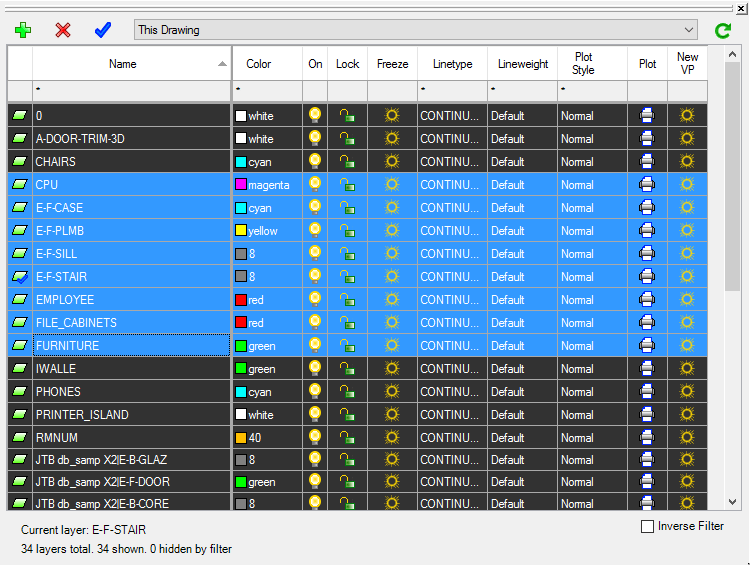
JTB Layer Palette for BricsCAD is now available.
JTB Layer Palette is a palette app for BricsCAD. Now you can manage layers in BricsCAD without leaving the drawing screen. Customizable view, multiple layers tasking, this will make managing layers much more easier.
More about JTB Layer Palette here. For more of JTB World’s software that you might find useful visit our software list. We also offer custom programming services and can help you with both small and large projects.
Subscribe to our JTB Layer Palette newsletter or any of our other Newsletters.
JTB Align Plus is now available for GstarCAD.
JTB Align Plus makes it easy to copy and align your text, block or selection of objects at picked point of selected line or curve. Curve can be Arc, Circle, Polyline, Leader or 3D Polyline, in current space as well as nested inside Blocks or Xrefs.
More about JTB Align Plus here. For more of JTB World’s software that you might find useful visit our software list. We also offer custom programming services and can help you with both small and large projects.
JTB Align Plus is now available for BricsCAD.
JTB Align Plus makes it easy to copy and align your text, block or selection of objects at picked point of selected line or curve. Curve can be Arc, Circle, Polyline, Leader or 3D Polyline, in current space as well as nested inside Blocks or Xrefs.
More about JTB Align Plus here. For more of JTB World’s software that you might find useful visit our software list. We also offer custom programming services and can help you with both small and large projects.
JTB Text Bubble Plus is now available for GstarCAD.
With JTB Text Bubble Plus you can insert text bubbles to lines, curves, or draw leaders with it, or quickly make a schedule from text bubbles and/or other blocks. Incrementing of numbers or letters is done automatically.
More about JTB Text Bubble Plus here. For more of JTB World’s software that you might find useful visit our software list. We also offer custom programming services and can help you with both small and large projects.