
Now this is a tips I've been looking for since Today was yesterday and removed from AutoCAD.
I've used the grouping in Outlook 2003 but never though of its existance in Windows Explorer.
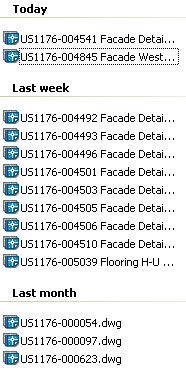
Now I can group files based on date in the Open dialog box as well as in Explorer.
"When you're ready to open a drawing, you choose File > Open to get the Select Drawing dialog box. Place the cursor over some white space in the area where the files are listed, right-click, and choose Arrange Icons By > Show in Groups. If the files weren't already sorted by name, click the Name header. (If you don't have any headers, click Views at the upper-right corner of the dialog box and choose Details.) To see the files by date, click the Date Modified heading."
Via Kent Elrod and Ellen Finkelstein's AutoCAD Tips RSS
feed.
http://www.ellenfinkelstein.com/AutoCAD_tips_organize_files.html
 Now this is a tips I've been looking for since Today was yesterday and removed from AutoCAD.
I've used the grouping in Outlook 2003 but never though of its existance in Windows Explorer.
Now I can group files based on date in the Open dialog box as well as in Explorer.
Now this is a tips I've been looking for since Today was yesterday and removed from AutoCAD.
I've used the grouping in Outlook 2003 but never though of its existance in Windows Explorer.
Now I can group files based on date in the Open dialog box as well as in Explorer.


No comments:
Post a Comment