Wednesday, August 3, 2005
Kids Programming Language
I love programming and with KPL your kids or someone elses might learn the fun of programming. Or if you just want to begin learning programming.
KPL is a freeware and can be found here.


Tuesday, August 2, 2005
Autodesk Architectural Desktop Customer Council
See the post by Chris Yanchar on the ADT blog Between the Walls how you can participate in making ADT what you would like it to be.
Direct link to ADTCC.
Monday, August 1, 2005
SmartPurger 2.1 released (script files can be run now!)
SmartPurger 2.1 is now released.
Download it and try it for free. No upgrade cost for existing customers.
Compared to version 1.6.7 and 2.0 beta a lot of things has been added and been fixed. Most notably is full support for AutoCAD 2006 and now you can execute custom script files (.SCR) or AutoLISP files (.LSP, .FAS or .VLX).
Change the way Export to AutoCAD works in ADT
Here is a tips on how to change the way Export to AutoCAD works in Autodesk Architectural Desktop 2006.
The commands are ExportToAutoCAD, -ExportToAutoCAD, ExportToAutoCAD2000 (Export to AutoCAD 2000 Format...), ExportToAutoCAD2000Dxf (Export to AutoCAD 2000 DXF Format...) , ExportToAutoCAD2004 (Export to AutoCAD 2004 Format...) , ExportToAutoCAD2004Dxf (Export to AutoCAD 2004 DXF Format...) , ExportToAutoCADDxf, ExportToAutoCAD12Dxf. Some of them are not mentioned in the help documentation and has to be entered on the command line.
Open the Options dialog box using the command Options or select it from the Format menu.
Click on the AEC Editor tab.
There you have some settings that Export to AutoCAD uses.
If you have problem with drawings created using Export to AutoCAD so that the color changes on objects it could be that you have different settings on layers in different xrefs and when using the Insert Method only one of the xrefs settings are used. If the Insert Method is used frozen layers could be thawed and layers can change color or linetype. So even though more layers are created by having the Use Insert Method when Binding xrefs cleared I recommend to have it cleared anyway to get the best result.
Bind xrefs gives you the option to bind the xrefs or not. (This is not in the help though)
Block Properties of Exploded Object applies to Export to AutoCAD commands as well even though it's not stated in the documentation.
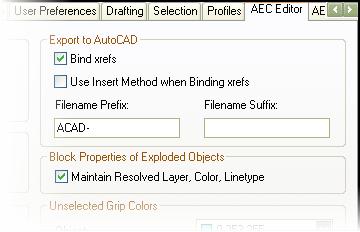
From the help documentation:
Under Export to AutoCAD, select Use Insert Method when binding Xrefs if you want all objects from an xref drawing referenced in the file you export to be incorporated into the host drawing.
If you select this option, the names of the xref drawings are discarded when the exported drawing is created. In addition, their layers and styles are incorporated into the host drawing. For example, all exploded walls, regardless of their source (host or xref) are located on the same layer.
Clear Use Insert Method when binding Xrefs if you want to retain the xref identities, such as layer names, when you export a file to AutoCAD or to a DXF file. For example, the blocks that define walls in the host drawing are located on A-Wall in the exploded drawing. Walls in an attached xref drawing are located on a layer whose name is created from the drawing name and the layer name, such as Drawing1$0$A-Wall.
Enter a prefix or a suffix to be added to the drawing file name when the drawing is exported to an AutoCAD drawing or to a DXF file.
Under Block Properties of Exploded Object, select Maintain Resolved Layer, Color, Linetype to maintain the layer, color, and linetype of AEC objects when you explode them.
When you explode an AEC object, you create several primitive objects grouped in a block definition. If this option is selected, any objects whose component layer, color, and linetype properties are set to ByBlock take the layer, color, and linetype of the parent object. If this option is cleared, when you explode an object, properties that are ByBlock remain ByBlock. Clear this option if you want to explode the block definition even further.
For related information see:
AutoCAD 2006 and the included ADT OE
http://www.jtbworld.com/adt2006.htm
Friday, July 29, 2005
Register for Autodesk University 2005 on Monday
Registration for AU 2005 will open by August 1, 2005
http://www.autodeskevents.com/au2005/
I'll be there. Will you?
http://jtbworld.blogspot.com/2005/07/i-will-speak-at-autodesk-university.html
Thursday, July 28, 2005
Vista, Virtual Earch, etc links
Here are some misc links you might want to take a look at:
PC Magazine about Vista - http://www.pcmag.com/category2/0,1874,1786052,00.asp
Microsoft Windows Vista Developer Center - http://msdn.microsoft.com/windowsvista/
Visual Studio 2005 code snippets FAQ - http://blogs.msdn.com/vbide/archive/2005/07/22/441923.aspx
Visual Basic 2005 Starter Kits - http://msdn.microsoft.com/vbasic/downloads/2005/starterkits/
MSN Screen Saver - http://screensaver.msn.com/
"Escape from YesterWorld" with some fun videos - http://www.escapeyesterworld.com/
For NG nerds - http://netscan.research.microsoft.com/
MSN Virtual Earth - http://virtualearth.msn.com/
MSN Virtual Earth on Channel 9 - http://channel9.msdn.com/ShowPost.aspx?PostID=91714#91714
Acrylic Beta - http://www.microsoft.com/products/expression/default.aspx
DPack is a FREE collection of Microsoft Visual Studio .NET 2003 and 2005 tools. - http://www.usysware.com/dpack/

Monday, July 25, 2005
Located problem with the Drawing Recovery Manager
Here are some free tools I use often when trying to locate a bottle neck, leak, bug, poor performance or the like.
They and others can be found at http://www.systeminternals.com/
I had a case today with a PC that I run a lot of automated scripts on every night.
I tried to manually start AutoCAD 2006 and noticed that it took an extremely long time to start. I actually thought AutoCAD had locked up. Of course I could reinstall or repair AutoCAD but I wanted to find the reason for this so I fired up Filemon, filtered on *acad* but I didn't notice anything strange. I then run Regmon and found that it was a lot of traffic to some keys in the registry.
I took a look at the keys in question and found the cause. It was related to one of the new features in AutoCAD 2006, the Drawing Recovery Manager.
The locations where:
HKEY_CURRENT_USER\Software\Autodesk\AutoCAD\R16.2\ACAD-4001:409\Profiles\\Drawing Recovery
and
HKEY_CURRENT_USER\Software\Autodesk\AutoCAD\R16.2\ACAD-4001:409\Profiles\\Drawing Recovery\Unresolved
If where thousands of entries in there pointing to files. Not sure exactly how so many could get in there but since I don't is in need to use drawing recovery manager on that PC I deleted these registry keys and when starting AutoCAD again it was as quick as it should.
It seems like AutoCAD has a hard time to start when there are so many files listed. Not really a bug but something that the developers at Autodesk might take a look at. Especially the reason why AutoCAD thinks that it might need to recover drawings when AutoCAD haven't crashed. I any several users have seen this behavior before. And that looks like a defect to me.
To prevent this from happen again I first though about deleting these registry keys automatically but remembered that there was a new system variable to control this. RECOVERYMODE
Controls whether drawing recovery information is recorded after a system failure.
0 - Recovery information is not recorded, the Drawing Recovery window does not display automatically after a system failure, and any recovery information in the system registry is removed
1 - Recovery information is recorded, but the Drawing Recovery window does not display automatically after a system failure
2 - Recovery information is recorded, and the Drawing Recovery window displays automatically in the next session after a system failure
So I ended up setting it it 0.
Problem solved!
They and others can be found at http://www.systeminternals.com/
I had a case today with a PC that I run a lot of automated scripts on every night.
I tried to manually start AutoCAD 2006 and noticed that it took an extremely long time to start. I actually thought AutoCAD had locked up. Of course I could reinstall or repair AutoCAD but I wanted to find the reason for this so I fired up Filemon, filtered on *acad* but I didn't notice anything strange. I then run Regmon and found that it was a lot of traffic to some keys in the registry.
I took a look at the keys in question and found the cause. It was related to one of the new features in AutoCAD 2006, the Drawing Recovery Manager.
The locations where:
HKEY_CURRENT_USER\Software\Autodesk\AutoCAD\R16.2\ACAD-4001:409\Profiles\
and
HKEY_CURRENT_USER\Software\Autodesk\AutoCAD\R16.2\ACAD-4001:409\Profiles\
If where thousands of entries in there pointing to files. Not sure exactly how so many could get in there but since I don't is in need to use drawing recovery manager on that PC I deleted these registry keys and when starting AutoCAD again it was as quick as it should.
It seems like AutoCAD has a hard time to start when there are so many files listed. Not really a bug but something that the developers at Autodesk might take a look at. Especially the reason why AutoCAD thinks that it might need to recover drawings when AutoCAD haven't crashed. I any several users have seen this behavior before. And that looks like a defect to me.
To prevent this from happen again I first though about deleting these registry keys automatically but remembered that there was a new system variable to control this. RECOVERYMODE
Controls whether drawing recovery information is recorded after a system failure.
0 - Recovery information is not recorded, the Drawing Recovery window does not display automatically after a system failure, and any recovery information in the system registry is removed
1 - Recovery information is recorded, but the Drawing Recovery window does not display automatically after a system failure
2 - Recovery information is recorded, and the Drawing Recovery window displays automatically in the next session after a system failure
So I ended up setting it it 0.
Problem solved!
Tuesday, July 19, 2005
SWECO Grøner AS among others selects JTB FlexReport
SWECO Grøner AS in Norway, FLSmidth in Denmark and DRS Signal Solutions in USA has recently selected JTB FlexReport as their solution to have better control on their network licenses based on the FLEXlm or FLEXnet technology. E.g. details on what users are using the product most or less can be reported on as well as graphical reports as seen below. This is done for applications like SoldWorks, AutoCAD, MagiCAD, Novapoint, Mathcad, ProE, Matlab, Rose and others.

Can DWF files created by DWF Toolkit 7.0 be read by Autodesk DWF Viewer 6.0 and Autodesk DWF Composer 2.0?
In short the answer is Yes.
See the explanation that Scott Sheppard at Autodesk posted to the Discussion Group.
2005-07-25 Update:
More about it by Shaan Hurley:
http://autodesk.blogs.com/between_the_lines/2005/07/new_dwf_toolkit.html
Saturday, July 16, 2005
I will speak at the Autodesk University 2005
I will speak at the Autodesk Univerity 2005 in Orlando, Florida. The event will be held November 28 - December 1, 2005 at the Walt Disney World Swan and Dolphin Hotel.
Multi-discipline CAD usage at an EPC company. (PD12-1, Plant Design, All Levels, Mon. 11/28 10:00 am - 11:30 am)
I'll let you know more about the content later.
See you there!
The offical AU 2005 website Here is what some have said about AU before: Autodesk University from 33,000 Feet Between the Lines Beyond the UI
2005-07-19 Update: RobiNZ: My Autodesk University 2004 Summary Lynn Allen: How to justify AU
Windows search of files with unknown extensions
Since Windows XP Find in Files only searches files with known file extensions you can use this registry file that makes the search work as you want it.
This is the content of the file:
[HKEY_LOCAL_MACHINE\SYSTEM\CurrentControlSet\Control\ContentIndex]
"FilterFilesWithUnknownExtensions"=dword:00000001
MSN Search Toolbar rolls out more international versions
This is a great tool that is now also available in Swedish, my language, among others. The most useful part of it is Windows Desktop Search.
http://blogs.msdn.com/msnsearch/archive/2005/07/15/439465.aspx
Thursday, July 14, 2005
JTB FlexReport minor updates
There has been some minor updates to the FLEXnet/FLEXlm graphic report tool JTB FlexReport.
-The time on the file name on the HTML backup files is more correct now. It was off 10 minutes before.
-Some special cases of the FLEXnet/FLEXlm status file syntax that generated an error are fixed upon users notification.
-Spaces in the user name are now handled correctly.
-There is a undocumented registry fix so the temporary files can be saved in another folder than %temp%. Contact me if needed.
-There is a separate Access database (JTBFlexReportDetailed.NET.mdb) that helps you with detailed reports on user usage.
-Some issues with grouping of users in the grafic report have been addressed.
The update is free for all existing users.
Backup the installation folder to be on the safe side.
Install the latest version from this location:
http://www.jtbworld.com/jtbflexreport/JTBFlexReportSetup2.1.zip
Subscribe to:
Posts (Atom)