Imports System
Imports Microsoft.Win32
Imports System.Collections


Module Module1

    Public Declare Function SendMessageTimeout _
            Lib "user32" Alias "SendMessageTimeoutA" _
            (ByVal hwnd As Long, _
            ByVal msg As Long, _
            ByVal wParam As Long, _
            ByVal lParam As String, _
            ByVal fuFlags As Long, _
            ByVal uTimeout As Long, _
            ByVal lpdwResult As Long) As Long

    Public Const HWND_BROADCAST = &HFFFF&
    Public Const WM_WININICHANGE = &H1A
    Public Const SMTO_ABORTIFHUNG = &H2

    Sub SetUserEnvironmentVar(ByVal EnvName, ByVal EnvValue)
        Dim resApi As Long
        Dim regVersion As RegistryKey
        regVersion = Registry.CurrentUser.OpenSubKey("Environment", True)
        regVersion.SetValue(EnvName, EnvValue)
        regVersion.Close()
        SendMessageTimeout(HWND_BROADCAST, _
                            WM_WININICHANGE, _
                            0, _
                            "Environment", _
                            SMTO_ABORTIFHUNG, _
                            5000, _
                            resApi)
    End Sub

    Sub SetSystemEnvironmentVar(ByVal EnvName, ByVal EnvValue)
        Dim resApi As Long
        Dim regVersion As RegistryKey
        Dim subkey As String
        subkey = "SYSTEM\CurrentControlSet\Control\Session Manager\Environment"
        regVersion = Registry.LocalMachine.OpenSubKey(subkey, True)
        regVersion.SetValue(EnvName, EnvValue)
        regVersion.Close()
        SendMessageTimeout(HWND_BROADCAST, _
                            WM_WININICHANGE, _
                            0, _
                            "Environment", _
                            SMTO_ABORTIFHUNG, _
                            5000, _
                            resApi)
    End Sub
    Sub Main()
        SetUserEnvironmentVar("USERVAR1", "Test Value")
        SetSystemEnvironmentVar("SYSTEMVAR1", "Test Value")
    End Sub

End Module
Thursday, November 17, 2005
Set an environment variable using VB.NET
I found that there was no easy to use .net class to set an environment variable. So here is what I ended up with:


Code snippet to convert RGB to ACI
Here is a VBA function for AutoCAD that converts RGB values to ACI.
Function RGBtoACI(r As Long, g As Long, b As Long)
  Dim color As New AcadAcCmColor
  Call color.SetRGB(r, g, b)
  RGBtoACI = color.ColorIndex
End Function

Sub test()
  Debug.Print RGBtoACI(63, 127, 111)
End Sub
Wednesday, November 9, 2005
Exclusive: Full text of Gates email, Ozzie memo
Here is some recommended reading on where Microsoft is heading.
Via Dave Wine - Exclusive: Full text of Gates email, Ozzie memo
AddNode acquires CAD-Q
This is a news for the Nordic countries. CAD-Q is the Autodesk reseller for Pharmadule Emtunga where I'm the CAD and Database Development Manager so I'll see how that can affect us. Technia that is part of AddNode is also an Autodesk partner as well as a PLM solution supplier. It will probably show up in english here. The Swedish press release can be found here and more about it in this memorandum.
LEGO Digital Designer
Have you too played with LEGO once and would like to do it again or do you have kids that likes LEGO? LEGO Digital Designer a free software that let you build LEGO models virtually in 3D.
http://www.lego.com/ldd
Tuesday, November 8, 2005
VS 2005 Express och SQL 2005 Express for free
Make sure to download VS 2005 Express that is free for a limited time. SQL 2005 Express will continue to be free.
http://msdn.microsoft.com/vstudio/express/default.aspx
I'm starting to download now...
Organize files in Windows to mimic the Today file listing
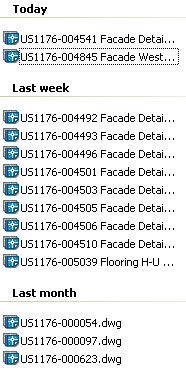 Now this is a tips I've been looking for since Today was yesterday and removed from AutoCAD.
I've used the grouping in Outlook 2003 but never though of its existance in Windows Explorer.
Now I can group files based on date in the Open dialog box as well as in Explorer.
Now this is a tips I've been looking for since Today was yesterday and removed from AutoCAD.
I've used the grouping in Outlook 2003 but never though of its existance in Windows Explorer.
Now I can group files based on date in the Open dialog box as well as in Explorer.
"When you're ready to open a drawing, you choose File > Open to get the Select Drawing dialog box. Place the cursor over some white space in the area where the files are listed, right-click, and choose Arrange Icons By > Show in Groups. If the files weren't already sorted by name, click the Name header. (If you don't have any headers, click Views at the upper-right corner of the dialog box and choose Details.) To see the files by date, click the Date Modified heading."Via Kent Elrod and Ellen Finkelstein's AutoCAD Tips RSS feed. http://www.ellenfinkelstein.com/AutoCAD_tips_organize_files.html
Silent installation of Autodesk DWG TrueConvert
Do you want to distribute the new DWG TrueConvert for a lot of users?
Here is how it can be done.
Download it from http://www.autodesk.com/dwgtrueconvert and extract the zipped file DWGTrueConvert.exe.
Locate the setup.ini file and edit it. Change the this row:
INSTALL_CMD_ARGS=/L*v "%temp%\DWGTrueConvert Install.log"
to
INSTALL_CMD_ARGS=/qb! /L*v "%temp%\DWGTrueConvert Install.log"
/qb! is installing DWG Convert showing a progress dialog box that cannot be cancelled by the user.
/qb let's the user cancel the installation.
/q doesn't show any progress. Completely silent.
I prefer to use /qb! because the user can see that something is happening. If /q is used the installation can use up the processor but the user don't have a clue on what's going on.
To start the installation run Setup.exe and it will use setup.ini with the settings you have in it.
Convert DWG's between different versions without AutoCAD
For those that need to batch convert DWG files between different file format versions. Convert to any DWG version to R14, 2000 or 2004 DWG format. No need to have AutoCAD installed.
It's free and available here:
http://www.autodesk.com/dwgtrueconvert
Via Shaan's blog post at Between the Lines
Saturday, November 5, 2005
Hatch Mott MacDonald, Philips Research among others selects JTB FlexReport
Elcoteq and NetHawk in Finland, PT Freeport Indonesia, ACT Engineers, Inc. in USA, Philips Research in USA, Navarro & Wright Consulting Engineers in USA, Université de Franche-Comté, Maison des Sciences in France, Fisheries Research Services Marine Laboratory in UK, ATK Space Systems in US, EEF in Switzerland, Tractebel Engineering in Belgium, Parsons Brinckerhoff Quade & Douglas, Inc. US and worldwide, Nestor in Norway, Hatch Mott MacDonald in US, Teleca Ltd. in UK has recently purchased JTB FlexReport as their solution to have better control on their network licenses based on the FLEXlm or FLEXnet technology. E.g. details on what users are using the product most or least can be reported on as well as graphical reports as seen below. This is done for applications like SoldWorks, AutoCAD, MagiCAD, Novapoint, Mathcad, ProE, Matlab, Rose, ESRI ArcGIS, Leica Erdas Imagine and others.

More information about JTB FlexReport.
Autodesk University 2005 teaser
I'm working right now on preparing for my class PD13-1: Plant Design Tips and Tricks and even though it's related to Plant Design, most things I will go through can be applicable to any discipline. Things I will cover are a lot of the new functionality that came in AutoCAD 2006 and how to apply this in your daily work. I combine this with lots of older useful functions that you might never used. All in all this will increase your productivity using AutoCAD and it's a lot of fun doing it too. How about this? Convert your old blocks to smart dynamic blocks. Put them on a tool palette. Add them to a drawing a make a BOM that is updatable. Learn some tricks about tables and fields. Connect to external datasources and reuse that data instead of typing it in a second time and when the master data is changed the text on the drawings can easily be updated. Work smart in 2D/3D and make use of CUI. Here is my profile at AU Connect.
Autodesk beta only for honest people
Beta software tracking notice
"Autodesk reserves the right to individually sign (or electronically watermark) each download of this pre-release Autodesk software, and the files created from said software, allowing Autodesk to track its pre-release software, and the files created with it, to its original downloader."
In case you have good intentions and want to be able to make a difference to future versions of Autodesk products go ahead and apply to participate. I recommend it.
Friday, November 4, 2005
One year of blogging
One year since I started blogging and you've been one of the readers.
The site meter shows more than 37000 visits. That is not all visits because it doesn't show visits by RSS readers. No matter what the figures says I hope that some of my readers can find my blog useful.
Here are some of the most popular posts among 161 post during the year that has been:
Let's see what the second year will end up with...
Here are some of the most popular posts among 161 post during the year that has been:
- ADT Update Space Tips
- ADT: Restrict access to PSD's
- Sheet Set Manager API code sample for AutoCAD 2005
- AutoCAD Sheet Set Manager properties shows "----" when you don't want to
- Performance tips when using SSM
- AutoCAD 2006 Hatch enhancements
- Lisp sample on how to change plot devices
- Delete AutoCAD layer filters
- AutoCAD 2006 and formulas in fields, tables and the calculator
- AutoCAD 2006 and access to the hatch area using API
- Upgrade Autodesk Network License Manager within minutes
- Tips when changing license server
- Microsoft IntelliMouse Explorer with Tilt Wheel not recommended for AutoCAD users
- AutoCAD 2006 and the inluded ADT OE
- Find more in AutoCAD 2006
- Change the way Export to AutoCAD works in ADT
- Print DWF files from Windows ExplorerSilent installation of Autodesk DWG TrueView
Let's see what the second year will end up with...
Annoyed by having MS Office Research Explorer Bar popping up
Since starting using Microsoft Office 2003 I don't know how many times I've unintentionally started the Research Explorer Bar by using Alt+Click. I tried to find a way to disable Alt+Click or change it but failed to find anything even after spending some time searching on the internet for a solution. So I found that I had two options.
1) In research options deselect all services. This at least stops it from start searching the internet.
2) I then started Add or Remove Programs and clicked on Change>Add or Remove Features. Selected advanced customization and found that below Office Tools it was possible to remove the feature Research Explorer Bar that "Allows you to use the Research tool and its collection of information services from Microsoft Internet Explorer."
I just hope that the next version handles this better.
If you have found a better solution please leave a comment.
Subscribe to:
Posts (Atom)