Wednesday, February 15, 2006
Beyond the Paper - the latest Autodesk blog
Shaan got my eyes on Scott Sheppard's new blog Beyond the Paper. It will be a valuable resource for those using or wanting to know more about DWF.
Why Beyond the Paper?
Improve 3D Geometry in DWF files from AutoCAD 2006
I look forward to read more from his blog.


Monday, February 13, 2006
ADT Formula Property Definition causes Just-In-Time Debugging Window linked
I got a question about this issue and wanted to share the solution I was given by an Autodesk employee a time ago. This occurs when you have Microsoft Visual Studio and ADT/ABS 2006 installed on the same machine. Add this row below as the first row for the formula (a tip is to copy this row and paste it into the FPD editor so you don't get a popup for each character entered):
on error resume next
Another solution is this. In Visual Studio, select [Tools] --> [Options] --> select [Debugging] --> [Just-In-Time] --> turn off "Script ." It should then stop the debugging window from popping up.
Scott Durkee's interview with Shaan Hurley
I just read Scott Durkee's interview with Shaan Hurley, Autodesk. Great initiative.
Thursday, February 9, 2006
AutoCAD for Architects
"Experience how Autodesk® Architectural Desktop offers the very best AutoCAD®-based design and documentation productivity for architects, designers, and drafters."
Of course this is marketing but it's useful and I recommend visit www.autodesk.com/autocadforarchitects that is a resource center with screencasts that can be useful for those wondering to upgrade to ADT or for existing ADT users that wants to learns more about ADT. The screencasts are informative and a few minutes each.
There are also archived webcasts if you missed those that have been so far.
Forward this to others in your organization. Architects, designers, drafters, CAD Managers or even to Managers that you want to show what ADT can do for you.
Monday, February 6, 2006
Intergraph acquires Alias (the company behind ISOGEN)
I learned from WorldCAD Access blog about Intergraph acquires Alias. Their product ISOGEN is used by a lot (most) of other CAD vendors.
 Speaking about acquiring I would suggest Autodesk to acquire NavisWorks. We use Autodesk's products extensively and NavisWorks has some great products that also seem to fit in the plans for Autodesk 3.0 as described by Carl Bass.
 Speaking about acquiring I would suggest Autodesk to acquire NavisWorks. We use Autodesk's products extensively and NavisWorks has some great products that also seem to fit in the plans for Autodesk 3.0 as described by Carl Bass.
Thursday, February 2, 2006
AUGI Wish List Ballot for AutoCAD
As several other bloggers have pointed out it's time for voting on wishes for future features of AutoCAD. The newest AutoCAD Wish List Ballot is now open for voting. There are a lot of wishes to review and vote on. Vote for your top 10 wishes. I put in some wishes earlier related to Sheet Set Manager that can be found below the Other feature. Kudos to the AUGI team for the improved functionality of the Wish List Ballot.
Wednesday, February 1, 2006
How to enter absolute WCS coordinates in AutoCAD 2006
This tips and tricks is for AutoCAD 2006 users.
The DYNPICOORDS system variable controls if pointer input uses relative or absolute format for coordinates. You can use symbol prefixes to temporarily override this setting.
This setting is also available using DSETTINGS or right click and select Settings on DYN (Dynamic Input) on the Status bar. Click on Settings for Pointer input and ther you have it.
To enter absolute coordinates when relative coordinates are displayed in the tooltip, enter #.
To enter relative coordinates when absolute coordinates are displayed, enter @. Typically this is no longer needed if you use the default setting with relative coordinates.
Finally the answer to the question.
To enter absolute world coordinate system (WCS) coordinates, enter * (an asterisk).
Friday, January 27, 2006
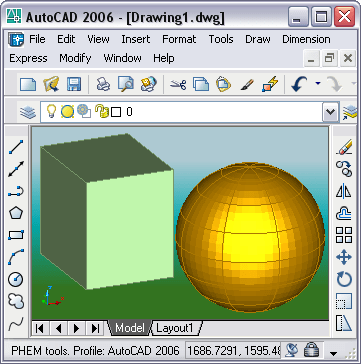
Add a nice background to AutoCAD
I thought I should mention a not so known command in AutoCAD that works when you are in a shaded display mode. It is the BACKGROUND command and with it you can set a gradiend background as seen on the image or you can use an image as background. You can also set the height of the horizon and rotation used in the gradient background.

The undocumented SPACESWITCH system variable
The undocumented SPACESWITCH system variable in AutoCAD can be used to allow or forbid switching between paperspace and model space within a layout viewport with a double click.
This tip can be useful if you have annotations in paper space and don't want to unintentionally activate the floating model space.
It was recently added to the Autodesk Knowledge Base so now it's at least somewhat documented.
Thursday, January 26, 2006
The old GLOBEtrotter folks behind FLEXlm are back..
Here's the scoop. They are back with a brand new company called Reprise Software.
"In 2006, the team has come back together to develop the Reprise License Manager™ (RLM). Initially targeted at smaller ISVs who do not need a high-end product such as FLEXnet from Macrovision, RLM provides the core license management functionality that most ISVs and end-users require."
"The main themes of RLM (Reprise License Manager) are openness, simplicity and value."
Wednesday, January 25, 2006
AVEVA, Autodesk Announce Suite of Design, Engineering Tech
Working at a company as CAD Manager and having both Autodesk and AVEVA products like AutoCAD, ADT and PDMS I think this news is interesting.
"The first half of 2006 will see integration between AVEVA's leading Plant Design Management System (PDMS) and Autodesk's Architectural Desktop and Inventor solutions."
http://www.tenlinks.com/news/PR/aveva/012406_autodesk.htm
Monday, January 23, 2006
Tweakomatic script utility
Tweakomatic is a really useful and free utility that writes VBScripts that allow you to retrieve and/or configure Windows and Internet Explorer settings.
http://www.microsoft.com/downloads/details.aspx?familyid=bd328d1e-6c01-4447-bd7c-c09646d722c8&displaylang=en
The Tweakomatic is a nifty new utility that writes scripts that allow you to retrieve and/or configure Windows and Internet Explorer settings. So what, you might ask. Well, think about it. Because these are WMI scripts, they can be used to configure settings on remote computers. Need to change something on a remote machine? Then haul out the Tweakomatic. And think about this: because the Tweakomatic writes scripts, you could do something like run these scripts as logon or logoff scripts. In other words, you could quickly, easily, and automatically configure settings on any or all the computers in your organization.
Thursday, January 19, 2006
Find the path to My Documents using VBScript
Set WshShell = Wscript.CreateObject("Wscript.Shell")
path=WshShell.RegRead("HKCU\Software\Microsoft\Windows\CurrentVersion\Explorer\Shell Folders\Personal")
Observe that it's Personal that keeps the path to My Documents. This works if the path is below C:\Documents and Settings\ or redirected to a server location like \\server\home$\Jimmy.Bergmark
PS. to show code like above I've used HTML code like this. It's useful when the rows are long. Setting the height and width so it fits for the purpose.
<pre style="margin:0px; padding:6px; border:1px #666666 solid; width:600px;
height:70px; overflow:auto"></pre>
Tuesday, January 17, 2006
ADT and location of the Content Browser Library
Have you ever wondered how to change the path to the file ContentBrowserLibrary47.cbl that Autodesk Content Browser fires up?
I did and could not find any documentation about it. So I made a bit of investigation and came up with this. So here is the tip.
Without changing anything it's default location is in ..\My Documents\Autodesk\My Content Browser LibraryUsing the Deployment Wizard it's possible to change that location.
But where is that saved?
If you use the Deployment Wizard a file named ContentBrowser.ini is created with a content like this. It's located in the same folder as acad.exe. Typically C:\Program Files\Autodesk Architectural Desktop 2006
[Files]
Library=S:\ADT\ContentBrowserLibrary47.cbl
So if you want to change the path on an existing installation ContentBrowser.ini is where you should go. If it doesn't exist just use Notepad and create it. This is ADT 2006 specific as far as I know.
Subscribe to:
Posts (Atom)