Monday, January 15, 2007

ADT tip: Browsing Property Data

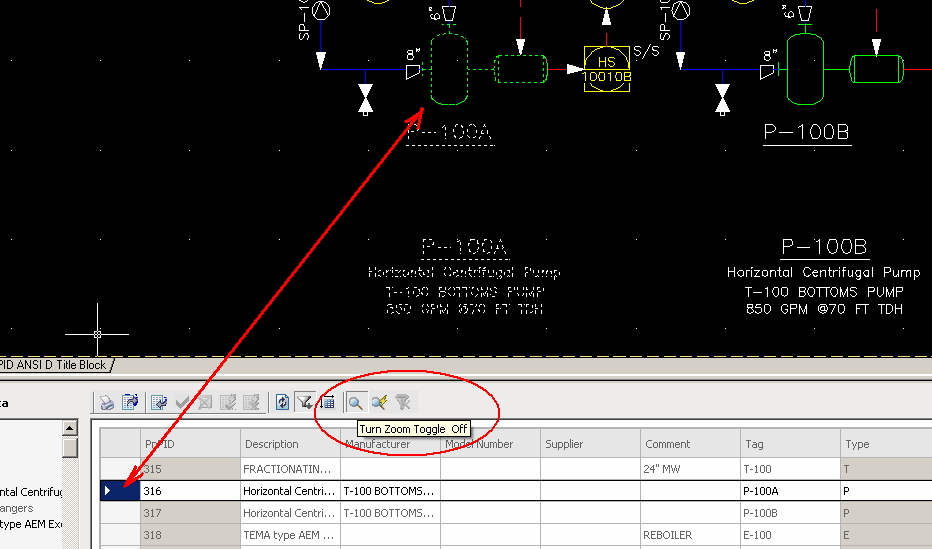
AecPropertyDataBrowse is a command I found not many know about but can be useful.

Open the tool palette that contains the Browse Property Data tool, and select it.
This tool is located with the Scheduling and Reporting Tools in the Stock Tool Catalog.

There is an option that allow an object to be highlighted in the drawing when you select a property set that is attached to the object or its style as well as zoom into the object.

Technorati tags:

Wednesday, January 10, 2007

Fix problems with Flash Player like when New Features Workshop doesn't work

I got an email from a blog reader an wanted to share the solution I gave that helped.

For some reason (maybe due to updating ADT2007 to SP1), my New Features Workshop (in ADT2007) is not working. I know it uses Flash Player 9 (which also is not working on Internet Explorer, but is working on Firefox). I have downloaded and installed all the updates for IE, DirectX, Flash Player.

Here is what I suggested and uninstalling and installing Flash Player solved it.

First try to delete Temporary Internet Files and see if that helps. If that does not work uninstall the Flash Player using the instructions on this site (because it's not so obvious so you can use Control Panel>Add or Remove Programs). Restart the computer. Install the Flash Player again from the ADT 2007 CD at Install\support\Flash\Install Flash Player 8 AX.exe or install the latest available from Adobe.

It can for example affect installation of AutoCAD and the problem can be seen in the installation log file like below.

Installation started: Flash
Command = "\support\flash\Install Flash Player 8 AX.exe" /q
[Error: 1] Incorrect function.
Installation failed: Flash
[Info] Failure is ignored
[Error: 1603] Fatal error during installation.
Installation failed: AutoCAD 2007
Installation aborted

Version test for Adobe Flash Player.

Technorati tags: , ,

Google 'CAD' news

SketchUp 6 is Released! It even includes Layouts making it even more useful when it comes to 2D presentations. Other new features.

Google Earth 4 Officially Released as well.

FLEXlm/FLEXnet based applications not releasing the licenses properly

Thanks to a JTB FlexReport customer I have I got this information. IBM told them there is defect in the Macrovision’s 10.8 version of their License Manager. This was related to Rational applications but might as well be the the case for other applications like AutoCAD 2007 that uses this version and I know this has been a problem for Autodesk applications as well.

A workaround for many have been to use the TIMEOUTALL feature.

If you can, try to get at least version 10.8.5 from your vendor or reseller. I know that version 11.1 and version 11.4 exists but is not available from Macrovision's public ftp from what I can find.

Anyway, here is the FLEXnet licensing end user guide for 11.4 or newer ones.

The lowest acceptable value for timeout of Autodesk products is 900 seconds (15 minutes) and for MathWorks is 14,400 seconds (4 hours) and for IBM 7200 seconds (2 hours).

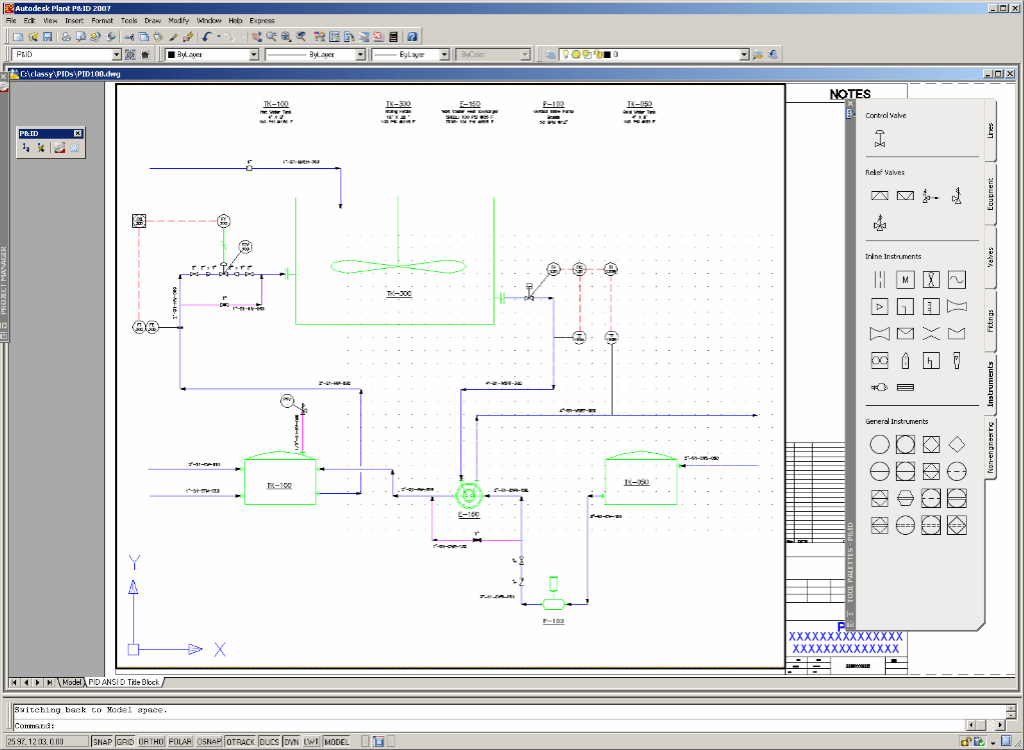
AutoCAD P&ID 2007

AutoCAD P&ID 2007 (aka Guinness beta) is soon to be released. The beta period is over. This is Autodesk’s first major venture into the Process and Power industry.

The public discussion group for AutoCAD P&ID has been opened.

www.autodesk.com/discussiongroup-autocadpid also works.

Technorati tags: , ,

Monday, January 8, 2007

ADT Tip: INSPECT

Here is a tip about a useful command introduced in Autodesk Architectural Desktop 2005 and available in newer versions as well as ABS and Civil 3D. The ADT command AECINSPECT (or _AECINSPECT or INSPECT) lets you hover over entities to inspect and get information about them like layer, style name and style description, keynote information and property set information. Good for inspecting drawings without having to select the objects. Autosnap tooltip has to be enabled for this command to work. The initial value for the AUTOSNAP variable is 63.

Technorati tags:

Sunday, January 7, 2007

Autodesk trademarked Cyberspace

I ended up at archive.org because I found that my SmartPurger application dated from 2004 had been added to the archive. Searching around I found a TV program from 1992 about Autodesk Cyberspace.

In 1988, John Walker, then the chairman at Autodesk, Inc., of Sausalito, had the idea of building a software toolkit for creating shared virtual realities. Autodesk trademarked the word Cyberspace for an (unsuccessful) product called the Cyberspace Developer’s Kit. William Gibson was somewhat annoyed by this and jokingly claimed he was going to trademark Eric Gullichsen, this being the name of the first lead programmer on the Autodesk Cyberspace project. - http://www.rudyrucker.com/lifebox/lifeboxsample.pdf

1992 the same year as this program was broadcast Autodesk’s stock price went down and Rudy Rucker that also worked with the Cyberspace project was out of the industry.

Autodesk last year at Autodesk Island in Second Life. Another kind of Cyberspace 14 years later.

Technorati tags: ,

Friday, January 5, 2007

Some great old news from Autodesk

Finally! Drawing Tabs for AutoCAD 2007 and based products by Autodesk. Via Between the Lines blog.

Batch Publishing DWF files with AutoCAD 2007. Via Beyond the Paper blog.

Technorati tags: , , ,

Thursday, January 4, 2007

Skype behind IIS error


I got a problem with Microsoft Internet Information Services (IIS) and the Default Web Site. I found out that Skype was taking up port 80. The error message "Unexpected error 0x8ffe2740 occurred." was not obvious and the System Event showed below neither.

Event Type: Error
Event Source: W3SVC
Event ID: 115
Description:
The service could not bind instance 1. The data is the error code.
For additional information specific to this message please visit the Microsoft Online Support site located at: http://www.microsoft.com/contentredirect.asp.

For more information, see Help and Support Center at http://go.microsoft.com/fwlink/events.asp.
Data:
0000: 40 27 00 00 @'..

Solution to this problem. In Skype>Options>Connections uncheck this option "Use port 80 and 443 as alternatives for incoming connections" or temporary stop Skype, start the Default Web Site and after that Skype.

Technorati tags: ,

Wednesday, January 3, 2007

Learn ADT has a great compilation on ADT 2007 Wall Cleanups

Wall Cleanups can be most frustrating in Autodesk Architectural Desktop for many users. Share this link on the Learn ADT blog with them.

In addition to these tips don't forget to use the basic commands like Fillet, Extend and Trim first. There are so many times I have helped users with this simple tip. Another help can be to isolate the problematic walls to identify the problem. Copy some of the walls to an empty place and try to solve the problem there, maybe delete some of the walls to see if they are the problem.

Technorati tags:

Tuesday, January 2, 2007

Space Auto Generate Tool bug and workaround

Sometimes not all properties are listed in AecSpaceAutoGenerate>Generate Spaces>Tag Settings>Add Property Set to New Spaces>Property 1 and Property 2. The reason is that if the PSD has other than manual property definitions and all property definitions added after that will not show up. The workaround is then to add all manual property definitions first.

Technorati tags: ,

Sunday, December 31, 2006

ADT/ABS List Definition freeware

I have added a new freeware on my website.

It is a free plug-in created in VB.NET 2005. Use ADTListDefinition to import, create and export ListDefinitions quick and easy.

You need ADT (Autodesk Architectural Desktop) or ABS (Autodesk Building Systems) to be able to use this program. In the Style Manager>Multi-Purpose Objects there are List Definitions (introduced in the 2007 versions) that can be useful for many purposes. But you have to add them one by one. Imagine if you have an existing list of many items in Excel or some other format and you have to add them manually. Another thing is that even though the list in the Style Manager shows up sorted the list is sorted in the order the items where added when the list is used in a Manual Property Definition, Space name or Zone name. So if you want the items in alphabetic order and add one that is not supposed to end up last you have to add all again. This is one reason when this tool comes handy.

Tip. ListDefinition is the command to start the Style Manager with only the List Definitions.

Wednesday, December 27, 2006

XML XML XML

There is a lot XML usage going on. I use it in an application for ADT 2007 I'm developing in Visual Studio 2005 and will export to Fi2xml. AutoCAD Palette Auto-hide Speed freeware modifies fixedProfile.aws (an xml file) that AutoCAD based applications uses.

The Mars Project from Adobe Labs with an XML-friendly implementation of PDF syntax with the new file format Mars (.MARS file extension).

Microsoft .NET 3.0 Framework includes DWF (.dwfx) Viewing Capability based on the XML Paper Specification (XPS) from Microsoft. But even the existing DWF format uses a lot of XML in it. AutoCAD's .CUI,  AutoCAD Standards Check File (.CHX), Autodesk Project Information (.APJ) files used by ADT as many others are XML files.

XML Marker - A free XML Editor that uses a synchronized table-tree-and-text display to show you both the hierarchal and the tabular nature of your XML data.

XML Marker

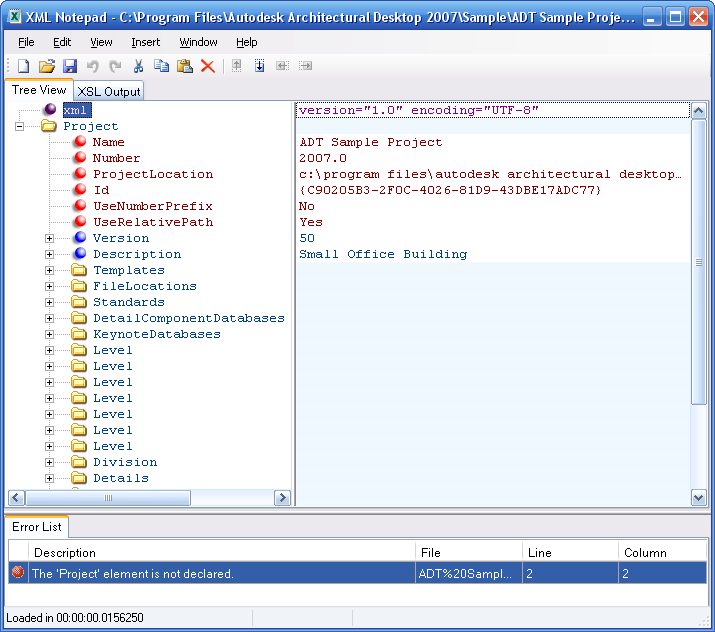
XML Notepad 2007 - A free XML editor from Microsoft. Version 2.2 published 11/27/2006.

 XML Notepad

3D PrintScreen that can grab a 3D model from any OpenGL based application and save to 3D XML and the 3D XML Player are free from Dassault Systemes.

Sunday, December 24, 2006

VS 2005 - The breakpoint will not currently be hit. No symbols loaded for this document.

 When developing and debugging using Visual Studio 2005 you might end up not being able to debug. Instead of a filled red dot  you get a non filled dot  and it says "The breakpoint will not currently be hit. No symbols loaded for this document."

For me the solution has sometimes been to right click on the project in the Solution Explorer and go to Properties>Compile>Advanced Compile Options...>Generate debug info: Set the value to Full. Make sure the Configuration is the correct one as well.

Another solution can be that the active solution configuration does not include the project to build that you have the breakpoint in or the StartUp Project is not the correct one.

Technorati tags:

Some of the latest blog posts

Subscribe to RSS headline updates from:
Powered by FeedBurner

Contact Us | About JTB World | Website General Terms of Use | Privacy Policy
^ Top of page

© 2004- JTB World. All rights reserved.