Thursday, March 27, 2008

DWG TrueView 2009 includes measuring ability

DWG TrueView 2009 is Autodesk's free viewer for DWG files and is found here: http://www.autodesk.com/dwgtrueview
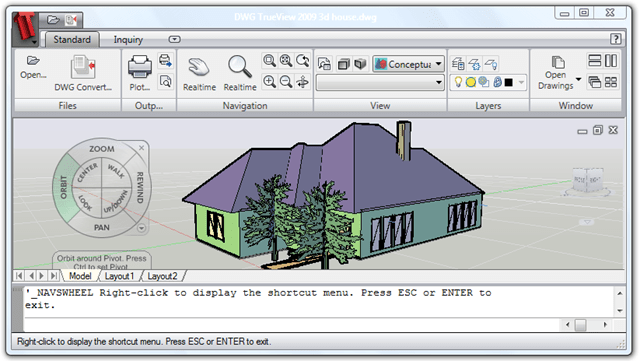
DWG TrueView 2009

The big news are:

  • Measure objects with these new inquiry commands: Distance, Area, List, Locate Point, Region/Mass properties, and Object Snaps.
  • Enhanced UI with the addition of Ribbon Navigation
  • Measure objects with these new commands: Distance, Area, List, Locate Point, Region/Mass properties, and Object Snaps
  • Navigate drawings in 2D and 3D with SteeringWheel
  • Enhanced 3D view selection with ViewCube
  • Restore views and play new "animated" views with ShowMotion

Inquiry

It is quite a big install on almost 200 MB for the 32-bit version and bit more for the 64-bit version.

DWG TrueConvert is available from within the program and can convert from and to different versions of the DWG format.

DWG TrueView 2009 can be installed side by side with for example AutoCAD 2009.

Here is a tip I maybe should keep quiet about as I might sell fewer licenses of SmartPurger because of it. You can with some limitations batch purge drawings using DWG Convert as there is an option to purge included and even "Check and Fix Errors" (When active, drawings are checked for the presence of errors. Drawings are automatically recovered if errors are found).

Silent installation of DWG TrueView 2009 could be done with a VBScript like this:
on error resume next
Set WshShell = CreateObject("WScript.Shell")
runstring="msiexec /I ""\\DWGTrueViewx86InstallImage\DWGVIEWR.msi"" /qb! " & _
"INSTALLDIR=""C:\Program Files\DWG TrueView 2009"" " & _
"ACAD_SILENT_LICENSE=YES"
WshShell.Run runstring,1,true
msgbox "Ready"

This previous post describes more details on silent installation.

For more important details like how to handle drawings created with a vertical like AutoCAD Architecture or 3:rd party applications that creates custom objects see the FAQ.

Wednesday, March 26, 2008

Usage of mpt.lsp in AutoCAD

I got the following question regarding the free AutoLISP program mpt.lsp.

"I don't understand the use of these. How do I use them in a way that does not cancel my running command?"

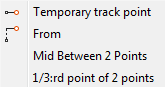
I guess it could be that this user added for example the command MPT to a menu using ^C^CMPT. To have the command running transparently it needs to be 'MPT instead.

Below is a small video showing the usage of the four helper commands:

  • MPT - Midpoint of 2 points
  • 3PT - 1/3:rd point of 2 points
  • 4PT - 1/4:th point of 2 points
  • MPT3 - Midpoint of 3 points

First mpt.lsp needs to be loaded and acaddoc.lsp is a good way or the APPLOAD command's Startup Suit.

CUI can be used to create a command that is then added to the Object Snap Cursor Menu.

 CUI

And now it is available on the object snap menu.

Right click menu

I used AutoCAD 2009 in this short demonstration.

Tuesday, March 25, 2008

First hotfix for AutoCAD 2009 with NLM IPv6 Support

This update enables the Autodesk Network License Manager to support IPv6 networks.

Knowledge Base document: Hotfix - Autodesk Network License Manager IPv6 Support

AutoCAD 2009 New Features Workshop

Without having to install anything (you need to have Flash Player) you can access NFW for AutoCAD 2009 here. This is one of the best ways to start getting familiar with the new release. The User Interface has been changed a lot and hopefully you will find it to be better (eventually). I think the Quick Properties will be useful for many.

New Features Workshop Menu

AutoCAD 2009 download

Available from now on you can download AutoCAD 2009. Download is free as one would expect and you can use it without limitations for 30 days. But there is a bad restriction. This offer is valid only in the United States and Canada. You must be located in these countries to be able to download as your IP number is controlled. Trying to download from Sweden I got this error:

Location Error - Trial Download Request
Trial Not Available
This trial program is not available in some countries.

I think it should be available to download more freely.

http://www.autodesk.com/autocad-trial


AutoCAD 2009 Software Family of Products

Here is from a media advisory on AutoCAD 2009 product availability:

Autodesk today announced that it is shipping AutoCAD 2009 software, one of the leading applications for conceptual design, drafting and detailing. The AutoCAD 2009 portfolio includes updates to AutoCAD and AutoCAD LT, as well as the discipline-specific applications AutoCAD Architecture, AutoCAD Electrical, AutoCAD Mechanical, and AutoCAD MEP software applications.

AutoCAD 2009 features significant user interface enhancements along with new productivity tools to help AutoCAD customers of all levels work more efficiently toward competitive design ideas and compelling presentations:

• Improved User Interface & Usability – The new AutoCAD 2009 software task-based user interface is designed to make new and experienced users more productive and has been optimized to reduce the number of steps it takes to reach commands. Furthermore, it is customizable and extensible, can be migrated forward using the standard migration tools and offers a “classic workspace” that provides access to the traditional toolbar and menu interface. In addition, the new AutoCAD 2009 user interface provides a common toolset for operations such as file open and close, rotate, pan, and zoom, into the next several releases of Autodesk products, streamlining the transition between products and reducing learning time.

• Faster Drafting – AutoCAD 2009 can boost productivity by helping automate tedious tasks. The action recorder provides a simple to use macro recorder, and the interactive layer manager instantly makes changes appear in the drawing.

• Autodesk Impression – AutoCAD 2009 subscription customers will receive Autodesk Impression illustration software for the creation of presentation-ready graphics with a hand-drawn look.

• AutoCAD LT 2009, one of the world’s highest selling 2D drafting and detailing product, also features the new user interface to increase productivity for experienced and new users.

The AutoCAD 2009 Portfolio of Industry-specific Solutions Autodesk is also shipping the latest version of the AutoCAD software portfolio, which includes discipline-specific applications built on AutoCAD technology.

• AutoCAD Architecture 2009 features intuitive architectural drawing and design tools within a familiar AutoCAD workflow, offering users the flexibility to learn new tools at their own pace and increase their productivity.

• AutoCAD Electrical 2009 is purpose-built to design electrical controls systems quickly and accurately with automated tasks, comprehensive symbol libraries, and an electrical-specific workflow designed to increase the productivity of controls engineers.

• AutoCAD Mechanical 2009 is designed to accelerate the mechanical design process with standards-based symbol libraries, engineering calculators and a mechanical-specific workflow created to significantly improve productivity for AutoCAD users in manufacturing.

• AutoCAD MEP 2009, the AutoCAD software for mechanical, electrical and plumbing (MEP) businesses, features intuitive system drawing and design tools and built-in design calculators for more efficient and accurate designs.

For more details on AutoCAD 2009 see this website dedicated for AutoCAD 2009.

Monday, March 24, 2008

Welcome Autodesk NavisWorks

NavisWorks has now been added to Autodesk's website (time for a visit as it has been updated for the 2009 product launches). You find the products at www.autodesk.com/navisworks. If you are into 3D construction, BIM, PIM or the like NavisWorks is a great solution to review and manage your project.

NavisWorks

The products are now named:


NavisWorks is now also possible to license using FLEXnet like most other Autodesk products and that means JTB FlexReport can be used for network license monitoring and statistics.

NavisWorks

Panda3D a free 3D engine

If you want to make a 3D game or 3D software using Python or C++ consider Panda3D. It comes with Shader Generation, Performance Monitoring, Full Python Integration, Modern OpenGL features exposed, Debugging Tools and more.

image

Saturday, March 22, 2008

PC magazine on Pirate Bay

If you read Swedish (don't you?) you can now fully legally download the PDF torrent of the Swedish "Allt om PC" on Pirate Bay. It is the chief editor that uploaded it and I hope he can continue to do it.

I also noticed that BitTorrent distribution was tried by NRK in Norway and now CBC Canada to release high-quality, DRM-free copies of a prime-time show using the popular P2P file-sharing technology.

Via Jag laddar upp min tidning till Pirate Bay and Canadian public TV to try out BitTorrent

Friday, March 21, 2008

AutoCAD history for the AutoCAD nerd, historian or the like

You now find the AutoCAD Release History site on Between the Lines.

You will find that AutoCAD R13 added Tooltips on the toolbars and TrueType Font Support among other things. AutoCAD 2000 added the Properties Window. AutoCAD 2002 added Associative Dimensioning. AutoCAD 2007 was the big 3D release. These are just a few things you can find if you are curious.

Conceptual_car_red_n_yellow_stripes

Via AutoCAD History from Version 1 to Release 2009 Which is the 23rd Release

PS. For my take on and experience of AutoCAD I have so far AutoCAD 2004 to AutoCAD 2009 covered on my AutoCAD site.

Acrobat 8 installation including all patches

For all details see this TechNote: Install all of the Acrobat patches in one step using the Adobe Bootstrapper and patch sequencing

Thursday, March 20, 2008

Vista SP1 installation problem 800704C8 and solution

SP1 is available for quite many now and I tried to install it but it failed with the error code 800704C8.

To isolate the I used MSCONFIG.

Disable all startup items and third party services when booting. This method will help to determine if this issue is caused by a loading program or service on computer startup. Perform the following steps:

1. Click the Start Button, type "msconfig" (without quotation marks) in the "Start Search" text box and then press ENTER.

2. Click the Services tab, check the "Hide all Microsoft services" box and click "Disable all" (if it is not gray).

3. Click the "Startup" tab and take note of the items that are checked and the items that are unchecked, as we will want to return your computer to this configuration when we finish troubleshooting. Once the checked items have been noted, click "Disable all".

4. Click OK to restart the computer.

If it still does not work there might be Microsoft services that you can try to disable.

In my case I found it was related to my previous post. When I disabled the Carbonite service I was able to install Vista SP1.

Vista SP1

I reported the problem to Carbonite and got this reply:

Carbonite and other backup software use a Windows component called VSS (Virtual Shadow Service) to back up open or 'busy' files, but at times other applications on your system may be delaying Carbonite from accessing VSS, which in turn may delay the backup of your open files and cause an error with the Vista file copy feature. It uses the same VSS and the programs cannot use it at the same time. Disabling Carbonite while copying the file will allow you to use that feature.

What is interesting is that the problem I had described in that post where solved after SP1 was installed.

The Vista blog has more useful details.

Wednesday, March 19, 2008

JTB FlexReport 4.1.1 released

JTB FlexReport 4.1.1 is now available. Check the revision history for details that only affects very few if you already have installed 4.1. If you have not installed 4.1, now might be a good time to upgrade as 4.1.1 is as stable as it can be with several customers already using 4.1 or 4.1.1 and I have even tested that it works on Windows Server 2008. If you you on the other hand have old Excel 2000 consider upgrade Excel or stay with an older version of the graphic reports.

JTB FlexReport

It probably is needed to uninstall the old version before installing this one. To be sure the latest version of the reports are installed rename or delete JTB FlexReport Detailed Reports.mdb and JTB FlexReport Graphic Reports.xls.

AutoCAD Plant 3D coming this year

It was possible to get a preview of AutoCAD Plant 3D at AU 2007. A few more details in this AECCafé article with indication that AutoCAD Plant 3D might be released in 2008. Not a big surprise that it will be AutoCAD based as AutoCAD P&ID is AutoCAD based. It has probably been a lot of thoughts behind the selection as Revit was the other platform candidate Autodesk has. It shows a firm commitment for AutoCAD and those with AutoCAD Architecture might feel less threatened by Revit.

Will it be AutoCAD Plant 3D 2009 then? If Revit is the BIM platform, is AutoCAD the PIM platform (Plant Information Modeling)? Both can at least end up in NavisWorks.


Some of the latest blog posts

Subscribe to RSS headline updates from:
Powered by FeedBurner

Contact Us | About JTB World | Website General Terms of Use | Privacy Policy
^ Top of page

© 2004- JTB World. All rights reserved.