
Knowledge Base document: AutoCAD crashes while saving, closing or plotting a drawing
Knowledge Base document: AutoCAD crashes while saving, closing or plotting a drawing
I blogged about Autodesk Seek a short while ago and now it's "official". Autodesk officially announced today the availability of the new Web service.

Autodesk Seek provides an online source for building product design information and delivers information-rich results – including relevant design files in multiple formats from within the customer's design applications. Design files can then be easily dropped directly into the designer's building model or drawing, reducing the need to recreate individual components in the design.
This embedded search functionality is now available in the 2009 U.S. versions of Autodesk's Revit-based software applications, as well as AutoCAD, AutoCAD Architecture and AutoCAD MEP. The web service is also available through standard browsers at http://seek.autodesk.com.
Via Inside the System on BIM content and Autodesk press release
Head over to the blog if you are in an RSS reader and look at the new "My Blog List" that is on the right side a bit down. This is available via Blogger in draft but I was not able to Import subscriptions from Google Reader using IE7 as it just hanged, but when using FireFox it worked even though the import was really slow.

The new Blog List gadget is right now only available if you log in to Blogger in draft.

Here are settings available and how to add from Google Reader.


I just wish it was updated in real-time if a Google Reader tag is selected so any changes you make in Google Reader is directly reflected in Blogger.
Head over to the blog and look at it.
With ACA_db you can use AutoCAD Architecture or MEP more fully in your BIM process.
Property Set values can automatically be updated or populated with values that you have available and updated in an external database.

The ACA_db program finds database connection on selected objects in the active drawing and property set(s) that has definition(s) with specific database links and updates them accordingly.
ACA_db will improve the BIM process and experience and will improve quality of your data and remove redundancy and conflicts of data. ACA_db is easy to setup and use.
AutoCAD 2009 comes with Quick View Drawings so not sure this free tool will keep being available in next version or not. But it does work for 2007-2009.
Even though the Readme says other things (only for 2007) I've been able to use Drawing Tabs in AutoCAD 2008, AutoCAD 2009, ACA 2008, ACA 2009, other verticals as well as on Windows Vista. It's a great little piece of freeware but there is still no 64-bit support.
And in AutoCAD 2009 with the right click menu showed.

http://autodesk.blogs.com/between_the_lines/2006/10/trick_or_treat_.html
This might be useful for others with many distributed FLEXnet license servers.
Chris Dodge at Microdesk shared the following with me:
Just ran across something interesting with a large client - Have you heard of this?
They had recently been having a problem where their "Suite" Autodesk products like Land Desktop companion and some of the Revit products could not get a license. But "Regular" products such as Civil 3D 2008 and Acad MEP had no trouble.
Of course I checked and double checked PLIST – All was fine.
It WORKS if we set FLEXLM_LICENSE_FILE (registry and environment) to a SINGLE server.
The customer finally figured out that the problem started happening when they added a few more FLEXLM servers in the company….
They have a total of 17 servers – He counted the number of characters in his "@server1;@server2…" string, and found that products that need to "CASCADE" for their license don’t seem to like a server list that is over 128 characters.
PS. JTB FlexReport has no limitations on the amount of servers it can report license statistics on.
See the new comment by Bob Gilbert in this previous post for latest news.
Riverbed recently completed a set of tests of AutoCAD 2007 and AutoCAD 2004 with four vendors' WDS appliances: Riverbed, Cisco WAAS, Silver Peak and Blue Coat....
• All products that use de-duplication are affected by the new file format
• Customers can still see significant time savings by using WDS appliances, even with the new file format
• Vendors who use de-duplication and claim to be unaffected by this are not providing complete or accurate information
...
Here is what it look like for me using AutoCAD 2009 and Windows Vista.
Can you see the windows title text?

Can you see the InfoCenter Search text in below?
When maximized I can see it or if the background is darker.

AutoCAD 2008 was much better as you can see.


How will AutoCAD 2010 look like? Invisible? Hope not.
Here is a comment I got by email: "It doesn't change even you do change the window settings! Every new version of AutoCad gets worse!!!!!!!!!!!!"Blogger now schedules future-dated posts is no longer beta. Now I just wish Windows Live Writer (WLW) add support for this. It warns me about not supporting this but it sure does work if you just click on Yes. This is great news.

How do you keep up-to-date with CAD news?
TenLinks.com and CAD digest most of you knows about as it's been around for long.
CadKicks.com has been running for a short while now. CadKicks.com is a community based news site. Individual users of the site submit and review (kick) stories, the most popular of which make it to the homepage.

Now comes another CAD related site Novedge Pulse.
It’s a new free area of the Novedge website where blog posts, Press Releases, tutorials, and other pertinent information is collected, organized, and presented in a simple and clear way. At Novedge Pulse, you can also vote for each item with a simple and effective thumb-up, thumb-down system.
A glitch I've mentioned to Franco is that if you use PgUp and PgDn as a keyboard junkie you will miss some of the content. Hopefully it will be fixed soon.

Do you read/contribute to sites like this? Do you care? Do you not like it? Are they just stealing content on your cost? Do you find new blogs this way?
Personally I rarely visit sites like this but I can understand that they are useful for some and I don't mind that they aggregate snippets from my blog as long as they link back in a good way as they do and not just put up plain copies like many splogs do.
I have my doubts on how valuable the ranking is based on that it's probably only a handful that will bother to do the ranking.
What's in it for me? I checked how many referrals I've got so far and found 6 from CadKicks and 0 from Novedge Pulse and some of them could have been when I myself tried the sites.
Both these new sites have a lot of work behind to set things up to be user and community friendly so give it a try.
Via email and seen on the Novedge Blog.
You know what you look for in Word, Excel or PowerPoint but cannot find it in the Ribbon. Now with the free Search Commands this is so much easier.
Do you know for example where you can find the command to Insert Form Field?

It is found on the Insert tab and under Quick Parts. Took me a while to find the first time.
Or click on the Search Commands tab and enter "field" and there you have it as well as other related commands.
Hoover with the mouse over any of the results and you find more information including where it is found.

BTW. Similar functionality is included already out-of-the-box in AutoCAD 2009.

And here are the matches using Search menu.

The Microsoft Office Lab Website and Blog. This is another blog to keep a watch on as more useful tools will be released.
The handle value is stored as a 64 bit number (8 bytes) in the DWG file no matter if you run 32-bit or 64-bit AutoCAD. The maximum value for a handle is: "FFFFFFFFFFFFFFFF" as hexadecimal or 6744073709551615 as integer.
If you for example use the LIST command you see the handle listed:
Handle = 1e9
Or if you list the properties using AutoLISP:
(entget(car(entsel)))
that can give a result like this:
(5 . "1E9")
If you with AutoLISP want to delete an object based on its handle ("1E9") this can be used:
(entdel(handent "1e9"))
The last tip can be useful if you have a problem with for example:
*Warning* Multiply owned object, handle "1e9"
Here is a new dialog box in AutoCAD 2009 that shows up if you open a DWG file that was saved by an application that was not developed or licensed by Autodesk.
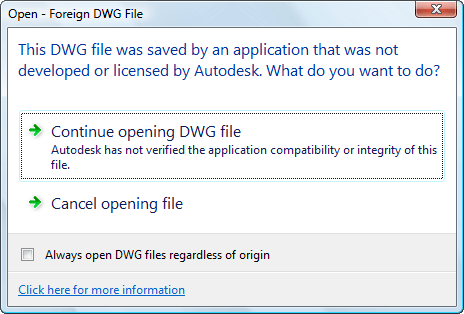
Something new is if you check the box to make sure you don't get a message like this again you can at any time restore it through Options>System>Hidden Message Settings.
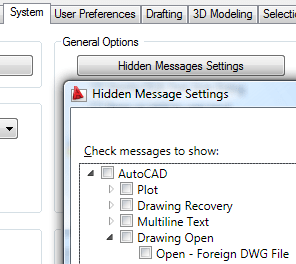
At the bottom of the Hidden Message Settings dialog box you can also see a full preview of what the message look like.
For more information on TrustedDWG: http://www.autodesk.com/trusteddwg
JTB FlexReport 4.1.2 is now available to help you report on your network license usage. Check the revision history for details.
Autodesk's new prior usage and Package license file introduced with AutoCAD 2009 and other 2009 products is fully supported.
Fully functional trial is available upon request.
PS. This information has been emailed to all customers and trial users and if you have not received any email it might be that your email filter has stopped it so please contact me one way or the other.


