Friday, September 12, 2008

Google Chrome comments

Chrome is the new browser from Google you probably have heard about by now.

In general it works pretty good and I think the speed is quite good to render the web pages. The Task Manager is a cool geeky thing. I like the clean interface and the address field search functionality but be cautious because of some security vulnerability it has. See also this post.

One thing that bug me is that I cannot use the wheel to scroll with by holding the wheel down and drag up and down as I often do.

Google Chrome uses WebKit for rendering, which is the same rendering engine as Apple’s Safari browser so most web sites show up as expected.

Google Chrome is a per-user application. It installs in the per-user Local AppData folder.
%USERPROFILE%\AppData\Local\Google\Chrome\Application\chrome.exe
This makes it easier to install if you don’t have administrator privileges.

Google Chrome doesn’t so far support browser extensions but it does support plug-ins, such as Flash.

The Chrome comics describing how it works.

Matt Cutts with common objections on Chrome

Chrome forum

Autodesk’s tests of Chrome

Make a visit to pages like these: "about:network", "about:stats", "about:dns" and "about:memory"

Thursday, September 11, 2008

Tip to make boundaries valid for SpaceUpdateSelectedSpaces

Say you select a space in AutoCAD Architecture and select Update Space Geometry>Selected Spaces and it does not work.image

You may see this on the command line:
Command: SpaceUpdateSelectedSpaces
No valid boundaries generated.

Select the lines and set Bound spaces to Yes. This is a new thing in ACA 2009.
image

Now try again and it will work as expected.
image

No valid boundaries generated can also be seen if the objects forming the boundary is not closed.

One user has also reported that he does not have the Bound spaces option available in ACA 2009 for some reason. Any idea why?

Wednesday, September 10, 2008

Free 30-day trial of AutoCAD Architecture 2009

I got a question on this if there is a trial for ACA 2009.

Here is the location for downloading the free 30-day trial of AutoCAD Architecture 2009. If you want it on DVD this is the location. It is the fully functional product except that you can only use it for 30 days.

Tuesday, September 9, 2008

AutoCAD 2009 slow performance tips

In the Knowledge Base document Slow performance you find 7 tips worth knowing about.
Issue
You experienced unusually slow performance when using AutoCAD®, especially when working in palettes (for example, Properties palette, Design Center, Tool Palettes, Sheet Set Manager, Layer Manager).

Solution

To improve performance, try the following:


  1. In AutoCAD® 2009, enable the AutoCAD Classic workspace.
  2. Dock any desktop element and make sure that none of the palettes are floating.
  3. Turn off any unused palettes.
  4. Update the graphics driver.
  5. If using multiple monitors, see if using only a single monitor improves performance.

    (The graphics hardware certification tests conducted by Autodesk are performed on systems using only a single video card with a single monitor attached.)
  6. Reduce the level of hardware acceleration
    • Click Start menu (Windows) > Control Panel.
    • In the Control Panel, double-click Display.
    • In the Display Properties dialog box, click the Settings tab.
    • Click the Advanced button.
    • On the Troubleshoot tab, adjust the Hardware Acceleration slider as needed.
  7. If you are using an nVidia graphics card adapter, check to see if a process called nwiz.exe is being loaded when AutoCAD is started. Disable it from being loaded by default. If you have installed the nView Desktop Manager, make sure no additional features are used. Uninstall it from Add or Remove programs in Windows, if possible.

Monday, September 8, 2008

Navigation Tool for AutoCAD reviewed

image

This is a neat tool by Autodesk for AutoCAD making it easy to navigate back and forward on the following activities:

  • Active drawing switch
  • Layout switch
  • View changes such as zoom, pan ...etc
  • Active viewport switch
  • Viewport maximize/minimize

It’s like zoom previous on steroids and I look forward having it added into the core AutoCAD in the future.

The free Navigation Tool for AutoCAD is available at Autodesk Labs.

Via It’s Alive in the Lab

Clear sticky Sheet Sets from Recent Documents List in AutoCAD

I’ve thought about posting this for a while and was triggered by a question in Autodesk’s discussion group for AutoCAD 2009.

Even if you select “Clear Recent Document List” the Sheet Sets comes back to Recent Documents in the Menu Browser after a while. They actually comes back if you run the Sheet Set manager (command SSM) and have anything in that SSM Recent list. A side effect is that today’s date is used even if you have not even used that Sheet Set for a long time.

There are three locations AutoCAD 2009 uses for the Resent File List that is related to Sheet Sets (DST-files).

To completely clear also the Sheet Sets you would need to first clear the Sheet Set Recent List.

The Sheet Set Recent List is saved in the profile. This is used if you click on Recent in Sheet Set Manager. Only edit this file when AutoCAD is not running.
%APPDATA%\Autodesk\AutoCAD 2009\R17.2\enu\Support\Profiles\FixedProfile.aws

In recent versions the settings are saved here instead:
%APPDATA%\Autodesk\AutoCAD 2014\R19.1\enu\Support\Profiles\<Profile>\Profile.aws

<Profile> is the name of the AutoCAD profile. Default is “Unnamed Profile”.

AutoCAD 2009\R17.2\enu are parts of the path that is different depending on AutoCAD version, vertical and language.

image

Right now there is is a bug in AutoCAD 2009 that makes it impossible to select any of the recent Sheet Set files because the menu collapses the second it opens. Not sure why this comes or how to fix it. Could be related to that I have so much on my machine like older AutoCAD versions, etc. Any solution to this problem?

The aws files are XML files and can easily be edited using the Microsoft freeware XML Notepad or even plain Notepad. Make sure you have a backup of the aws file in case you unintentionally do something that corrupts the aws file.

Search for MRU_FILES and delete the MRU_FILE “folders” that you don’t want to keep.

image

image

After that you can select Clear Recent Document List and it will be completely cleared.

image

Here is the registry location for Recent Documents:
HKEY_CURRENT_USER\Software\Autodesk\AutoCAD\R17.2\ACAD-7001:409\Recent File List
This location is cleared if you right click on one of the recent documents.

image

Here is the History location that is used if you click on History in the Open Sheet Set dialog box from the Sheet Set Manager:
%APPDATA%\Autodesk\AutoCAD 2009\R17.2\enu\Recent\AcSmNavOpenSheetSet

image

Wondering what %APPDATA% is?
In XP: C:\Documents and Settings\%username%\Application Data
In Vista: C:\Users\%username%\AppData\Roaming

Another tip is to group the recent list by type instead of group by date and the sheet set will show at the bottom. Update: Rick Moore informed me that this is not always the case. It seems like the type that is last used is what is on top using Group by Type. But if you have SSM to automatically open when you start AutoCAD the sheet sets will be on the top when you start AutoCAD.

image

A tip that is a bit related is that you can set the number of recently-used files in the Menu Browser to anything between 0 and 50. You find it in Options>Open and Save.

image

This logic also applies to AutoCAD verticals like AutoCAD Architecture and some of it probably applies to older AutoCAD versions like where the Sheet Set recent history is located.

If you have read this far you probably use the Sheet Set Manager and I recommend you take a look at SSMPropEditor that will make your life easier by allowing you to edit Sheet Set Properties on multiple Sheets at a time.

Jerry Seinfeld and Bill Gates and Microsoft’s new start page


Video: Shoe Circus


Video: New Family

Found on the new Microsoft start page.

Sunday, September 7, 2008

Windows Installer CleanUp Utility

IT tool worth knowing about.

With the Windows Installer CleanUp Utility, you can remove a program's Windows Installer configuration information. You may want to remove the Windows Installer configuration information for your program if you experience installation (Setup) problems. For example, you may have to remove a program's Windows Installer configuration information if you have installation problems when you try to add (or remove) a component of your program that was not included when you first installed your program.

Description of the Windows Installer CleanUp Utility

Friday, September 5, 2008

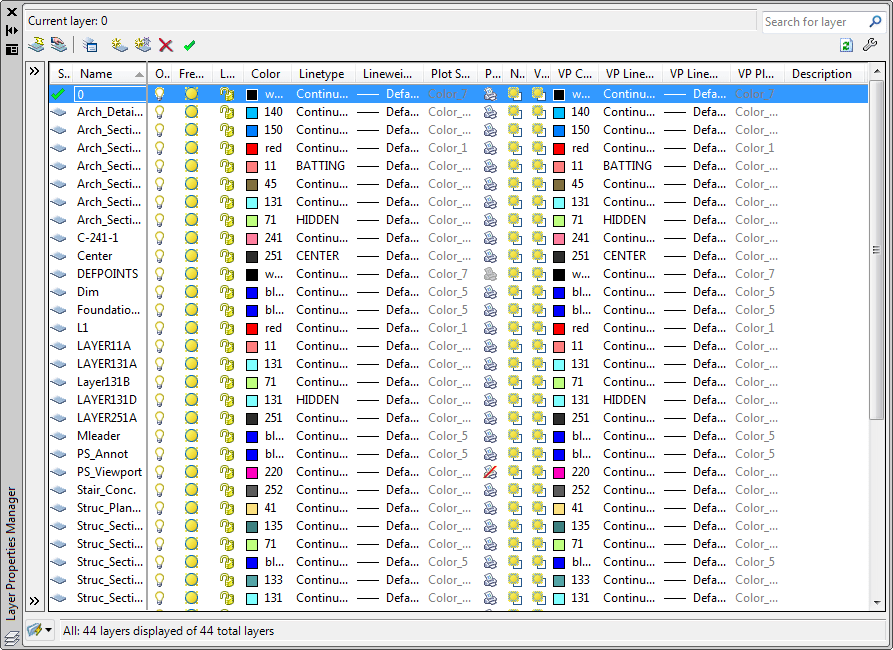
AutoCAD 2009 Layer Properties Manager enhancements

You have probably already seen that the new layer dialog box is mode-less just like the Properties palette and can be kept open at any time if you want to.

Notice though that you might get performance problem if you keep it open, so if things goes slow try to just open it when needed. Having it minimized does not help so close it completely. Of course it can be anchored, docked, auto-hidden and use transparency as any palette.

Notice also how the layers are sorted differently in AutoCAD 2009. In previous versions 10 was sorted before 2, 20 before 9 and 02 before 1. Not any longer. Now the sort is as expected.

AutoCAD 2008          AutoCAD 2009

But there are so many columns and it takes up my whole screen you may say.

Click to enlarge

Columns can be customized. Select what columns you want to see or not. Change the column width using the Maximize and Optimize options on one column at a time or on all. You can also freeze/unfreeze a column like in Excel so the columns of your choice always are seen on the left side.

Customize Layer Columns dialog box.

There is no OK or Apply button so Layer property changes are applied instantly. This can in some case be a performance problem to where you would need to use the old CLASSICLAYER command.

When space (Model to Layout or Layout to Viewport) is switched, the enhanced Layer Properties Manager displays the current state of the layer properties and filter selection in the current space. The display of the appropriate additional layout or viewport properties is restored.

The enhanced Layer Properties Manager supports dual monitor scenarios. It can be placed on secondary display while drafting on primary display.
The dialog box or palette can also be minimized or closed when not needed.

The context menu has been expanded to include "Remove  Viewport Overrides for" and "Isolate selected layers"

You can now use layer filters in real time. Filter selection is instantly reflected in the drawing session.
With the Hide/Show Layer Filters pane button, you can now control the display of the layer filters pane in the Layer Properties Manager.

Layer Isolate controls have been added to the Layer Settings dialog box.

A new option for combining layer property changes for Undo and Redo operations is accessible from the User Preferences tab of the Options dialog box.

If you want to revert to the old LAYER command you can use CLASSICLAYER.

LAYERCLOSE Closes Layer Properties Manager.

LAYERDLGMODE Sets the flavor of the Layer Properties Manager that will be defined for the use of the LAYER command. The LAYER command is mapped to execute either the CLASSICLAYER or LAYERPALETTE.

LAYERMANAGERSTATE Returns value indicating whether the Layer Properties Manager is open or closed.

More on AutoCAD 2009.

Wednesday, September 3, 2008

Website favicons on Vista desktop works better with IE8

I noticed a good thing after installing Internet Explorer 8 Beta 2. In How to show website favicons on the Vista desktop I described a problem and it was related to IE7 on Vista.

Now the favicon is used when you right click in IE and select “Create Shortcut”.

Yes, I have installed Chrome ;-)

Autodesk new login system

Time to check your Autodesk accounts and hope the soon to be transition works smoothly.

Autodesk is working to consolidate multiple user accounts, simplify the sign in process, and provide a single User ID and Password for accessing several Autodesk web sites. To help ensure a smooth transition, we recommend that you review your current account information for accuracy, especially first name, last name, and e-mail address.
Please note: If you have multiple User IDs with the same email address and want to keep those User IDs, you’ll need to assign a unique email address for each User ID.
Sites affected:

Via It’s Alive in the Lab

Tuesday, September 2, 2008

Google Reader makes Internet Explorer 7 crash

I have this problem and it happens once in a while. I have only seen this in IE7 on Windows Vista when I start Google Reader.

iexplorer.exe is still running as a process in the background and has to be killed manually or there will be problems to run IE7 again.

Have anyone else run into this problem?

Since installing IE8 Beta 2 I have not had this problem though. On the other hand I initially had problems with YouTube in IE8. After cleaning up among the installations, reinstalling some and uninstall some plugins I had installed for IE I got YouTube to work fine in IE8. Did not have time to isolate the problem though. This problem did also result in having iexplorer.exe running after the crash.

Monday, September 1, 2008

SSMPropEditor 2 released

SSMPropEditor version 2 is released.

  • Performance when selecting sheets in large sheet sets.
  • After Save the selection remain and the new values are seen in the Properties list.
  • Added ability to edit the Sheet title, Sheet number and Include for publish.
  • Export as tab separated text file that easily can be opened with Excel.
  • Added Include for publish, Sheet title and Sheet number and corrected the Sheet Properties sort order to mach AutoCAD's.
  • Hide and show sheets in the tree.
  • Open the sheet in the program that you have associated to open DWG files.
  • Open the folder in Windows Explorer where the sheet DWG file is located in.
  • Some minor bugs fixed.

This YouTube video shows how it works.

Or if you cannot access YouTube use here is an alternative.

Do you use AutoCAD's Sheet Set Manager (SSM) or AutoCAD Architecture's Project Navigator (PN)?

Have you wanted to change sheet properties like a revision, date or name on two or more sheets at the same time?

Contact us to get a time limited license file for free.

Autodesk Updates vs Service Packs

“Autodesk is now delivering product Updates, which will be released more frequently and continue to be released over the life of your product ownership. … Each Update will improve the performance of the product through fixes, performance improvements, and usability enhancements ”
This indicates that it might be updates for AutoCAD 2009 after AutoCAD 2010 has been released.
Autodesk Knowledge Base article.
Previous blog post 1 and post 2 on the subject.

Some of the latest blog posts

Subscribe to RSS headline updates from:
Powered by FeedBurner

Contact Us | About JTB World | Website General Terms of Use | Privacy Policy
^ Top of page

© 2004- JTB World. All rights reserved.