Tuesday, April 29, 2014

VBA Enabler downloads for previous versions of AutoCAD

Where are the VBA installers? It’s no longer possible to download the VBA installer for AutoCAD 2013, AutoCAD 2012 and AutoCAD 2011 on Autodesk’s page “Download the Microsoft Visual Basic for Applications Module (VBA)” autodesk.com/vba-download. At this point they’re only available for AutoCAD 2014 and AutoCAD 2015.

Here’s the explanation from Autodesk: “As of January 31, 2014, Autodesk is no longer authorized to distribute VBA 6 or earlier versions of VBA for use with Autodesk AutoCAD and other Autodesk products. This change affects the availability to download and install VBA for Autodesk AutoCAD 2013 or earlier, VBA remains available for Autodesk AutoCAD 2014 and Autodesk AutoCAD 2014-based products because those products support VBA 7.1.” (FAQ) Same with AutoCAD 2015.

It’s just too bad this information is not directly seen on the download page where you end up on if you for example run the VBAIDE, VBALOAD, VBAMAN commands without having VBA installed.

If you need VBA for AutoCAD 2013 or older, you will need to find an alternative download (might not be safe) or you need to upgrade to the latest AutoCAD release or migrate your custom programs to AutoLISP, ObjectARX, or Managed .NET (VB.NET or C++). JTB World can help with customization and migration work.

Thursday, April 24, 2014

FlexNet version 11.12.1

The updated FlexNet (FLEXlm) version 11.12.1 (based on Flexera Software’s FlexNet Publisher 2014 R1) has been released and is now available as a public download as well as the updated License Administration Guide.

Here are the news in Version 11.12.1 as far as I could find. There might be some bug fixes too that not are documented.

Support reclaim of borrowed license (trusted storage)

Improved Virtualization support

“Binding in a Virtual Environment” subject has been updated on page 25. The text “Do not change MAC address of the virtual machine.” has been added as well.

“lmremove” subject has been split into “lmremove (in License-File-Based Licensing)” and “lmremove (in Trusted-Storage-Based Licensing)”

There are two new option keywords added:

ACTIVATION_LOWWATER Controls the number of licenses that cannot be borrowed or transferred.

ACTIVATION_ EXPIRY_DAYS Controls the activation request based on the expiration dates mentioned in options file during activation.

Previous version FlexNet license manager 11.12

lmgrd.exe, lmutil.exe and lmtools.exe are all version 11.12.1 now. It might take some time before vendors start supporting this new version but it most probably will work to update it if you for some reason want or need to do it.

JTB World’s JTB FlexReport license monitoring tool has been tested with and supports this new version.

Thursday, April 17, 2014

Autodesk 2015 FlexNet feature codes

AutoCAD 2015 and other Autodesk 2015 products have recently been made available and thus there are a bunch of new FlexNet feature codes added to this page. AutoCAD 2015 feature code is 86295ACD_2015_0F.

From within JTB FlexReport and the free JTB FlexReport LT you can use the button to get these new feature descriptions.

Friday, April 11, 2014

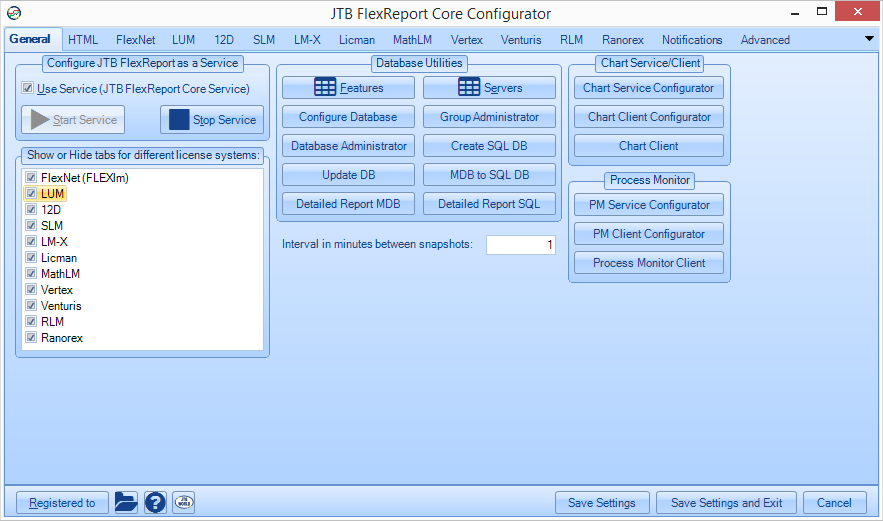
JTB FlexReport 8.0 adds Reprise License Manager monitoring

This new version of JTB FlexReport license report solution adds some new functionality to help with your license tracking and solves some other issues:

  • Added support for monitoring of Reprise License Manager (RLM) usage. For RLM monitoring rlmutil.exe is used and is available for download here: http://www.reprisesoftware.com/enduser_kits/end-user-download.php You might need to run the installer and take note of installation folder to find it. Import of RLM license server report log is also available.
  • Added support for monitoring of Venturis (TRICAD) license usage.
  • Added support for monitoring of Ranorex license usage.
  • JTB FlexReport Config has got a large UI update.
  • Email PNG reports automatically added to chart client.
  • More settings available before a report is created on the Report Settings tab in the chart client. These are also use by the auto report functionality.
  • More preset values for date ranges added in the chart client.
  • Time frame is being used for Histogram charts now.
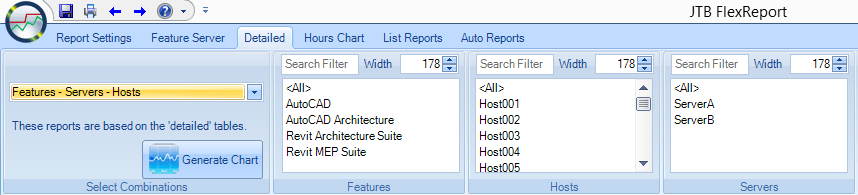
  • <All> and <Unassigned> added to all list boxes in chart client where applicable to make it easier to make selections.
  • Filtering added for lists in the chart client. Example: filter all features containing the text Auto.
  • Improvements and bug fixes for the auto report functions.
  • and much more added and fixed that can be found in the revision history.

Here are the downloads and general upgrade tips.

Previous release: JTB FlexReport 7.4.3

Contact us to get a time limited license file for free. You can try it in your environment with your real data for a few weeks with full functionality.
Full support is provided during trial period.

About JTB FlexReport: JTB FlexReport from JTB World is a report tool (HTML, chart and list reports) for applications using the FlexNet / FLEXlm (flexlm license manager), IBM LUM (IBM License Use Management), SPLM (Intergraph SmartPlant License Manager), SLM/Sentinel LM/Sentinel RMS/Sentinel Protection Server/SafeNet Sentinel, LM-X, Solidworks SNL License Manager, T-Systems license manager product LICMAN, Vertex Systems, MathLM (Wolfram Mathematica license manager), RLM (Reprise License Manager), Ranorex, Venturis, Primavera from Oracle or 12D software licensing. With Process Monitor any Windows application like Acrobat, Visio, Bentley MicroStation, single licensed AutoCAD or AutoCAD LT can be reported usage of.

Tuesday, April 1, 2014

Autodesk AutoCAD 2015 trial available

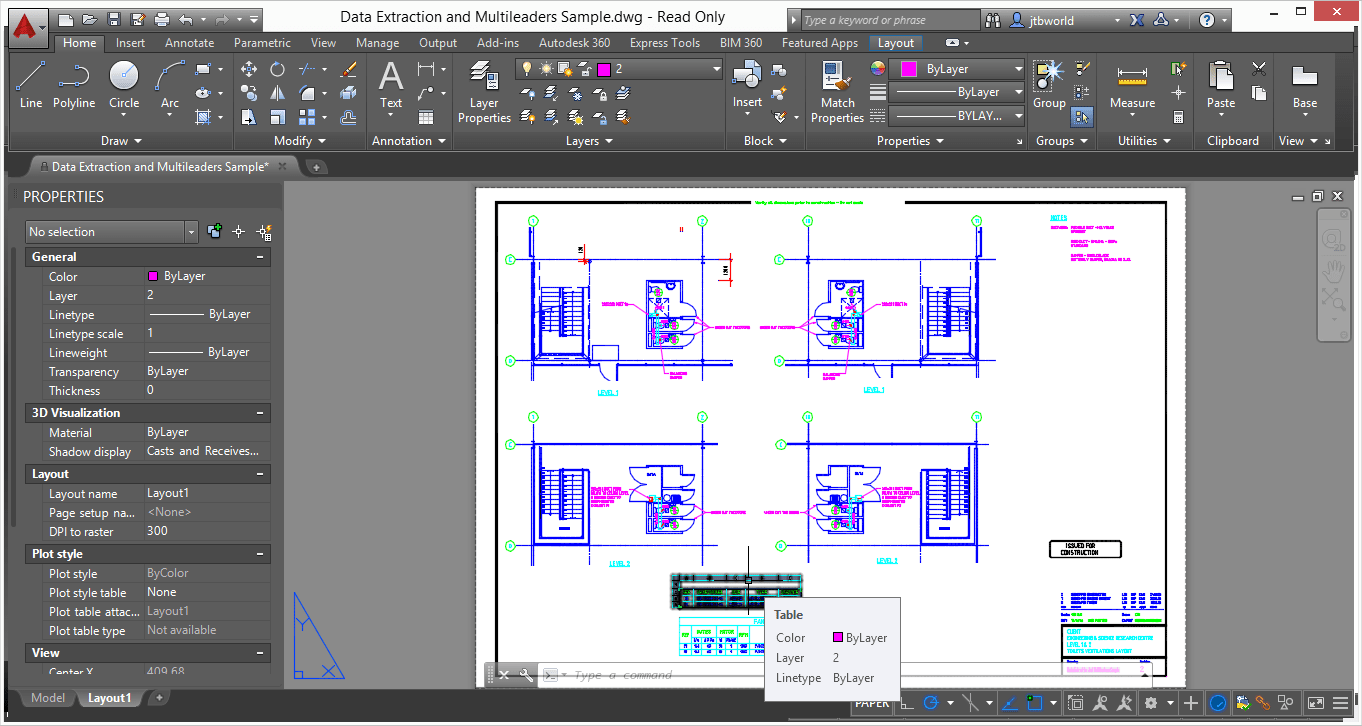
Autodesk AutoCAD 2015 was released last week and now available as trial too.

As you can see AutoCAD has a new updated look with a the theme darker. There are also several nice new features to consider. I’m updating the page about AutoCAD 2015 so it’s not yet complete and I’ll post more about it later on too.

Most JTB World’s apps will just work with AutoCAD 2015 as they are and where needed they soon will be updated to work fully with AutoCAD 2015.

Tuesday, March 25, 2014

DWG TrueView 2015 can remove educational plot stamps

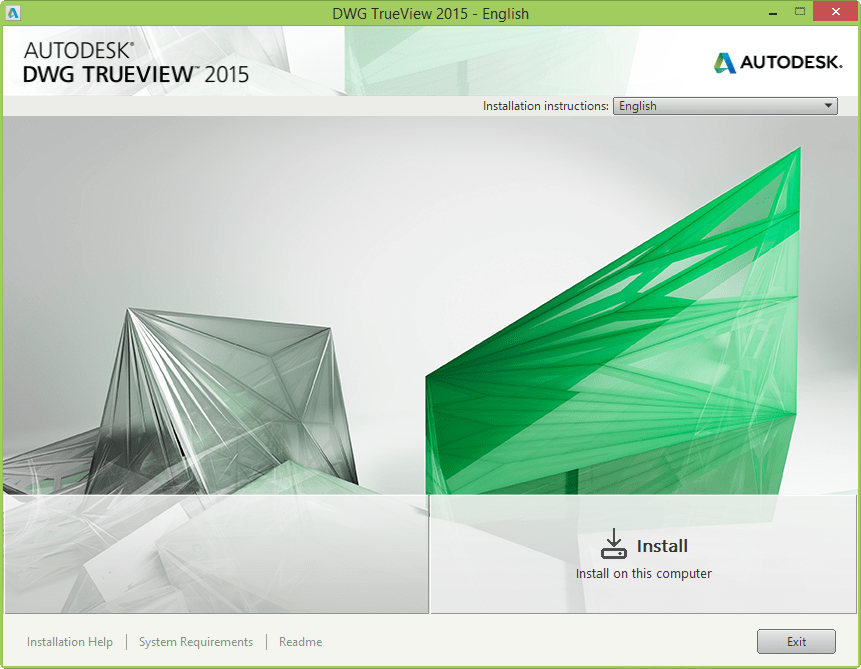
If you visit www.autodesk.com/trueview you will find that the English version of Autodesk DWG TrueView 2015 now is available for download. Note that only Windows 7, Windows 8 and Windows 8.1 are supported operating systems.

Direct links to download:

DWG TrueView 2015

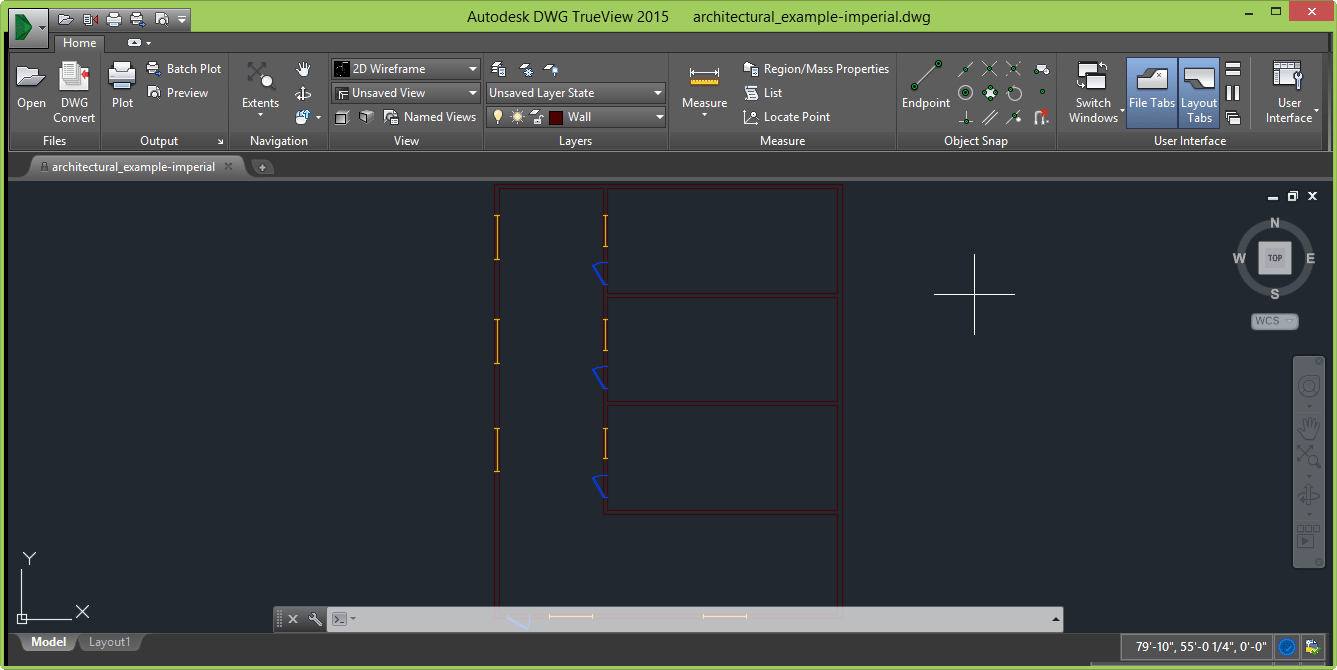
By default there is a dark color scheme and some icons have an updated look. Layout Tabs is a new icon that lets you display or hide layout and model tabs. The status bar where the coordinates are is now on the same row as the layout tabs.

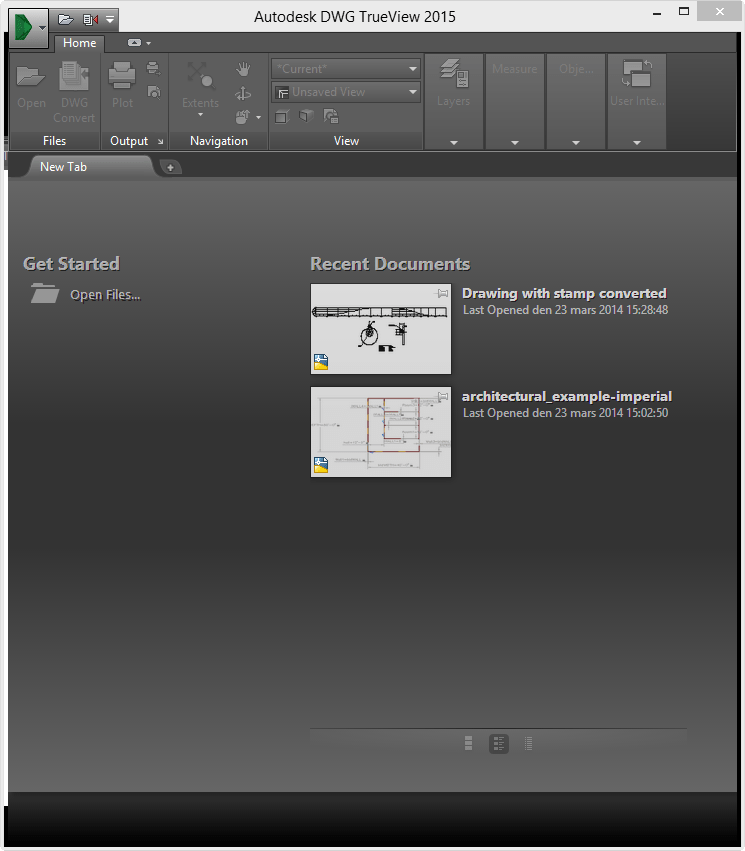
The “New Tab” lets you open files and access Recent Documents.

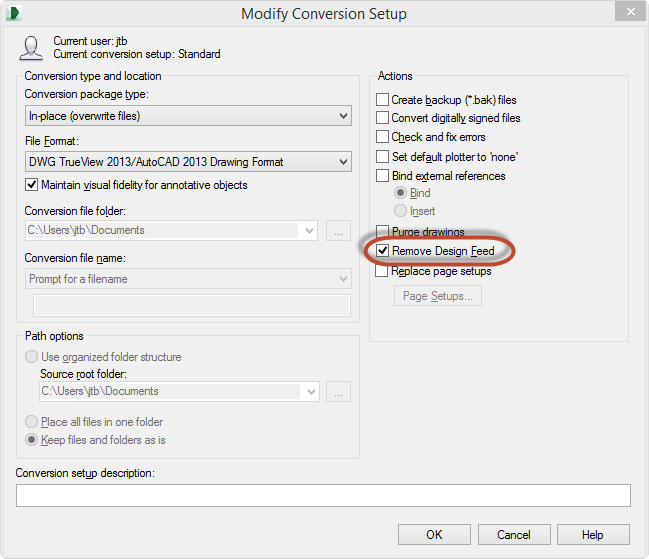
In DWG Convert Modify Conversion Setup, “Remove Design Feed” is a new option.

DWG Convert 2015 Setup Settings

In the post AutoCAD Educational Version - Plot Stamp Not Detected! I speculated that “Autodesk DWG TrueView 2015 and DWG Convert to batch re-save drawings to get rid of the stamp.” and after testing I can verify that DWG Convert now remove the educational plot stamp just by re-saving the drawings. If you want to know if you have any of these infected drawings in your network use JTB World’s EduFinder.

Goodbye to  “Educational Version - Plot Stamp Detected This drawing will display the message, "PRODUCED BY AN AUTODESK EDUCATIONAL PRODUCT," Do you want to continue? If you continue, the message will mark this drawing and any drawings that reference it.”

SMS and SCCM Integration ReadMe
Improvements in Autodesk® deployment technology allow many administrators to streamline their process of integrating Autodesk deployments on Microsoft® Systems Management Server (SMS) and System Center Configuration Manager (SCCM). In most cases, Autodesk deployments can now be advertised using a single program line instead of individual program lines for each component in the deployment.
To advertise a deployment with a single program line, use the following syntax:
.\Img\Setup.exe /W /Q /I .\Img\<deployment name>.ini /language en-us
This sample command line assumes that the package contents are defined at the root folder of your Autodesk product deployment folder, and that the product language is US English (en-us). If you have created a combined deployment and you would like to advertise it, use the following syntax:
.\img\Setup.exe /w /x86 <adminImage's name> /x64 <adminImage's name>

Software Requirements
Before creating an SCCM advertisement, ensure that all target computers have Microsoft .NET 4.0 Framework installed. Windows XP computers need Direct X installed prior to receiving a 2011 or later Autodesk product advertisement.

Component-level Advertisement
Special circumstances such as execution time limits may require you to advertise an Autodesk deployment at the component level. Please refer to <deployment name>_SCCM.txt for a listing of required program lines in the order they must occur on target computers. These commands will vary by deployment. For long command lines, use a batch file.

See also this post on install/uninstall.

This gives us an early sneak peek of what AutoCAD 2015  will look like. If you wonder about its system requirements they are already available here. You also find that AutoCAD 2015 is the only version officially supporting Windows 8.1 at this point.

I’ve also heard that Autodesk Subscription downloads already have 2015 available as well as the news that Network Licensing for AutoCAD LT 2015 is available and thus JTB FlexReport will also be able to monitor these FlexNet-based network licenses.

If you want to compare 2015 to what DWG TrueView 2014 looks like.

Monday, March 24, 2014

Autodesk Upgrade Policy after February 1, 2015

Here is a Frequently Asked Questions about the Autodesk® Upgrade Policy with all details. Here’s why you should read it.

What is changing around the upgrade policy?
As of February 1, 2015, Autodesk will no longer offer the option to purchase an upgrade version of the latest software release if you own a perpetual license* to a previous version. New versions will be available through purchase of a new perpetual license for the current version or as a Subscription benefit.

*A perpetual license grants the license holder the right to use the version of Autodesk software that is purchased for as long as desired.
 
Why is Autodesk eliminating upgrades?
Autodesk is evolving its business model to achieve a stronger and ongoing relationship with its customers, offering perpetual software licenses with Subscription and Desktop Subscriptions (software rental) as the primary purchasing options.

Starting in 2015, we will stop selling upgrades to simplify the offering and in recognition of the fact that most of our customers are on Subscription.

Purchasing Autodesk Subscription is the most cost effective way to stay current and competitive in today’s market. We continue to provide enhanced value and experiences to Subscription customers, such as flexible licensing rights, and access to select additional Autodesk® 360 cloud services, among others.

AutoCAD 2014 for Mac Service Pack 1

AutoCAD 2014 for Mac Service Pack 1 is available here and AutoCAD LT 2014 for Mac Service Pack 1 is available here.

Readme details about AutoCAD 2014 for Mac Service Pack 1:

Problems Reported with the Customer Error Reporting Utility
As a result of detailed information from customers who used the Customer Error Reporting (CER) utility, a number of problems were identified and fixed. Updates have been made to the following features:
Block
-Crash when making blocks in some situation.
Copy/paste
-Crash when copy/paste in some drawings.
Drafting
-Random crash during drawing and editing.
Startup
-Crash at startup due to some user profiles missing.
-Random crash at startup when getting the Displcay Card infomation.
View
-Crash when click the viewport control label.

The following general changes and improvements have been made:
AutoCAD LT
-Align command missing in LT.
Image
-Image underlay shows twisted or white/black bands when zooming in canvas.
License
-Cannot activate AutoCAD with some suite serial number, like Education Master suite serial number.
Other
-System animation(scrolling or switching desktop) glitches after force quit AutoCAD in some situation.
-Typo in lynda.com link in AutoCAD.
-Mis-use of Lucida Grande font.
Plot
-AutoCAD hangs when plotting drawings in some situation.
-Plot stamp now shows the system time on local machine.
-Image underlay is not fully displayed in plotted result.

And an enhancement: Now you can Reset AutoCAD at startup by holding Shift+click AutoCAD(or AutoCAD LT) icon. This helps in the case when you cannot start AutoCAD normally.

More about AutoCAD for Mac.

Monday, March 3, 2014

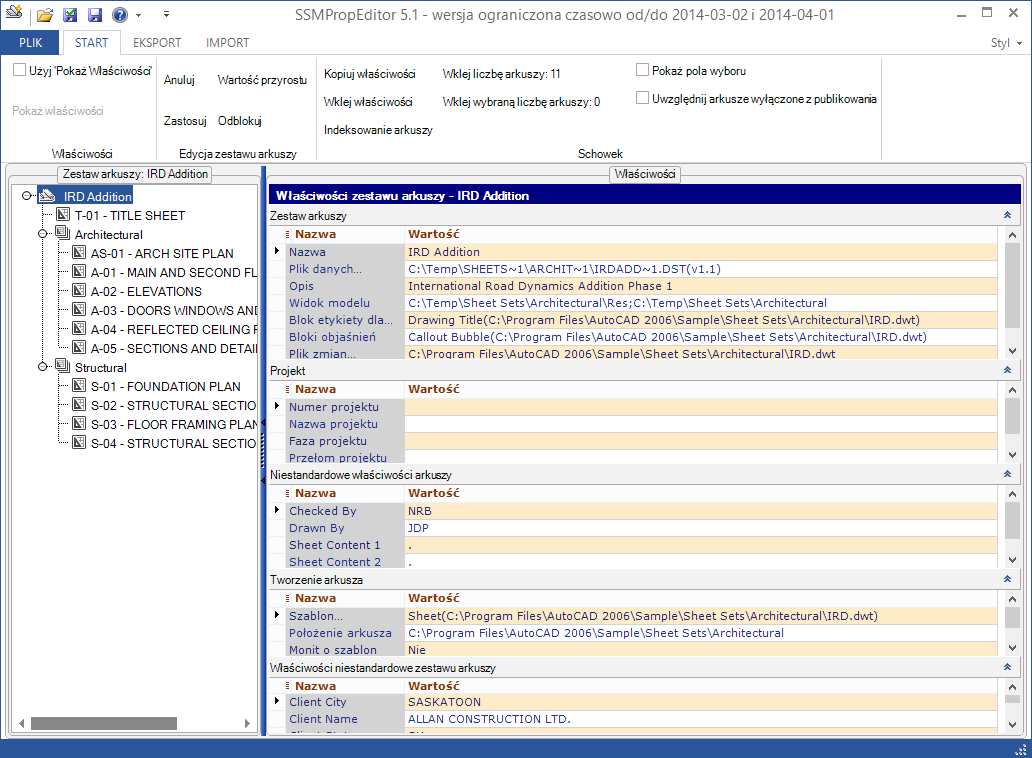
SSMPropEditor 5.1 released

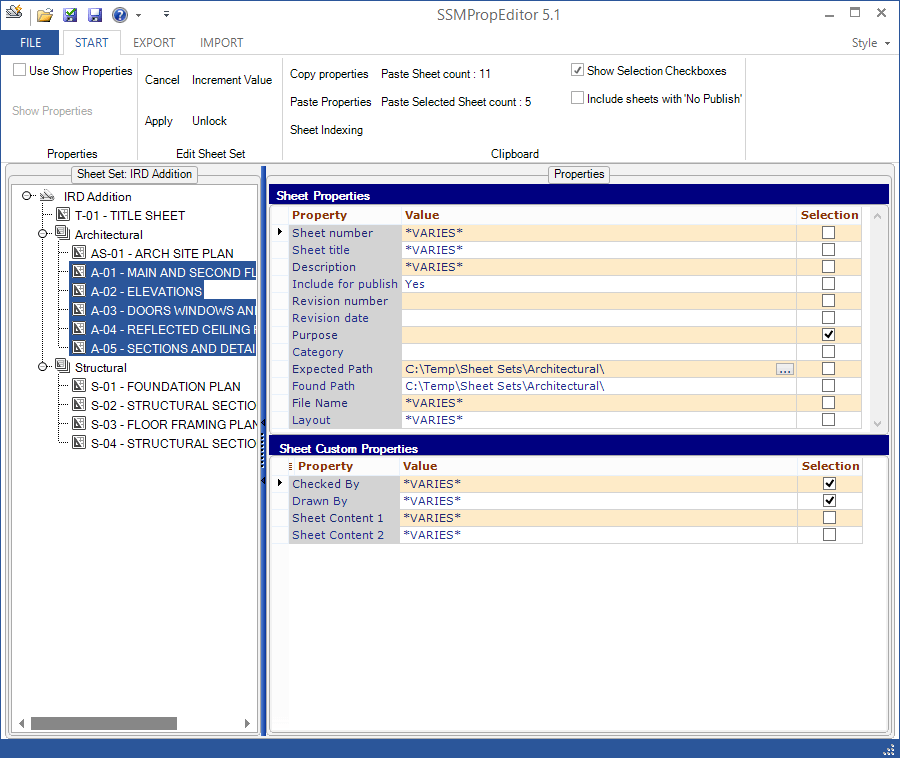
JTB World’s SSMPropEditor version 5.1 is now available. If you use the Sheet Set Manager in AutoCAD this app can save you a lot of time with its ability to index sheets, increment property values and edit Sheet Properties or Sheet Custom Properties on multiple sheets at the same time.

The main news in this release are:

  • Added Polish language.

  • 30-day trial added without need to request a trial license.
  • Added ability to drag and drop a DST file into SSMPropEditor to open the Sheet Set.
  • Improved performance while exporting and importing to and from Excel.
  • Added functionality to rename matching XML file when renaming sheets belonging to Project Navigator.

For more details see the revision history.

Download SSMPropEditor and give it a try.

If you are interested in other useful AutoCAD apps take a look at SmartPurger, JTB Sheet Set Creator, HVACPAC, HTools, AutoCAD Automation Tools, DigSigStamp, Batch Publish for AutoCAD, DimensionPatrol, TransTips or OffsetInXref.

If you need any custom app created, small or large, for AutoCAD and its verticals or Revit you are welcome to contact us.

Tuesday, February 18, 2014

AutoCAD Educational Version - Plot Stamp Not Detected!

There was a change in AutoCAD 2014 SP1 that can put you in problems. If you open, plot or save a drawing you will not be aware that the drawing have been saved with an Educational version of AutoCAD and thus unknowingly infecting a lot of drawings that you will have problem to use in older versions. I think this is a very dangerous bug that was introduced. In AutoCAD 2014 without SP1, AutoCAD 2013 and older you will see this dialog box. “Educational Version - Plot Stamp Detected This drawing will display the message, "PRODUCED BY AN AUTODESK EDUCATIONAL PRODUCT," Do you want to continue? If you continue, the message will mark this drawing and any drawings that reference it.”

The plan is that in AutoCAD 2015 it will be possible to save drawings with the plot stamp and then have it removed permanently. That is at least good news. I guess it will also work with Autodesk DWG TrueView 2015 and DWG Convert to batch re-save drawings to get rid of the stamp.

Here’s a quote from an Autodesk employee in the AutoCAD forum:

“The educational plot stamp has been a part of the Educational version of AutoCAD for a long time. It was meant to prevent commercial use being done with an educational version of the product. Recently, a decision was made to no longer show this stamp, even on files created with the EDU version. Starting with the installation of SP1 for the 2014 products, files will no longer show the stamp when plotting, nor will they give a warning message when opening them. However, the stamp is still attached to the file even though it is not showing.”

“So yes, the danger is that someone with 2014 SP1 could open a file and work on it without realizing it has the educational stamp on it. If they then send that to someone without SP1, or on an earlier version, that user will see the warning and the stamp. At this time, using 2014 with SP1 will still propagate the stamp to other drawings, as in the past. The current plan (and please keep in mind that this could change), but the current plan is that the 2015 version will have the ability to remove the stamp altogether if a Save is performed. You'd then be able to save a file in 2015, and send it back to users on earlier versions, and the stamp will be gone altogether. More information will be provided on this as we go on as to what the final implementation will be.”

See also this knowledge base article explaining more about the Educational Plot Stamp.

If you want to identify drawings with the Educational Plot Stamp try our EduFinder app that is able to batch process all your drawings and find those with the stamp. Due to the change in AutoCAD 2014 SP1 the app might not be able to find them unless you also have for example AutoCAD 2013 installed or remove the AutoCAD 2014 SP1.

Monday, February 17, 2014

How to test if a DVB file is loaded using AutoLISP

This is a sample code snippet showing how you with AutoLISP (or rather Visual LISP) can test if a certain VBA DVB file is loaded in AutoCAD or not.

(vl-load-com)
(defun isDVBLoaded (dvb / oVBProjs c found)
  (setq oVBProjs (vlax-get (vla-get-vbe (vlax-get-acad-object)) "VBProjects"))
  (setq dvb (strcase dvb))
  (repeat (setq c (vla-get-count oVBProjs))
    (if (vl-string-search dvb (strcase (vla-get-FileName (vla-item oVBProjs c))))
      (setq found T)
    )
    (setq c (1- c))
  )
  found
)

Here’s how to call the function:
(isDVBLoaded "jtbworld.dvb")

Sunday, February 9, 2014

Autodesk Knowledge Network reviewed

Here’s the new Autodesk Knowledge Network where you can “access a broad range of knowledge to help you get the most out of your Autodesk products and services”.

One nice thing when searching for downloads is that you can use Narrow Results to filter out for example only a specific version or type of download like hotfixes, object enablers or service packs. It works the same with the troubleshooting section.

So I checked the AutoCAD troubleshooting result and found this link that offers not help and seems to be from the forums. Strange. It would be good to see forum results too but it should be possible to filter out as well.

“Autodesk invites you to share your knowledge with the rest of the world, inspiring others to learn, achieve goals, and ignite creativity. In collaboration with Creative Commons, Autodesk invites you to share your knowledge with the rest of the world, inspiring others to learn, achieve goals, and ignite creativity. You can freely borrow from the Autodesk Help, Support and Video libraries to build a new learning experience for anyone with a particular need or interest.” Note that this seems to apply only for noncommercially purpose. Attribution-NonCommercial-ShareAlike (CC BY-NC-SA) and Attribution-NonCommercial-No Derivative Works (CC BY-NC-ND)  is used.

But there is a problem. If I for example visit this AutoCAD page I cannot find anywhere how to access the online help for AutoCAD. Even if I visit the Knowledge Network page for AutoCAD here. Hopefully this will be corrected soon. I did a search for AutoCAD documentation and got this link that seems to be taken from a blog post as can also be seen in the URL …/blog/autodesk.blogs.com/between_the_lines/201…

Another noteworthy thing is that “as of February 1st, 2015, upgrades from previous releases will only be available with Subscription, the most cost-effective way to stay current. Upgrade and subscribe now to gain additional savings on our latest software with all the benefits of Subscription.” More here.

After this update a lot of the direct links that before work are now broken. Before this URL format was working: http://usa.autodesk.com/getdoc/id=DL22867787 and now when searching for something like DL22867787 will not show up any result. This will break a lot of links existing on the web and even on Autodesk’s own blogs. Not sure if this will be fixed eventually or not.

Head over to http://knowledge.autodesk.com and see what you think about these updates.

UPDATE: I found that some of the old URLs to technical solutions and other pages are working and later on the Up and Ready blog said: “most of the solutions do indeed work and have proper re-directs”.

Friday, February 7, 2014

Why there is no Autodesk Design Review 2014

You may wonder why there is no Autodesk Design Review 2014 (ADR 2014). On the Autodesk Labs blog you got the answer:

  • DWF is definitely NOT dead.

  • We are investing significant resources on a cloud solution that will allow the sharing of models without sharing the source. This solution will also build collaboration tools because that is one of the strengths of a cloud solution.

  • To prove that we are strongly investing into DWF, we already are loading bigger DWF files than ADR can and will be making them available to the workflow of the cloud applications like Autodesk 360, Fusion 360, etc. AutoCAD WS is planning the same for the 2D side of things. Eventually they will merge into Autodesk 360 viewing that covers both aspects.

  • ADR will have less and less value as the cloud solution matures.

  • The cloud solution is being built in stages and handling larger DWF files is part of that roadmap. Our cloud-teams are looking at Customer Improvement Program (CIP) data from ADR on the most commonly used ADR features today. This will guide their efforts in rounding out our cloud functionality.

So in the meantime Autodesk Design Review 2013 is available and can be used.

You can also read on this post why Autodesk Freewheel was shut down.

Monday, February 3, 2014

AutoCAD Architecture Detail Components problem and solution

Do you have problem in Autodesk AutoCAD Architecture to open the Detail Component Manager or using any of the tools on the Tool Palettes - Design Details tab?

Maybe you get this error message showing up one or many times?

“Cannot open database C:\ProgramData\Autodesk\ACA 2014\enu\Details\Details (Global)\AecDtlComponents (Global).mdb.” followed by “Unable to execute the tool. Unspecified error.” and on the command line “ERROR: No database information found!” It might also show ACA 2013 or ACA 2012 or older. The file can also be for example AecDtlComponents (US).mdb or AecDtlComponents (UK).mdb.

Still if you try to open the mdb file manually it works fine.

But there is a solution available. This fix only applies to if you run a 64-bit version of AutoCAD Architecture.

SOLUTION: Download this Detail_Component_Manager_Fix.reg file and run it and you probably also need to answer yes a couple of times so it is merged into the Windows Registry. After that you should be able to use the tools as normal. No need to even restart AutoCAD Architecture.

Tools affected are Metal Runner, Metal Stud, Wood Stud, Hat Channel, Gypsum Board, Batt Insulation, Rigid Insulation, Brick, Concrete Block, Plywood, Protection Board, Roof Hatch, Roof Drain, Floor Drain, Sliding Door Head, HM Door Frame, Carpet, Stone Pavers, Recessed Light, Steel, Concrete Column, Earth Hatch and possibly some others.

Some of the latest blog posts

Subscribe to RSS headline updates from:
Powered by FeedBurner

Contact Us | About JTB World | Website General Terms of Use | Privacy Policy
^ Top of page

© 2004- JTB World. All rights reserved.