Tuesday, June 29, 2010

Vuuch for AutoCAD released and ready for primetime

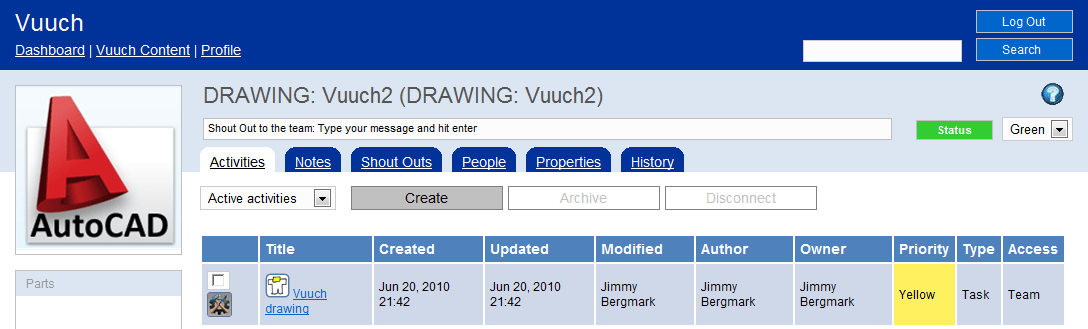
A new version of Vuuch is available and the Vuuch for AutoCAD add-in has been updated as well so you can put the power of social to work for you and your team.

Turn drawings into WEB Pages & Connect People, Activities & Notes in a New & Social Way. It’s like Facebook for your drawings as well as for other documents.

Thursday, July 1 there are two free webinars. These webinars will walk through a series of use case examples of how to start using Vuuch inclusive of live Q&A. See the time and details at the Vuuch events page.

Vuuch palette within AutoCAD.

Private or public WEB site that you and others invited can access.

For more Vuuch details visit the Vuuch for AutoCAD page.

Monday, June 28, 2010

100 AutoCAD tips

If you want to learn some new AutoCAD tips take a look at 100 of them that Edwin Prakoso assembled on his blog CAD Notes.

I wonder if all the words AutoCAD tips where counted what that number would be. Start counting all commands and variables as a starter. Did you know that the command DCCONVERT converts associative dimensions to dimensional constraints?

Wednesday, June 23, 2010

Autodesk Design Suits bundles

There are three new product suits available from Autodesk that can be useful if you find that you need to use a mix of products. Previously there have been suits around Inventor and Revit.

"The design suites make it much easier for Autodesk customers to accelerate their design processes and benefit from the wide range of Autodesk design, visualization and simulation technologies," said Carl Bass, Autodesk President and Chief Executive Officer. "Customers will also benefit from increased interoperability and productivity through access to new features and web services that will only be available as part of the design suite family."

Here are the new suits and each suit is in different editions like Standard, Premium and Advanced depending on what products you want to have included.

Autodesk Design Suite is a bundle of AutoCAD, Alias Sketch for AutoCAD, 3ds Max Design, Autodesk Showcase and Alias Design.

Autodesk Factory Design Suite is a bundle of AutoCAD Architecture, Autodesk Inventor, Autodesk Vault and Autodesk Navisworks.

Autodesk Plant Design Suite is a bundle of AutoCAD, AutoCAD P&ID, AutoCAD Plant 3D and Autodesk Navisworks.

Via Between the Lines.

Tuesday, June 22, 2010

Free 2D editor for DWG files

You find it at DraftSight with most 2D features you can need. Dassault Systemes and Graebert is behind it and makes it tougher for AutoCAD clones and possibly AutoCAD LT.

You can read more at Deelip.com and also an interview he made.

The product that is made public now is still Beta.

Thursday, June 17, 2010

SSMPropEditor 4.0 released

SSMPropEditor now makes work with Sheet Sets even more easier.

Here are the news:

  • Indexing/renumbering functionality making it possible to renumber all or selected sheets in a sheet set
  • Easy to add Sheet count to a property so you can have text on the drawing showing for example “Sheet 5 of 18”.
  • File Path, File Name and File Layout is possible to edit on one or multiple sheets at a time.
  • Performance improvements when selecting sheets in the tree view.
  • Recent list have the option to delete not found shortcuts.
  • Alternative to use tab to move between property cells.
  • Close of Sheet Set without closing the application.
  • UI improvements.
  • Bug fixes.

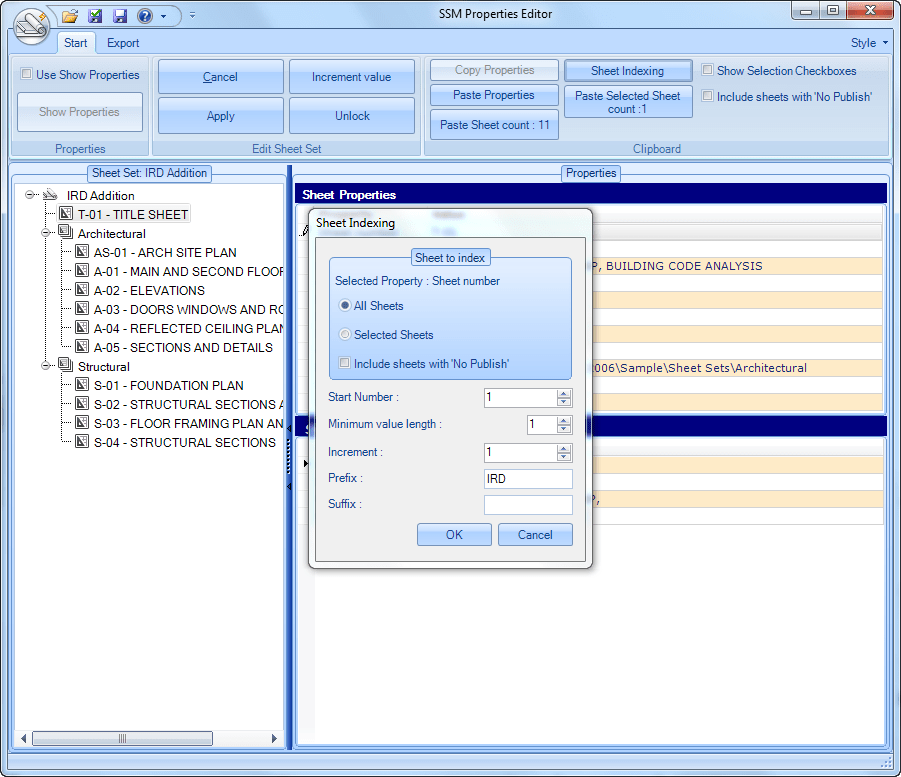
Sheet Indexing makes it possible to renumber multiple sheets.

If a selection of sheets should be indexed select them in the tree view.

Select one Sheet Property or Sheet Custom Property.

Click on Sheet Indexing button.

The dialog box that makes it possible to specify how the indexing should work opens up.

Note in this case how the Sheet Property Sheet number have been changed on all sheets and with the prefix specified.

Imagine doing this within Sheet Set Manager in AutoCAD manually on hundreds of sheets. With SSMPropEditor it is done with a few simple steps.

Contact us to get a time limited license file for free.
Full support is provided during trial period.

Existing customers are entitled to this upgrade at no extra fee.

Monday, June 14, 2010

AutoCAD and AutoCAD LT news

AutoCAD LT and Object Enablers Survey at surveymonkey.com

Among the questions is this one: “Which of the following (if any) Object Enablers would you like to see made available for AutoCAD LT?”

  • AutoCAD Plant
  • AutoCAD Raster Design
  • AutoCAD Structural Detailing

New and updated AutoCAD LT tutorials are available.

If you have the need to find AutoCAD drawings or blocks on your hard drive give Project Snap for AutoCAD a try and give Autodesk your feedback.

Now this looks a lot like the Design Center so It is Alive in the Lab has this post What's So Special about Project Snap? and below is a video showing how it works.

If you use AutoCAD and AutoCAD LT or any flavor/vertical and have a story to tell Autodesk is looking for case study participants: www.autodesk.com/acadcasestudy

Tuesday, June 8, 2010

Create Microsoft Office documents online

First try to create online documents using Office Web Apps with Word Web App, Excel Web App, PowerPoint Web App and OneNote Web App.

Here is what the Word Web App editor look like with its Ribbon.

Visit http://office.live.com/ and try for yourself.

Update: http://office.live.com/?docsf=1 can sometimes help if the above link does not work in your region.

Autodesk Discussion Forums changes

Check out the new look and features at www.autodesk.com/discussion. I’m sure there are those that miss the support for newsreader (NNTP) so Autodesk tells more about it. There are also more details in this FAQ  & How To. Lithium now seems to be behind the technology. First thing I found was that the password is now saved something that I had problem with before as described in Password problem with Internet Explorer 7 and solution. Other than that there seems to be several useful features. Some great features I think stand out are that I can:

  • Mark a thread as answered
  • Embed images in posts
  • Subscribe to RSS feeds (for boards, topics, and searches)

Saturday, June 5, 2010

AutoCAD LT network license?

Is there support for network licenses for AutoCAD LT 2011?

Knowledge Base document: FLEXnet® feature codes for Autodesk 2011 products includes the feature code for AutoCAD LT 2011 at least.

I also find reference to AutoCAD LT Civil Suite 2011 but no idea what it is. A Google search and I think this is something for the Japanese market. Could the network license thing also be only for a limited market?

Tuesday, June 1, 2010

AutoCAD Exchange redesign

Here is a tip of a great resource for AutoCAD users.

“Based on your feedback, the site has been redesigned to provide a better user experience.  The new design allows you to more easily find, view, and experience content to make you more productive. We welcome your feedback on this redesign and ideas for further site improvements.” - http://autocad.autodesk.com

I think the new design is a big improvement. I did not like the previous all in black layout you can find a screenshot of on the Kung Fu Drafter blog.

Monday, May 31, 2010

JTB FlexReport 6 released

Finally JTB FlexReport 6 is released.

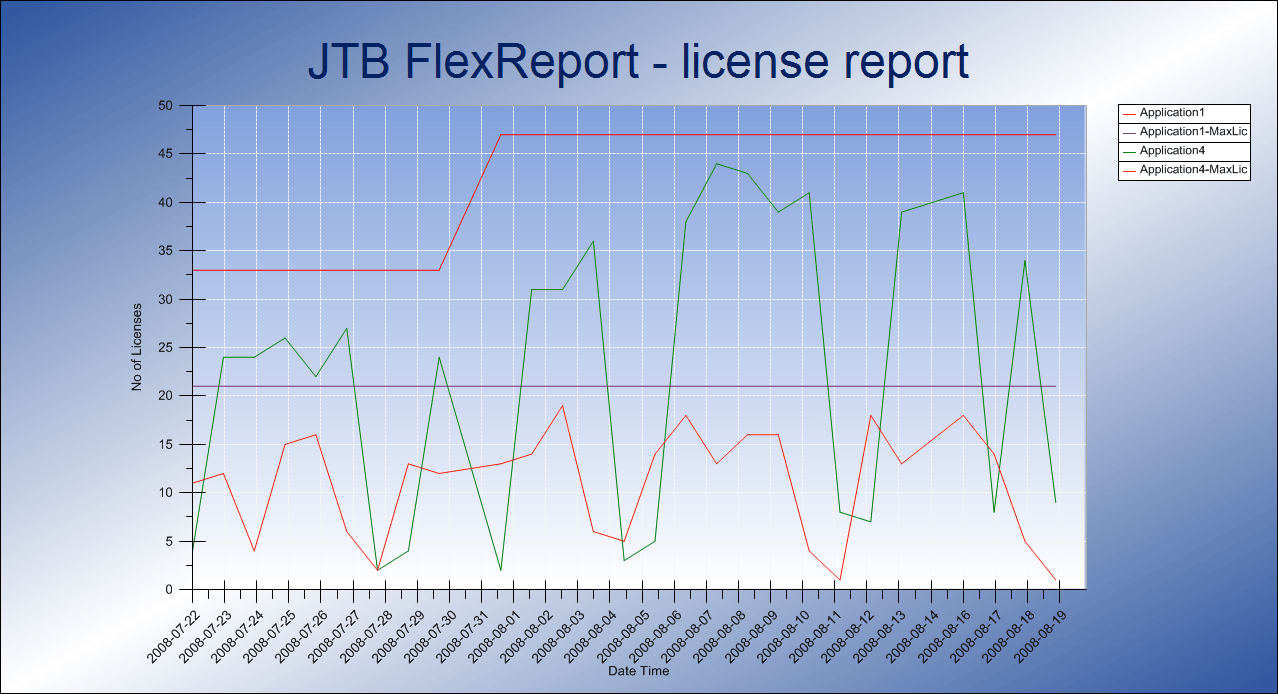
Network license monitoring (FLEXlm/FlexNet/IBM LUM/12D/SPLM or most any other application usage monitoring and reporting on is made easy. It will be useful when deciding if and when to add more licenses or to cut back on the number of licenses you have at your company. Many make use of JTB FlexReport to help splitting license and maintenance costs among their users or groups of users.

News:
  • SQL Server/SQL Server Express support.
  • Better performance for chart reports.
  • New chart reports and other changes to the chart client.
  • Drilldown on chart reports.
  • Copy chart to clipboard.
  • Hour chart improvements and hour filters.
  • Process Monitor improvements.
  • Database structure changes.
  • Bug fixes.
Chart report on how many hours users have been using a feature. The hours chart now support many different combinations to create the chart you want to see as well as the ability to filter for example if you only want to see hours greater/equal than specified amount.

Drilldown to find who might have used licenses at a specific point in time.

Histogram Chart that can help to determine if you need more or less licenses.

Downloads and documentation are found at the JTB FlexReport site. Uninstall previous installations first before installing this new version.

Contact us to get a time limited license file for free. You can try it in your environment with your real data for a few weeks with full functionality.
Full support is provided during trial period.

Now work is started on JTB FlexReport 6.1 that will include a better application to administrate groups of user, hosts, feature and servers without the need of Access. Grouping of usage based on IP ranges. Support for SafeNet's Sentinel License Monitor (SLM). Improvements on other things and probably some bug fixes.

Friday, May 28, 2010

Windows Live Writer 14.0.8117.416

First post using Windows Live Writer 14.0.8117.416. Hope some of the bugs that annoy me are fixed. So I’ll be using this while waiting for the new big Windows Live Wave 4 release that hopefully comes soon with a new update of WLW.

Windows Live Writer 14.0.8117.416

“New version of Wave 3 Windows Live Writer. No new features but higher quality. Upgrade today!” – WLWriter on Twitter May 12th

For solutions and forums see the Live Writer Portal. Only problem I found was that I got it in Swedish when I wanted it in English. But that was solved by changing the order in Language Preferences in Internet Explorer > Internet Options > Language Preference.

Internet Options > Language Preference

What is the solution if AutoCAD 2011 hangs at startup?

If you try to start AutoCAD 2011 and it hangs and becomes unresponsive the solution might be to that the Autodesk InfoCenter file C:\Program Files\Common Files\Autodesk Shared\WSCommCntr\lib\WSCommCntr2.exe is still running. AutoCAD starts to the point that you can see the application UI, command line, Properties and so on. This happened to me right now so I though I should share the solution.

If you just kill the WSCommCntr2.exe process in Windows Task Manager AutoCAD becomes responsive again and you can start using it. No need to kill the acad.exe process.

Tuesday, May 25, 2010

Ribbon problem solutions for AutoCAD

How to fix a broken Ribbon? It can certainly be a pain with such a problem in AutoCAD and it doesn’t heal by waiting like when a rib is fractured.

If you find yourself in a situation where you see the text “The Ribbon does not have any tabs or panels currently loaded.” and don’t know how to restore the Ribbon and menus here are some tips. It might be because you have done some customization in a wrong way to accidentally deleted all workspaces or messed up something else.

The Ribbon does not have any tabs or panels currently loaded

I’ll try to come up with a solution here.

The easiest method is to click on the black down arrow and click on Workspace.

Then select one of the workspaces from the Workspace dropdown.

Another method is the following:

Run the command WSCURRENT and you might find that it has an empty value. This indicates that something is wrong.

  Command: wscurrent
  Enter new value for WSCURRENT <"">:

Run the CUI command.

If there are no Workspaces existing

No Workspaces existing

try first to use Restore ACAD.CUIX and if that does not work try Reset ACAD.CUIX.

Restore ACAD.CUIX

Now this is what it look like when there are Workspaces but none current.

No current workspace

Right click on any of the Workspaces and select Set Current.

Set Current Workspace

Close CUI.

If the Ribbon still is missing run the RIBBON command.

If Express Tools menu is missing run the EXPRESSTOOLS command.

If the Ribbon is missing next time you start AutoCAD you probably need to show it again and then save the workspace using WSSETTINGS command.

See also Restore lost workspace, menus and profile in AutoCAD Architecture.

Feel free to leave a comment with your favorite remedy.

Some of the latest blog posts

Subscribe to RSS headline updates from:
Powered by FeedBurner

Contact Us | About JTB World | Website General Terms of Use | Privacy Policy
^ Top of page

© 2004- JTB World. All rights reserved.