Tuesday, November 3, 2009

Close License Borrowed Dialog boxes automatically freeware

Do you use a borrowed license and want to prevent the "License Borrowed" message from showing up every single time i start your AutoCAD?

The license on this machine has been borrowed from a license server. You can continue to use this product during the borrow period without a connection to the license server. The borrow period for this license expires on: … To access the product again after the license expires, you must reconnect to a license server.

With this freeware CloseLicenseBorrowedDialogs for AutoCAD and verticals it is possible. It will automatically close this dialog box for you.

Tip: It is possible to get it started together with AutoCAD if you create a BAT, CMD or VBS file and use calls like this:
start "" "C:\jtb\CloseLicenseBorrowedDialogs.exe"
start "" "C:\Program\AutoCAD 2010\acad.exe" /p MyProfile

Other languages supported upon request.

Symboldatei auswählen Dialog automatisch geschlossen

German AutoCAD is also supported now in CloseShapeDialog. Dialog boxes named “Symboldatei auswählen” are also closed as well as “Select Shape File”. Freeware available here.

Other languages supported upon request.

Monday, November 2, 2009

Autodesk Sponsors McGraw-Hill Construction BIM SmartMarket Reports

For those that want to start with BIM this report is worth reading. I did read through it quickly and it seems like the report is valid and correct also according to my experience in this field.

Some advices. To BIM is not an on and off switch. You don’t need to reach 100% BIM at once. Don’t BIM too fast, if internal and external processes don’t follow you might get in trouble and find that BIM is more a problem than a solver.

The report is a summary of a survey that was given to approximately 3,000 architects, engineers, contractors, and business owners across the United States and Canada. See the results of BIM adoption, usage, impact and infrastructure, and review case studies and interviews.

Download the PDF: McGraw-Hill SmartMarket Report: The Business Value of BIM

McGraw_Hill Construction has an ongoing survey to gather some of these requirements from the design community.  If you haven’t done so already, please participate in the online survey – it only takes a few minutes.

Monday, October 26, 2009

Autodesk 2010 products FlexNet error -15.570.36 solution

You configured a machine to be a network license server and then installed an Autodesk product on the same machine.  When you launch the product, it tries to check out a network license and fails.  This seems to affect most 2010 products.

On Windows, the FLEXnet Finder dialog displays and, when dismissed, is followed by a license error dialog displaying the error code [-15.570.36]. In the Mac OS, a license error dialog displays the same error code but it does not display a FLEXnet Finder dialog.

Find the solution is this Knowledge Base document: Failure to check out a license when running a network product on the same machine as the network license server

ACAD_db 1.0 released – sync block attributes with database

Make use of AutoCAD together with an external database. Block attribute values can automatically be updated back and forth to one or many external databases. If you make changes to the attribute values they can be synchronized back to the external database and the other way around.

With the new ACAD_db from JTB World this is now possible. ACAD_db works with AutoCAD and all its verticals. Use for example Access, SQL Server, SQL Server Express, Oracle, ODBC or Excel as your database.

ACAD_db

There are three sync methods available and can be set individually for each attribute to synchronize.

  • Sync in both directions.
  • Sync only from the drawing to the database.
  • Sync only from the database to the drawing.

Some information might be useful to sync in both directions while other information like dimensions needs AutoCAD to be the owner. Other information like price might best be owned by the database.

    Contact us to get a time limited license file for free and try ACAD_db in your environment.

    Friday, October 23, 2009

    Autodesk University Attendees Can Give Away 'Virtual' Passes

    Via this press release I learned that “Autodesk announces the availability of four (4) complimentary Premier Passes for Autodesk University Virtual.”

    I would love to get one of these as I will not be there IRL. Anyone having a spare?
    Update: I have now got a virtual pass. Thanks!

    Subscription Advantage Pack – AutoCAD Architecture 2010

    Renovation Extension for ACA 2010 makes it easier to work with the 3 phases Existing, New and Demolition. This really simplifies the work so if you do these kind of works and have subscription just go get it. Others need to wait for AutoCAD Architecture 2011.

    Here is a video showing how it works.

    AutoCAD 2010 Subscription Advantage Pack

    AutoCAD 2010 Subscription Advantage pack is now available to AutoCAD subscription members. Other have to wait for AutoCAD 2011.

    Isolate, Add Selected, Select Similar is something that been found in verticals earlier and as 3:rd party tools.

    With Isolate Objects, Hide Objects and End Object Isolation you get more freedom on visibility of objects that extends beyond layers.

    There are also two Draw Order tools: Bring Annotations to Front, Send Hatches to Back.

    These are some useful tools so go and grab this advantage pack.

    Here is a video showing the features.

    AutoCAD 2010 support for Windows 7 and for other Autodesk software

    Both 32-bit and 64-bit versions of AutoCAD® 2010 and AutoCAD® LT® 2010 are compatible with and supported on Microsoft Windows® 7.

    Windows 7 Autodesk does not officially support 2009 and older versions of AutoCAD and AutoCAD LT on Windows 7. If you choose to run older versions of AutoCAD on the Windows 7 operating system, you may opt to use Windows compatibility mode.

    There are some known minor limitations of AutoCAD 2010 and AutoCAD LT 2010 on Windows 7.  For a description of these limitations, please refer to the following solution:

    Known Limitations with Windows 7 for AutoCAD and AutoCAD-based Products

    The following issues have been identified with Windows 7 and are currently being researched for a potential fix in a future release:

    AutoCAD® and all AutoCAD-based vertical products:

    • Infocenter balloons sometimes display blank
    • Dragging Ribbon tabs sometimes crashes the product
    • Encrypted files fail to open and save on Windows 7
    • Open files do not appear on Windows 7 Jumplist
    • Export to Impression functionality will not work because Autodesk Impression is not supported on Windows 7

    AutoCAD Architectural 2010 and AutoCAD Mechanical 2010:

    • Text in the Drafting Settings dialog overlaps radio buttons

    Knowledge Base document: Windows 7 Support for AutoCAD and AutoCAD LT

    According to this press release:

    For the 2010 product line, Autodesk will support nine products on Windows 7. These products are Autodesk Inventor 2010, Autodesk Inventor LT 2010, AutoCAD 2010, AutoCAD LT 2010, AutoCAD Architecture 2010, AutoCAD Electrical 2010, AutoCAD Mechanical 2010, AutoCAD MEP 2010 and Autodesk Algor Simulation 2010 software. Autodesk will support Windows 7 for most of its other products as updated versions are released.

    See also

    Knowledge Base document: Windows 7 support for Revit 2010 products and previous versions

    Knowledge Base document: Support for 3ds Max 2010 and 3ds Max Design 2010 on Windows 7

    Knowledge Base document: Support for Maya 2010 on Windows 7

    Knowledge Base document: Support for AutoCAD Map 3D 2010 and Windows 7

    Knowledge Base document: Support for AutoCAD Civil 3D 2010 and Windows 7

    Thursday, October 22, 2009

    FlexNet lmgrd.exe problem solved

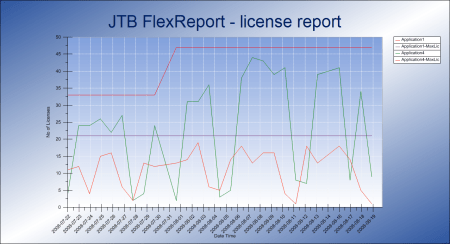
    During the start of evaluating JTB FlexReport one customer got a problem with FlexNet (FLEXlm) that eventually was solved.

    The following command was run on the server where FlexNet license manager is installed. The server is a virtualized Windows 2008 std server.

    lmutil.exe lmstat -a -c 27000@server

    [Detecting lmgrd processes…]
    Error getting status: Cannot connect to license server system. (-15,10:10061 “Winsock: Connection refused”)

    The FlexNet debug log also had this information.

    16:27:23 (lmgrd) adskflex exited with status 58 ()
    16:27:23 (lmgrd) Since this is an unknown status, license server
    16:27:23 (lmgrd) manager (lmgrd) will attempt to re-start the vendor daemon.
    16:27:23 (lmgrd) EXITING DUE TO SIGNAL 1

    There were no problems with the ports and firewalls as they were opened. LMTOOLS.EXE did not show any problem on the status.

    Using IP instead of server name resulted in this message:

    lmutil - Copyright (c) 1989-2007 Macrovision Europe Ltd. and/or Macrovision Corporation. All Rights Reserved.
    Flexible License Manager status on Tue 10/20/2009 15:49

    [Detecting lmgrd processes...]
    Error getting status: Cannot find license file. (-1,359:2 "No such file or directory")

    Other errors that also might show up are some or all of these:

    The TCP port number in the license, [portnumber], is already in use.
    (adskflex) Unable to initialize access to trusted storage: 1
    (adskflex) Failed to open socket to lmgrd, Exiting
    (adskflex) EXITING DUE TO SIGNAL 28 Exit reason 5
    (lmgrd) Can't send reread to adskflex: Cannot read data from license server system. (-16,10009:10054 "WinSock: Connection reset by peer")
    (lmgrd) adskflex exited with status 28 (Communications error)
    (lmgrd) Since this is an unknown status, license server 
    (lmgrd) manager (lmgrd) will attempt to re-start the vendor daemon.

    Eventually the solution found. The problem was caused because of Windows DEP (Data Execution Prevention) on the server. DEP simply killed lmgrd from doing its job.

    The solution is:

  • Stop the licenseservice using LMTOOLS.EXE or in Windows Services.
  • Stop any process in Task Manager like lmgrd.exe and adskflex.exe (or whatever the vendor daemon is named).
  • Start the DEP program from Control Panel > System > Advanced > Performance Settings > Data Excution Prevention.
  • Add an exception for LMGRD.exe and possibly also LMUTIL.EXE, LMTOOLS.EXE and the vendor EXE where the license manager is installed.
  • Restart the service and it should work.

    DEP might also have the effect that LMTOOLS.EXE crashes or that you just notice that the license service is stopped after a while and you cannot check out any licenses. The problem is no only on Windows 2008 server but have been seen also on Windows 2003 server

  • Tuesday, October 20, 2009

    Revit Wood Wall Framing tool

    This is good news now that residential building also is expected to increase in 2010. This means Revit can be even more used for this industry.

    “Single family housing for 2010 will advance 32 percent in dollars, corresponding to a 30 percent increase in the number of units, to 560,000.” -ref

    Revit Subscription Advantage Pack will include this for Revit Architecture and Revit Structure and is now available for subscription customers.

    We’ll see how this will compare with MWF from StrucSoft.

    JTB World will soon release a software add-on that will leverage framing construction done in Revit into the production. It will be compatible with both MWF and with Autodesk new Wood Wall Framing tool. For more details on this concept visit AccuFrame™ System.

    Do you face problems to automate Autodesk software installers?

    If you do take a look at this post and the invitation from Autodesk to hear your views (see the comment from Eric Stover).

    I recognize several of the key points mentioned and know that it is quite some work to automate installations of all kind of applications.

    The below point for example that requires you to automate a launch of AutoCAD and close it before you can push some of the settings to the client.

    • Make it easier for us to push a custom profile (.arg) and set default shortcuts on the clients.  First launch always reverts them back to vanilla configurations, which breaks this.

    Monday, October 19, 2009

    Learn how to convert VBA code into VB.NET for AutoCAD

    Visit Through the Interface for details on the free webcast.

    The session will be taking place at 8am Pacific/10am Eastern/4pm in the UK/5pm in Central Europe, on October 20, 2009. If you cannot make it the webcast will be recorded.

    Unable to find main dictionary. Could not start speller. Solution!

    Here are some reasons why you get the message “Unable to find main dictionary. Could not start speller.” or “unable to find main dictionary could not start spelling” in AutoCAD (or vertical) or AutoCAD LT when you try to add or change text or make a spell check.

    You have deleted some DCT files in your support folder and might need to restore them from the CD/DVD alternatively make a repair of the installation.

    Make sure to install dictionaries as feature if you select a custom installation. Even if you don't need multi-language dictionaries you will get an annoying error message every time you want to create or edit text. "AutoCAD Message - Unable to find main dictionary. Could not start speller."

    You might have deleted the path to the location of the DCT files in OPTIONS. You can check that you have the path to where the DCT file are among the paths in OPTIONS>Files>Support File Search Path. If it is not there add it and restart the application. Another way is to restore the profile but then you might loose a lot of your settings that you have customized.

    Here are some of the DCT files that comes with AutoCAD:
    cat.dct
    csy.dct
    dan.dct
    dan2.dct
    deu.dct
    deu2.dct
    deuo2.dct
    enc.dct
    enc2.dct
    eng.dct
    eng2.dct
    enu.dct
    enu2.dct
    esp.dct
    esp2.dct
    fin.dct
    fin2.dct
    fra.dct
    fra2.dct
    ita.dct
    ita2.dct
    nld.dct
    nld2.dct
    nor.dct
    nor2.dct
    ptb.dct
    ptb2.dct
    ptg.dct
    ptg2.dct
    rus.dct
    sve.dct
    sve2.dct

    This post was made thanks to an email question I got on this problem and I wanted to give the solution to others that might run into this.

    Some of the latest blog posts

    Subscribe to RSS headline updates from:
    Powered by FeedBurner

    Contact Us | About JTB World | Subscribe to this blog | JTB World's website
    ^ Top of page

    © 2004-2009 JTB World. All rights reserved.