Tuesday, March 14, 2006
Google @Last into game market to SketchUp a virtual world?
Here's one potential usage. How about making a 3D game available for free where you could model your own house, city or world and interact with others in real time anywhere?
There has been a lot of talk this day about Google bying @Last Software with it's SketchUp.


AutoCAD 2007 Purge and Workspace enhancements
The purge (and -purge) command now also purges materials and visual styles not used in the drawing.
Command: -PURGE Enter type of unused objects to purge [Blocks/Dimstyles/LAyers/LTypes/MAterials/Plotstyles/SHapes/ textSTyles/Mlinestyles/Tablestyles/Visualstyles/Regapps/All]:
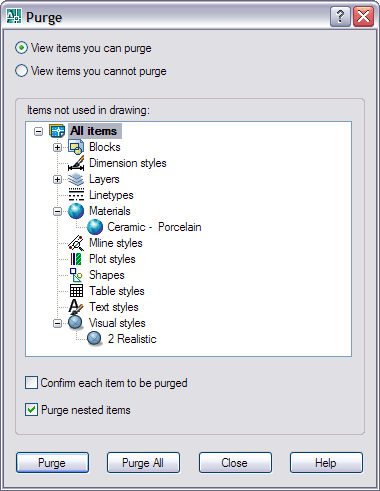
Starting AutoCAD with the command line switch /w designates which workspace in the loaded CUI files should be restored on startup. A welcome feature that we really missed in AutoCAD 2006 when workspaces where introduced.
* JTB World's SmartPurger will be updated to work fully with AutoCAD 2007 *
Monday, March 13, 2006
ADT 2007 Scheduling Enhancements
Here are some news in Architectural Desktop 2007 that will be useful.
Hierarchical classification definitions

Classifications can be assigned to individual objects.

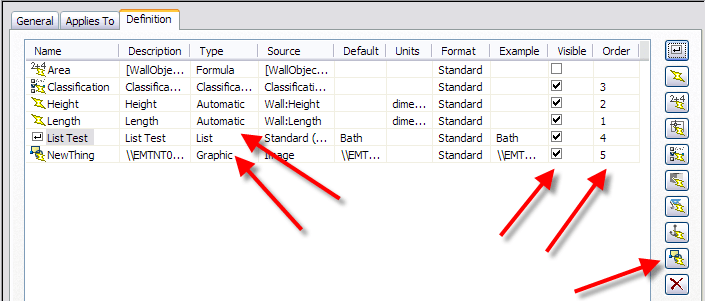
List definitions allow the creation of a list of values that can be used as
space names, zone names or within a manual schedule property definition.

Graphic Property Definition
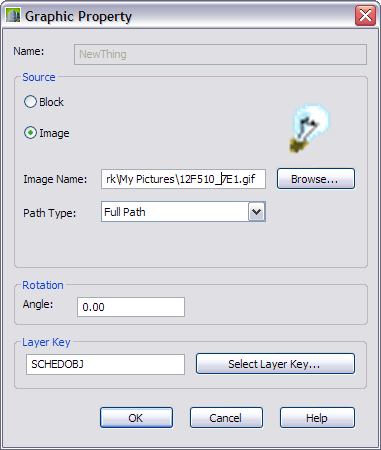
Property Set Definition with list definition, graphic property definition, visibility and sort order.
The anchor property definition allows a schedule property to retrieve information from an object to which the scheduled object is anchored.
Schedule Table Title per object

Header override

The new schedule formula column
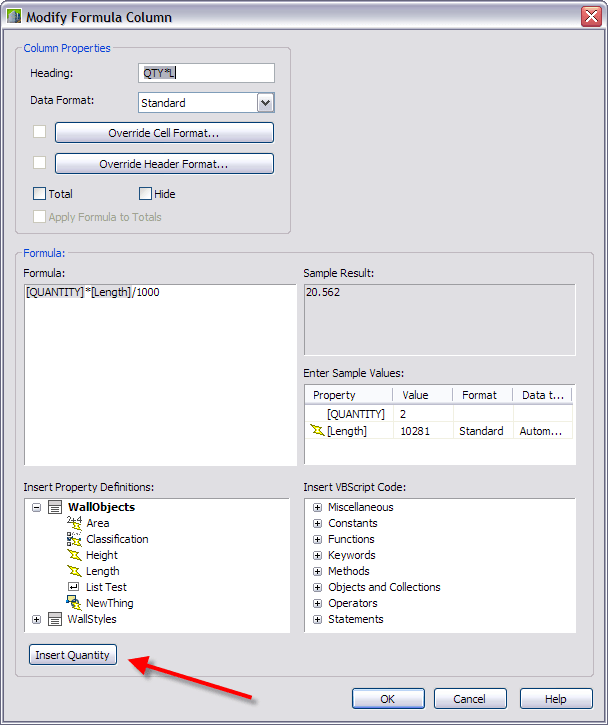
Schedule with images

Tuesday, March 7, 2006
Live Clipboard an i-drop killer?
i-drop by Autodesk is a great technology but quite niched and somewhat limited. Nothing wrong with that. But, what might be the next thing then? When I read Scobleizer, Ray Ozzie both at Microsoft and Dave Winer I thought that the ideas of a Live Clipboard might work the way i-drop works and even more so. Let's see what happens with this idea. There is a lot of talk about this now. Just imagine copying a drawing from the web and paste it into AutoCAD or into an EDM application or Explorer, or copy something from within Revit and paste it into Microstation using XML formats like IFC from one BIM application to another.
Saturday, March 4, 2006

Friday, March 3, 2006
How to install a printer from a DWF
I have though about sharing this tip about "Printer Connector" a long time. I've got some emails from those wondering how it could be done after Shaan Hurley, Autodesk posted about a solution I made a few years ago at the company I work for. Now I got reminded again reading about Internal Facilities Management application by Scott Sheppard, Autodesk. I assisted Brian Mathews and Brian Pene at their class at Autodesk University 2005 in Florida and I really recommend you to take a look at the available class materials you can find on Scott's blog. Actually Brian was one of those wondering how I had solved installing the printers from a DWF hyperlink. Nice to see that it's used at Autodesk too. Now to the solution that is really simple but useful.
Start with a DWG drawing of the facility and add a block that represents a printer or plotter. Add a hyperlink on the block that links to a html file on a location available for all users. Use the name of the printer and maybe size and type as description. The content of the html file is here. Just change the server name and the printer name in the code. Now Plot or Publish the drawing to DWF. If you have several levels and buildings you can create a main html page that links to these DWF files. The DWF files can also be embedded into a html page and add some simple instructions that they should click on a printer etc.
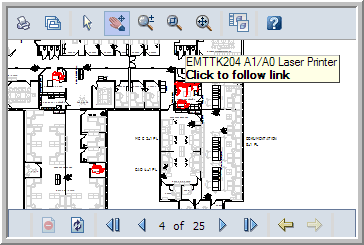 I assisted Brian Mathews and Brian Pene at their class at Autodesk University 2005 in Florida and I really recommend you to take a look at the available class materials you can find on Scott's blog. Actually Brian was one of those wondering how I had solved installing the printers from a DWF hyperlink. Nice to see that it's used at Autodesk too. Now to the solution that is really simple but useful.
Start with a DWG drawing of the facility and add a block that represents a printer or plotter. Add a hyperlink on the block that links to a html file on a location available for all users. Use the name of the printer and maybe size and type as description. The content of the html file is here. Just change the server name and the printer name in the code. Now Plot or Publish the drawing to DWF. If you have several levels and buildings you can create a main html page that links to these DWF files. The DWF files can also be embedded into a html page and add some simple instructions that they should click on a printer etc.
<html>
<head>
</head>
<p><font face="Verdana">Printer connection...</font></p>
<SCRIPT LANGUAGE="VBScript">
<!--
on error resume next
Set WshNetwork = CreateObject("WScript.Network")
PrinterPath = "\\SERVERNAME\PRINTERNAME"
msg="Do you want " & PrinterPath & " to be Default printer?"
answ=msgbox(msg,vbYesNoCancel,"Add Printer")
If answ=vbYes then
  WshNetwork.AddWindowsPrinterConnection PrinterPath
  WshNetwork.SetDefaultPrinter PrinterPath
elseif answ=vbNo then
  WshNetwork.AddWindowsPrinterConnection PrinterPath
end if
history.back()
-->
</SCRIPT>
</html>
See this html code or check in the DWF Viewer Help.
<script language="vbscript">
<!--
on error resume next
if not IsObject(CreateObject("AdView.AdViewer")) then msgbox "You need the DWF Viewer!" & vbNewLine & vbNewLine & "Please contact the IT department."
function ShowPrinters
EView.Viewer.HighlightLinks = not EView.Viewer.HighlightLinks
end function
-->
</script>
<html>

<head>
<meta http-equiv="Content-Type" content="text/html; charset=windows-1252">
<title>Printer Connector</title>
<style type="text/css">
a:link {color: #FFFFFF}
a:visited {color: #FFFFFF}
a:hover {color: #FF0000}
a:active {color: #FFFFFF}
</style>
</head>

<body bgcolor="#4083A8" topmargin="0">

<OBJECT
id=Eview
codeBase="file:///server/dwfviewer/installer/DwfViewerSetup.cab"
classid=clsid:A662DA7E-CCB7-4743-B71A-D817F6D575DF
width=100%
height=92% border="2" vspace="4">
<param name="_cx" value="38788">
<param name="_cy" value="25056">
<param name="BackColor" value="7895160">
<param name="EmbedDoc" value="0">
<param name="Src" value="Printers.dwf?NotifyMissingFonts = false">
<param name="ViewerParams" value="?NotifyMissingFonts = false">
</OBJECT>

<script language="vbscript">
<!--
; If multipage DWF's are used navigate to the page named "Level 8"
EView.Viewer.Page = "Level 8"
-->
</script>

<font face="Verdana" color="#FFFFFF" size="2">
<i>Click on the
<a title="Flash the printers" href="vbscript:ShowPrinters">printer</a> you want to have installed.
</i></font><br>
<font face="Verdana" size="1"><font color="#FFFFFF">Send mail to
<a href="mailto:HelpDesk%20IT?subject=Printer Connector">HelpDesk IT</a> or
the </font>
<a href="mailto:info@jtbworld.com?subject=Printer Connector">
Author</a><font color="#FFFFFF">
with questions or comments about Printer Connector.</font></font>
</body>

</html>
I recommend that you activate usage of single click to follow hyperlinks or include instructions to hold down CTRL + Click.
I hope you get the idea. Feel free to use it, have fun and impress on your management and users and IT. Feel free to contact me if you got any questions or post a comment.
Companies worldwide selects JTB FlexReport
Companies all over the world uses JTB FlexReport. From Australia and Portugal to US.
Teleca Ltd., UK; Sec. Regional do Equipamento, Portugal; Cúram Software, Irland; WSP Management Services, UK; SNG SurgutNIPIneft Russia; Port of Seattle, US; Pate Engineers, Inc., US; Affinion Group, US; Guardian Life, US; GPD Associates, US; GAI Consultants, Inc., US; GHD, Australia; Bascon A/S, Denmark; Aker Yards AS, Norway; CDS/Muery Services, US; Britannia Building Society, UK; RMT, Inc., US has recently purchased JTB FlexReport as their solution to have better control on their network licenses based on the FLEXlm or FLEXnet technology. E.g. details on what users are using the product most or least can be reported on as well as graphical reports as seen below. This is done for applications like ARM, Rational Rose, SoldWorks, AutoCAD, MagiCAD, Novapoint, Mathcad, ProE, Matlab, ESRI ArcGIS, Intergraph GeoMedia, SpeechWorks and others.
Support for consolidating several version of one application. If you have Autodesk subscription you are allowed to have for example AutoCAD 2007, AutoCAD 2006 and AutoCAD 2005 available for the users as long as you don't use more licenses as you have subscription for. JTB FlexReport can group these licenses together in one graph.

Read more about JTB FlexReport and ask for a free fully functional trial.
Thursday, March 2, 2006
Keep up to date with the latest ADT 2007 news...
If you want to see all Architectural Desktop 2007 posts on this blog and on my web site or if you want to see what all other bloggers says. Some have started like Matt Dillon, Chris Yanchar and Robin Capper.
Keep up to date with the latest AutoCAD 2007 news...
See this BLAUGI post by Mike Perry at AUGI about Breaking info on AutoCAD 2007.
If you want to see all AutoCAD 2007 posts on this blog and on my web site or if you want to see what all other bloggers says.
Wednesday, March 1, 2006
Subscribe using email
AutoCAD 2007 DWG file format
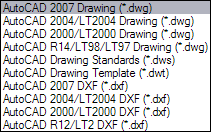 New DWG file format. Now it's AutoCAD 2007 DWG. So users without AutoCAD 2007 needs to download DWG TrueConvert™ that can batch convert from AutoCAD 2007 DWG to 2004, 2000 and R14. Or you can use SaveAs that now allows to save down to R14 DWG and R12 DXF as well as several versions in between.
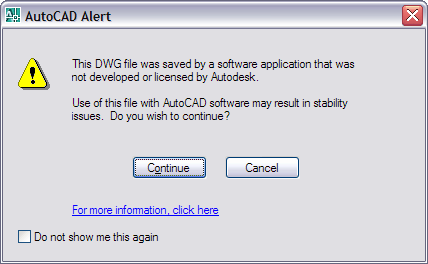 AutoCAD 2007 will optionally warn users when the DWG file they are opening was saved using an application that was not created by an Autodesk product or RealDWG licensee.What is a Trusted DWG? Answer here. In the tray within AutoCAD you will either see
 for a Trusted Autodesk DWG and
 for a Non Autodesk DWG.
Use a feed reader
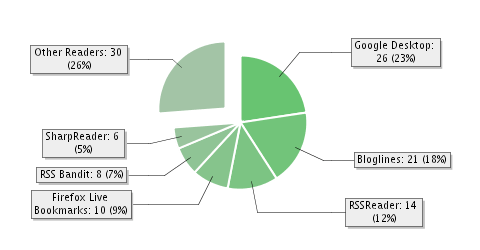
Here is the statistic for users that subscribes to the blog feed:
http://feeds.feedburner.com/JtbWorld
 Using a feed reader is an easy way to get the latest from this blog and others. If you want to keep the news coming about AutoCAD 2007 and other things consider using a feed reader.
Subscribe Now!
...with web-based news readers. Click your choice below:


 ...or download a free reader:
RssReader
SharpReader RSS Aggregator
RSS Bandit (the one I use most right now)
 Using a feed reader is an easy way to get the latest from this blog and others. If you want to keep the news coming about AutoCAD 2007 and other things consider using a feed reader.
Subscribe Now!
...with web-based news readers. Click your choice below:
...or download a free reader:RssReader
SharpReader RSS Aggregator
RSS Bandit (the one I use most right now)
AutoCAD 2007
A picture of AutoCAD 2007 that shows a lot of the news.
It is a 3D model on screen with shadows, conceptual visual style, edge overhand, edge jitter, silhouette edges, obscured edges in a perspective projection that you can work in.
Anchored palettes as icons only to the left and with text and icons to the right.
The dashboard palette is a single palette with most 3D features.
What can you see more?

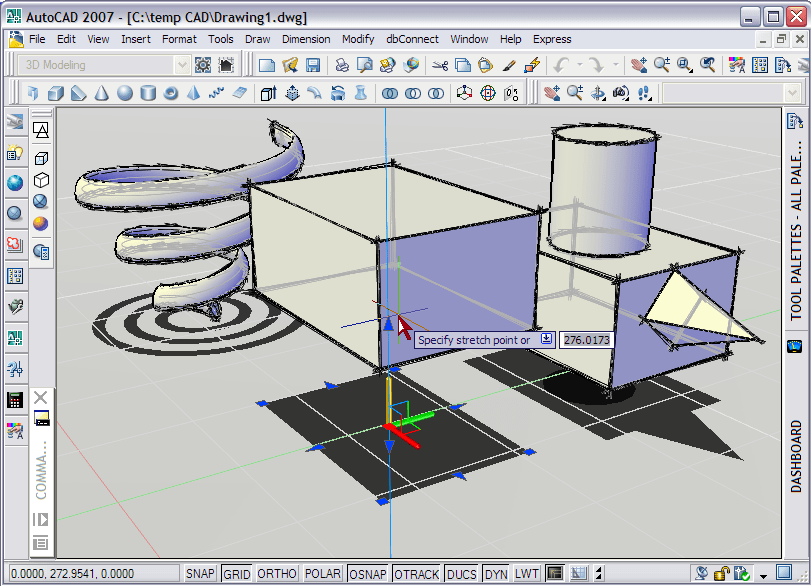
AutoCAD 3D
3D is the big thing in AutoCAD 2007 that is soon to be released.
More will come on the blog and website.
www.jtbworld.com/autocad2007.htm
Subscribe to:
Posts (Atom)