Saturday, December 16, 2006

Introduction to Windows PowerShell

Are you using VBScript, CMD or BAT? Are you using the old Command line using cmd.exe? Then Windows PowerShell is worth looking at. Windows PowerShell™ is a new Windows command-line shell.

Take a look at the VBScript to Windows PowerShell Conversion Guide. See Windows PowerShell Team blog and download from the homepage for Windows PowerShell.

You can run Windows command-line programs and start Windows graphic programs in Windows PowerShell. In Windows PowerShell, script files have a .ps1 file name extension.

Support for Tab-Completion. Start with for example get- and press tab several times and find cndket's like Get-Acl, Get-Alias, etc.

Windows PowerShell is built on top of the .NET common language runtime (CLR) and the .NET Framework, and accepts and returns .NET objects and you work with methods and properties.

Windows PowerShell has syntax features and keywords that are very similar to those used in the C# programming language.

A cmdlet (pronounced "command-let") is a single-feature command that manipulates objects in Windows PowerShell. You can recognize cmdlets by their name format -- a verb and noun separated by a dash (-), such as Get-Help, Get-Process, and Start-Service.

Windows Management Instrumentation (WMI) is supported with the cmdlet for accessing WMI objects, Get-WmiObject and is one of the most powerful ones.

You can reference COM objects like WScript.Shell.
$WshShell = New-Object -ComObject WScript.Shell

You can use the Win32_Product class to install Windows Installer packages, remotely or locally.

In addition to the familiar file system drives, such as C: and D:, Windows PowerShell includes drives that represent the HKEY_LOCAL_MACHINE (HKLM:) and HKEY_CURRENT_USER (HKCU:) registry hives.

Technorati tags:

Hyperlinks in Word documents to work in PDF

If you want to use one of the free PDF printers or writers that are available hyperlinks does not always convert correctly when the Word document is printed to PDF. Typically this is when they are wrapped on two or more rows or have very long paths.

I've tried CutePDF Writer, Pdf995 and PDFCreator among others and they all had this limitation.

To solve this using CutePDF there is no free solution. You need to buy ($49.95) CutePDF Pro (Commenting -> Link Tool) to add those links back onto created PDF document.

PDF995 had the solution with the Word toolbar addin that comes with pdfEdit995 that also is free.

PDFCreator could not solve this at all.

Both the support for CutePDF and Pdf995 where quick to answer my questions.

Technorati tags: , , , ,

Friday, December 15, 2006

Useless feature in AutoCAD field?

There is a Field name introduced in AutoCAD 2007 named LispVariable. When selected it shows all Lisp variables available at that moment. Cool! But how useful is it. If you open the drawing and not have that variable and updates the field it will show ####. Have you found any use for LispVariable?

Technorati tags: ,

Secure backup online with Mozy is getting better

 Here's the latest new stuff in Mozy:

  • In-Windows Restore Files in Folder (just right click in Windows Explorer) and a new virtual folder directly in My Computer to the backup files. 
  • Unlimited restores (web or in-windows!). Before there was a limitation of the number of backups per month. 

2 GB of 100% free online backup space and 30GB - $4.95/month. Secure and easy to use. Use the link here or the referral code - VWW637 - and get another 256MB of free backup space.
I've used Mozy for some months. I feel safe and I like it a lot. It can even backup my Outlook data files when Outlook is running.

Update: For $4.95 a month, users may now backup unlimited amounts of data. Mozy now also offers consumers the option to order a copy of their data on DVD, shipped next-day air via FedEx.

Technorati tags: ,

Thursday, December 14, 2006

Windows Vista and Office 2007 compatibility for JTB FlexReport

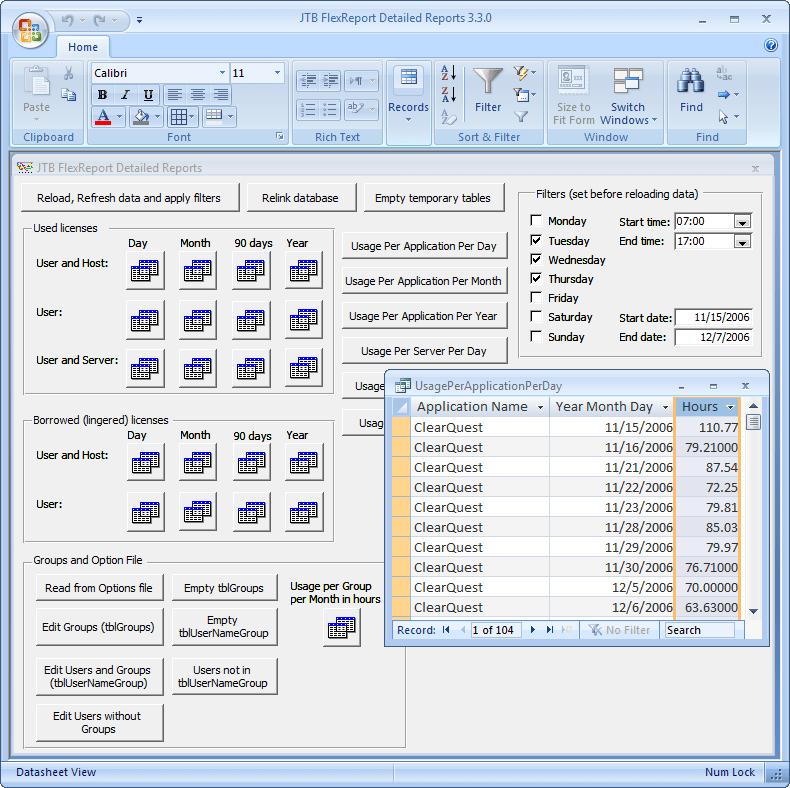
I started to make sure my products work in Windows Vista as well as with Office 2007. During earlier betas of these versions there where a lot of incompatibility but now with the final versions Microsoft have managed to solve these problems so without any changes to JTB FlexReport it work fine in my tests with both Windows Vista + Office 2007 and Windows XP + Office 2007 .


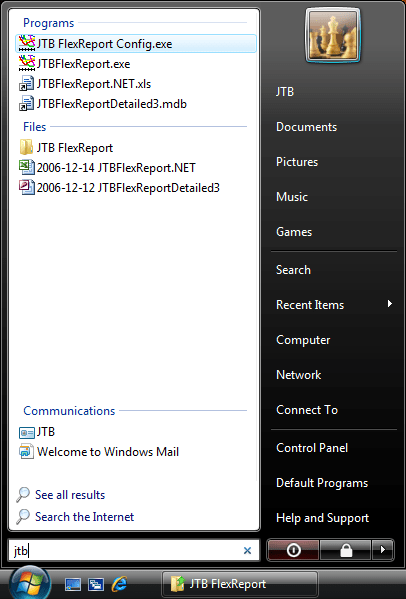
And here comes a Windows Vista tip. To quickly run an application click on Windows Start and enter for example jtb and see the result to the left or enter cmd followed by Enter to start the Command Prompt.


Technorati tags: ,

Open source A/E/C CAD

A start-up, non-profit company, geared towards increasing the performance of the A/E/C Industry of Asia Pacific intend to create a special software, or group of software's, and distribute it to the public through open source. Functionalities included would be 2D, 3D, design computations, process optimization, virtual simulation, Quantity Breakdown, Import/Export to data library.

If you would like to participate feel free to contact josepaolocalma@yahoo.com. He is right now looking for a competent Project Manager for this project.

Technorati tags: ,

Wednesday, December 13, 2006

Why SmartPurger can batch run AutoLISP files directly

Most batch programs for AutoCAD and its verticals can only run script files (files with the SCR extension). SmartPurger can also run AutoLISP files (files with the LSP, FAS or VLX extension) directly among all other useful things. Here is one reason why it can be useful.

If you want to redefine a block definition without inserting a new block in a drawing you can insert a file using = as this example shows.

(command "insert" "blockname=c:\\path\\filename.dwg"))
(command)

The row (command) cancels the insert command but still the block is updated. But if this is run by the script command (command) stops the script from executing any further. It doesn't help to load a lisp file from the script file. But this can work when running a lisp file using SmartPurger like this sample below. The last to rows are needed for SmartPurger to continue and process the next drawing.

; The name of the block to redefine
(setq blockname "Tag - Metric")
; The path and name to the block use for redefining
(setq blockfile "C:\\temp\\Tag - Metric.dwg")
; Insert the new block and cancel using (command)
(command "insert" (strcat blockname "=" blockfile))
(command)
(command "QSAVE")
(command "_QUIT")

Click here to download the free trial of SmartPurger. It also for the AutoCAD 2007 platform where you might have trouble to get ScriptPro to work. The trial is fully functional except that you can only batch 3 drawings at a time. The fully functional version can be purchased from 25 USD. Since it has ability to close dialog boxes like the one for missing shapes it can almost run forever without interruption.

Technorati tags: ,

Sunday, December 10, 2006

AutoCAD Error Aborting FATAL ERROR: Unhandled e06d7363h Exception at 7c812a5bh


I was working with Autodesk Architectural Desktop 2007 when I started to get this error. After a couple of times I noticed that it happened when I clicked on the File menu. I did not want to reinstall and wondered what it could be. Other menues worked well so I thought about the Drawing History. I started to set Options>Open and Save>File Open>Number of recently-used files to list to 0 and restarted ADT. Now I could access the File menu. It also helped to delete this registry key: HKEY_CURRENT_USER\Software\Autodesk\AutoCAD\R17.0\ACAD-5004:409\Recent File List
I can reproduce the error editing the key File1. When it is C:\ADT2007 ABC spaces construct.dwg it crashes. This is a non existing drawing. When changed to C:\test.dwg that also is non existing it does not crash. What if it was related to the lenght. I tried C:\12345678901234567890123.dwg and it crashed and C:\1234567890123456789012.dwg without getting a crash. Oh well.
But I want the history and I want to be able to use names with more than 17 characters including .dwg. I've used files with names like this before and it worked so it's probably something else related to this problem. Still not satisfied I searched the Knowledge Base and found
TS1061587 that was about the same error message but the issue was not related. I tried to enable hardware acceleration as the solution was and what do you know. It solved the problem. For a moment. Then it returned again. Workaround found but not satisfied with it. Let's see if the ADT Error Report's I sent in to Autodesk helps... If you know of a solution please add a comment.
Update! The problem has started to happen in AutoCAD 2007 as well.
2007-04-07 Update!
A solution is found. See this
KB document. This
error will occur if an incorrect version of a Microsoft DLL file MFC80U.DLL
exists on the computer.
2007-10-25 Update. Shaan posts about AutoCAD crashes when the File menu is accessed

Friday, November 3, 2006

Windows Live Writer and Blogger Beta problem solved

I got WLW working again after migrating to Blogger Beta. WLW didn't post at all and could not load the style template.

I got this tip by email from Joe Cheng at Microsoft that solved the problem. I initially posted about it to the msn Groups.

Find this registry key:
HKEY_CURRENT_USER\Software\Windows Live Writer\Weblogs\2e27accf-425c-4996-9c2d-a075aad9307a

Rewrite BlogId and PostApiUrl to use "beta.blogger.com" instead of "www.blogger.com" (leaving the rest of the URL the same). Then restart Writer and try again.

Sunday, October 29, 2006

Hotfix for users IE7 and Autodesk Design Review 2007 or Autodesk DWF Viewer 7.0

Since IE7 beta and the recent IE7 final release I was a bit worried that it took so long but here it is. See this post on Beyond the Paper blog or at Autodesk support site. "Autodesk has a Hotfix for Autodesk Design Review 2007 and Autodesk DWF Viewer 7.0 that addresses compatibility issues with Microsoft Internet Explorer 7."

Hotfix for AutoCAD 2007-based products - Closing Drawings

Been quite busy lately so I just installed this Hotfix - Closing Drawings - AutoCAD® 2007-based products may crash when closing drawings. This problem can also manifest itself while saving or plotting drawings.

Friday, October 13, 2006

New companies using JTB FlexReport

Companies all over the world uses JTB FlexReport, the FLEXnet/FLEXlm license report solution to keep better control on their licenses, usage and costs.

Some of the new customers are:

Arlington County DES Eng. Div., Virginia, US
TU Ilmenau Universitätsrechenzentrum, Germany
BC Consultants, Inc., Virginia, US

TDC, Denmark
BOOTH HANSEN, Illinois, US
Dürr Systems GmbH, Germany

Sandis, California, US
Coomes Consulting Group Pty Ltd, Australia
Vulcan Materials Company, Alabama, US

Aker Kvaerner, Norway
SHW Group LLP, Texas, US
South Tyneside Council, UK

Benchmark Group, Alabama, US
Coperion Werner & Pfleiderer, Germany
HWS Consulting Group, Inc., Nebraska, US

Guardian Life, New York, US
Woodward, Illinois, US
PÖYRY TECNOLOGIA, Brasil

STS Consultants, LTD., Wisconsin, US
George Kelk Corporation, Canada
Royal Huisman Shipyard b.v., The Netherlands

GF KONSULT AB, Sweden
Johnson, Mirmiran and Thompson, Baltimore, US
Gunnar Karlsen a.s, Norway

Alfa Laval Lund AB, Sweden
Universitaet Karlsruhe, Germany
Kleinschmidt Associates, US

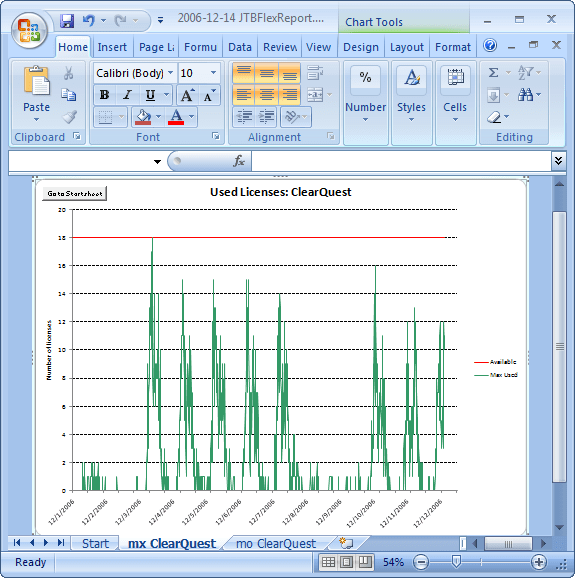
JTB FlexReport is their solution to have better control on their network licenses based on the FLEXlm or FLEXnet technology. E.g. details on what users are using the product most or least can be reported on as well as graphical reports as seen below. This is done for applications like ARM, Rational Rose, SoldWorks, AutoCAD, MagiCAD, Novapoint, Mathcad, ProE, Matlab, ESRI ArcGIS, Intergraph GeoMedia, SpeechWorks and others.

JTB FlexReport has support for consolidating several version of one application. If you have Autodesk subscription you are allowed to have for example AutoCAD 2007, AutoCAD 2006 and AutoCAD 2005 available for the users as long as you don't use more licenses as you have subscription for. JTB FlexReport can group these licenses together in one graph.

Read more about JTB FlexReport and ask for a free fully functional trial.

Thursday, October 5, 2006

(Code Search)

I tried the new Google Code Search and it looks promising including support for regular expressions. But it seems to not find things as I wish it would find.

Google Code Search

Does the code really need to be in an archive like zip?

Take a look at this search for some code I have in an AutoLISP file:

http://www.google.com/codesearch?hl=en&lr=&q=%5C%28vlax-ename-%3Evla-object+area&btnG=Search

It finds one in a newsgroup that is zipped. Why could it not find this file I wonder that is not zipped:

http://www.jtbworld.com/download/HATCHB.LSP

Another wish is that it could find code snippets on web sites and blogs.

Technorati tags:

Tuesday, October 3, 2006

Architectural Desktop 2007 Service Pack 1 released

ADT 2007 SP1 was made available for some days ago and I recommend to download the readme and see if it make sense for you to install it. It includes the AutoCAD 2007 SP1 as well so there is a lot of reasons why you should install it.
...improving upon a number of features within the product, some of which include, Construction Lines, Doors,Inserting DXF Files, Multi-View Blocks, Project Management, Properties Palette, Reference Keynote Legend, Roof Slabs, Spaces, Stairs, Style Manager, Tool Palettes, Windows while also addressing early customer feedback.

Performance is also improved in some areas. Project-based callouts will no longer make plot preview that slow. File open time has also been somewhat improved. This is true if FIELDEVAL is set to update when plotting or opening. The use of Project Standards will no longer have a significant effect on file open time.

Notice also the hotfixes:

Hotfix - Plotting to Raster Files Performance Improvement

Hotfix - Regenerating Drawings Containing Text

Some of the latest blog posts

Subscribe to RSS headline updates from:
Powered by FeedBurner

Contact Us | About JTB World | Website General Terms of Use | Privacy Policy
^ Top of page

© 2004- JTB World. All rights reserved.