Friday, January 19, 2007

Do you want to make an impression?

It is free so make use of it now that most Beta problems has been removed. But be aware of the catch. You might get addicted and just have to buy it when it is out of Beta.

Impression Preview 3 is now available at Autodesk Labs. The updates to Autodesk Impression can be downloaded at no cost on http://www.autodesk.com/impression


Watch Video

PS. This offer is valid only in Australia, Canada, Ireland, New Zealand, the United Kingdom, and the United States. So in Sweden we are left out so far. Waiting for some good...

Technorati tags:

Thursday, January 18, 2007

DOSLib 7.5 for AutoCAD 2007

According to Dale Fugier at Robert McNeel & Associates DOSLib 7.5 for AutoCAD 2007 is now available from www.mcneel.com. DOSLib is a free LISP library of Windows and DOS functions for AutoCAD users and developers.

This update contains several new functions and some fixes to existing ones.

Technorati tags:

Cannot edit a PivotTable in group edit mode

What to do if this message comes up in Microsoft Excel?

Right click on a sheet and select Ungroup Sheets or click on one of the sheets that is not selected.

If you don't know what group edit is, here is a little explanation from the help file on "Edit data on multiple worksheets".

When you select several worksheets and then change the data on one of them, the changes are applied to the same cells on all the selected worksheets.

And a nice note that can be useful.

When you edit data, the changes affect all selected worksheets and may inadvertently replace data that you didn't mean to change. If needed, you can view worksheets at the same time:

  1. On the Window menu, click New Window.
  2. Switch to the new window, and then click a worksheet that you want to view. Repeat for each worksheet that you want to view.
  3. On the Window menu, click Arrange, and then click the option that you want.

To view worksheets in only the active workbook, select the Windows of active workbook check box.

Technorati tags:

Tuesday, January 16, 2007

Personal backup of your drawings and documents using Mozy

Here is a tip for those that don't fully want to rely on their IT/IS department for backups. How many times have you tried to get some drawings or documents restored from backups having to wait hours for help and in worst case get the answer that the backup had failed? I have been there several times and sometimes made my own backup to my PC or to an USB memory stick.

The tip is to use Mozy online backup. Even if you work with files and have them open in (and locked by) for example Word, Excel or AutoCAD, Mozy is able to backup them. Some other services I have tried halt with a dialog box when trying to backup a locked up file and that is not good. Mozy can run in the background and take the backups (several times a day) and you don't need to worry about remembering to take the backup.

Below I show how it can look like if you want to restore from the backup. It is done directly within Windows Explorer.

2 GB of 100% free online backup space and unlimited space for only $4.95/month. Secure and easy to use. Use the link here or the referral code - VWW637 - and get another 256MB of free backup space. Now with unlimited restores and easy right click restore in Windows Explorer

I see that Mozy is going up the ladder quickly. Now on place 4. I also noticed that Mozy is no longer a beta product.

Technorati tags: ,

Monday, January 15, 2007

ADT tip: Browsing Property Data

AecPropertyDataBrowse is a command I found not many know about but can be useful.

Open the tool palette that contains the Browse Property Data tool, and select it.
This tool is located with the Scheduling and Reporting Tools in the Stock Tool Catalog.

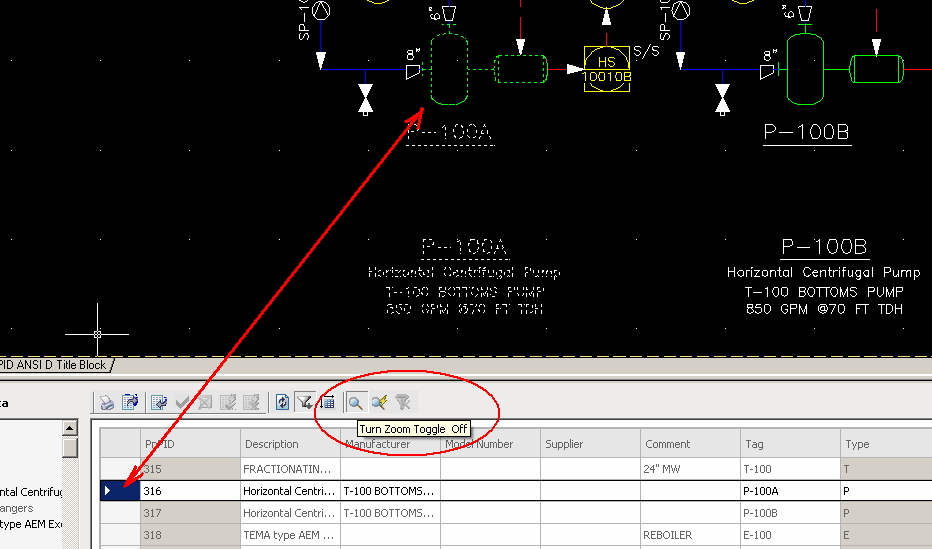
There is an option that allow an object to be highlighted in the drawing when you select a property set that is attached to the object or its style as well as zoom into the object.

Technorati tags:

Wednesday, January 10, 2007

Fix problems with Flash Player like when New Features Workshop doesn't work

I got an email from a blog reader an wanted to share the solution I gave that helped.

For some reason (maybe due to updating ADT2007 to SP1), my New Features Workshop (in ADT2007) is not working. I know it uses Flash Player 9 (which also is not working on Internet Explorer, but is working on Firefox). I have downloaded and installed all the updates for IE, DirectX, Flash Player.

Here is what I suggested and uninstalling and installing Flash Player solved it.

First try to delete Temporary Internet Files and see if that helps. If that does not work uninstall the Flash Player using the instructions on this site (because it's not so obvious so you can use Control Panel>Add or Remove Programs). Restart the computer. Install the Flash Player again from the ADT 2007 CD at Install\support\Flash\Install Flash Player 8 AX.exe or install the latest available from Adobe.

It can for example affect installation of AutoCAD and the problem can be seen in the installation log file like below.

Installation started: Flash
Command = "\support\flash\Install Flash Player 8 AX.exe" /q
[Error: 1] Incorrect function.
Installation failed: Flash
[Info] Failure is ignored
[Error: 1603] Fatal error during installation.
Installation failed: AutoCAD 2007
Installation aborted

Version test for Adobe Flash Player.

Technorati tags: , ,

Google 'CAD' news

SketchUp 6 is Released! It even includes Layouts making it even more useful when it comes to 2D presentations. Other new features.

Google Earth 4 Officially Released as well.

FLEXlm/FLEXnet based applications not releasing the licenses properly

Thanks to a JTB FlexReport customer I have I got this information. IBM told them there is defect in the Macrovision’s 10.8 version of their License Manager. This was related to Rational applications but might as well be the the case for other applications like AutoCAD 2007 that uses this version and I know this has been a problem for Autodesk applications as well.

A workaround for many have been to use the TIMEOUTALL feature.

If you can, try to get at least version 10.8.5 from your vendor or reseller. I know that version 11.1 and version 11.4 exists but is not available from Macrovision's public ftp from what I can find.

Anyway, here is the FLEXnet licensing end user guide for 11.4 or newer ones.

The lowest acceptable value for timeout of Autodesk products is 900 seconds (15 minutes) and for MathWorks is 14,400 seconds (4 hours) and for IBM 7200 seconds (2 hours).

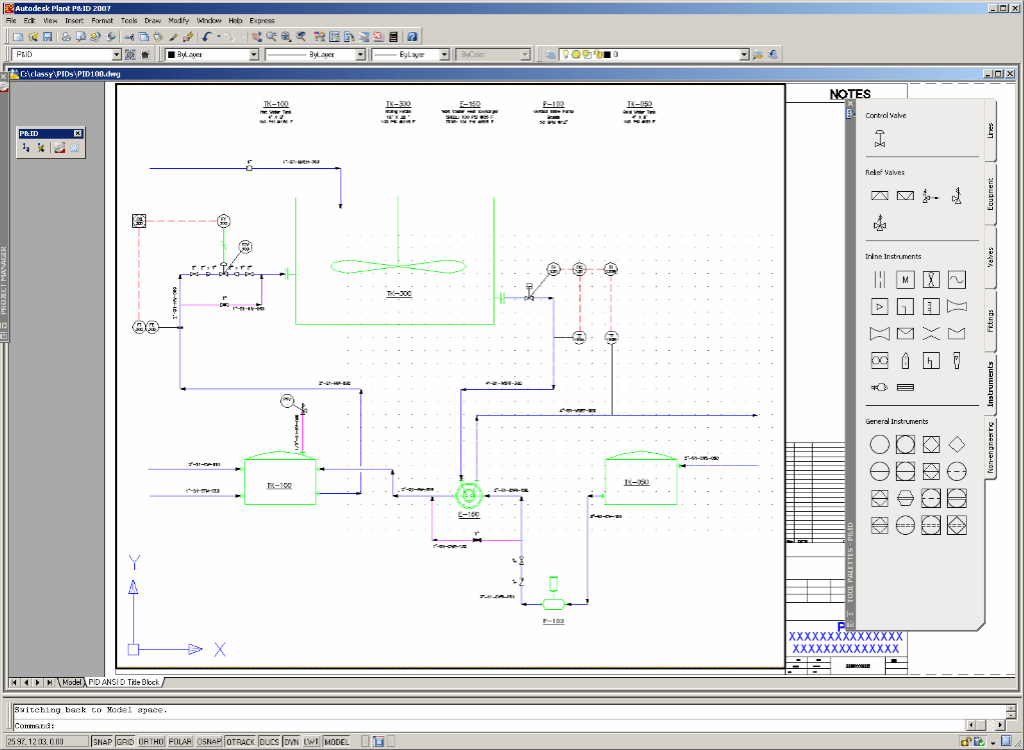
AutoCAD P&ID 2007

AutoCAD P&ID 2007 (aka Guinness beta) is soon to be released. The beta period is over. This is Autodesk’s first major venture into the Process and Power industry.

The public discussion group for AutoCAD P&ID has been opened.

www.autodesk.com/discussiongroup-autocadpid also works.

Technorati tags: , ,

Monday, January 8, 2007

ADT Tip: INSPECT

Here is a tip about a useful command introduced in Autodesk Architectural Desktop 2005 and available in newer versions as well as ABS and Civil 3D. The ADT command AECINSPECT (or _AECINSPECT or INSPECT) lets you hover over entities to inspect and get information about them like layer, style name and style description, keynote information and property set information. Good for inspecting drawings without having to select the objects. Autosnap tooltip has to be enabled for this command to work. The initial value for the AUTOSNAP variable is 63.

Technorati tags:

Sunday, January 7, 2007

Autodesk trademarked Cyberspace

I ended up at archive.org because I found that my SmartPurger application dated from 2004 had been added to the archive. Searching around I found a TV program from 1992 about Autodesk Cyberspace.

In 1988, John Walker, then the chairman at Autodesk, Inc., of Sausalito, had the idea of building a software toolkit for creating shared virtual realities. Autodesk trademarked the word Cyberspace for an (unsuccessful) product called the Cyberspace Developer’s Kit. William Gibson was somewhat annoyed by this and jokingly claimed he was going to trademark Eric Gullichsen, this being the name of the first lead programmer on the Autodesk Cyberspace project. - http://www.rudyrucker.com/lifebox/lifeboxsample.pdf

1992 the same year as this program was broadcast Autodesk’s stock price went down and Rudy Rucker that also worked with the Cyberspace project was out of the industry.

Autodesk last year at Autodesk Island in Second Life. Another kind of Cyberspace 14 years later.

Technorati tags: ,

Friday, January 5, 2007

Some great old news from Autodesk

Finally! Drawing Tabs for AutoCAD 2007 and based products by Autodesk. Via Between the Lines blog.

Batch Publishing DWF files with AutoCAD 2007. Via Beyond the Paper blog.

Technorati tags: , , ,

Thursday, January 4, 2007

Skype behind IIS error


I got a problem with Microsoft Internet Information Services (IIS) and the Default Web Site. I found out that Skype was taking up port 80. The error message "Unexpected error 0x8ffe2740 occurred." was not obvious and the System Event showed below neither.

Event Type: Error
Event Source: W3SVC
Event ID: 115
Description:
The service could not bind instance 1. The data is the error code.
For additional information specific to this message please visit the Microsoft Online Support site located at: http://www.microsoft.com/contentredirect.asp.

For more information, see Help and Support Center at http://go.microsoft.com/fwlink/events.asp.
Data:
0000: 40 27 00 00 @'..

Solution to this problem. In Skype>Options>Connections uncheck this option "Use port 80 and 443 as alternatives for incoming connections" or temporary stop Skype, start the Default Web Site and after that Skype.

Technorati tags: ,

Wednesday, January 3, 2007

Learn ADT has a great compilation on ADT 2007 Wall Cleanups

Wall Cleanups can be most frustrating in Autodesk Architectural Desktop for many users. Share this link on the Learn ADT blog with them.

In addition to these tips don't forget to use the basic commands like Fillet, Extend and Trim first. There are so many times I have helped users with this simple tip. Another help can be to isolate the problematic walls to identify the problem. Copy some of the walls to an empty place and try to solve the problem there, maybe delete some of the walls to see if they are the problem.

Technorati tags:

Some of the latest blog posts

Subscribe to RSS headline updates from:
Powered by FeedBurner

Contact Us | About JTB World | Website General Terms of Use | Privacy Policy
^ Top of page

© 2004- JTB World. All rights reserved.