Thursday, March 1, 2007

ObjectDCL sold

According to an email I got from Andrea Andreetti ObjectDCL has been sold. We will se how it goes with OpenDCL and the efforts to keep it free. www.Ductisoft.com will be up in 2 or 3 week and ObjectDCL will be ready in around June 2007. No price disclosed so far.

Greetings to all,

As you already know by now,
ObjectDCL has been sold.

It is a fact.

Martin Leduc P.E. and I, Andrea Andreetti, Are founders of DuctiSOFT inc. and are now owners of all legitimate and legal rights of this product created by M. Chad Wanless, according to the legal agreement signed between the two parties.

This transaction is to ensure the survival and proper operation of ObjectDCL.

www.DuctiSOFT.com will be available shortly and will allow you to download the new official version of ObjectDCL

Thanks again M. Chad Wanless.
Hoping you will enjoy the upcoming version.

Sincerly,
Andrea Andreetti       
President DuctiSOFT inc.

OpenDCL as well as ObjectDCL is for AutoLISP programmers who want to replace AutoCAD's limited DCL (Dialog Control Language) user interface language with a rich set of modern Windows user interface elements.

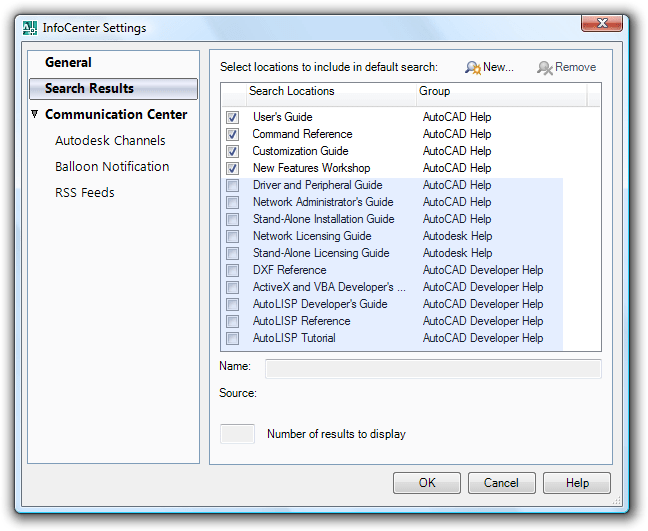
InfoCenter Search Results in AutoCAD 2008

As a CAD Manager, developer or the like notice that you probably want to include some other search locations that are not searched by default like Network Administrator's Guide, AutoLISP Developer's Guide and the like. You access InfoCenter Settings at the top right of AutoCAD 2008.

Usage of CAD in Vista

I run into this report by Pfeiffer Consulting on Windows Vista vs. XP and Mac OS X that among other things mention mouse precision. Something that every CAD user knows how important it is.

As far as Windows Vista was concerned, it was important to conduct the necessary benchmarks to compare the new release with currently installed versions of Windows. In the light of the results, the core recommendation coming out of this research is simple: before deciding on an upgrade to Windows Vista, it seems wise to conduct thorough productivity analysis in a concrete workflow situation to see if User Interface Friction here would negatively impact overall efficiency. This is particularly true in creative industries such as design, publishing and photo retouching, where mouse precision is a major concern. Overall, Mac OS X remains the most fluid environment of the three systems tested.

Mouse precision is obviously essential for any task where precise positioning of the cursor is essential> this is the case in graphic design, CAD, retouching, page layout and web design, among others.

The result below is according to the test report not hardware related.

I've not been using Mac OS X but I don't feel there is any difference between Vista and XP when it comes to the mouse.

Wednesday, February 28, 2007

7-Zip a great WinZip alternative

7-Zip from http://www.7-zip.org/ is a great open source software for handling zip files as well as other formats. One I have found use for is to extract the contents of ISO files.

The main features of 7-Zip

  • High compression ratio in new 7z format with LZMA compression
  • Supported formats:
    • Packing / unpacking: 7z, ZIP, GZIP, BZIP2 and TAR
    • Unpacking only: RAR, CAB, ISO, ARJ, LZH, CHM, Z, CPIO, RPM, DEB and NSIS
  • For ZIP and GZIP formats 7-Zip provides compression ratio that is 2-10 % better than ratio provided by PKZip and WinZip
  • Self-extracting capability for 7z format
  • Integration with Windows Shell
  • Powerful File Manager
  • Powerful command line version
  • Plugin for FAR Manager
  • Localizations for 63 languages
7-Zip

Tuesday, February 27, 2007

Process Explorer problem in Vista

Process Explorer (procexp.exe) is a great free software and can usually replace the Task Manager but in Windows Vista the following error message comes up when this is done.

C:\Windows\system32\taskmgr.exe
The requested operation requires elevation.

No solution found so far. Please add a comment if you find a solution to this.

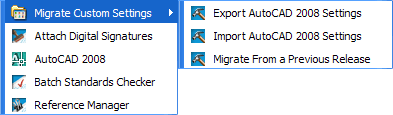
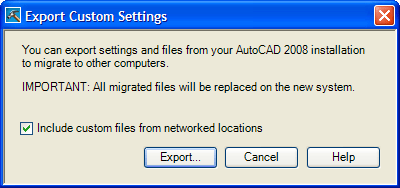
Migrate custom settings in AutoCAD 2008


Here's how it works in AutoCAD 2008. You can export your custom settings between systems running the same release of AutoCAD, or export the custom settings and later re-import them on the same computer if you need to reinstall AutoCAD. When exporting custom settings, a migration package is created that contains an XML file. This file contains custom settings, a listing of the custom files from local locations used with AutoCAD, and optionally, custom files in network locations. The migration package is a ZIP file archive, so it has the file extension ZIP. During the import process, you select the ZIP file archive that contains the exported custom settings you want to merge onto your computer.

File types that are most commonly included in the migration package are: xml, lin, pat, pgp, pc3, pmp, ini, shx, mlm, ctb, stb, cui, mnl, fmp, cus, psf, bmp, atc and aws.

Friday, February 23, 2007

lmtools.exe crash solution

If you get a crash of lmtools.exe (Macrovision's network license management application) when you try to access the system settings tab the solution is as follow.

  • Open System Properties, click Start, click Control Panel, and then double-click System.
  • Click the Advanced tab and, under Performance, click Settings.
  • Click the Data Execution Prevention tab.
  • Add all exe files like lmgrd.exe, lmtools.exe, lmutil.exe and the vendor deamon for example adskflex.exe to the Data Execution Prevention exception list.

    Data Execution Prevention (DEP) helps prevent damage from viruses and other security threats that attack by running (executing) malicious code from memory locations that only Windows and other programs should use. DEP can take advantage of software and hardware support.

    A detailed description of the Data Execution Prevention (DEP) feature in Windows XP Service Pack 2, Windows XP Tablet PC Edition 2005, and Windows Server 2003

  • Thursday, February 22, 2007

    Snipping Tool the Vista killer application or is it AutoCAD 2008?

    There are actually reasons to upgrade to Vista. Snipping Tool is not really a killer application but it is really a good one that is included with Vista.

    By the way. AutoCAD 2008 based applications are supported to run on Vista. For some it will be the killer application on Vista due to all the great 2D functionality added to it.

    Microsoft® Windows Vista™ Home Basic, Home Premium, Ultimate, Business, and Enterprise, Windows® XP Home and Professional SP2, Windows® 2000 SP4 can be used as operating systems to run AutoCAD 2008.

    You can use Snipping Tool that is found among the Accessories to capture a screen shot, or snip, of any object on your screen and then annotate, save, or share the image.

    There’s no hotkey so you have to right click on the icon and set a shortcut key for it. PrintScreen cannot be used though so use something else that is easy to remember F12 is close so try Ctrl+F12.

    Simply use a mouse or tablet pen to capture any of the following types of snips:

    • Free-form Snip. Draw an irregular line, such as a circle or a triangle, around an object.
    • Rectangular Snip. Draw a precise line by dragging the cursor around an object to form a rectangle.
    • Window Snip. Select a window, such as a browser window or dialog box, that you want to capture.
    • Full-screen Snip. Capture the entire screen when you select this type of snip.

    After you capture a snip, it's automatically copied to the mark-up window, where you can annotate, save, or share the snip.

    AutoCAD 2008 among applications with a Windows Vista logo

    This article contains a list of applications that have earned the "Certified for Windows Vista" logo or the "Works with Windows Vista" logo. These applications are officially supported on Windows Vista by our independent software vendor (ISV) partners.
    Here are some of the applications in the list:
    • SolidWorks Corporation SolidWorks 2007 SP01 15.1.103
    • TechSmith Corporation SnagIt 8 8.2.0.157
    • Autodesk, Inc AutoCAD 2008 - English
    • Autodesk, Inc AutoCAD LT 2008 - English
    • Autodesk, Inc Autodesk VIZ Stilton S020 9.0.0
    • Autodesk, Inc Autodesk 3ds Max 9 32-bit 9.5.0
    • Bentley Systems, Incorporated Bentley MicroStation V8 XM Edition 08.09.03.48 8.9.3037
    The complete list is here and is updated regularly.
    Applications that have earned the "Certified for Windows Vista" logo or the "Works with Windows Vista" logo

    Wednesday, February 21, 2007

    CAD Manager Control Utility for AutoCAD 2008

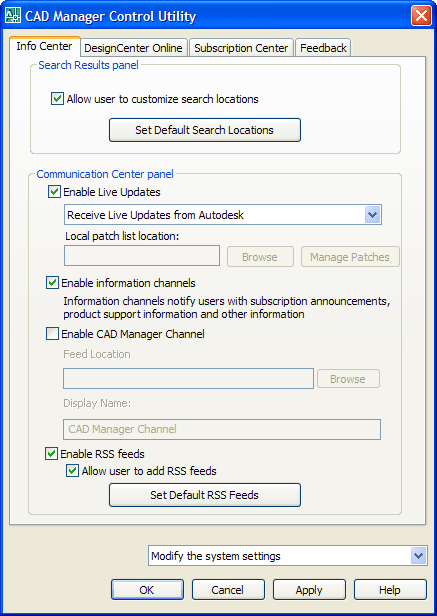
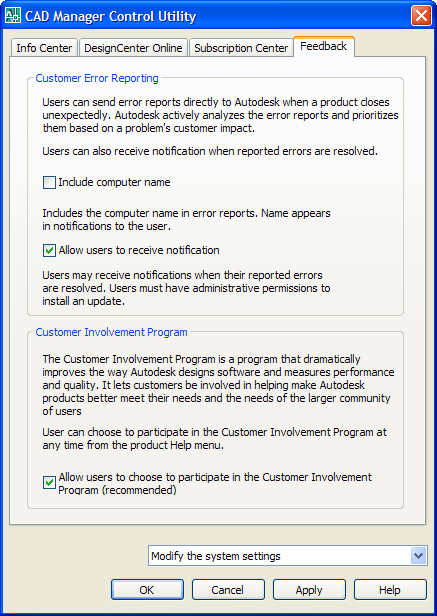
    The CAD Manager Control Utility has been updated for AutoCAD 2008. It is also still backward compatible with AutoCAD 2007.
    The Search Results tab of InfoCenter can be configured to display content from various sources, such as the product Help system, CAD Manager Channels, or the Internet. You can specify whether users who install from the deployment can customize access to their InfoCenter search locations. The following file formats are supported: xml, doc, chm, html, htm, pdf and xml. This is a great way for the CAD Manager to add the CAD Manuals and other useful documents so they are easily accessed.
    The search locations are saved in the registry at this location.
    HKEY_LOCAL_MACHINE\SOFTWARE\Autodesk\AutoCAD\R17.1\ACAD-6001:409\CadManagerControl\Infocenter\SearchResults
    The CAD Managers dream has come true. Enable CAD Manager Channels. Controls the display of the CAD Manager Channels in InfoCenter. Aside from being able to toggle CAD Manager Channels, you can also define the CAD Manager feed location and set the display name for the CAD Manager Channel.
    Enable RSS Feeds. Users can subscribe to any number of RSS feeds. Each feed is contained within a discrete InfoCenter category. Additionally, you can specify whether users can add RSS feeds.
    Customer Involvement Program (CIP) is also a new thing. As CAD Manager you should consider if you want to allow your users to participate or not. A lot of data is sent to Autodesk's servers. Don't worry. My suggestion is that you do participate. Check out here what CIP is.
    Something that is not possible with this utility is to edit the RSS feeds or add new ones as well as specify what AutoCAD Help files should be included in a search.
    If you want to hack some xml take a look at this file.
    %USERPROFILE%\Application Data\Autodesk\AutoCAD 2008\R17.1\enu\Support\infocenter.xml
    Notice that you need to set the item id correct and follow the general syntax overall to have it working.
    <?xml version="1.0" encoding="utf-8" ?> <ICXmlSourceTree xmlns:xsi="http://www.w3.org/2001/XMLSchema-instance" xmlns:xsd="http://www.w3.org/2001/XMLSchema"> <SearchLocations> <Item DisplayNum="5" Enabled="true" ID="4"> <Name xlate="true" UID="401">User's Guide</Name> <Url xlate="true" UID="404">Help\acad_aug.chm</Url> <Group xlate="true" UID="403">AutoCAD Help</Group> <Description xlate="true" UID="402">AutoCAD User's Guide</Description> </Item> ....... <Item DisplayNum="5" Enabled="true" ID="29"> <Name xlate="true" UID="2901">JTB World Blog</Name> <Url xlate="true" UID="2904">http://feeds.feedburner.com/JtbWorld</Url> <Group xlate="true" UID="2903">RSS Feeds</Group> <Description xlate="true" UID="2902">Software development and Consulting - CAD, AutoCAD, ADT, VB.NET, VBA, AutoLISP, VisualLISP, databases, Access, SQL Server and more</Description> </Item> </RssFeeds> </ICXmlSourceTree>

    Tuesday, February 20, 2007

    Virtual PC 2007

    Final release of Microsoft Virtual PC 2007 available for free. 

    I've used Virtual PC 2007 to run for example Windows Vista Ultimate together with the latest AutoCAD 2008 and AutoCAD Architecture 2008 and confirmed that it works to run older versions of AutoCAD like AutoCAD 2007, AutoCAD 2006, AutoCAD 2005 and AutoCAD 2004 on Vista.

    AutoCAD 2008 on myFeedz from Adobe Labs

    Adobe Labs has released a new kind of feed reader or so called social newspaper as a technology preview. I took my OPML from RSS Bandit and gave myFeedz a try. It's pretty nice. Give it a try and see what the news are about AutoCAD 2008 using myFeedz.

    Below I also tried some of the API to create a tag cloud as well as showing 5 new articles related to AutoCAD 2008.

    My myFeedz profile tag cloud
    Five new blog posts about AutoCAD 2008


    What is myFeedz
    myFeedz is a social newspaper because what people talk about matters. But people talk about too many things. myFeedz finds what's important from the sea of information out there and shows you what you need to read. It learns from what you like and helps you keep up with your interests.
    What myFeedz is not
    • myFeedz is not an online RSS reader, although news are tracked via RSS feeds.
    • myFeedz is not a search engine, although you can search articles by specific tags.
    • myFeedz is not a bookmarking service, although you can submit feeds of your favorite websites.
    The social component
    myFeedz shows the news that matter to the people, the most linked to and referenced news. It also learns from what users like to read and uses that information to better personalize the service for each of them.
    Not a regular RSS reader
    A RSS reader simply shows you articles from your feeds only, ordered by date. There's no relevance sorting or filtering, you get a lot of noise that makes it difficult to find out what's really interesting.
    myFeedz uses artificial intelligence techniques to show you personalized news about topics you are interested in. Some of the things used to create an article's importance are its source, tags, popularity, rating, language and more. Your profile (tags, feeds and reading history) is then also taken into account to determine how important that article is for you.
    All this complicated process helps you save time and keep up with the things you like.

    Monday, February 19, 2007

    AutoCAD 2008 feeds

    Interested in all the buzz about AutoCAD 2008?
    Here is a feed using Technorati (29 found) tag search where you can find what is said about AutoCAD in the blog sphere. If you use search in blog posts (226 found) there are more to be found in this feed.
    Another way is to use Google Blog Search (114 found) so here is a feed for that.
    Here is using Microsoft Live Search Feeds Beta (105 found). The search engine is not supporting feeds as output. At least is not with a good result since it points to the actual feed and not the post.
    But there is a lot of crap found as well as posts in forums. One site had the AutoCAD 2008 CD to be downloaded 1.13GB.

    AutoCAD 2008 pipe

    Trying the new pipes from Yahoo I aggregated all official Autodesk blogs that are about AutoCAD 2008. Here is the pipe and here is the RSS feed. One thing that does not seem to work is to filter the content of the blog posts so it is only those with AutoCAD 2008 in the title that shows up.
    I also cloned it to make a pipe and RSS feed in German as well as a pipe and RSS feed in French. But it seems like not all posts get translated.
    Il est officiel - AutoCAD 2008 est ici !
    Le moment est venu de nouveau...... pour que blogging débute sur le prochain dégagement d'AutoCAD ! Je signalerai quelques nouveaux dispositifs chaque jour pour ceux de vous qui préfèrent prendre votre médecine dans de plus petites doses... ici que nous allons !...
    AutoCAD 2008 das ein youve, das!!! wartet!
    AutoCAD 2008 ist auf seiner Weise zu einem Computer nahe Ihnen undseinem verpackt mit Werkzeugen, die Ihre zeichnendeAlltagsproduktivität erheblich verbessern können! Einige meinerLieblingswerkzeuge schließen ein: Automatisierte Anmerkung Skalierung(Yeah!!!) Schichteigenschaften…
    Not sure it make much sense since I don't understand either of the languages. But trying those automated language translators before I know it can be a lot of errors in the process.

    Some of the latest blog posts

    Subscribe to RSS headline updates from:
    Powered by FeedBurner

    Contact Us | About JTB World | Website General Terms of Use | Privacy Policy
    ^ Top of page

    © 2004- JTB World. All rights reserved.