Monday, April 2, 2007

Do you want to subscribe to a specific label?

Here is how to do it. You might only be interested in something special on this blog or other Blogger blogs.

For example a feed for what I write with label (category) as AutoCAD 2008:
http://jtbworld.blogspot.com/feeds/posts/default/-/AutoCAD%202008

If the label name contains a space make sure to substitute it with %20 so instead of AutoCAD Architecture 2008 it should be AutoCAD%20Architecture%202008.

This is another great way to put the reader in charge. You maybe don't care about VBScript or VB.NET but want to read all about the latest and greatest AutoCAD 2008.

But what if you want to know everything about multiple feeds and don't want feed items to show up more than one time. How about using pipes from Yahoo as described before. I made this little test pipe on AutoCAD and here is the resulting RSS feed that combines three labels (AutoCAD 2008, AutoCAD 2007 and AutoCAD).

Here is what the Blogger help answers on: Can I get site feeds for specific labels?

Yes, you can! If a blog you read is using labels and also has site feeds enabled, then you can pick and choose which topics you want to subscribe to. The format for label feeds is this:
http://blogname.blogspot.com/feeds/posts/default/-/labelname

Be sure to substitute in the correct blog address for blogname and the label you're interested in for labelname. Also, don't miss the hyphen ("-") in the URL. That's not a typo!

Note that a URL of this form will only work if the blog in question is using this specific label, and has also enabled site feeds. However, no special site feed settings are necessary. As long as the basic site feed for posts is enabled (with either short or full descriptions) then label feeds will also work.

Saturday, March 31, 2007

DOSLib 7.5 supports AutoCAD 2008

If you use AutoLISP take a look at DOSLib. It has almost 200 useful functions.
What's new in DOSLib 7.5?
  • Supports AutoCAD 2008 (32 and 64-bit).
  • dos_hatcharea - Returns the area of a hatch object.
  • dos_hideobjects - Hides one or more AutoCAD entities.
  • dos_hlstorgb - Converts an HLS color into RGB format.
  • dos_isinsidecurve - Verifies a point lies inside of a closed, planar curve.
  • dos_linetypebox - Display AutoCAD's linetype selection dialog box.
  • dos_mergefiles - Merges two or more files into a single file.
  • dos_msgboxchk - Displays a "Do not show this dialog box" message box.
  • dos_plinecentroid - Returns the centroid of a closed, planar polyline.
  • dos_rgbtohls - Converts an RGB color into HLS format.
  • dos_showobjects - Shows, or unhides, one or more AutoCAD entities.
  • dos_strformat - Formats string similar to the sprintf C-Runtime library function.
  • dos_strformatcurrency - Formats a number as a currency string.
  • dos_strformatnumber - Formats a number as a number string.
  • dos_traywnd - Displays a popup tray window.

Friday, March 30, 2007

DWF Viewer for a little while

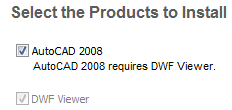
As you might have noticed DWF Viewer is still around even though Autodesk Design Review is the big next thing. The image is from the AutoCAD 2008 installation.

The DWF Viewer that is installed and mandatory includes Service Pack 1 and has Build version: 7.2.0.946.

Thursday, March 29, 2007

Upgrade Autodesk Network License Manager for Autodesk 2008 products

Here is a quick way to upgrade NLM for you Autodesk 2008 products.

On the DVD your Autodesk 2008 product is delivered on the files needed are found to easily upgrade the license manager. There is no need to reinstall Autodesk Network License Manager.

In the following folder on the AutoCAD 2008 DVD they are found:
\x86\support\nlm\Program Files\Autodesk Network License Manager

Identify the location of these files on your server(s):
adskflex.exe, lmgrd.exe, lmtools.exe, lmutil.exe

Now copy the 4 exe files  adskflex.exe, lmgrd.exe, lmtools.exe, lmutil.exe from the DVD to your license server.

Run lmtools.exe and start the service(s).

If you do the above quick enough (stopping the service, copying the files and starting the service again) and is cool you can do it even when users are using AutoCAD. I don't recommend it but I have done it so I know it works. Recommendation is to do it at a time so you can recover the errors that might happen.

Install the Network License Activation Utility. If you don't have internet access on the license server do it on your PC so you directly can connect and request a new license file or append to your existing license file the new feature. Start the Installation Wizard and select Install Tools and Utilities. When installed "AutoCAD 2008 Network License Activation Utility" or the like is found on the Windows start menu in the folders Autodesk>Network License Manager.

When you have made the change to the license file go to the license server and stop the FLEXlm/FLEXnet service(s) using lmtools.exe. See the Start/Stop/Reread tab. Close lmtools.

To easier and better control the license usage give JTB FlexReport a try if you are not happy enough with SAMreport-Lite.

Create the deployment and test that it works before rolling out for all users.

FLEXnet Licensing End User Guide is still version 10.8 so there is probably not much changed in the 11.4 version.

The files adskflex.exe and lmutil.exe are still version 10.8.

The files lmgrd.exe and lmtools.exe are version 11.4.

The above raises the question if it really is needed to upgrade. At this point I don't know but it is so easy I recommend to do it.

Feel free to contact me or add a comment below if you need some help or have some questions.

Wednesday, March 28, 2007

AM-DeadLink detect dead favorite links and download FavIcons

Here is a great piece of freeware.

AM-DeadLink detects dead links and duplicates in browser bookmarks and text files. If a bookmark has become unavailable you can verify and delete it permanently. Additionally you can download FavIcons for all your Favorites and Bookmarks.

Related blog post about FavIcons in Windows Vista.

Tuesday, March 27, 2007

Adobe Reader 8 please wait

The Content Preparation Progress dialog box shows "Please wait while the document is being prepared for reading" in Adobe Reader 8. This is useful if you use a screen reader or screen magnifier (mostly used by visually impaired users). If you like me don't want it, here is how to remove it and speed up Adobe Reader.

Close Adobe Reader and delete or move this file:

C:\Program Files\Adobe\Reader 8.0\Reader\plug_ins\Accessibility.api

When you open a PDF file next time make sure to select the checkbox "Do not show this message again".

Monday, March 26, 2007

Availability of CD media for AutoCAD 2008

You will receive AutoCAD 2008 on DVD as well as other software's from Autodesk like AutoCAD LT 2008. If you want it on CD visit www.autodeskmediarequest.com.
I think it should be available as download too. Maybe for AutoCAD 2009? For me it is because of ADN membership. How is it for subscription customers nowadays?

QuickCUI introduced in AutoCAD 2008

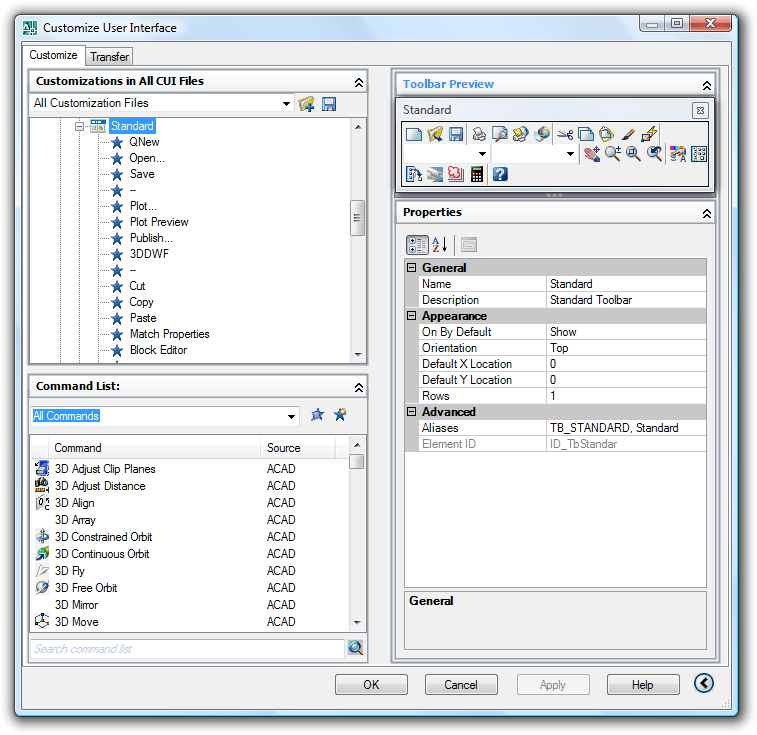
Right click on a toolbar in AutoCAD 2008 and the command QuickCUI will be started. It opens up CUI (Customize User Interface) quicker but you will not see the actual toolbar that you right clicked on until you click on Customizations in ... pane (Customizations in All CUI Files as seen below).
The CUI dialog box is displayed in a collapsed state. Only the Customizations in ... and Command List panes are displayed. The Customizations in ... pane is shown collapsed and the Command List pane is shown expanded. So the QuickCUI command is useful since it opens up quicker than the CUI command.

Customizations in All CUI Files expanded and since I right clicked on the Standard toolbar that one is selected.

To see everything click on the arrow in the circle at the bottom right.

You don't end up on the button you right clicked on but close enough.

Friday, March 23, 2007

No impression in AutoCAD 2008

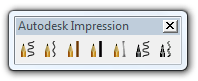
Since Autodesk Impression is not for all markets so far you might end up on a non existing website if you want to learn more about Impression. The Autodesk Impression toolbar is showed floating in AutoCAD 2008 as default. When I clicked on one of the buttons it shows a dialog box telling that "This functionality requires that you install Autodesk Impression. Do you want to download it now? Download size: 200 MB". (Note that the download size is 282 MB, not 200 MB as the dialog box says.)
http://www.autodesk.com/autocad-impressiontrialdownload

Clicking on the link "Learn more about Impression" in the dialog box below it tried to open http://www.autodesk.se/impression-toolbar that is a so called 404 page, non existing. It should rather look like http://www.autodesk.com/impression-toolbar to make any sense but inform that it is not yet for your market.

Other links that are hard coded into AcImpressionUI.dll that does not work so far are:
Another link is http://impressiontp.autodesk.com/Impression/Preview/ImpressionSystemTest.exe and it shows this text for me:
Location Error – Autodesk Impression Technology Preview Download Request
This technology preview is available only in Australia, Belgium, Denmark, Finland, Ireland, Luxembourg, Malaysia, Netherlands, New Zealand, Norway, Singapore, Sweden, and the United Kingdom.  It appears you are accessing the Internet from a point outside the one of these countries, and therefore cannot access the download. 
We appreciate your continued support of Autodesk Impression.
Let's see how quick this will be fixed. Not a good impression right now.

RPC for AutoCAD 2008 and AutoCAD Architecture 2008

If you want great high quality photo-realistic images RPC (Rich Photorealistic Content) is worth taking a look at and try. There are several free ones. Take a look at Archivisions website for AutoCAD & AutoCAD Architecture Users. Registration is needed to be able to download them though.

Via IMAGINiT Architectural Solutions Blog that also mentions there are 500 free Multi-View Blocks for AutoCAD Architecture 2008.

Thursday, March 22, 2007

DWG TrueView for AutoCAD 2008 DWG files

You might think that a new version of DWG TrueView based on AutoCAD 2008 has been released if you look at Autodesk's website http://www.autodesk.com/dwg.
Use this FREE* download to accurately view, plot, and publish authentic DWG and DWF files. And now, DWG TrueView incorporates all the functionality of DWG TrueConvert. This means you can translate any AutoCAD or AutoCAD-based drawing file for compatibility with AutoCAD Release 14 through AutoCAD 2008.
But you have to wait a little more for that. It is still the old DWG TrueView from last year that is there. But at least you can see what is coming.

Preview AutoCAD text files in Outlook 2007 and Vista

I mentioned about PDF preview handlers in a previous post.

Here is a picture showing how an AutoLISP file with the LSP file extension is previewed in Outlok 2007.

Here is a preview in Vista Explorer.

The above was achieved without any extra coding. A simple registry hack made lsp files and other files to be handled just like plain txt files.

Here is a sample reg file including some txt format files that are used by AutoCAD. CUS, DCL, LIN, LSP, MNL, MNS, MNU, PAT, PGP, SCR and SHP. This works for Windows Vista and Microsoft Outlook 2007. If you want other files to be handled like TXT files it is simple to edit the reg file and add or remove these. For example you might want to add CMD, BAT, VBS.

http://www.jtbworld.com/download/AutoCAD%20Preview%20Handlers.reg

Here is a snippet from the file.

[HKEY_CLASSES_ROOT\.lsp\shellex\{8895b1c6-b41f-4c1c-a562-0d564250836f}]
@="{1531d583-8375-4d3f-b5fb-d23bbd169f22}"

To remove it you can create a REG file with lines like this.

[-HKEY_CLASSES_ROOT\.lsp\shellex\{8895b1c6-b41f-4c1c-a562-0d564250836f}]

Wednesday, March 21, 2007

Autodesk Impression launched

It seems like the final version of Impression has been launched now after beeing available and matured on http://labs.autodesk.com/. ;-) At least for those in USA and Canada according to the FAQ. :(

5. What is the price for Autodesk Impression and where can I buy it?Autodesk Impression is $495 per commercial license.  It is available exclusively in the United States and Canada on the Autodesk Store at www.autodesk.com/store-impression. 

6. Is Subscription available for Autodesk Impression?
No, subscription is not available for Autodesk Impression.

7. Is there a student version of Autodesk Impression?
Yes, a student version is available on the Student Design & Engineering Community as a free download. In addition, the community lets you search job postings, discuss projects, share work, and learn from the experts. Join today at www.students.autodesk.com.

www.autodesk.com/impression

Create 3 solid models for free*

TenLinks, Inc. has launched a new service to create solid models called Innovate3D.

Models can be created in Autodesk Inventor, Pro/ENGINEER or SolidWorks formats.

This service is meant for anyone who has a need to create a solid model but doesn't have the time or resources to meet demand. For example, you may want to create a solid model from 2D drawings so you can find its mass properties, submit it for FEA, send it to be manufactured or to send off to tech pubs for a service manual.

If you mention that you saw about this on JTB World's blog, you will get up to 3 solid models for FREE. After that the price is $49 per model. (Not sure how long time this offer will exists though as seen below)

Please comment on what you think about this service. Notice the Terms and Conditions. It answered my initial questions when I got the email from Roopinder Tara.

  • Only one free part per company per week.
  • Service will monitor the number of free parts created and may withdraw or extend the offer after 500 free parts have been created.
  • Free offer applies only to parts, not assemblies.
  • Final determination of what constitutes a part or an assembly will be made by the service.
  • Parts will be created based upon data provided.
  • In the case of missing information, such as incomplete dimensioning, the service will attempt a "best guess" to complete the model.
  • Too much missing information will result in delays.
  • Order is considered completed when models are sent to the user.
  • Revisions to model are the responsibility of the customer.
  • Minor revisions may be implemented for free on discretion of the service, or for nominal cost agreed upon by user and the service. 
  • The service intends to create models in the fastest time possible.
  • Extra time will be required for complex parts.

Some of the latest blog posts

Subscribe to RSS headline updates from:
Powered by FeedBurner

Contact Us | About JTB World | Website General Terms of Use | Privacy Policy
^ Top of page

© 2004- JTB World. All rights reserved.