Tuesday, March 18, 2008

Vista File copy Error 0x8007045D or Error 0x800704C8

Trying to install AutoCAD 2009 I get this error message: "The copy functions cannot be used.Failed to copy the following files: F:\x86\eula to C:\Users\JTB\AppData\Local\Temp\_AIA.tmp"

I tried then manually copy the files and instead got either of these messages:

An unexpected error is preventing the operation. Make a not of this error
code, which might be useful if you get additional help to resolve this
problem:

Error 0x800704C8: The requested operation cannot be performed on a file with a user-mapped section open.

Error 0x8007045D: The requested operation could not be performed because of an I/O
device error.

I tried the following and was able to install as well as copy the files after disabling Microsoft OneCare virus protection. Not sure if it was related or not or what made it work for sure.

  • Goto computer properties > Advanced system settings > System protection tab.
  • Uncheck all drives, hit apply.  This will turn of shadow copies and clear them.
  • Reenable the drives, hit apply.  I then hit the create button to repopulate at least one shadow copy.

Update: It might have something to do with Carbonite backup as well. When I disabled their service and kept OneCare running I was able to have everything working normally. Solved with Vista SP1 as seen here.

Monday, March 17, 2008

Urban pictures

I subscribe to the Urbanity blog to see all amazing buildings. Even though my Spanish is not as good is it should, looking at the images is enough.


Saturday, March 15, 2008

FolderShare - free file sharing in the cloud

I've used FolderShare from Microsoft for PC to PC sync for some months recently and pushed it to the limits synchronizing files over Internet larger than 1GB (2GB is the limit) and with a file count of just less than 10,000 files (10k is the limit and a bit low in my opinion) and it has worked really good except a few hiccups. Now there is a new version and a new blog and it should be even better. It has crashed a couple of times though.

Keep files in sync across your computers.
Share folders with friends.
Access your files from any computer.

When I moved a bunch of files from one folder to another FolderShare only sent a move message so the files were not sent over Internet something that would slow down things.

Some features missing are being able to sync the desktop, shortcuts (.LNK), excluding file types, files or folders. It can also be useful if it was possible to synchronize a whole drive.

For sync on a PC only or on a network SyncToy is a better option.

Highly recommended as one of several Microsoft's useful freeware.

Ps. answers to some common questions on the FolderShare blog.

Friday, March 14, 2008

JTB FlexReport 4.1 released

JTB FlexReport 4.1 is now available. Check the revision history for details on the performance improvements and the news.

It probably is needed to uninstall the old version before installing this one. To be sure the latest version of the reports are installed rename or delete JTB FlexReport Detailed Reports.mdb and JTB FlexReport Graphic Reports.xls.

Wednesday, March 12, 2008

Riverbed and DWG 2007 file format workaround

It has been mentioned on civil3d.com, AECnews.com and SearchStorage how the file 2007 DWG file format used in AutoCAD 2007, AutoCAD 2008 and now also AutoCAD 2009 might affect users of WAN acceleration appliances like Riverbed’s Steelhead appliances. The performance has been a real problem.

Autodesk now has added a Knowledge Base document on this issue: Potential for reduced write performance for Riverbed WAN links when working with AutoCAD 2007 DWG files

Users of Riverbed or other affected WAN acceleration solutions can implement the following immediate workarounds that improve write productivity.

  1. Using a feature in AutoCAD called “Incremental Save Percentage” (ISP), and setting it to 50
  2. Using a version of the DWG format other than the AutoCAD 2007 DWG format

 AutoCAD Options

Notice that there are some commands that does not respect this setting to save in another version. Using Saveall and the drawings will be saved in 2007 format.

Tuesday, March 11, 2008

AutoCAD Automation Tools released

AutoCAD Automation Tools are some tools for AutoCAD that JTB World have released that can be a real time saver if you need to make justifications on hundreds or thousands of drawings.

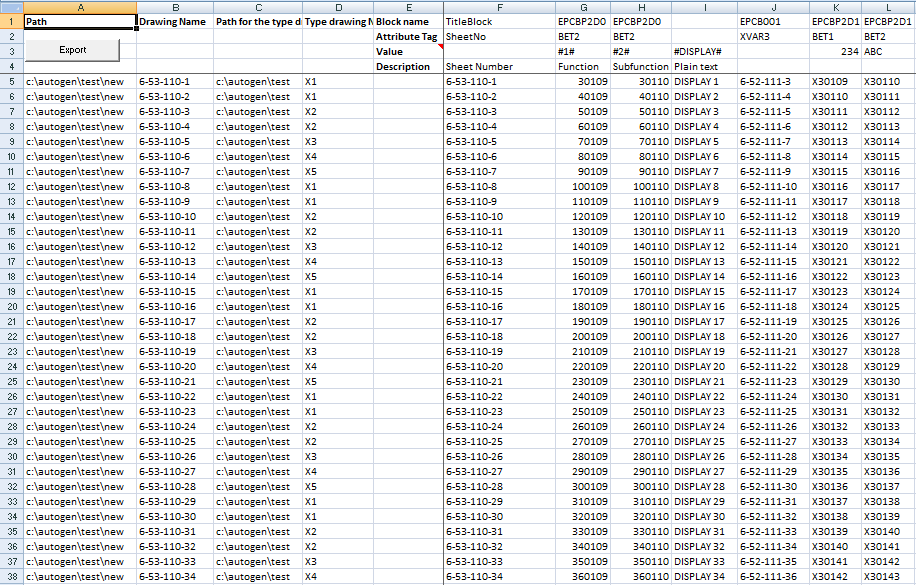
Typical usages are if you have a template drawing but text in the title block and some attributes or other text needs to be different on each drawing. Use for example Excel to enter or populate all values. Depending on your computer performance and the complexity of the drawing you can generate around 100 drawings in just 60 seconds.

AutoGen Excel template

You can change text or attribute values on a lot of drawings. It could update a title block with revision, date or some names for example.

You can add text, blocks or xrefs to existing drawings.

It works with AutoCAD 2000 or later (tested also with AutoCAD 2009) or verticals based on AutoCAD.

The AutoCAD Automation Tools are great for the CAD manager or administrator but also very easy for any AutoCAD user to use.

Monday, March 10, 2008

FLEXnet issues when restarting the server or service

If and when you restart your FLEXnet/FLEXlm server or service it can be good to know that the status will be incorrect if lmutil.exe or lmtools.exe is used.

If the user has an application running and restarting the license server or just the license service the following can happen:

USER1 HOST1 HOST1 (v1.000) (HOST1/27000 103), start Sat 1/19 08:24

Restarting server or service and it will not pick up that a license actually still is in use and it will look like the license was checked out just after the server restart notice also how the license handle can change.

USER1 HOST1 HOST1 (v1.000) (HOST1/27000 101), start Sat 1/19 12:26

It affects the report like this one jtbflexreportHTML2.htm where used hours are showed and it is the same with borrowed licenses that you cannot fully rely on when the license was borrowed:

USER1@HOST1 Checked out license at 2007-04-28 06:33  Hours used: 2:52

Friday, March 7, 2008

Purge of DWG takes forever - solution

I got an example drawing that needed to be purged and cleaned using SmartPurger. The problem was that it took forever. Increasing the timeout did not help.

Here was my tip.

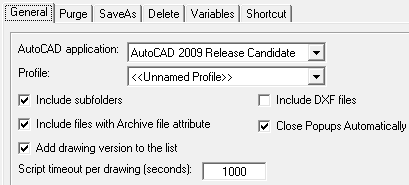
I suggest you select only the Purge Regapps using ASDKCleanRegAppARX and set the script timeout to something high like 1000 seconds.
After that you can purge using other options.

General tab

Purge tab

Using this tip it still took a few minutes to remove all the Regapps but it helped and it worked even with AutoCAD 2009 as I was using it to confirm this.

This functionality was added with the 2.6 release of SmartPurger as previously described.

Wednesday, March 5, 2008

ShellRunas by Microsoft

ShellRunas is the new (already 1.01 version) must have tool for you as IT or CAD Manager/Tech or the like.

The command-line Runas utility is handy for launching programs under different accounts, but it’s not convenient if you’re a heavy Explorer user. ShellRunas provides functionality similar to that of Runas to launch programs as a different user via a convenient shell context-menu entry.

ShellRunas works on Windows XP, Windows Server 2003, Windows Vista, and Windows Server 2008.

Tuesday, March 4, 2008

Invalid display of polyline with negative thickness in AutoCAD

Nikolay Poleshchuk, an Autodesk Authorized Author, sent me this and I was able to reproduce the problem in AutoCAD 2009. You find the bug fully described here.

display bug in AutoCAD 2009

Friday, February 29, 2008

AutoCAD 2008 spam emails redirected via blogspot

Don't be fooled by these spam emails that shows a blogspot link like these ones.spam email

image

If you click on the link you will automatically end up at another site than the one you see. If you have restricted this in IE you will just see a site like the one below.

redirection site

I think Blogger (Google) should restrict usage of these kind of redirections.

Autodesk introduces VSTA

No VSTA (Visual Studio Tools for Applications) in AutoCAD 2009. I read in the CAD Application Development blog that Revit 2009 has it. That means probably AutoCAD 2010 will introduce VSTA unless Autodesk put resources on other things. AutoCAD have at least VBA and AutoLISP something Revit does not have.

Some of the latest blog posts

Subscribe to RSS headline updates from:
Powered by FeedBurner

Contact Us | About JTB World | Website General Terms of Use | Privacy Policy
^ Top of page

© 2004- JTB World. All rights reserved.