Thursday, March 30, 2006
Free book about VB 2005 to download as PDF's
Introducing Microsoft Visual Basic 2005 for Developers
http://msdn.microsoft.com/vbasic/learning/introtovb2005/
or read online.


Wednesday, March 29, 2006
AutoCAD 2007 and Network Licensing
FLEXlm version 10.8.0.0 is supplied with AutoCAD 2007 and has to be used.
You need to update to 10.8.0.0 or later. The update can be done quick and
easy using
this method.
Use the Network License Activation Utility to request a new license file for AutoCAD 2007-based products. It just takes a few minutes and you have the license.
One new feature is support for INCREMENT PLIST as seen in the example below.
================== Example license file ====================
SERVER NLMSVR1 000476e5cb3d
USE_SERVER
VENDOR adskflex port=2080
INCREMENT 51200ACD_2007_0F adskflex 1.000 permanent 10 VENDOR_STRING=commercial:permanent BORROW=4320 SUPERSEDE DUP_GROUP=UH ISSUED=12-Feb-2006 SN=341-12345678 SIGN="03A5 6350 B274 A1F5 0797 F256 BBD0 1935 0DCF 189B 5B9F 7188 AE4A"
INCREMENT PLIST adskflex 1.000 permanent 1 VENDOR_STRING=A07:51600ACDLAND_2007_0F:52200CIV3D_2007_0F;
B07:51900AMECH_PP_2007_0F:51300INVBUN_11_0F:52900INVPRORS_
11_0F:53000INVPROSIM_11_0F:51400INVPRO_11_0F;C07:51200ACD_
2007_0F:52500REVITS_9_0F;D07:52600REVIT_9_0F:52500REVITS_9_0F;
E07:51200ACD_2007_0P:51300INVBUN_11_0P;F07:51800BLDSYS_2007_
0F:53100REVSYP_1_0F SUPERSEDE ISSUED=12-Feb-2006 SIGN="08BD F4CC 1CCE C4A7 8755 A8F7 0F49 2F3E BF9C 8BA0 7876 91D3 E69A"
================== End of example =========================
From AutoCAD 2007 Network Licensing Questions and Answers.pdf:
11. Cascading for Network Licenses
11.1 What is Cascade Licensing?
Cascade Licensing allows a product to grab the least expense license from a network license manager pool when the license manager is servicing more then one product.
For example, you have purchased network licenses for both AutoCAD and Revit Series. In the past when AutoCAD from Revit Series is launched it would always grab a license from the Revit Series pool. If no license is available it would fail to run. With Cascade licensing, AutoCAD from Revit Series would first try to grab a license from AutoCAD pool or the least expensive license. If no license is available it will grab a license from the Revit Series pool.
11.2 Does Cascade Licensing work for stand-alone licenses?
No. This feature relates only to Network Licensing, and the manner in which licenses are drawn from a network license pool on the server.
11.3 How does Cascade Licensing work?
Implementation of cascading licenses allows a user to utilize licenses from more than one license pool on a server, based on a sequence of priorities.
For 2006 based products the network license manager allows product groups to ship a series of software which can all run using a single license. For example, Autodesk Inventor Series is shipped containing Autodesk Inventor, AutoCAD Mechanical, and Mechanical Desktop. A user who has these three applications installed on their computer can launch all three products concurrently, and will only consume a single license from the pool.
Cascading licenses will allow users who have purchased licenses for a series product, and have also purchased licenses separately for a product which is a component of the series to draw licenses from the lower-end individual product first before drawing licenses from the more expensive series pool.
Cascading license will "cascade" from the first priority product to the last priority product. When a new product is installed the cascading sequence is automatically enabled on the server.
11.4 How can I turn Cascading on?
Cascading licenses are not turned on or turned off. Cascading licensing is a feature of the network license manager and is enabled through the license file. If an application supports cascading license, the license file will contain a plist, or prioritized list of products.
11.5 How is Cascading prioritized and which products use it?
For each list of products below, the application will try to grab a license from the product listed first.
Prioritization for Infrastructure products:
1. Autodesk Land Desktop Licenses
2. Autodesk Civil 3D Licenses
3. Autodesk Civil 3D Pro Licenses
So Land Desktop will try to first grab a license from the Land Desktop license pool but if a license is not available it will try Autodesk Civil 3D, and lastly Autodesk Civil 3D Pro before denying a license.
Prioritization for Mechanical products:
1. AutoCAD Mechanical / Mechanical Desktop Licenses
2. Autodesk Inventor Series Licenses
3. Autodesk Inventor Pro Licenses
So AutoCAD Mechanical will try to first grab a license from AutoCAD Mechanical license pool. If a license is not available it will try Autodesk Inventor Series and lastly Autodesk Inventor Pro. Inventor will first try to grab a license from Inventor Series first followed by Inventor Pro.
Prioritization for Building system products:
1. AutoCAD Licenses
2. Revit Series Licenses
So AutoCAD will try to grab a license from AutoCAD pool first before trying to grab a license from the Revit Series license pool.
11.6 Can I change how Cascading prioritized?
No, the prioritization is stated as above.
Use the Network License Activation Utility to request a new license file for AutoCAD 2007-based products. It just takes a few minutes and you have the license.
One new feature is support for INCREMENT PLIST as seen in the example below.
================== Example license file ====================
SERVER NLMSVR1 000476e5cb3d
USE_SERVER
VENDOR adskflex port=2080
INCREMENT 51200ACD_2007_0F adskflex 1.000 permanent 10 VENDOR_STRING=commercial:permanent BORROW=4320 SUPERSEDE DUP_GROUP=UH ISSUED=12-Feb-2006 SN=341-12345678 SIGN="03A5 6350 B274 A1F5 0797 F256 BBD0 1935 0DCF 189B 5B9F 7188 AE4A"
INCREMENT PLIST adskflex 1.000 permanent 1 VENDOR_STRING=A07:51600ACDLAND_2007_0F:52200CIV3D_2007_0F;
B07:51900AMECH_PP_2007_0F:51300INVBUN_11_0F:52900INVPRORS_
11_0F:53000INVPROSIM_11_0F:51400INVPRO_11_0F;C07:51200ACD_
2007_0F:52500REVITS_9_0F;D07:52600REVIT_9_0F:52500REVITS_9_0F;
E07:51200ACD_2007_0P:51300INVBUN_11_0P;F07:51800BLDSYS_2007_
0F:53100REVSYP_1_0F SUPERSEDE ISSUED=12-Feb-2006 SIGN="08BD F4CC 1CCE C4A7 8755 A8F7 0F49 2F3E BF9C 8BA0 7876 91D3 E69A"
================== End of example =========================
From AutoCAD 2007 Network Licensing Questions and Answers.pdf:
11. Cascading for Network Licenses
11.1 What is Cascade Licensing?
Cascade Licensing allows a product to grab the least expense license from a network license manager pool when the license manager is servicing more then one product.
For example, you have purchased network licenses for both AutoCAD and Revit Series. In the past when AutoCAD from Revit Series is launched it would always grab a license from the Revit Series pool. If no license is available it would fail to run. With Cascade licensing, AutoCAD from Revit Series would first try to grab a license from AutoCAD pool or the least expensive license. If no license is available it will grab a license from the Revit Series pool.
11.2 Does Cascade Licensing work for stand-alone licenses?
No. This feature relates only to Network Licensing, and the manner in which licenses are drawn from a network license pool on the server.
11.3 How does Cascade Licensing work?
Implementation of cascading licenses allows a user to utilize licenses from more than one license pool on a server, based on a sequence of priorities.
For 2006 based products the network license manager allows product groups to ship a series of software which can all run using a single license. For example, Autodesk Inventor Series is shipped containing Autodesk Inventor, AutoCAD Mechanical, and Mechanical Desktop. A user who has these three applications installed on their computer can launch all three products concurrently, and will only consume a single license from the pool.
Cascading licenses will allow users who have purchased licenses for a series product, and have also purchased licenses separately for a product which is a component of the series to draw licenses from the lower-end individual product first before drawing licenses from the more expensive series pool.
Cascading license will "cascade" from the first priority product to the last priority product. When a new product is installed the cascading sequence is automatically enabled on the server.
11.4 How can I turn Cascading on?
Cascading licenses are not turned on or turned off. Cascading licensing is a feature of the network license manager and is enabled through the license file. If an application supports cascading license, the license file will contain a plist, or prioritized list of products.
11.5 How is Cascading prioritized and which products use it?
For each list of products below, the application will try to grab a license from the product listed first.
Prioritization for Infrastructure products:
1. Autodesk Land Desktop Licenses
2. Autodesk Civil 3D Licenses
3. Autodesk Civil 3D Pro Licenses
So Land Desktop will try to first grab a license from the Land Desktop license pool but if a license is not available it will try Autodesk Civil 3D, and lastly Autodesk Civil 3D Pro before denying a license.
Prioritization for Mechanical products:
1. AutoCAD Mechanical / Mechanical Desktop Licenses
2. Autodesk Inventor Series Licenses
3. Autodesk Inventor Pro Licenses
So AutoCAD Mechanical will try to first grab a license from AutoCAD Mechanical license pool. If a license is not available it will try Autodesk Inventor Series and lastly Autodesk Inventor Pro. Inventor will first try to grab a license from Inventor Series first followed by Inventor Pro.
Prioritization for Building system products:
1. AutoCAD Licenses
2. Revit Series Licenses
So AutoCAD will try to grab a license from AutoCAD pool first before trying to grab a license from the Revit Series license pool.
11.6 Can I change how Cascading prioritized?
No, the prioritization is stated as above.
Monday, March 27, 2006
How to turn off the drafting tooltip in AutoCAD 2007
Do you want to turn off the drafting tooltip and it doesn't seem to work as it used to? Turn off Display AutoTrack tooltip in Options>Drafting. This is a changed behavior compared to AutoCAD 2006.
Can we download AutoCAD next time?
Behind the Scenes Video: Who Was Shipped the First AutoCAD 2007?
Impressive work behind the scenes.
Maybe we can have the option to download it next time.
AutoCAD 2007 CUI enhancements
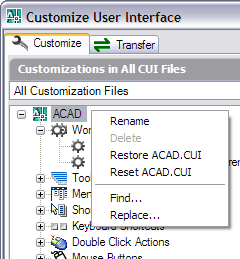
CUI functionality has been updated enabling you to drag and drop from the command list onto tool palettes.
If you have messed up with the CUI file it can be restored or reset. If restore is selected the backup acad.bak.cui is used. If reset is selected the file is taken from C:\Program Files\AutoCAD 2007\UserDataCache\Support
Visual Studio 400 Differences
I found http://www.400plusdifferences.com/ with a lot of fun videos via Scott Hanselman.
I love working in VS 2005 now with AutoCAD and ADT.
Will you jump on new products like Autodesk Revit Systems?
I appreciate honest comments like this.
"No version one product is ever a great product. Version two products are OK, version three are the good ones." - Carl Bass in CRNIt's very true, but still there are cases when there are good reasons to start using version one products. For you it might be just great enough. I will at least take a look at Autodesk Revit Systems version one and see how it is compared to the applications we use today like MagiCAD and PDMS.
Are you missing some Express Tools commands in AutoCAD 2007?
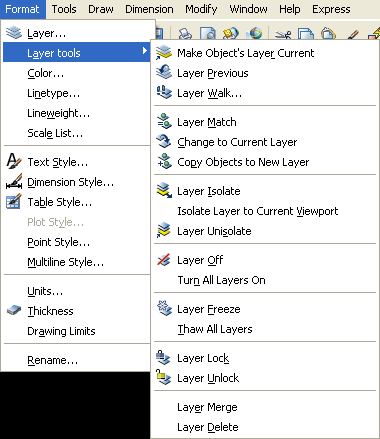 Layer Express Tools (now in the Format menu) and the Chspace command (in the Modify menu) are now part of core AutoCAD.
The new Layer tools commands are:
LAYMCUR
LAYWALK
LAYMCH
-LAYMCH
LAYCUR
COPYTOLAYER
-COPYTOLAYER
LAYISO
LAYVPI
LAYUNISO
LAYOFF
LAYON
LAYFRZ
LAYTHW
LAYLCK
LAYULK
LAYMRG
-LAYMRG
LAYDEL
-LAYDEL
Layer Express Tools (now in the Format menu) and the Chspace command (in the Modify menu) are now part of core AutoCAD.
The new Layer tools commands are:
LAYMCUR
LAYWALK
LAYMCH
-LAYMCH
LAYCUR
COPYTOLAYER
-COPYTOLAYER
LAYISO
LAYVPI
LAYUNISO
LAYOFF
LAYON
LAYFRZ
LAYTHW
LAYLCK
LAYULK
LAYMRG
-LAYMRG
LAYDEL
-LAYDEL

DWG TrueConvert ready for 2007 DWG format
"DWG TrueConvert™ translates any AutoCAD or AutoCAD-based drawing file for compatibility with AutoCAD Release 14, AutoCAD 2000, 2000i, 2002, 2004, 2005, 2006 and 2007 versions. The DWG TrueConvert software allows conversion of pen widths to lineweights and the addition of page setups." Download from http://www.autodesk.com/dwgtrueconvert. Instructions for Silent installation of Autodesk DWG TrueConvert.
Update: Here is the direct link to download DWG TrueConvert 2007.
Update: Here is the direct link to download DWG TrueConvert 2007.
Wednesday, March 22, 2006
Problem with embedded DWF Viewer
You might have run into this as well.
 Suddenly you have to click or "Press SPACEBAR or ENTER to activate and use this control" on the embedded DWF Viewer object to activate it. This is because an introduced bug in a patch from Microsoft. More here at this news group thread: Internet Explorer ActiveX Activation Patch interferes with DWF Viewer ActiveX. Both Microsoft and Autodesk are working on this. You can try if you have been affected by looking at the DWF at this page.
Suddenly you have to click or "Press SPACEBAR or ENTER to activate and use this control" on the embedded DWF Viewer object to activate it. This is because an introduced bug in a patch from Microsoft. More here at this news group thread: Internet Explorer ActiveX Activation Patch interferes with DWF Viewer ActiveX. Both Microsoft and Autodesk are working on this. You can try if you have been affected by looking at the DWF at this page.
SmartPurger 2.3 (support for AutoCAD 2007)
SmartPurger 2.3 is now released to support AutoCAD 2007 and its verticals.
Download it and try it for free. Demo limitation is three drawings.
No upgrade cost for existing customers but email and request a new license key.
 SmartPurger is the ultimate software for purging multiple AutoCAD drawings at top speed with full control. SmartPurger is a batch processing utility that allows you to purge multiple drawings. A Unique feature is that the file time stamp can be restored. SmartPurger handles crashes so the script continues to the end and leaves bad drawings. This is extremely useful before backups and distribution of drawings.
SmartPurger is for example useful if you want to minimize the size of files before a backup or before sending drawings by e-mail, burning to CD or just to use as a quick viewer of drawings. You can even save the files to a separate folder or to a different drawing version.
SmartPurger can also execute custom script files (.SCR) or AutoLISP files (.LSP, .FAS or .VLX).
SmartPurger is the ultimate software for purging multiple AutoCAD drawings at top speed with full control. SmartPurger is a batch processing utility that allows you to purge multiple drawings. A Unique feature is that the file time stamp can be restored. SmartPurger handles crashes so the script continues to the end and leaves bad drawings. This is extremely useful before backups and distribution of drawings.
SmartPurger is for example useful if you want to minimize the size of files before a backup or before sending drawings by e-mail, burning to CD or just to use as a quick viewer of drawings. You can even save the files to a separate folder or to a different drawing version.
SmartPurger can also execute custom script files (.SCR) or AutoLISP files (.LSP, .FAS or .VLX).
SmartPurger is the ultimate software for purging multiple AutoCAD drawings at top speed with full control. SmartPurger is a batch processing utility that allows you to purge multiple drawings. A Unique feature is that the file time stamp can be restored. SmartPurger handles crashes so the script continues to the end and leaves bad drawings. This is extremely useful before backups and distribution of drawings.
SmartPurger is for example useful if you want to minimize the size of files before a backup or before sending drawings by e-mail, burning to CD or just to use as a quick viewer of drawings. You can even save the files to a separate folder or to a different drawing version.
SmartPurger can also execute custom script files (.SCR) or AutoLISP files (.LSP, .FAS or .VLX).
Tuesday, March 21, 2006
AutoCAD 2007 and IE 7 B2
If you have IE7 B2 installed and when you get AutoCAD 2007 within a few days make sure that you have the latest Internet Explorer 7 Beta 2 Preview - released on March 20th. If not some features like search in Help and the New Features Workshop might not work. Those bugs are now solved. Still there seems to be problems with the DWF Viewer as Scott Sheppard has blogged about.
Saturday, March 18, 2006
Sharing ADT eTransmit transmittals
If you want to share the eTransmit transmittals setups on your system with other systems across the network a solution is found here. They are stored in the registry for the current user.
Architectural Desktop 2006
[HKEY_CURRENT_USER\Software\Autodesk\AutoCAD\R16.2\ACAD-4004:409\ETransmit\setups]
Architectural Desktop 2007
[HKEY_CURRENT_USER\Software\Autodesk\AutoCAD\R17.0\ACAD-5004:409\ETransmit\setups]
Subscribe to:
Posts (Atom)