Tuesday, March 31, 2009

Disable InfoCenter and AutoCAD 2010 will start quicker

Outside The Box told about how Tony Tanzillo has posted instructions for disabling the InfoCenter in AutoCAD 2010. Owen also posted an AutoLISP file to handle it.

HKEY_CURRENT_USER\Software\Autodesk\AutoCAD\R18.0\ACAD-8001:409\InfoCenter
Changing InfoCenterOn value from 1 to 0 will disable the InfoCenter toolbar.

This tip on how to disable InfoCenter that worked in previous versions no longer works.

Autodesk Network License Manager 11.5.0 system requirements

Autodesk Network License Manager 11.5.0 (that comes with 2010-based products like AutoCAD 2010) is supported on the following operating systems:

  • Windows Vista 32-bit SP1
  • Windows Vista 64-bit SP1
  • Windows XP 32-bit SP3
  • Windows XP 64-bit SP2
  • Windows 2003 R2 Server Edition
  • Windows 2003 Server Edition
  • Windows 2000 Server Edition

Some other new documents are:

Knowledge Base document: Supported operating systems for the Autodesk Network License Manager shipped with 2010 products

The path for the Plot Styles folder has been moved from a sibling level of the Plotters folder to a subdirectory in the Plotters folder. - Knowledge Base document: Location of Plot Styles folder

Knowledge Base document: VBA support in AutoCAD 2010

Friday, March 27, 2009

Autodesk’s new pricing strategy

What do you think about Autodesk’s new pricing strategy? Especially if you consider to remove some of your licenses that are on subscription or if you are not on subscription right now and used to upgrade once in a while.

“After March 15, 2010, your upgrade from any of the three previous software releases will cost 50 percent of the price of a new license, no matter which release you own.”

Autodesk’s Simplified Upgrade Pricing Begins March 16, 2010

Via WorldCAD Access “No April Fools Day Joke: Autodesk to Triple Upgrade Pricing”

At JTB World if a customer cannot for one or the other reason pay maintenance (support and upgrades) for JTB FlexReport there is no penalty for that and they can pick it up whenever they want to. We think this is to simplify it.

Outlook custom toolbars are saved here

Microsoft Outlook stores toolbar information, including any custom toolbars you create, in a file named outcmd.dat. You’ll find this file in the following folder:

C:\Documents and Settings\username\Application Data\Microsoft\Outlook

C:\Users\username\AppData\Roaming\Microsoft\Outlook

It’s a good idea to back up this file after you customize the interface. If something goes wrong, you can reclaim missing toolbars by replacing the current copy of outcmd.dat with the backup. You can also use this file to copy custom toolbars to another instance of Outlook.

Windows hides outcmd.dat by default. To view it so you can copy or replace it, you must enable Show Hidden Files And Folders in Windows Explorer by choosing Folder Options from the Tools menu and then clicking the View tab.

Thursday, March 26, 2009

Restore the Show desktop icon on Quick Launch toolbar

I got a question how to solve this and here is a tip that works for XP.

How to re-create the Show desktop icon on the Quick Launch toolbar in Windows XP

If you have Vista try this solution instead.

February Cumulative Update for Outlook 2007

The Microsoft Office Outlook February Cumulative Update (CU) contains a large set of the fixes that release as part of the 2007 Microsoft Office suite Service Pack 2 (SP2).

Outlook 2007 SP2 delivers performance improvements in four major areas:

  • General Responsiveness
    SP2 reduces I/O disk usage and UI response time.
  • Startup
    SP2 removes long operations from initial startup.
  • Shutdown
    SP2 makes Outlook exit predictably despite pending activities.
  • Folder/View Switch
    SP2 improves view rendering and folder switching.

Frequently Asked Questions about the February CU and Announcing the February Cumulative Update for Outlook 2007 as well as this article Outlook 2007 improvements in the February 2009 cumulative update

Last word of warning. I have run into some glitches after applying this update with incomplete search results with blank rows at the bottom as well as duplicated rows in the result. But other than that Outlook is indeed quicker and snappier. Now if they just could make search better and quicker.

Wednesday, March 25, 2009

Sök termer och dess förklaring och översättning

Rikstermbanken är Sveriges nationella termbank. (Swedish national terminology bank)

Rikstermbanken innehåller termer och begrepp från ett stort antal ämnesområden.

Så här ser definitionerna av begreppet CAD ut i Rikstermbanken i sökresultatet:


Definitioner som “datorstödd konstruktionsritning”, “datorstödd ritning” eller “Det avser datorstöd för formgivning, ritning, teknisk beräkning, konstruktionsarbete och stycklisteframställning i samband med konstruktion och produktutveckling”.

Tuesday, March 24, 2009

More details on VBA in AutoCAD 2010 products

AutoCAD 2010, AutoCAD OEM 2010, AutoCAD Architecture 2010, AutoCAD MEP 2010, AutoCAD Map 3D 2010, AutoCAD Mechanical 2010 and AutoCAD Electrical 2010 are NOT delivered with VBA. Only exceptions are Autodesk Inventor 2010 and AutoCAD Civil 3D 2010.

No need for panic as VBA for AutoCAD is available to download at no cost from www.autodesk.com/vba-download

It is permitted to include the VBA Enabler with your own AutoCAD-based application installer.

These are all commands that will trigger this dialog box.

VBAMAN, VBAIDE, VBANEW, VBASTMT, VBAPREF, -VBARUN,
VBARUN, VBALOAD, –VBALOAD as well as Runmacro and LoadMacro functions.

To determine if VBA is installed:

  • Use SearchPath() (or equivalent) to try and find the AcVba.arx in the configured %PATH%.
  • Check the VBA Enabler registry entry at HKEY_LOCAL_MACHINE\SOFTWARE\Autodesk\AutoCAD 2010 VBA Enabler:<LANGID>

See also No VBA installed with AutoCAD 2010 and AutoCAD 2010 VBA and VSTA future

AutoCAD Exchange - new community site for AutoCAD users

Head over to http://autocad.autodesk.com as AutoCAD Exchange will feature videos, humor, tips and tricks, ask the expert, tutorials, videos, discussions groups, best practices, and much more.

Autodesk 2010 today

Today March 24th 2009 is Autodesk’s big day for 2010 in 2009, today as confusing as yesterday for many. But today among many other products the following are released:

Will you take the step up to 2010? Check out what is new in your product.

For the press release see Autodesk 2010 Design and Engineering Software Product Line Now Available

Earth Hour countdown gadget in Blogger

I found that the Earth Hour countdown on Bloggers toolkit on http://wwf.ca/earthhour/toolkits/ did not work on a Google Blogger/blogspot blog.

I hosted the files on my site and tried to add the <HEAD> part into the Blogger template but got this problem.

Please correct the error below, and submit your template again.

Your template could not be parsed as it is not well-formed. Please make sure all XML elements are closed properly.
XML error message: The reference to entity "c2e_month" must end with the ';' delimiter.

But I was able to put all code in a HTML/JavaScript gadget. I also found that using an IFRAME it worked.

You can for a few more days see the end result on the left side of this blog or below.

Earth Hour 2009

Earth Hour 2009 is 8:30PM on Saturday 28 March 2009.

Royal Castle in Stockholm

A combo picture shows the Royal Palace of Stockholm (Stockholms slott), Sweden, moments before (top) and after the lights were switched off for Earth Hour, March 29, 2008.

The Royal Palace of Stockholm is His Majesty The King's official residence and is also the setting for most of the monarchy's official receptions. The palace is a daily place of work for The King and Queen as well as for the various departments that make up the Royal Court.

The palace is built in baroque style by the architect Nicodemus Tessin and is formed as a Roman palace. The construction started in 1697 and was completed in 1760. Tessin died at an age of 73 in 1728 so he could not see the result of his design. (I know for sure he didn't use CAD) The palace has more than 600 rooms divided between seven floors.

It is the biggest Palace in the word that is still in use by a king. And if you are in Sweden you can take a guided tour through parts of the castle.

See the Royal Palace in Bird's eye view

Monday, March 23, 2009

AutoCAD 2010 network license – not much news

These are the executable that comes with AutoCAD 2010 and probably other 2010 products.

They are included in an msi installer file so if you have anything to extract them with (or install on your PC and grab the files) you can just copy install them manually.

  • adskflex.exe version 11.5.0.0
  • lmgrd.exe version 11.5.0.5
  • lmtools.exe version 11.5.0.0
  • lmutil.exe version 11.5.0.0

Here are the installed files in Autodesk Network License Manager

The Licensing system is based on FLEXnet Publisher Licensing Toolkit 11.5

Version 11.5 comes with:

  • Support new attribute for the NOLOG Option keyword
  • IPv6 support
  • New error codes
  • New feature definition line keywords–ONE_TS_OK and SUPERSEDE_SIGN

Here follows some tips from the readme.

To Activate A Network License Through Autodesk.com

If your product does not include the Network License Activation Utility, you can activate your license by going to http://www.autodesk.com/register and following the on-screen instructions.

Running a Network License Manager on Microsoft Windows Vista

When starting the network version of AutoCAD 2010 on a Microsoft Windows Vista workstation, you may encounter licensing error -15 if the license manager is running on Windows Vista (FLEXlm server version 11.4.100). Do the following:

Install the latest service pack and updates for Microsoft Windows Vista.
If you continue to encounter errors, do the following:

On the Start menu (Windows Vista), click Control Panel Network and Sharing Center Manage Network Connections. Right-click Local Area Connection. Click Properties. Clear the check mark from Internet Protocol 6 (TCP/IPv6). Click OK.
FlexLM License is Created in Two Locations

The FLEXlm License Finder (FlexNet License Finder) dialog box may not display when AutoCAD 2010 is launched for non-administrative users who are using Windows Vista 64-bit. The license server path information is stored in the HLKM\STOFTWARE\Wow6432Node path, which is not accessible to non-administrative users.

To fix this problem, replicate the license server path information stored in the above path to go to the HKLM\software\FLEXlm License Manager path.

JTB FlexReport does fully support the Autodesk 2010 products for license reporting.

Related post FLEXnet/FLEXlm manuals and downloads

Sunday, March 22, 2009

EASEUS Partition Master reviewed

First off. Why Partition?

In my case I wanted to install Windows 7 64-bit on a separate partition so I could dual boot as I could not run Windows 7 64-bit in a Virtual PC. Another reason could be you want to install Linux or that if you keep all your data on a separate partition it’s easier to just reinstall the OS if needed.

Symantec does not seem to update Norton PartitionMagic to work with Windows Vista and newer so here is one great alternative that you don’t have to run from a CD.

EASEUS Patition Master

There are other ways to work with partitions but this one has a User-friendly interface and is fairly easy to use even for those that are no computer wizard.

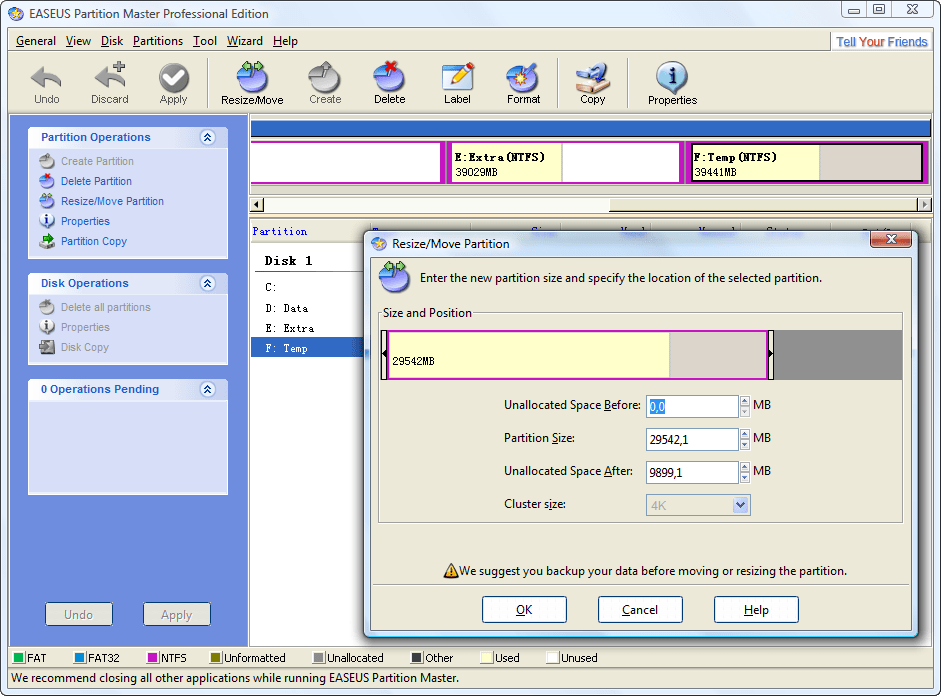
I used EASEUS Partition Master Professional Edition 3.0.2 as I failed to shrink the volume in the Disk Management tool in Windows Vista even though there was room for it.

It was easy and quick to install, get up and running and do its job. Here I’ve selected an existing partition shrinking it with the Resize/Move command.

The documentation as well as support documents online are extensive and clearly explains the ins and outs of how to succeed with your partitioning.

Depending on what you operation you do you might not even have to reboot.

The UI might not be something special or having the Ribbon but in this case it does not matter and some actually prefer having this type of basic user interface.

You can visit the support forum or if you have purchased you also can get email support.

In my tests I found everything working as expected. You should always make sure you have a backup of your data before doing things like this.

Key Features of EASEUS Partition Master

  • Resize and move partitions without losing data.
  • Hard Disk Copy or Partition Copy Wizards - Easily upgrade/migrate hard drive or copy partition to protect data.
  • Copy with resize - Resize (shrink or enlarge) partitions and disks during copy process in order to fit target space.
  • Support hardware RAID.
  • Create, delete and format partitions with simple step.
  • Creates a bootable CD/DVD to manage partitions easier and faster. (Only Professional, Server and Unlimited Edition).

For usage on a server it’s great that it can handle up to 32 hard disks under Windows Server systems and supports 1.5 TB hard disk for Windows Server partition.

Windows 2000 Professional and Server/Advanced Server, Windows Server 2003 (32 and 64 bit), Windows Server 2008 (32 and 64 bit), Windows XP (32 and 64 bit) and Windows Vista (32 and 64 bit) are supported as with the Server Edition and the Unlimited Edition. The Home Edition only supports Windows 2000, XP and Vista 32-bit while the Professional Edition also supports 64-bit.

Even though Windows 7 is not released yet I found that EASEUS Partition Master runs well on Windows 7 (32 and 64 bit). If you wonder what the difference between Windows 7 Disk Management and EASEUS Partition Master is check the chart here as the Disk Management in Windows 7 have been improved.

The Home Edition free for personal usage but with limited functionality. See this comparison chart to see the difference of feature set.

Disclaimer. I was provided a free copy of EASEUS Partition Master Professional Edition to be able test fully.

Some of the latest blog posts

Subscribe to RSS headline updates from:
Powered by FeedBurner

Contact Us | About JTB World | Website General Terms of Use | Privacy Policy
^ Top of page

© 2004- JTB World. All rights reserved.