Tuesday, July 27, 2010

Rendering of DWG files in the cloud with Project Neon

News from the Autodesk Labs: Project Neon is a rendering service that offers greater productivity and a faster turnaround of photorealistic renderings by leveraging the power and compute capabilities of the cloud.

Customers looking for more rendering capacity can now send out multiple DWG files out into the cloud, render them simultaneously and have high-quality, photo-realistic renderings delivered directly to their own secure online storage.

Thursday, July 22, 2010

Autodesk Labs Project Photofly - 3D models from photographs

Create 3D Model Scenes from Photos with Project Photofly. You can give it a try right now for free.

Capturing the reality as-built for various purposes (renovation, energy analysis, add-ons design, etc...) is now becoming possible using your standard digital camera, thanks to advanced computer vision technologies developed by Autodesk, called "Camera Factory," and now made available through "Project Photofly." Project Photofly is a technology preview to automatically convert photographs shot around an object or a scene into "Photo Scenes" using the power of cloud computing.

Between The Lines and It’s Alive in the Lab have more details.

Autodesk Acquires Swedish Illuminate Labs

Autodesk Acquires Illuminate Labs headquartered in Gothenburg, Sweden.

SAN RAFAEL, Calif., July 21, 2010 — Autodesk, Inc. (NASDAQ: ADSK) has acquired Illuminate Labs, a privately held maker of lighting technology for game development. Illuminate Labs’ Beast middleware solution and Turtle plug-in for Autodesk Maya software enable faster iteration on a game’s creative intent, and more realistic in-game lighting.

Autodesk plans to develop and sell Illuminate Labs’ technology and support Illuminate Labs customers. Autodesk anticipates that Beast middleware will continue to be licensed as a standalone product. Autodesk plans to incorporate Turtle into future offerings, and discontinue licensing it as a standalone product.

www.illuminatelabs.com and www.autodesk.com/autodeskandilluminate

Wednesday, July 21, 2010

Code Formatter Plugin for Windows Live Writer

There’s a new version of the Code Formatter Plugin for Windows Live Writer.
The new version is 2.5 and can be found at http://code.google.com/p/codeformatterpluginforwindowslivewriter

The biggest feature of 2.5 is the ability to insert snippets of code as an image (guaranteeing exact formatting no matter what blog engine you’re on).
You can also add effects to the images, such as reflections and perspectives.

Here is an example as image:

And as text:

Public Sub WriteXRec() Dim oDict As AcadDictionary Dim oXRec As AcadXRecord Dim dxfCode(0 To 1) As Integer Dim dxfData(0 To 1) Set oDict = ThisDrawing.Dictionaries.Add("SampleTest") Set oXRec = oDict.AddXRecord("Record1") dxfCode(0) = 1: dxfData(0) = "First Value" dxfCode(1) = 2: dxfData(1) = "Second Value" oXRec.SetXRecordData dxfCode, dxfData End Sub

Thanks for the update Steve Dunn.

Tuesday, July 20, 2010

ArcGIS 10 FLEXnet version and JTB FlexReport support

The 10.0 release of the ESRI ArcGIS 10.0 license manager uses FLEXnet v11.6.1.0. If you would prefer to use a newer version of FLEXnet like v11.7.0.0 that comes with Autodesk’s 2011 product line or the even the newest v11.9.0.0 it should work just fine.

Executables involved are lmgrd.exe, lmutil.exe, lmtools.exe as well as any vendor daemon like ARCGIS.EXE.

ArcGIS 10 license manager is not by default bound to FLEXlm port 27004 (so it defaults to 27000) unless that is already taken. You can force the port to be used by editing the service.txt configuration file on the license manager.

Multiple vendor daemons on the same license server

Update Autodesk Network License Manager for 2011 release of Autodesk products works also with other vendors.

License usage reports with JTB FlexReport works with ArcGIS 10 as well as the latest v11.9 of FLEXnet/FLEXlm.

Here is a comment by ESRI staff in a newsgroup:

The 10.0 release of the ArcGIS 10.0 license manager uses FLEXnet v11.6.1.0 but has also been significantly reworked to support the more robust ArcGIS 10.0 licensing model which makes use of more secure, encrypted license storage. The license manager will serve licenses to 9.x clients and 10.x clients alike.

As to the result of running the new ArcGIS 10.0 License Manager along side the AutoCad License Manager, your results may vary. With prior license manager releases, it was possible to manipulate the license files to effectively serve ArcGIS licenses from AutoCAD managers, and vice versa provided they were running roughly the same core FlexLM version. With the 10.0 ArcGIS License Manager, this would not be possible as all licenses are stored in an encrypted/secured datastore thus one's ability to "rig" these systems to work together is reduced.

That said, through the 10.0 Beta, there were no reports of "conflicts" between the new ArcGIS License Manager (10.0) and other software vendor's license managers that make use of FlexLM technology. We expect this is in large part due to architectural changes that isolate data stores and eliminate the problems of multiple license managers conflicting by reading the same locations. Regardless, running both these license managers on the same system with the 10.0 License Manager is not recommended. The changes from the ArcGIS License Manger 9.x to 10.x represent an architectural leap; running both the newer ArcGIS License Manager along side another vendor's license manager on the same system may present challenges, and should be thoroughly tested before going into production and risking downing either user base.

Saturday, July 17, 2010

User Group Leaders qualify for one free year of Vuuch

Visit the Vuuch Blog post User Group Leaders Unite for all the details on how to qualify.

Vuuch helps to communicate and collaborate around your model, drawing or document.

For more Vuuch details visit the Vuuch for AutoCAD page and the previous blog post Vuuch for AutoCAD released and ready for primetime.

Monday, July 12, 2010

Intergraph acquired by Hexagon

Stockholm, Sweden based Hexagon AB last week acquired Intergraph with products like PDS, SmartPlant 3D, SmartPlant P&ID, CADWorx, COADE, ISOGEN, CAESAR II, GeoMedia.

On 6 July 2010, Hexagon AB entered into an agreement to acquire US-based software provider Intergraph Corporation for a cash purchase price of 2 125 MUSD on a cash and debt free basis.

Intergraph fulfils all prerequisites that Hexagon has set for software driven expansion. The combination of Hexagon's leadership in solutions that capture rich geospatial data using aerial and ground based point cloud sensor technology, with Intergraph's leadership in GIS and CAD application software, will enable the enlarged Hexagon Group to develop and provide unrivalled integrated solutions to clients.

Intergraph operates through two divisions: Process, Power & Marine (PP&M) and Security, Government & Infrastructure (SG&I).  Intergraph PP&M provides enterprise engineering software for the design, construction and operation of plants, ships and offshore facilities. Intergraph SG&I provides geospatially-powered solutions to the defense and intelligence, public safety and security, government, transportation, photogrammetry, utilities, and communications industries. For more information, visit www.intergraph.com.

Full press release at www.hexagon.se/1485.asp

Quote from by Ralph Grabowski, upFront.eZine:

The other aspect of the deal that titillates observers is the position of Bentley Systems. As I understand it, Intergraph still owns 30% of Bentley, meaning either (a) Hexagon becomes a miniority owner, or (b) the Bentley brothers buy out Intergraph's share. I wonder if this now leaves Autodesk as the oldest independent CAD vendor?

Randall at Vektorrum says:

If any executives from ESRI, Bentley, or AVEVA were watching Hexagon CEO Ola Rollen’s presentation to analysts this morning, they must have reached for the antacids before he finished. He waxed enthusiastic about the market disruptions his now-doubled company intends to produce by marrying terabytes of constantly updated point cloud data into the original 3D engineering model. Instead of only using a laser scanner as a point solution for specific tasks, the marriage of scan data and CAD makes Hexagon solutions a friend of the asset from initial design to decommission.

Quote from Bloomberg:

Hexagon will help Intergraph boost sales in China, Ola Rollen, the Swedish company’s chief executive officer, said by phone today. “We have 14 regional offices, four factories and more than 1,500 employees in China,” Rollen said. “We’ll help Intergraph reach more customers through our sales organization in China.” Hexagon may also pursue “some smaller complementary acquisitions.”

Note also that CADWorx is running on Autodesk’s AutoCAD.

Hexagon owns among other brands Brown & Sharpe, Leica Geosystems and NovAtel.

The 4000 new employees will surely move Hexagon up on the list of Sweden’s largest companies.

Mr Melker Schörling is on the board of directors of Hexagon and owns a big share. Back in 1998 when I worked at Emtunga, Melker Schörling was part of IDI that acquired Emtunga and the same year Melker Schörling also acquired the controlling stake in Hexagon.

Tuesday, June 29, 2010

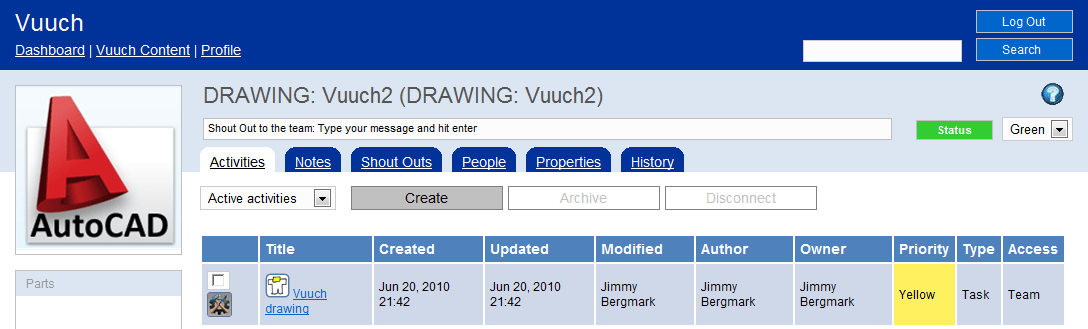
Vuuch for AutoCAD released and ready for primetime

A new version of Vuuch is available and the Vuuch for AutoCAD add-in has been updated as well so you can put the power of social to work for you and your team.

Turn drawings into WEB Pages & Connect People, Activities & Notes in a New & Social Way. It’s like Facebook for your drawings as well as for other documents.

Thursday, July 1 there are two free webinars. These webinars will walk through a series of use case examples of how to start using Vuuch inclusive of live Q&A. See the time and details at the Vuuch events page.

Vuuch palette within AutoCAD.

Private or public WEB site that you and others invited can access.

For more Vuuch details visit the Vuuch for AutoCAD page.

Monday, June 28, 2010

100 AutoCAD tips

If you want to learn some new AutoCAD tips take a look at 100 of them that Edwin Prakoso assembled on his blog CAD Notes.

I wonder if all the words AutoCAD tips where counted what that number would be. Start counting all commands and variables as a starter. Did you know that the command DCCONVERT converts associative dimensions to dimensional constraints?

Wednesday, June 23, 2010

Autodesk Design Suits bundles

There are three new product suits available from Autodesk that can be useful if you find that you need to use a mix of products. Previously there have been suits around Inventor and Revit.

"The design suites make it much easier for Autodesk customers to accelerate their design processes and benefit from the wide range of Autodesk design, visualization and simulation technologies," said Carl Bass, Autodesk President and Chief Executive Officer. "Customers will also benefit from increased interoperability and productivity through access to new features and web services that will only be available as part of the design suite family."

Here are the new suits and each suit is in different editions like Standard, Premium and Advanced depending on what products you want to have included.

Autodesk Design Suite is a bundle of AutoCAD, Alias Sketch for AutoCAD, 3ds Max Design, Autodesk Showcase and Alias Design.

Autodesk Factory Design Suite is a bundle of AutoCAD Architecture, Autodesk Inventor, Autodesk Vault and Autodesk Navisworks.

Autodesk Plant Design Suite is a bundle of AutoCAD, AutoCAD P&ID, AutoCAD Plant 3D and Autodesk Navisworks.

Via Between the Lines.

Tuesday, June 22, 2010

Free 2D editor for DWG files

You find it at DraftSight with most 2D features you can need. Dassault Systemes and Graebert is behind it and makes it tougher for AutoCAD clones and possibly AutoCAD LT.

You can read more at Deelip.com and also an interview he made.

The product that is made public now is still Beta.

Thursday, June 17, 2010

SSMPropEditor 4.0 released

SSMPropEditor now makes work with Sheet Sets even more easier.

Here are the news:

  • Indexing/renumbering functionality making it possible to renumber all or selected sheets in a sheet set
  • Easy to add Sheet count to a property so you can have text on the drawing showing for example “Sheet 5 of 18”.
  • File Path, File Name and File Layout is possible to edit on one or multiple sheets at a time.
  • Performance improvements when selecting sheets in the tree view.
  • Recent list have the option to delete not found shortcuts.
  • Alternative to use tab to move between property cells.
  • Close of Sheet Set without closing the application.
  • UI improvements.
  • Bug fixes.

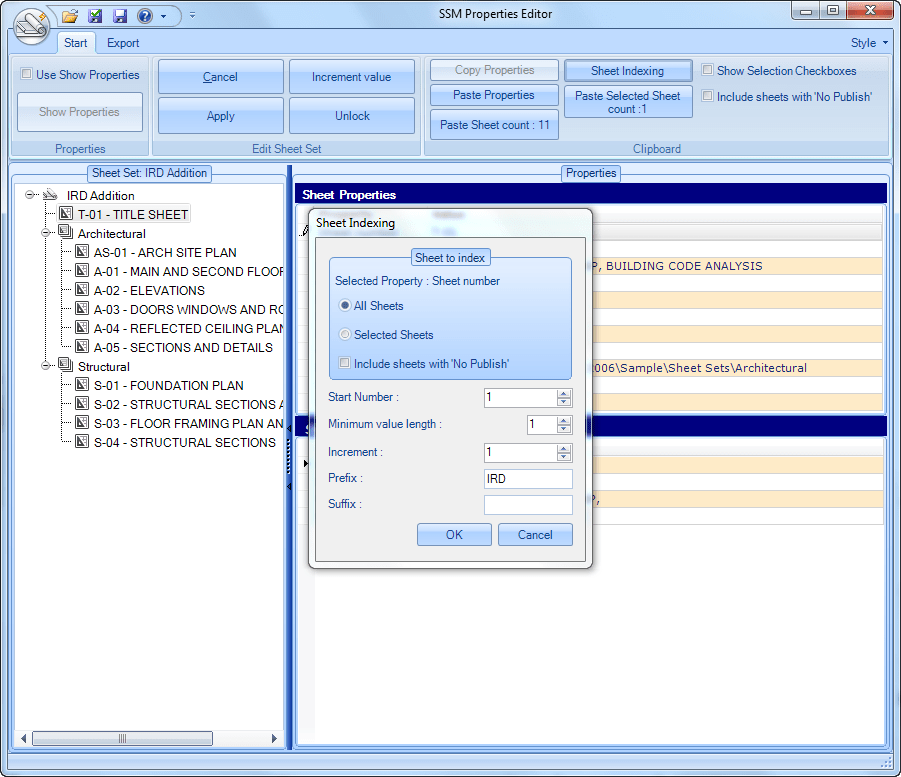
Sheet Indexing makes it possible to renumber multiple sheets.

If a selection of sheets should be indexed select them in the tree view.

Select one Sheet Property or Sheet Custom Property.

Click on Sheet Indexing button.

The dialog box that makes it possible to specify how the indexing should work opens up.

Note in this case how the Sheet Property Sheet number have been changed on all sheets and with the prefix specified.

Imagine doing this within Sheet Set Manager in AutoCAD manually on hundreds of sheets. With SSMPropEditor it is done with a few simple steps.

Contact us to get a time limited license file for free.
Full support is provided during trial period.

Existing customers are entitled to this upgrade at no extra fee.

Monday, June 14, 2010

AutoCAD and AutoCAD LT news

AutoCAD LT and Object Enablers Survey at surveymonkey.com

Among the questions is this one: “Which of the following (if any) Object Enablers would you like to see made available for AutoCAD LT?”

  • AutoCAD Plant
  • AutoCAD Raster Design
  • AutoCAD Structural Detailing

New and updated AutoCAD LT tutorials are available.

If you have the need to find AutoCAD drawings or blocks on your hard drive give Project Snap for AutoCAD a try and give Autodesk your feedback.

Now this looks a lot like the Design Center so It is Alive in the Lab has this post What's So Special about Project Snap? and below is a video showing how it works.

If you use AutoCAD and AutoCAD LT or any flavor/vertical and have a story to tell Autodesk is looking for case study participants: www.autodesk.com/acadcasestudy

Tuesday, June 8, 2010

Create Microsoft Office documents online

First try to create online documents using Office Web Apps with Word Web App, Excel Web App, PowerPoint Web App and OneNote Web App.

Here is what the Word Web App editor look like with its Ribbon.

Visit http://office.live.com/ and try for yourself.

Update: http://office.live.com/?docsf=1 can sometimes help if the above link does not work in your region.

Some of the latest blog posts

Subscribe to RSS headline updates from:
Powered by FeedBurner

Contact Us | About JTB World | Website General Terms of Use | Privacy Policy
^ Top of page

© 2004- JTB World. All rights reserved.