Monday, March 27, 2006
Can we download AutoCAD next time?
Behind the Scenes Video: Who Was Shipped the First AutoCAD 2007?
Impressive work behind the scenes.
Maybe we can have the option to download it next time.


AutoCAD 2007 CUI enhancements
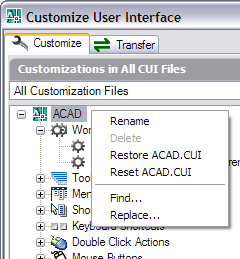
CUI functionality has been updated enabling you to drag and drop from the command list onto tool palettes.
If you have messed up with the CUI file it can be restored or reset. If restore is selected the backup acad.bak.cui is used. If reset is selected the file is taken from C:\Program Files\AutoCAD 2007\UserDataCache\Support
Visual Studio 400 Differences
I found http://www.400plusdifferences.com/ with a lot of fun videos via Scott Hanselman.
I love working in VS 2005 now with AutoCAD and ADT.
Will you jump on new products like Autodesk Revit Systems?
I appreciate honest comments like this.
"No version one product is ever a great product. Version two products are OK, version three are the good ones." - Carl Bass in CRNIt's very true, but still there are cases when there are good reasons to start using version one products. For you it might be just great enough. I will at least take a look at Autodesk Revit Systems version one and see how it is compared to the applications we use today like MagiCAD and PDMS.
Are you missing some Express Tools commands in AutoCAD 2007?
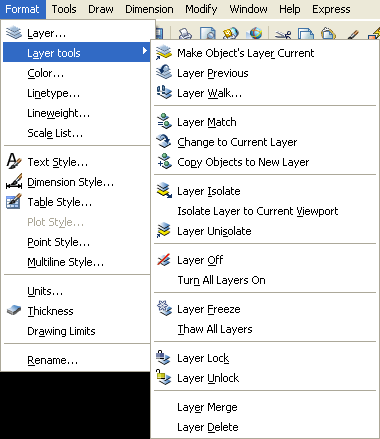 Layer Express Tools (now in the Format menu) and the Chspace command (in the Modify menu) are now part of core AutoCAD.
The new Layer tools commands are:
LAYMCUR
LAYWALK
LAYMCH
-LAYMCH
LAYCUR
COPYTOLAYER
-COPYTOLAYER
LAYISO
LAYVPI
LAYUNISO
LAYOFF
LAYON
LAYFRZ
LAYTHW
LAYLCK
LAYULK
LAYMRG
-LAYMRG
LAYDEL
-LAYDEL

DWG TrueConvert ready for 2007 DWG format
"DWG TrueConvert™ translates any AutoCAD or AutoCAD-based drawing file for compatibility with AutoCAD Release 14, AutoCAD 2000, 2000i, 2002, 2004, 2005, 2006 and 2007 versions. The DWG TrueConvert software allows conversion of pen widths to lineweights and the addition of page setups." Download from http://www.autodesk.com/dwgtrueconvert. Instructions for Silent installation of Autodesk DWG TrueConvert.
Update: Here is the direct link to download DWG TrueConvert 2007.
Update: Here is the direct link to download DWG TrueConvert 2007.
Wednesday, March 22, 2006
Problem with embedded DWF Viewer
You might have run into this as well.
 Suddenly you have to click or "Press SPACEBAR or ENTER to activate and use this control" on the embedded DWF Viewer object to activate it. This is because an introduced bug in a patch from Microsoft. More here at this news group thread: Internet Explorer ActiveX Activation Patch interferes with DWF Viewer ActiveX. Both Microsoft and Autodesk are working on this. You can try if you have been affected by looking at the DWF at this page.
SmartPurger 2.3 (support for AutoCAD 2007)
SmartPurger 2.3 is now released to support AutoCAD 2007 and its verticals.
Download it and try it for free. Demo limitation is three drawings.
No upgrade cost for existing customers but email and request a new license key.
 SmartPurger is the ultimate software for purging multiple AutoCAD drawings at top speed with full control. SmartPurger is a batch processing utility that allows you to purge multiple drawings. A Unique feature is that the file time stamp can be restored. SmartPurger handles crashes so the script continues to the end and leaves bad drawings. This is extremely useful before backups and distribution of drawings.
SmartPurger is for example useful if you want to minimize the size of files before a backup or before sending drawings by e-mail, burning to CD or just to use as a quick viewer of drawings. You can even save the files to a separate folder or to a different drawing version.
SmartPurger can also execute custom script files (.SCR) or AutoLISP files (.LSP, .FAS or .VLX).
SmartPurger is the ultimate software for purging multiple AutoCAD drawings at top speed with full control. SmartPurger is a batch processing utility that allows you to purge multiple drawings. A Unique feature is that the file time stamp can be restored. SmartPurger handles crashes so the script continues to the end and leaves bad drawings. This is extremely useful before backups and distribution of drawings.
SmartPurger is for example useful if you want to minimize the size of files before a backup or before sending drawings by e-mail, burning to CD or just to use as a quick viewer of drawings. You can even save the files to a separate folder or to a different drawing version.
SmartPurger can also execute custom script files (.SCR) or AutoLISP files (.LSP, .FAS or .VLX).
Tuesday, March 21, 2006
AutoCAD 2007 and IE 7 B2
If you have IE7 B2 installed and when you get AutoCAD 2007 within a few days make sure that you have the latest Internet Explorer 7 Beta 2 Preview - released on March 20th. If not some features like search in Help and the New Features Workshop might not work. Those bugs are now solved. Still there seems to be problems with the DWF Viewer as Scott Sheppard has blogged about.
Saturday, March 18, 2006
Sharing ADT eTransmit transmittals
If you want to share the eTransmit transmittals setups on your system with other systems across the network a solution is found here. They are stored in the registry for the current user.
Architectural Desktop 2006
[HKEY_CURRENT_USER\Software\Autodesk\AutoCAD\R16.2\ACAD-4004:409\ETransmit\setups]
Architectural Desktop 2007
[HKEY_CURRENT_USER\Software\Autodesk\AutoCAD\R17.0\ACAD-5004:409\ETransmit\setups]
Use INDEXCTL and speed up your AutoCAD
I was scanning through the Autodesk newsgroups and found this post about Slow performance with clipped xrefs and though I could help.
"We are having performance issues with drawings that have multiple copies of an xref that is clipped in various ways. ... AutoCAD slows down substantially as the number of copies of the clipped xref increases, to the point that it can take 40-50 seconds to change tabs. It seems that the regeneration of the paperspace tabs is the problem because once they are cached switching is almost instant."Here was my suggestion: Using INDEXCTL set to 3 can improve the performance up to 10 times I have seen, especially in combination with xrefs, xclip and viewports.
"INDEXCTL seems to do the trick!!Dropped tab swapping times from 40-50 seconds to only 4-5 seconds.This is a life saver... thanks guys."The Autodesk User to User Discussion Groups are a valuable asset. Another one is AUGI Forums.
Friday, March 17, 2006
Reasons to move from AutoLISP to .NET
I run across this about the next version of CLR namely 3.0 that will be basis for VB 9.0 and C# 3.0. How about things like nested functions, lambda expressions that LISP users are used to?
"Though it is not required for query comprehensions, Visual Basic may support direct syntax for anonymous functions and subroutines (so called "lambda expressions"), which would be translated by the compiler to local function declarations."- Source including more news in VB 9.0.
Then of course there are other reasons to start looking at .NET. With every new release more API opens up if you use managed code and less using AutoLISP and VBA. AutoLISP and VBA still have it's place but I find I use it less.
I'm now working on a project in Visual Studio 2005, VB.NET and AutoCAD 2007 and ADT 2007. Less reason to close down AutoCAD or ADT after using NETLOAD of a DLL because of lack of NETUNLOAD. With the ability to debug, edit and continue quite a lot of code changes can be done during a debug session. This could not be done with VS.2003. Having started to use VS.2005 there will be a hard time to go back to VS.2003 for projects without need to upgrade.
Text enhancements and bugs fixed in AutoCAD 2007
MTEXTFIXED set to 2 and MTEXTED set to “Internal:”. Text that would otherwise be difficult to read (if it is very small, very large, or is rotated) is displayed at a legible size and is oriented horizontally so that you can easily read and edit it. This is great news for many that loved the new mtext editor but could not use it because they for example used so much rotated text.
"Give us back the ability to drag and drop selected text in the In-Place Text Editor. It worked in AutoCAD 2005."
Drag and drop selected text works now again in AutoCAD 2007.
"If using DTEXT and entering underscored text starting with %%U and end the command by two enter leaves an extra row with a dot (invisible if the font is True Type). The text includes only the text %%U. The same when using %%O for overscoring."
This bug is fixed in AutoCAD 2007.
I will eventually go through the bugs in AutoCAD 2006 listed on my website and see what has been fixed or not.
Subscribe to:
Posts (Atom)