Tuesday, May 12, 2009

Technology behind lighting on Eurovision Song Contest in Moscow 2009

Right now a the big European show have started with semi-finals. My wife told me about how the scene lighting effects are spectacular at this years Eurovision Song Contest in Moscow. (Swedish winner of “melodifestivalen”, Malena Ernman with her song "La Voix" did just qualify for the final)

I could not resist to try to find out more about who was behind it and how it was done.

60 trailer trucks totally of technical equipment making the show really spectacular. The scene changes for each artist and during their performance with 2000 m2 LED screens. 550 m2 of the LED screens are on the stage floor covered by 80,000 kg of glass.

Eventually I found out that PROCON is a supplier for the ESC 2009.

The Procon group, internationally leading full-service provider of technical equipment for events, film and TV productions, was appointed as technical supplier for the Eurovision Song Contest in Moscow.

Procon will send 34 trailer trucks with technical equipment and a team of more than 70 people to this year’s Eurovision Song Contest. Contract value is in the seven-figure area.

In addition to this Sennheiser gives the following info.

Moscow is introducing 450 tonnes of the latest stage and lighting technology to the huge Olimpiyski Arena for this year’s Eurovision Song Contest. 2,000 square metres of LED walls will bathe the two semi-finals on the 12th and 14th of May and the final, on the 16th of May, in an extraordinary display of light and colour.

The Olympic Arena can hold a crowd of 80,000 but as the stage of the 54th Song Contest is so vast —1,000 square metres — there will only be space for an audience of around 20,000!

“The incredible amount of lighting technology in the arena means there’s also an increase in RF disturbance,” explains Willemsen. LED walls in particular disturb radio transmission as they consist of hundreds of thousands of pulsed LEDs, creating broadband interference which reaches far into the UHF range used by wireless microphones. “That’s why precise frequency planning and the right choice of antennas and antenna locations are vital,” continues Willemsen. 56 microphone channels and 16 links for wireless monitoring will be in action in Moscow. - press release details.

Monday, May 11, 2009

Windows 7 RC performance benchmark for CAD

According to this test in PC World:

We also measured a noteworthy 7 percent speed increase in our Autodesk 3ds max 8.0 SP3 (DirectX) test on the HP Pavillion desktop, which had an nVidia GeForce 9300GE graphics board. nVidia's drivers appear to be better optimized for Windows 7 than Windows Vista.

My real world experience running Windows 7 RC on a low end and low priced notebook has been very positive compared to using Vista on the same hardware and with the same software (Office 2007 SP2, Visual Studio 2008, SQL Server 2008, AutoCAD 2010, AutoCAD Architecture 2010, etc). I actually can use most of these software at the concurrently up and running something that was not possible on Vista.

I love the boot speed, shutdown speed, general speed in day-to-day usage, lower memory consumption, stability as well as I do like some of the new look and features.

The notebook is an AMILO Pa 2510 with AMD Turion 64 X2 Mobile Technology TL-58 (1.9 GHz), 2GB RAM and an 120GB hard disk with 5400 revs, ATI Radeon X1200 video card and 1280x800 WXGA screen. Have to test a stationary later on. More on this notebok.

I’m pretty sure you get a better performance also on a high end stationary PC.

What is your experience?

Save time using Sheet Set Manager and SSMPropEditor

On AUGI I read this comment that was good to read: “I've purchased The SSMPropEditor and It's the best investment I have made in my life. I'm editing custom sheet set data regarding drawn-by and checked by and lot of other data for hundreds of sheets in seconds while it took me days to do it”

Contact us to get a time limited license file for free.

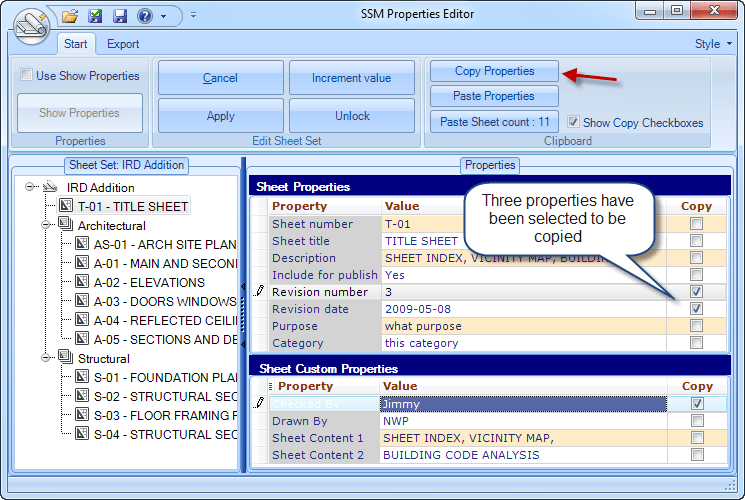
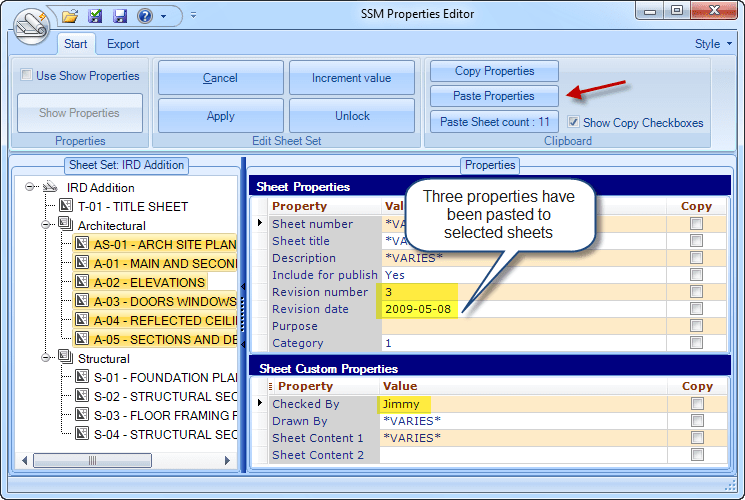
Very soon you will be able to edit Sheet Set properties as well as easily copy multiple properties from one sheet and paste to other sheets. The beta is available and a little more work on it and SSMPropEditor 3 will be released.

Sunday, May 10, 2009

Select Shape File dialog boxes automatically canceled freeware

Do you often get these dialog boxes opening drawings in AutoCAD and for some reason just want to cancel them. Here comes the solution for the problem.

Select Shape File

Now you can have this dialog box closed automatically with CloseShapeDialog.

Download this freeware CloseShapeDialog.zip. Extract it and run CloseShapeDialog.exe. After this you will find the “Select Shape File” dialog boxes canceled. You can try with the included shape.dwg file.

Warning! There is of course a reason for this dialog box that asks for a missing shape font (SHX file). If you dismiss this dialog box and don’t use the correct shape file the drawing might miss information, text, complex linetypes using shapes. If you got the drawing from someone you may consider to ask them for the file or ask them use eTransmit as it will include these type of external referenced files.

R.K. McSwain’s CAD Panacea has this post going into details and with an AutoLISP file that helps to search for shapes.

Here is the result running the command on the shape.dwg file that is included with the zip file for the program.

LINETYPE [EM-80KORR] uses SHAPE # [1] in the file [EM-80KORR]
The following SHAPE FILE is loaded: [ltypeshp.shx]
The following SHAPE FILE is loaded: [EM-80KORR]

Update: German AutoCAD is also supported so dialog boxes named “Symboldatei auswählen” are also closed.

How to be logged in on multiple accounts in Internet Explorer at the same time

This is one of my favorite features in Internet Explorer 8.

Click on Alt on the keyboard so the Menu shows up and click on File and New Session.

For a keyboard junky you can use Alt+F followed by “i” followed by Enter.

Now you can log into multiple Hotmail, Google, Gmail, Twitter, Yahoo or whatever account simultaneously. If it does not work you might need to deselect “Remember Me” option for the login as it might use a persistent cookie that is shared across sessions.

If you want to create a shortcut for this you can use iexplore.exe with the -nomerge parameter. "C:\Program Files\Internet Explorer\iexplore.exe" -nomerge

Saturday, May 9, 2009

The Shard of Glass tower / London Bride Tower

This building will be one of the tallest building in Europe with its 310 m including Antenna or 306 m to the roof. 87 floors and 111,400 m2.

TheShard

WSP Cantor Seinuk has stared work on the project. Wondering if Revit Structure is used.

More at www.shardlondonbridge.com and Wikipedia

The basement, including the core, will be constructed from the ground floor down at the same time as the 80-storey structure is constructed from the ground floor up.

WSP press release

Friday, May 8, 2009

Autodesk Navisworks supported file formats

It can be a bit tricky to find this information but here it is. There is a PDF available with a detailed list of supported formats and applications. They are many.

See also Navisworks documentation online

Thursday, May 7, 2009

AutoCAD Object Transparency – Do you want that?

AutoCAD Product Design and Usability Team would be interested in gathering user-specific preferences for the concept of Transparency in AutoCAD. Currently there is no support of transparency of object in AutoCAD and they are looking for your feedback for consideration in a future release.

This Survey consists of 29 questions. Please try to answer at the best of your knowledge and experience; use the "Comment" field for submitting your ideas or alternative responses.

Transparency, Opacity and Translucency are terms used in the survey. Do you know the meaning of them? If not, it’s not required. But if you want to read about it first see here on Wikipedia for example.

Follow this link to get to the survey: “Transparency in AutoCAD” Survey

The Survey will be active: May 6-15, 2009.

Opacity or Transparency?

Opacity or Transparency?

Opacity is used as AutoCAD does not support transparency. But what is the difference?

CADsmart software for CAD skill assessment reviewed

I reviewed and tested CADsmart Premier for AutoCAD some time ago.

 Tell me more

CADsmart software enables AEC firms to easily and automatically assess the skills of their CAD & BIM teams and potential staff.  Unlike multi-choice question based assessments, CADsmart assesses ability to actually use real-life CAD software.  Key features include; live skills drafting, automated marking, detailed results with helpful training reports, live screen recording of test sessions and the ability to compare results to wider industry CAD benchmarks.  CADsmart enables CAD administrators to capture and analyse valuable data for individual, team or company-wide CAD performance. Results are stored in a secure online area providing key information for management reporting and more targeted training. 

Current modules cover AutoCAD, MicroStation & Revit Architecture.  Revit Structure & Bentley Architecture modules due for release soon. http://www.cadsmart.net/products.asp

After having some initial issues with running it with my Swedish locale settings in the latest version CADsmart support were quick to identify and fix the problem by releasing a new update.

Up and running with the software I was able to try the product and I really like this concept of making an assessment of CAD skills. Much better than forms you need to fill in with correct answer on multiple-choice questions that often are skills you really don’t need in your day-to-day work anyway.

CADsmart uses live drawing exercises using the users AutoCAD, MicroStation or Revit installation and together with the reports and screen recordings the person that analyzes the result is in a very good position to determine the skill of the one taking the test.

I can really recommend CADsmart software for any company that uses any of the software from Autodesk and Bentley that CADsmart supports. It make sense for companies that are growing when they need to hire new staff or for companies that needs to downsize and want to make the best choice of what staff to keep. It finally make sense for any company to keep their staff knowing how to use their work tools and to know in what areas more learning is needed.

When I was working as CAD Manager several years ago I would without doubt have used CADsmart.

Visit CADsmart website or CADsmart blog and make sure to inquire for a trial.

Wednesday, May 6, 2009

Fix problem with icons on Desktop and in Explorer

When I installed Windows 7 RC and copied over some desktop files I found that the icons for several of the internet shortcuts did not show the correct icon. Some of them displayed incorrectly as some kind of earth globe.

The solution to rebuild the icon cache is to delete the hidden file IconCache.db that is located in %userprofile%\AppData\Local

If you delete this file the icon cache database will be rebuilt. This trick works in both Windows Vista and in Windows 7. (In Windows XP the folder is C:\Documents and Settings\Your User Name\Local Settings\Application Data)

  1. Close all open Explorer windows.
  2. First open up Windows Task Manager.
  3. Then Exit Explorer in Windows (open the Start menu, hold down Shift and Ctrl, right click on an empty surface in the menu and select Exit Explorer)
  4. In Task Manager File menu select New Task (Run…).
  5. Enter CMD.EXE and click OK.
  6. On the command prompt enter these three commands
    CD /d %userprofile%\AppData\Local
    DEL IconCache.db /a
    EXIT
  7. In Task Manager File menu select New Task (Run…).
  8. Enter EXPLORER.EXE and click OK.

Now things are back to normal as they should. Strange thing though that this happened directly after installing a fresh copy of Windows 7. And it seems to happen again after some weeks or months.

Have you too run into this bug?

Tuesday, May 5, 2009

Windows 7 RC available

Windows 7 RC build 7100 is here now.

image

There is a new Aero Theme named Architecture as well and you can have the desktop background change automatically like a slideshow if you want to.

I have used it since it was made available for MSDN members last week and is happy with it for the most part.

One thing I don’t like is when you quickly use Alt+Tab several times there is too much flicker on the screen because each application you switch between shows up.

Together with Office 2007 SP 2 I’m really happy with the result and an it is much snappier than Windows Vista. I also run AutoCAD 2010, AutoCAD Architectural 2010, Visual Studio 2008, SQL Server 2008, Mozy, Carbonite and more on this laptop. It is a very basic laptop with low hardware specs but with Windows 7 installed it works great for what I use it for.

I tried the beta of F-secure’s antivirus product that is in beta for Windows 7 but had to uninstall it because it hanged Windows from time to time quite badly.

I will use Windows 7 RC as my default OS even for production usage now.

You can get it now for free at http://www.microsoft.com/windows/windows-7

Timber Architecture resources

If you’re interested in the usage of Timber in constructions take a look at the site Timber Architecture accompanying blog and FrameWiki that is a community portal for Timber Framed Buildings. AutoCAD Architecture has been used in several of the projects.

Saturday, May 2, 2009

Guide to Sustainable Design for Architecture, Engineering & Construction

This is a nicely done interactive guide. It is easy to understand and guides you to Sustainable Design for Architecture, Engineering & Construction. Check it out here.

This is a free online resource that illustrates sustainable design principles, decisions and technologies for every phase of the building project lifecycle. The Guide helps owners, architects, engineers and contractors select their building paths and view the consequences of their design choices on the efficient use of water, energy, materials and land.

Disclaimer is that a lot is with focus on Autodesk products and American standards.

A method called passive houses is getting common here in Sweden.

Passive houses are airtight buildings that use heat from appliances and even the occupants' bodies for warmth. They have thick insulation, are oriented to maximize winter sun and use a heat exchanger to warm outside air that circulates throughout. The result is a house that needs little or no extra energy for heating, even in very cold climates. – NYTimes

Click for larger picture

Friday, May 1, 2009

Restore lost workspace, menus and profile in AutoCAD Architecture

Have you got problems in AutoCAD with missing things like workspace, menus, ribbon, QAT, toolbars, profile, settings, etc. This tip is usually quicker than doing a repair of the installation and a solution to the problem I often used.

Notice that you will loose any of the settings and customizations that are saved either of these locations.

Delete keys like this in the Registry Editor (Run regedit.exe and use with care):

For AutoCAD Architecture 2009
HKEY_CURRENT_USER\Software\Autodesk\AutoCAD\R17.2\ACAD-7004:409

For AutoCAD Architecture 2010
HKEY_CURRENT_USER\Software\Autodesk\AutoCAD\R18.0\ACAD-8004:409

For AutoCAD Architecture 2011
HKEY_CURRENT_USER\Software\Autodesk\AutoCAD\R18.1\ACAD-9004:409

For AutoCAD Architecture 2012
HKEY_CURRENT_USER\Software\Autodesk\AutoCAD\R18.2\ACAD-A004:409

Delete also the roamable contents (just paste the path into Windows Explorer):

For AutoCAD Architecture 2009
%APPDATA%\Autodesk\ACD-A 2009

For AutoCAD Architecture 2010
%APPDATA%\Autodesk\ACA 2010

For AutoCAD Architecture 2011
%APPDATA%\Autodesk\ACA 2011

For AutoCAD Architecture 2012
%APPDATA%\Autodesk\ACA 2012

Here is an explanation on where %APPDATA%\Autodesk takes you
in XP: C:\Documents and Settings\%username%\Application Data\Autodesk
in Vista: C:\Users\%username%\AppData\Roaming\Autodesk

When you now start AutoCAD Architecture a so called secondary installation will happen that restores the content of the above places to what it is like if you install from scratch.

This tip can also be used for AutoCAD as well as other AutoCAD verticals. For AutoCAD registry details see the documentation here. The paths for roamable contents also are different but is usually easy to figure out if you look in the %APPDATA%\Autodesk folder.

Some of the latest blog posts

Subscribe to RSS headline updates from:
Powered by FeedBurner

Contact Us | About JTB World | Website General Terms of Use | Privacy Policy
^ Top of page

© 2004- JTB World. All rights reserved.