Monday, April 11, 2011

SSMPropEditor 4.3 released

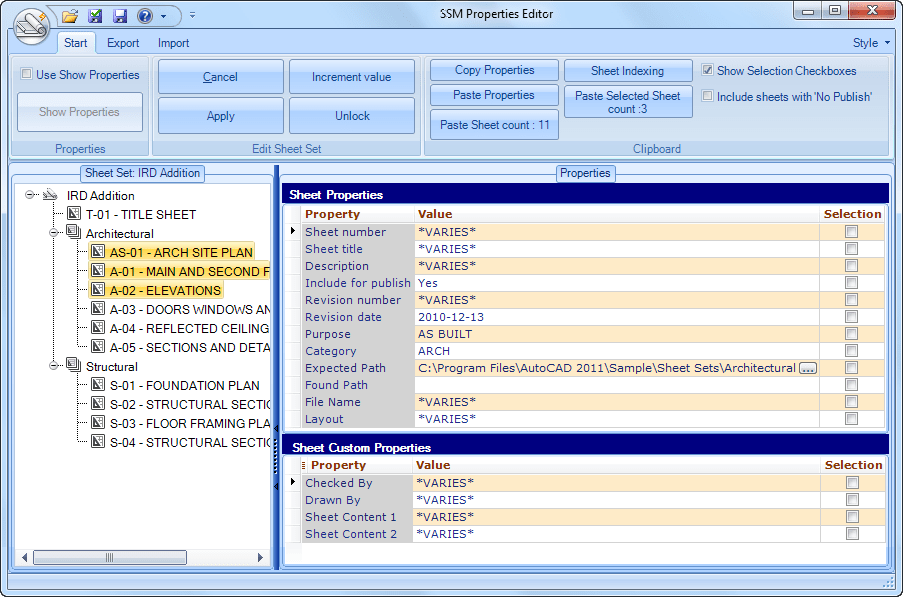
Have you ever wondered how to edit Sheet Properties and Sheet Custom Properties on many sheets at the same time? It cannot be done in AutoCAD’s Sheet Set Manager (SSM) but JTB World’s SSMPropEditor can do it.

Here is what’s new in SSMPropEditor version 4.3:

  • Added tooltip to recent sheet set list.
  • It is now possible to add just a space for properties to avoid the dots showing in AutoCAD.
  • Possible to add spaces at the beginning and end of Sheet Indexing prefixes or suffixes.
  • German translation.
  • Bugs fixed:
    • The tree view expansion/collapse is not restored in certain cases.
    • Sheets with .DWG in captial letters are incorrectly showing with an extra .dwg suffix.
    • Renaming and repathing of the actual dwg files is not always working.
    • Export is not working in some cases.
    • Removed save dialog when unlocking or closing a sheet if no changes have been done.
    • Some other minor issues.

Existing customers are entitled to this upgrade at no extra fee. Just install the new version. More about SSMPropEditor including downloads. Free trial available.

SSMPropEditor is compatible with the latest AutoCAD 2012 with its verticals as well as AutoCAD LT 2012. Congrats to AutoCAD LT 2012 users that now also have access to Sheet Set Manager.

More Sheet Set Manager resources:

Thursday, April 7, 2011

System Requirements, licensing and performance for Autodesk Citrix Ready products

In the previous post I mentioned that AutoCAD 2012 and Revit 2012 are Citrix Ready.

KB document TS16785740 has this info:

System Requirements for Autodesk Citrix Ready products

Issue

You wish to know the system requirements for Autodesk products that can be used on Citrix XenApp.

Solution

Revit Architecture, MEP, and Structural 2012:

  • Microsoft Windows Server 2008 R2.
  • Citrix system with XenApp® 6.0, Citrix® License Manager, and Citrix® Profile Manager.
  • Microsoft® Active Directory with support for roaming profiles.
  • Dedicated Autodesk license server for session-specific licenses.
  • Microsoft Internet Explorer 7 (or later).
  • Client computers should be bound to the network domain. Each client computer should install either the full or web online client plug-in.
  • Users should use their domain logins to access both the Citrix web console and the LAN.

AutoCAD 2012 and other Citrix Ready verticals:

  • Microsoft Windows Server 2008 R2 and Windows Server 2003.
  • Citrix system with XenApp® 6.0 for Microsoft Windows Server 2008 R2.
  • Citrix system with XenApp® 5.0 for Microsoft Windows Server 2003.
  • Microsoft® Active Directory.
  • Dedicated Autodesk license server for session-specific licenses.
  • Microsoft Internet Explorer 7 (or later).
  • Client computers should be bound to the network domain. Each client computer should install either the full or web online client plug-in.
  • Users should use their domain logins to access both the Citrix web console and the LAN.

AutoCAD Map 3D and AutoCAD Map 3D Enterprise 2012:

  • Microsoft Windows Server 2008 R2 and Windows Server 2003.
  • Citrix system with XenApp® 6.0 for Microsoft Windows Server 2008 R2.
  • Citrix system with XenApp® 5.0 for Microsoft Windows Server 2003.
  • Microsoft® Active Directory.
  • Dedicated Autodesk license server for session-specific licenses.
  • Microsoft Internet Explorer 7 (or later).
  • Client computers should be bound to the network domain. Each client computer should install either the full or web online client plug-in.
  • Users should use their domain logins to access both the Citrix web console and the LAN.

KB document TS16785782 has this info:

Licensing and license file format for Autodesk products on Citrix XenApp

Issue

You wish to know the requirements for licensing with Autodesk Citrix Ready versions of AutoCAD and Autodesk Revit.

Solution

Note: Using Autodesk Citrix Ready products requires the purchase of a special license. Contact your Autodesk Authorized Reseller to inquire about purchasing this license.

A separate network license server is required for Autodesk products on Citrix XenApp. The reasons for this are:

  • The license is a session specific license. More detail for this will be discussed below.
  • There is no special installer for the Citrix versions of Autodesk products. Therefore they use the same feature name in the licensing system.
  • Licenses cannot be allowed to cascade.

You can identify a license file as session specific by reviewing the key words in the INCREMENT. Regular network license files contain the DUP_GROUP key word. Session specific licenses do not.

As an example this INCREMENT for AutoCAD Map 3D 2011 does not contain a DUP_GROUP key word. It is therefore a license for only the Citrix environment. Each license is checked out for each session.

INCREMENT 85557MAP_2011_0F adskflex 1.000 permanent 5 \
VENDOR_STRING=commercial:permanent SUPERSEDE ISSUED=09-Mar-2010 \
SN=399-99999999 SIGN="1A7D ABCD B4EC CA97 E4AD 0AF2 0D95 3399 \
B51C 18F7 BB46 9ACA C19A F63E D42D 1E39 28F6 94C3 84B0 23E8 \
E314 3D97 E77E8 3F68 58DE 8C79 C0C3 0EF8 23B5 623D" SIGN2="02B6 \
5026 DBDA 268F DAC3 50E7 0A6A BD82 6A5C C926 B368 5DD2 5923 \
654E C5DD FFFF 1DD3 511B 66C1 0EF3 88FA 9667 7B43 57ED 08BC \
C699 4DD4 F866 9A99 665E"

As an example this INCREMENT for AutoCAD 2012 does have the DUP_GROUP key word. One license is checked out for the host. This license will prevent license usage for multiple users on the same host and is NOT to be used for the Citrix environment.

INCREMENT 85730ACD_2012_0F adskflex 1.000 permanent 5 \
VENDOR_STRING= commercial:permanent SUPERSEDE DUP_GROUP=UH \
ISSUED=29-Mar-2011 BORROW=4320 SN=399-99999999 SIGN="ABCD 8D3A \
94EA FFFF DE0D AF7C 77EC 9DB8 9695 A204 9229 C136 49EB 5423 \
82EB 11E3 FFFF 1DC0 917B 0FC0 B4F0 5555 8639 1F7C CCCC D20C \
DDDD C61D B7A3 AAAA" SIGN2="0808 DDDD B42B 030B AE34 42A5 4DD2 \
5FC3 0000 D699 AC7D 275C 9BEB 36A7 E993 1075 F3F8 3F17 5654 \
CB24 903E 7777 6897 71A8 3A41 A220 FA8A 57D6 4AB7 FDFD"

For installation and configuration steps refer to the Single server network license manager quick start guide solution.

KB document TS16755552 has this info:

AutoCAD Performance Recommendations for Citrix XenApp

Issue

You wish to know what user interface components most impact the user experience in the Citrix XenApp environment.
You wish to know recommended configurations to improve performance.

Solution

Tooltips

ToolTips and rollover ToolTips significantly impact performance when running AutoCAD on Citrix XenApp. We recommend that you disable ToolTips and rollover ToolTips. To disable ToolTips and rollover ToolTips, click Application menu button > Options. On the Display tab of the Options dialog box, clear the checkmarks for Show ToolTips and Show rollover ToolTips. You can also reset the TOOLTIPS and ROLLOVERTIPS sysvars to 0 at the command line.

Dynamic Input

Dynamic Input significantly impacts performance when running AutoCAD on Citrix XenApp. We recommend that you disable Dynamic Input. To disable Dynamic Input, right-click the Dynamic Input icon on the Map Status Bar or enter DSETTINGS at the command prompt. On the Dynamic Input tab of the Drafting Settings dialog box, clear the checkmarks for Enable Pointer Input, Enable Dimension Input where possible, and Show command prompting and command input near the crosshairs. You can also hide the Dynamic Input icon by right clicking on it and clearing the check next to Display > Dynamic Input.

Selection Preview

Selection Preview significantly impacts performance when running AutoCAD on Citrix XenApp. We recommend that you disable Selection Preview when no command is active. To disable Selection Preview when no command is active, click Application menu button > Options. On the Selection tab of the Options dialog box, clear the checkmark for When no command is active. You can also reset the SELECTIONPREVIEW sysvar to 2 at the command line.

AutoCAD 2012 and Revit 2012 are Citrix Ready

JTB FlexReport can be used to monitor license usage of Autodesk Citrix Ready products.

Tuesday, April 5, 2011

AutoCAD 2012 and Revit 2012 are Citrix Ready

Good news for Citrix users with AutoCAD and Revit based products. Something many been waiting a long time and might be a sole reason to upgrade to the 2012 version.

This is from the press release:

Autodesk Announces Eight More ‘Citrix Ready’ Verified Applications

Several Applications in Autodesk’s New Building and Infrastructure Design Suites Take Advantage of Citrix Networking and Virtualization Solutions

SAN RAFAEL, Calif.--(BUSINESS WIRE)--Autodesk, Inc. (NASDAQ: ADSK), a leader in 3D design, engineering and entertainment software, announced that eight design software products including AutoCAD 2012, AutoCAD Architecture 2012, AutoCAD Map 3D Enterprise, AutoCAD Mechanical 2012, AutoCAD MEP 2012, Autodesk Revit Architecture 2012, Autodesk Revit Structure 2012 and Autodesk Revit MEP 2012 software have been verified as Citrix Ready*.

“There is a clear advantage to our mutual customers to have additional Autodesk applications join us in the Citrix Ready program”

Autodesk became a member of the Citrix Ready program in 2008 with AutoCAD Map 3D and AutoCAD Raster Design. The Citrix Ready program helps customers identify third-party solutions recommended to enhance virtualization, networking and cloud computing solutions from Citrix Systems, Inc. Autodesk completed a rigorous verification process to ensure compatibility with Citrix XenApp 5 and Citrix XenApp 6, enhancing confidence in joint solution compatibility.

“As a member of the Citrix Ready program, we are better able to offer customers more intelligent solutions that combine our leading 3D design software with the Citrix XenApp product line,” said Robert Vizza, director of Strategic Alliances at Autodesk. “Since joining the Citrix Alliance Program in 2008, Autodesk customers have enjoyed the benefits of Citrix Ready solutions, which include centralized management of data and resources, reduced client hardware requirements and support costs, and consolidation of servers. Our nine Citrix Ready software offerings demonstrate our continued collaboration with partners to provide the highest-quality experience for our customers.”

Hosting Autodesk applications through Citrix XenApp provides users with the benefits of centralized computing (improved software deployment, configuration standardization, work-in-progress data distribution), as well as mobile computing, extending the reach of design data beyond the desk.

“Nearly every HOK project requires staff from multiple offices to collaborate on the same Revit model,” said John Bartolomi, vice president and director of IT Services at HOK. “All previous attempts to enable this type of collaboration presented challenges and unsatisfactory results. Running Revit over Citrix has solved a problem that seemed unsolvable just a few years ago. It provides a near desktop-like experience over rather modest bandwidth even over long distances. The Revit 2012 for Citrix is further optimized to take advantage of this great technology.”

The new Citrix Ready offerings complement Autodesk’s software and services direction by providing a remoting mechanism for some of the company’s most popular design applications. Autodesk software that supports both Citrix XenApp 5 and XenApp 6 includes AutoCAD 2012, AutoCAD Architecture 2012, AutoCAD Map 3D, AutoCAD Map 3D Enterprise, AutoCAD Mechanical 2012 and AutoCAD MEP 2012 software. Autodesk Revit Architecture 2012, Revit Structure 2012 and Revit MEP 2012 software support Citrix XenApp 6 only.

“There is a clear advantage to our mutual customers to have additional Autodesk applications join us in the Citrix Ready program,” said Matt Lull, senior director, global strategic alliances at Citrix. “Citrix Ready makes it easier for customers to select the most suitable virtualization infrastructure products for their specific needs. By verifying additional products in our program, Autodesk continues to enable its customers to obtain the highest quality user experience available today, and the simplest means for making an informed product purchasing selection.”

About Autodesk

Autodesk, Inc., is a leader in 3D design, engineering and entertainment software. Customers across the manufacturing, architecture, building, construction, and media and entertainment industries -- including the last 16 Academy Award winners for Best Visual Effects -- use Autodesk software to design, visualize and simulate their ideas. Since its introduction of AutoCAD software in 1982, Autodesk continues to develop the broadest portfolio of state-of-the-art software for global markets. For additional information about, visit www.autodesk.com.

About the Citrix Ready Program

The Citrix Ready program identifies verified solutions that are trusted to enhance virtualization, networking and cloud computing solutions from Citrix, including Citrix XenDesktop, XenApp, XenServer, NetScaler and GoToMeeting. The Citrix Ready designation is awarded to third-party products that have successfully met verification criteria set by Citrix, and gives customers an added confidence in the compatibility of the joint solution offering. The Citrix Ready program leverages industry-leading alliances across the Citrix partner eco-system to meet a wide variety customer needs, and currently incorporates over 2,800 partners who have demonstrated more than 18,000 product verifications. It also includes the Citrix Ready Community Verified program which allows customers to see thousands of products that have been verified by other customers to work in their production environments. The Citrix Ready program received the Alliance Excellence Award from the Association of Strategic Alliance Professionals (ASAP) for creating a strong community through implementation of new, innovative best practices. More information about the can be found at www.citrix.com/citrixready. Reach Citrix Ready using social media via the Citrix Ready blog site and Twitter.

*The Citrix application is network-based, and performance of Autodesk Citrix Ready Applications may vary with network performance. The software does not include the Citrix application, nor does Autodesk provide direct support for issues with the Citrix application. Users should contact Citrix directly with questions related to procurement and operation of the Citrix application.

Monday, April 4, 2011

AutoCAD Content Explorer

AutoCAD 2012 introduces AutoCAD Content Explorer. It overlaps to some extent with the old Design Center and comes via Autodesk Labs Project Snap.

Content Explorer is available on the Plug-ins ribbon tab and comes with the commands CONTENTEXPLORER and CONTENTEXPLORERCLOSE and system variable CONTENTEXPLORERSTATE.

Content Explorer aggregates design content from different folders that have been specified for monitoring by the Content Service (that is using Lucene for index/searching). Content Service is a separate installer. The executable for the Content Service is named Connect.Service.ContentService.exe but Autodesk missed to add file properties to it like a proper description and company name. Now it just has an anonymous description: “Service”.

With Content Explorer you can index design content for quick access, catalog the objects in each file, and search for content in local folders (not external drives and USB devices), network folders (not Windows network drives), and the Autodesk Seek Library.

With Content Explorer, you can

  • Browse and search design content in local folders, network folders, and the Autodesk Seek Library and immediately access files and objects from within the AutoCAD environment
  • Browse into DWG files and access and insert blocks, layers, linetypes, styles, etc.
  • Search for objects, all text, attributes (including block attributes), and files in specified local and network folders.
  • Pinpoint specific block references or text strings and automatically navigate to the containing file
  • Open any file from Content Explorer and zoom to any attribute within it
  • Save search parameters for instant access to design content that meets your design needs
  • Customize how search results are displayed to streamline your work environment
  • Right-click and select Open and Find text to open the drawing and locate any text within.

All text and attributes in the files are indexed, including block attributes. In addition, the following objects are indexed when a folder is selected for monitoring:

  • Block definitions
  • Block references
  • Dimstyles
  • Layers
  • Layouts
  • Linetypes
  • Multileaderstyles
  • Tablestyles
  • Textstyles
  • Xrefs
  • Hyperlinks

Manage Saved Searches in Content Explorer

The saved searches feature allows you to capture a certain search string in a single click.

You can eliminate all of the steps required to search for specific files or objects by saving the search string.

For example, you can save a search that locates all of the furniture created by a specific designer. Any time you want to quickly access furniture, select the saved search. Since the index is continuously updated, any new files that meet the search criteria are displayed every time the search is recalled.

You can also delete saved searches, edit the names of existing saved searches, and save new searches on the Saved Searches drop-down menu.

Advanced Searching with Content Explorer

Advanced searches can be performed using property:value pairings or boolean operators.

You can refine your searches by using string combinations and value pairings.

Use Property Name and Value Pairs

A property:value pair is the property name and specific value for which you want to search. To search for a property with a specific value, enter the data as property:value in the Search field.

For example, enter author:jsmith in the Search field to find all of the DWG files where the author was JSmith.

More than one property:value pair can be used in a search string. For example, you can search for all of the drawing files identified as seating which were created by jsmith by entering objecttype:seating author:jsmith in the Search field.

You can create custom properties and values for your files on the AutoCAD properties dialog box.

Use Attributes and Value Pairs

An attribute:value pair is the block attribute and specific value for which you want to search. To search for a block attribute with a specific value, enter the data as attribute:value in the Search field.

For example, enter Designedby:JohnDoe in the Search field to find all of the objects designed by John Doe.

Search Text for a Specific Value

With the basic search capability, you can enter a text string and the search engine will return all files with a file name, keyword, title, author, or other properties that meet the string criteria, as well as any files containing the string, and objects with names that match the text string. Sometimes this type of string search will return more results than you need.

Use the text:string pair to search only for text entities, such as leaders, fields, hyperlinks, MText, tables, or any other text that may show up on a drawing. This type of search parameter will not search file-level properties, such as Author or Title.

To search for a specific text string, enter the data as text:string in the Search field.

For example, enter text:reviewed in the Search field to find all of the files with text entities containing the string “reviewed.”

Search with wild cards

You can use wild cards when specifying search criteria.

* - Represents any number of characters within a string.

? - Represents a single character within a string.

The search engine assumes a trailing asterisk (*), so you do not need to put an asterisk at the end of a search phrase.

Search with Boolean Operators

You can use operators to further refine your search results.

For example, to search for all of the files identified as seating that were not authored by JSmith, enter objecttype:seating NOT author:jsmith in the Search field.

AND - Searches for x AND y in any order. The search granny AND smith returns anything containing both words.

OR - Searches for either x OR y. The search granny OR smith returns anything containing either word.

NOT - Searches for x but NOT y. The search granny NOT smith returns anything containing granny but not smith.

" " - Searches for the exact phrase contained within the quotation marks. The search "granny smith" returns everything containing the exact phrase granny smith.

Filter Results in Content Explorer

The filter lets you choose object types, specific dates, date ranges, and relative dates to display in search or browse results.

Filter settings persist throughout searches and browsing until they are changed or the filter is deactivated. If you do not get the search or browse results you expect, try checking your filter settings to make sure they are current.

Indexing Stages

The indexing occurs in three stages, with deeper indexing occurring with each stage. The stages can be determined by the thumbnails displayed in the Content Explorer window.

And after a while when indexing is ready...


Stage Icon Displayed Description
1

File has been discovered by the indexer.

By the end of this stage, file name and standard Windows properties have been extracted. You can search for file names and Windows properties, but you cannot explore the content within the file.

Note! Since all text and attributes in the files are indexed, the initial index of the files contained in the watched folders may take some time to complete.

2

Thumbnail and DWG-specific file properties have been discovered. During this stage, all objects and any text in the drawing, including block attributes, are being indexed.

You can now search for DWG properties, but you cannot explore the content within the file.

3

File is completely indexed.

You can now explore or search for content within the file.

!

There was an issue while indexing this file.

Select the file and press CTRL+ I for more information regarding the issue.

Tips

If the Sheet Set Manager dialog opens every time you open a file in Content Explorer, it is because of the SSMAUTOOPEN system variable setting. Change the setting to suppress the dialog.

If you plan to search folders on several different network computers, Content Service must be installed on each network computer and the folders added to the watched folder list for indexing. Any machine running AutoCAD or an AutoCAD vertical with Content Explorer can access the network machines running Content Service for real-time search results.

See also Autodesk 2012 Content Explorer Service Hot Fix
Saturday, April 2, 2011

Autodesk 2012 Content Explorer Service Hot Fix

This hotfix applies to the Autodesk 2012 Content Explorer Service (Public and Personal) and addresses the following issues:

  • Users performing searches in Content Explorer may encounter incorrect paging results.
  • Indexing problematic DWG files would require the Content Service to be restarted.
  • Searching on a network drive that is configured to use a substitute path may not return any results.

Please review the readme document for installation instructions.

Get the hotfix here: DL16732560

Applies to:
AutoCAD 2012
AutoCAD Architecture 2012
AutoCAD Civil 3D 2012
AutoCAD Electrical 2012
AutoCAD LT 2012
AutoCAD Map 3D 2012
AutoCAD Mechanical 2012
AutoCAD MEP 2012

Friday, April 1, 2011

Solution to System.IO.FileLoadException Could not load file or assembly error

I had a customer that downloaded a DLL to load in AutoCAD with NETLOAD having problem to get it work.
The solution to the error found at the bottom is to right click on the DLL file and click on Unblock button to the right of the text: This file came from another computer and might be blocked to help protect this computer.


If this does not work AlternateStreamView might work. Run it and delete all streams marked ":Zone.Identifier:$DATA" for the selected files (it might be .DLL, .ZIP, .EXE, .7z) to get rid of the security blocks.

Typical Error causing this problem found below:
Cannot load assembly. Error details: System.IO.FileLoadException: Could not
load file or assembly 'file:///C:\Users\JTB\AppData\Roaming\JTB
World\DimNotes\JTBDimNotes.dll' or one of its dependencies. Operation is not
supported. (Exception from HRESULT: 0x80131515)
File name: 'file:///C:\Users\JTB\AppData\Roaming\JTB
World\DimNotes\JTBDimNotes.dll' ---> System.NotSupportedException: An attempt
was made to load an assembly from a network location which would have caused
the assembly to be sandboxed in previous versions of the .NET Framework. This
release of the .NET Framework does not enable CAS policy by default, so this
load may be dangerous. If this load is not intended to sandbox the assembly,
please enable the loadFromRemoteSources switch. See
http://go.microsoft.com/fwlink/?LinkId=155569 for more information.
at System.Reflection.RuntimeAssembly._nLoad(AssemblyName fileName, String
codeBase, Evidence assemblySecurity, RuntimeAssembly locationHint,
StackCrawlMark& stackMark, Boolean throwOnFileNotFound, Boolean
forIntrospection, Boolean suppressSecurityChecks)
at System.Reflection.RuntimeAssembly.InternalLoadAssemblyName(AssemblyName
assemblyRef, Evidence assemblySecurity, StackCrawlMark& stackMark, Boolean
forIntrospection, Boolean suppressSecurityChecks)
at System.Reflection.RuntimeAssembly.InternalLoadFrom(String assemblyFile,
Evidence securityEvidence, Byte[] hashValue, AssemblyHashAlgorithm
hashAlgorithm, Boolean forIntrospection, Boolean suppressSecurityChecks,
StackCrawlMark& stackMark)
at System.Reflection.Assembly.LoadFrom(String assemblyFile)
at Autodesk.AutoCAD.Runtime.ExtensionLoader.Load(String fileName)
at loadmgd()

Tuesday, March 29, 2011

Associative Array in AutoCAD 2012

In AutoCAD 2012 The ARRAY command has been largely improved and is now creating a new Associative Array object by default. There are three commands for Rectangular Array, Path Array and Polar Array.

This will probably be a favorite by many and works in both 2D and 3D.

ARRAYRECT, ARRAYPATH, ARRAYPOLAR, ARRAYCLOSE and ARRAYEDIT are new commands. ARRAYEDITSTATE and ARRAYTYPE are new system variables.

Associativity allows you to quickly propagate changes throughout an array by maintaining relationships between items. Arrays can be associative or non-associative.

  • Associative. Items are contained in a single array object, similar to a block. Edit the array object properties, such as the spacing or number of items. Override item properties or replace an item’s source objects. Edit an item’s source objects to change all items that reference those source objects.
  • Non-associative. Items in the array are created as independent objects. Changes to one item do not affect the other items.

To edit the array properties, use ARRAYEDIT, the Properties palette, Ribbon or grips.

Apply Item Overrides: Ctrl+click items in the array to erase, move, rotate, or scale the selected items without affecting the rest of the array. Reset the array to remove all item overrides.

Replace items: Replace selected items with other objects. Any item overrides are maintained. You can also replace all items that reference the original source objects, rather than selecting individual items.

Edit Source: To edit an item’s source objects, activate an editing state for a selected item. All changes (including the creation of new objects) are instantly applied to all items referencing the same set of source objects. Save or discard your changes to exit the editing state.

There are unfortunately a few bugs still in the new Array command that hopefully soon will be squished either as a hotfix or in AutoCAD 2012 Update 1 (AutoCAD 2012 SP1).

The old AutoCAD array dialog box is gone with only –ARRAY as classic command line command and the ARRAY command is instead working with the command line, properties and the Ribbon. Some might miss the old and faithful but ClassicArray is under development by Steve Johnson at blog nauseam.

There is no LISP API to create and edit the new array object.

What if a drawing with the new Array object is opened in AutoCAD 2011 or older versions? The Associative block is a static anonymous block and all arrayed objects are also anonymous blocks. So you would need to explode twice to get the individual objects back.

Related posts: AutoCAD 2012, Package licenses and prior version support, AutoCAD 2012 VBA Enabler and more under the AutoCAD 2012 label.

Sunday, March 27, 2011

Revit 2012 3Dconnexion news

Autodesk’s Revit Architecture 2012, Revit Structure 2012, Revit MEP 2012 and Navisworks 2012 software applications have added native 3D mouse support.

Support for 3Dconnexion devices is improved in AutoCAD 2012. The precision and controllability of 3D mouse movements were further optimized to provide a more superior 2D and 3D navigation experience. In Walk and Fly modes, the navigation speed accelerates as the camera position moves away from the model. With Object mode, a consistent zoom speed is maintained regardless of the model size or position of the camera within the drawing.

3Dconnexion Announces Much Anticipated 3D Mouse Support for Autodesk Revit 2012 Software Applications

3Dconnexion Support Brings Design Productivity and Comfort to the AEC Community

FREMONT, Calif. – March 23, 2011 – 3Dconnexion today announced Autodesk® has added native 3D mouse support in Autodesk Revit® Architecture 2012, Autodesk Revit Structure 2012, and Autodesk MEP® 2012 software applications, bringing the full range of 3D mouse design benefits to Revit users. 3Dconnexion 3D mice complement the intuitive interface and modeling and documentation tools in Revit software, helping to enhance every design workflow stage with increased productivity and comfort.

“We are delighted to introduce 3Dconnexion 3D mouse support in the latest Revit software release, as it has been one of the top requests from customers,” said Nicolas Mangon, building business line director, Autodesk. “We’ve been working closely with 3Dconnexion to ensure the quality of support is what both Revit and 3D mouse users expect, enabling architects to work more freely and efficiently.”

3Dconnexion today also announced 3D mouse support in Autodesk Navisworks 2012 software applications, bringing 3D mouse navigation benefits to model integration, review and analysis. Offering a level of design interaction unattainable with a traditional mouse and keyboard, 3D mice allow Revit and Navisworks users to pan, zoom and rotate simultaneously to deliver superior navigation and more intuitive control, helping to boost productivity and efficiency while aiding user comfort.

“The decision to integrate 3D mouse support in Autodesk Revit 2012 software applications, some of the leading BIM applications, is an important landmark in our quest to bring superior 3D navigation to this community,” said Dieter Neujahr, president of 3Dconnexion. “3Dconnexion 3D mice have become the standard for navigation in 3D design software and we look forward to supporting the performance needs of today’s design professionals whatever industry they work in.”

Revit offers a comprehensive level of support for 3Dconnexion’s 3D mice, with an enhanced workflow at every step of the design process, including:

  • 3D Modeling: Leveraging a two-handed workflow with a 3D mouse and traditional mouse results in intuitive and precise 3D navigation and a more fluid, productive design process
  • Conceptual Design & Review: Leveraging the superior navigation features of 3D mice, architects are able to easily visualize a building or model at the beginning of a project for a more tangible connection to a design, as well as aid in the earlier detection of design flaws
  • Client Presentation: 3D mice help clients visualize a project with cinematic-like motions and smooth transitions from one perspective to another, giving the viewer a sense of being in the actual space
  • User Interface: An intuitive navigation bar features options for controlling the view, including navigation modes, keeping the scene upright, center tool, and 3Dconnexion driver control panel
  • 2D and 3D Navigation: When working in 3D, users can quickly switch between object and walk/fly camera modes within the conceptual design, 3D model or client presentation; in 2D, designers can continue editing while working in detail sheets and section views with easy pan and zoom functionality
  • Button Mapping: 3Dconnexion’s Professional Series products feature programmable function keys for instant access to commonly used application commands, and QuickView Navigation keys for one-touch access to specific views

Availability
The entire 3Dconnexion product line is compatible with Revit and Navisworks 2012, including the Professional Series with the SpacePilot PRO (MSRP $399) and SpaceExplorer™ (MSRP $299), and the Standard Series with the SpaceNavigator (MSRP $99) and SpaceNavigator for Notebooks (MSRP $129). For additional information, visit www.3Dconnexion.com.

About 3Dconnexion, A Logitech Company
3Dconnexion, a wholly owned subsidiary of Logitech (SIX: LOGN) (Nasdaq: LOGI), is the leading provider of 3D mice for 3D design and visualization. 3Dconnexion devices support today’s most popular and powerful 3D applications by offering users a more intuitive and natural way to interact with computer-generated 3D content. 3Dconnexion’s award-winning 3D mice serve a wide variety of industries and are used by 3D designers, animators and artists worldwide. 3Dconnexion is headquartered in Fremont, Calif. with European headquarters in Munich, Germany and offices worldwide. For more information, visit www.3Dconnexion.com. You may also connect with 3Dconnexion on Facebook (http://www.facebook.com/3Dconnexion) and Twitter (http://twitter.com/3Dconnexion).

Saturday, March 26, 2011

Earth Hour 2011

One thing that can be done before Earth Hour is to review your Windows 7 settings.

Enter Power in the Start search field.

and then on Power Options

Then select the preferred plan.

If needed change plan settings.

If there is a clear sky during Earth Hour why not take a look at the sky that probably will show more stars than normal.

Friday, March 25, 2011

AutoCAD 2012 VBA Enabler

Autodesk will continue to “unofficially” support VBA in its 2012 products, thus VBA (Visual Basic for Applications) is still available and as a separate installer.
http://www.autodesk.com/vba-download

The Express Tools command REVERT still requires VBA.

Trying to click on Installation Help, System Requirements or Readme does not work.

At least the actual installation works. If you have AutoCAD 2012 verticals like AutoCAD Architecture 2012, AutoCAD MEP 2012, AutoCAD Electrical 2012, AutoCAD Map 3D 2012, and AutoCAD Mechanical 2012, and AutoCAD Structural Detailing 2012 or AutoCAD Civil 3D 2012 the installer will install for all of them.

Software developers are strongly encouraged by Autodesk to base all future Microsoft Windows based development for AutoCAD based products on the Microsoft .NET Framework (VB .NET, C#, managed C++ etc).

If Autodesk’s future versions (AutoCAD 2013?) still will be able to run VBA or not only future can tell but don’t hold your breath.

JTB World offers fee based porting of LISP or VBA applications to .NET.

Wednesday, March 23, 2011

What graphic card is best for AutoCAD 2012?

If you want help to pick out a graphic card for Autodesk products like AutoCAD 2012, Invertor 2012 or Revit 2012 head over to the updated autodesk.com/graphics-hardware site and you can find out cards from AMD, INTEL, Matrox, NVIDIA, Parallels and WMware. Find certified and recommended card models as well as the drivers.

image

Without A Net describes it more.

Tuesday, March 22, 2011

AutoCAD 2012

AutoCAD 2012 is released now.

Most everyone will find something useful in this release. Many will upgrade just for the performance enhancements. Others might wait because of bugs or that this release does not give enough value to be worth deploying. Can I recommend it? I do recommend everyone to take a look at AutoCAD 2012 and see what it’s all about and decide for themselves.

“Install from download or DVD” the system requirements says. USB memory stick installation was the big thing during the Autodesk 2012 Webcast so I would expect it to be mentioned. Of course you can install it from a USB memory stick as well.

From Autodesk’s site comparing different AutoCAD versions there are some incorrect details. AutoCAD-Complete Command Entry is not completely new for AutoCAD 2012 but it is improved a lot. Before you had to press Tab.

Delete Duplicate Objects (OVERKILL) is not new but it is improved with increased performance and functionality and is now a core command instead of an Express Tool command.

Project Snap was the labs name but now it’s called Autodesk Content Explorer.

Here’s from the press release:

What’s New in AutoCAD 2012 Products

Users of the AutoCAD 2012 products gain several new productivity tools, helping them to slash drafting, detailing and design revision time. Parametric drawing tools automatically define persistent relationships between objects; extended associative array functionality enables creating an array of objects along a path; and PDF publish and import improvements help users clearly communicate with clients. More robust 3D modeling tools improve surfacing and conceptual design functionality, while enhanced design and documentation tools help users to read and edit multiple file formats, streamlining the documentation process to improve accuracy and accelerate design time. Other enhancements provide faster start times, faster commands and overall improved product performance, together with a premium graphics and visual experience.

With direct access to AutoCAD WS web and mobile applications from within the AutoCAD 2012 products and the Autodesk Design Suite editions, users can view, edit and share their designs with anyone, anywhere from a web browser or mobile device. The AutoCAD WS mobile application is currently available for Apple iOS devices, including iPad and iPhone.

Highlights of the AutoCAD 2012 Products

AutoCAD LT drafting and detailing software is the professional choice for data compatibility, reliability and 2D drafting productivity. With AutoCAD LT 2012, incremental improvements, support for hardware acceleration and overall performance enhancements can add up to bigger productivity gains. Key new features include:

  • Associative array can save valuable rework time when creating conceptual designs or finished documentation by establishing and maintaining a set of relationships between arrayed objects, such as windows on a building or trusses on a bridge.
  • Multifunctional grips help make editing faster and easier by enabling direct manipulation. The power and efficiency of multifunctional grips has been extended to lines, arcs, elliptical arcs, dimensions and multileaders, in addition to polylines and hatch objects. Simply hover over a grip to see the relevant commands and options.
  • Sheet Set Manager organizes drawing sheets, reduces steps to publish, automatically creates layout views, links sheet set information into title blocks and plot stamps, and performs tasks across a sheet set, so everything is in a convenient place.
  • AutoComplete commands provide a list of matching command names, system variables, and command aliases when users type in the command line.

AutoCAD 2012 includes all the improvements to AutoCAD LT 2012, along with new and expanded workflows for conceptual design, model documentation and reality capture. In addition to a wide range of timesaving enhancements, AutoCAD 2012 delivers powerful tools for performing 3D design more easily, streamlining time-consuming documentation workflows and helping drive projects to completion faster.

Enhancements include:

  • Model documentation tools enable users to import models from a wide variety of CAD applications (including Autodesk Inventor, Solidworks, CATIA, NX and Rhino), and quickly develop intelligent documentation for those designs.
  • Autodesk Inventor Fusion software for 3D conceptual design is now included with AutoCAD 2012. Inventor Fusion unites the power and control of parametric, history-based modeling with the ease of use and productivity advantages of direct, history-free modeling. The integration between AutoCAD and Inventor Fusion facilitates faster transfers between the applications, as well as with other 3D CAD environments.
  • Point cloud support for up to 2 billion points enables users to quickly visualize scanned objects directly in their modeling workspace, bringing 3D scans to life and helping to streamline time-consuming renovation and restoration projects.

AutoCAD Architecture 2012 software now offers faster startup and drawing load times for more immediate access to tools and large drawing navigation. A new corner windows capability makes it easy to add a single window in the corner intersection of two walls.

AutoCAD MEP 2012 mechanical, electrical, and plumbing software offers enhanced native productivity and utilities tools that make it easier to access dynamic and interactive 3D modeling for building system design. New Industry Foundation Classes (IFC) support from within AutoCAD MEP helps users manage and share data with others throughout the design process.

AutoCAD Electrical 2012 control design software expands its support for international standards, and new tutorial material and an intuitive user interface makes it even easier to save time, reduce errors, and create innovative electrical control designs.

AutoCAD Mechanical 2012 design and drafting software now enables editing 3D models from nearly any source with Inventor Fusion and intelligent drawing view creation with a new model documentation feature. It also includes enhanced bill of materials migration, performance and collaboration improvements designed to help make users more productive while allowing them to maintain existing workflows.

AutoCAD users now have access to product information and customer support through Autodesk’s new Autodesk Exchange site (http://exchange.autodesk.com). The Autodesk Exchange site hosts training, tips, advanced techniques, expert advice and other tools about AutoCAD products, using the AutoCAD 2012 user interface, and more. This site will be the destination for all AutoCAD Help Content, helping users to be more productive with resources all in one place.

More will be added to future blog posts and on the AutoCAD 2012 page.

Friday, March 18, 2011

Automation of Surveying

I remember how in early 1990s I was creating programs to import and export coordinates from AutoCAD to a total station and how it was used to locate the holes to be done for chair foundations in a large public hall.

The image is showing aerial LIDAR surveying from a paraplane operated by a Scandinavian Laser Surveying company.

What about those in the surveying trade?

Houston Neal over at Software Advice says:

“Surveying is going through a technological renaissance. The increased adoption of machine guidance systems has renewed the importance of the surveying trade. This technology calls for a highly-trained workforce, and surveyors are the most qualified for this job. But to get in on the action, surveyors need to learn to use this technology and re-brand themselves.”

“In addition to getting training, surveyors need to brand themselves as machine control experts. Contractors, land engineers and surveyors are all vying for this title and no one has proved themselves in the role yet. Land surveyors are the most qualified for the job, so they should position themselves accordingly. And to support this claim, they need only point to the existing state laws that require surveyors to be part of the machine control setup process.”

Read the whole article at Automation of Surveying Creates Disruption and Opportunities

Thursday, March 17, 2011

AutoCAD XLINE Offset

In AUGIWorld March 2011 I learned about the this XLINE trick in AutoCAD by Beth Powell.

“From the command line you can type “O” for Offset or choose it
from the drop-down menu of your dynamic input. It works just
like the Offset command in your modify tools. Let’s say you have
a rectangle. If you use the Modify version of the Offset command
it will offset the entire rectangle. But if you use a construction line
offset you can offset only one side.”

Command: XLINE
Specify a point or [Hor/Ver/Ang/Bisect/Offset]: O

Specify offset distance or [Through] <190.9883>: Specify second point:
Select a line object:
Specify side to offset:
Select a line object:

Some of the latest blog posts

Subscribe to RSS headline updates from:
Powered by FeedBurner

Contact Us | About JTB World | Website General Terms of Use | Privacy Policy
^ Top of page

© 2004- JTB World. All rights reserved.


