Monday, November 21, 2011

500 Internal Server Error bX-7sd12g

Problem to post from Microsoft's Windows Live Writer to Blogger (blogspot): The server reported an error with the following web address: 500 Internal Server Error bX-7sd12g.
It is also problem to open posts from WLW.
Workaround for now is to use the the Blogger website.
It seems also to work to post a draft from WLW and then post it from the web interface in Blogger.
Hopefully Google comes with a solution to this bug soon.


Update: Another bug is that the url created contains the first words from the post and not from the title as it should.


Update 2: A intermediate fix that works with Windows Live Writer is to make the post as usual in WLW, including images and then click on "Post draft to blog", ignore any errors, then click on "Publish" and ignore the errors. This will solve both the url problem and the post will be posted to your blog.


This problem also exist with other blog applications and it might work with the same workarounds too.

Update 3: November 23 and the issue with posting and opening blogs is fixed as well as the issue with the url.

Imagine Design Create

This is a great book to read and view.

At TED 2011, Autodesk launched a new book that celebrates the impact of design. Featuring the work of dozens of leading designers, many of them TEDsters, Imagine Design Create tells stories of how technology is transforming the very nature of design.

Bringing together stories of good design happening around the world, Imagine Design Create shows how people are using fresh design approaches and new capabilities to solve problems, create opportunities, and improve the way we live and work.

Design as a verb: Collaborating, building, and testing to create solutions that address human needs and improve our world.

Design as noun: The intended physical and emotional meaning conveyed through the crafted qualities of an image, object, or experience.

design

Download this .pdf version of the first Autodesk design book to view on your computer or tablet device.

Download the iPad App from Apples’ App Store and get even more.

  • More than 30 minutes of video
  • 13 original video interviews exclusive to the app
  • Interactive infographics
  • More than 250 stunning images, including dozens seen only in the app
  • Slideshows and interactive photo features
  • Visual table of contents for quick and easy navigation

Via Autodesk Manufacturing Northern Europe and Between the Lines.

Design is the fundamental soul of a man-made creation that ends up expressing itself in successive outer layers of the product or service. Design is not just what it looks like and feels like. Design is how it works. — Steve Jobs, CEO, Apple

Wednesday, November 16, 2011

Make a wish for AutoCAD, Revit, Civil 3D or Inventor

AUGI Wish list is available 2 weeks more. What do you wish for?

You can add wishes for these products: AutoCAD, AutoCAD Civil 3D, Inventor, Revit, Revit Architecture, Revit MEP and Revit Structure.

Tuesday, November 15, 2011

Autodesk® Network License Manager Virtual Class at AU 2011

Now you can register and sign up for AU Virtual 2011.

My class is Autodesk® Network License Manager and will go live on November 29 as well as be available to view also after that. The handout and Power Point presentation are available to download already.

Class Audience

CAD/IT managers and advanced users with CAD/IT management responsibilities for network licenses

Class Description

This class is for anyone who wants to learn how to manage network licenses. You will learn the steps required to install and configure Autodesk Network License Manager and use the Options file to manage group license permissions. We will also cover command-line tools, how to troubleshoot and diagnose problems, optimization, limit borrowing, and upgrade licenses. You will learn how to list current users and create usage reports. This class will benefit everyone new to network licenses and those that want to learn more.

Key Learning

  • Report license usage
  • Install and configure Autodesk Network License Manager
  • Troubleshoot network license issues
  • Manage network licenses

This class can be viewed on YouTube and handout is found on the Autodesk Network License Manager page.

Tuesday, November 8, 2011

IE7Pro Google PageRank broken and solved

Google changed the lookup URL for the PageRank value for more than a month ago and that broke the IE7Pro Alexa rank/google pagerank plugin (searchstatus) that makes it possible to see Google PageRank in the status bar of Internet Explorer. Even though the name indicates something else IE7Pro does work in IE8 and IE9 too.

Old PageRank URL:
http://toolbarqueries.google.com/search?client=navclient-auto&features=Rank&ch=8f3b58e04&q=info:[URLHERE]
New PageRank URL:
http://toolbarqueries.google.com/tbr?client=navclient-auto&features=Rank&ch=8f3b58e04&q=info:[URLHERE]
The solution it to edit …\IEPro\plugins\searchstatus\plugin.js like this and Google PageRank work again.
Old code:
queryurl = "http://toolbarqueries.google.com/search?client=navclient-auto&ch=" + mGoogleCH + "&ie=UTF-8&oe=UTF-8&features=Rank&q=" + reqgre;
New code:
queryurl = "http://toolbarqueries.google.com/tbr?client=navclient-auto&ch=" + mGoogleCH + "&ie=UTF-8&oe=UTF-8&features=Rank&q=" + reqgre;

The Alexa rank has since been broken and only show 0 so the plugin.js needs to be edited.
Change the regex parsing of the xml result like this:
Change from
var re = /POPULARITY.*TEXT=\"(\d+)\"\/\>/i;
to
var re = /POPULARITY.*TEXT=\"(\d+)\"/i;

Monday, November 7, 2011

Free BIM application – view, clash check, measure, markup…

Tekla BIMsight version 1.3 is the current version and if you haven’t tried it, now might be a good time. Tekla BIMsight was first released in February 2011 and has improved since.

Here’s what Tekla says: "Tekla now offers the missing link BIM application for building information model-based project communication and management to everyone in the construction industry for free."

With Tekla BIMsight you can:

  • Add and remove projects and models

  • View, navigate and search in the models

  • Change color and visibility of the objects and the models

  • Check for conflicts visually and with conflict checking tools

  • Measure in the models

  • Add notes in the projects

  • Add relevant project documentation and link it to model objects

  • Add markups in the model view to highlight items

Currently supported model file formats:

  • IFC (.ifc)
  • IFC XML (.ifcXML)
  • IFC ZIP (.ifcZIP)
  • DWG (.dwg)
  • DGN (.dgn)
  • Tekla Web Viewer (.xml)

AEC Magazine reviewed version 1.2

Have you tried it? What are the limitations? Will you try it? What pressure does this put on other vendors with similar products?

Wednesday, November 2, 2011

Autodesk and AutoCAD news

AutoCAD and AutoCAD LT 2012 SP1 Ribbon Hotfix

This hotfix is for users that have had an AutoCAD® 2012-based products become non responsive while navigating, saving or closing a drawing file. You must install Service Pack 1 before you apply this hotfix. DL18022638

AutoCAD Map 3D 2012 Service Pack 1

Get it here: DL18021295

Autodesk Shifts Industry-Leading R&D Budget Toward the Cloud

“We are devoting a larger percentage of our R&D budget to cloud computing, with a significant portion of our new product investments going toward products that are cloud-enabled,” said Paul Sullivan, a spokesman for Autodesk. “We expect that all of our major products will be available in the cloud within the next three years.” via Bloomberg

Autodesk has still not jumped on the Windows Phone OS train. My guess is that they will if Windows succeed with it’s mobile platform during next year.

Isometric Generation in the Cloud

The AutoCAD® Isometrics WS technology preview is an Autodesk® Cloud service for creating, storing, viewing, and sharing isometric drawings. You can design and collaborate on isometrics across multiple platforms - desktop, web, and mobile devices - with full DWG™ reliability and compatibility. Simply upload PCF files from AutoCAD Plant 3D, Autodesk Inventor, or 3rd party applications, and then generate isometric drawings without running any desktop software for isometric generation. You can then easily share and view the isometrics with your colleagues through the AutoCAD WS web and mobile applications.

www.autodesk.com/autocadisometricsws

Network Licensing Manager on the Mac

If you are setting up a license server on the Mac for Maya or AutoCAD, it's probably best to install the Network License Manager… read about it here.

Friday, October 28, 2011

AutoCAD Mechanical 2011 takes 2 licenses

Here is what Up and Ready says about this:

If you have Autodesk Product Design suite Premium 2012 Package license and if you still use 2011 version of AutoCAD Mechanical and Inventor, you might find that it is using 2 seats (if you have more than 1 license) or for you get license error for the second product.

One work around to the issue is to make sure the Inventor 2011 is started prior to starting AutoCAD Mechanical 2011.

If you don't want to pass on the responsibility to the user then you can create an options file with the following line to exclude AutoCAD Mechanical 2011 to all the users, forcing the users to checkout Inventor 2011 feature code.

INCLUDE 85545AMECH_PP_2011_0F USER DUMMYUSER

Tuesday, October 25, 2011

You can win a trip to AU 2011 and a SpacePilot PRO 3D mouse

Want to go to Autodesk University 2011 and get a SpacePilot PRO too?

Here’s your chance. Find the full details here on 3Dconnextions’s site.

Register now to enter to win:

  • One full-conference pass to Autodesk University 2011 in Las Vegas, NV
    Nov 29 through Dec 1, 2011
  • Airfare and hotel accommodations for 3 nights
  • A SpacePilot PRO - The Ultimate Professional 3D Mouse

Monday, October 17, 2011

FlexNet errors in the Event Viewer related to a network path

A customer of our license reporting manager JTB FlexReport recently had a problem with Autodesk Network License Manager and I found the solution in TS1053532 FLEXlm errors in the Event Viewer related to a network path:

Issue

Although the Start Server at Powerup option was selected in LMTOOLS, the FLEX service did not start automatically when you rebooted the license server. However, you were able to start the service manually.

In the Windows Event Viewer, there was an error message similar to the one below.

FLEXlm service failed to start. Cannot find the network path.

Solution

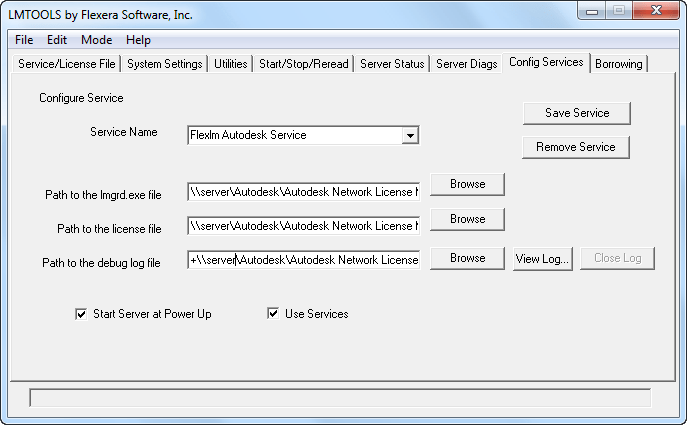
This error will occur if you use UNC paths when you configure the service in LMTOOLS.

SNAGHTML1879407a

In most Windows networks, proper credentials are required to access UNC paths and these credentials are usually not available before a user logs in to the machine. Because the FLEXlmservice tries to start before a user logs in, the UNC paths will not be resolved correctly. As a result, the FLEXlm service will not be started automatically when the license server is rebooted. 

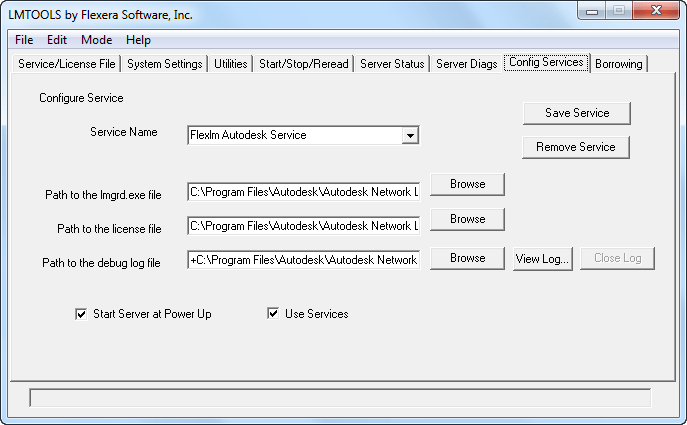
For this reason, it is strongly recommended that you use only valid, local drive letter paths when you configure the FLEXlm/FlexNet service in LMTOOLS.

SNAGHTML1878272b

It is possible to configure the service to recognize UNC paths by elevating the rights of the service, but this is not recommended.

Thursday, October 13, 2011

Solution to the problem with PayPal emails in Outlook

Problem:

Problem with PayPal emails locking up (Not Responding) Outlook?

You may see a message about contacting: \\102.112.207.net\b\ss\paypalglobal\1\G.4-NS

Microsoft Outlook 2010 and probably older versions stops responding, freezes or hangs for quite a while.

Solution:

One solution is to wait.

Another is to turn off the reading pane or just show it as plain text.

A better solution is to add a new line to the host file: C:\Windows\system32\drivers\etc\hosts
127.0.0.1 102.112.2o7.net

Hopefully PayPal will fix this issue with their emails soon.

Tuesday, October 4, 2011

How to change AutoCAD from network license to standalone

Sometimes it can be useful to convert a standalone license to a network license or the other way around. This works for AutoCAD and for verticals like AutoCAD Architecture, AutoCAD Electrical, AutoCAD Civil 3D, AutoCAD Map 3D, AutoCAD Mechanical, AutoCAD MEP, AutoCAD P&ID, AutoCAD Plant 3D and AutoCAD Structural Detailing. It can be done with a simple registry hack (start the Registry Editor with regedit.exe and take backup of the registry to be on the safe side).

For AutoCAD 2011 locate this key in the registry:
HKEY_LOCAL_MACHINE\SOFTWARE\Autodesk\AutoCAD\R18.1\ACAD-9001:409\AdLM

In that directory change the type for the installation that you require:

1 – Network
2 – Standalone
3 – Multiseat Standalone

For AutoCAD 2012:
HKEY_LOCAL_MACHINE\SOFTWARE\Autodesk\AutoCAD\R18.2\ACAD-A001:409\AdLM

A tip is to locate HKEY_LOCAL_MACHINE\SOFTWARE\Autodesk\AutoCAD first and then you will find the version (R18.2 is for 2012 products) and then the vertical (ACAD-A004:409 is for AutoCAD Architecture 2012).

Via Up and Ready

Change AutoCAD from standalone to network describes how it works for AutoCAD 2008 and older versions.

Change AutoCAD network to standalone to network describes how it works for AutoCAD 2009 and AutoCAD 2010.

Monday, October 3, 2011

Nucleus simulation engine in AutoCAD 2012

What is Project Nucleus:

Project Nucleus integrates the Nucleus simulation engine from Autodesk® Maya® into AutoCAD® 2012 software. It allows designers to experiment with "form-finding" in the conceptual design phase by simulating forces directly in AutoCAD.

Project Nucleus can simulate a wide range of physical phenomena in real time, like wind, gravity, constraints, and collisions. These forces can help architects generate free-form shapes, many of which would be impossible to model by hand.

Here’s my try of simulating a cloth falling down onto a table. First showing part of the Ribbon tab Nucleus.

It’s starting.

Slowly falling down.

Depending on how quick computer you have this can take some time to simulate.

Because of the Wind noise it’s blowing off the table eventually.

As this is CPU intensive I can see how this could be great to be able to run in the cloud.

Video showing how Nucleus works.

You find it here: Project Nucleus on Autodesk Labs

Via It’s  Alive in the Lab: Project Nucleus for AutoCAD Now Available

License monitoring - JTB FlexReport 6.3.2 released

JTB FlexReport license monitoring software has been updated to version 6.3.2 with the following bug fixes:

  • Fixed some problems to create chart reports on the Detailed tab.
  • Fixed some issues introduced in 6.3 for the HTML reports happening in some situations resulting in duplicate servers showing.
  • Fixed issue with reading certain OPT files in Group Administrator.
  • Improved silent installation procedure for Process Monitor Client using JTBProcessMonitorClientConfigured.reg.
  • Fixed problem with ' character in project names in Process Monitor Service.
  • Improved reliability in timing of showing the Project selection dialog box for Process Monitor Client.
  • Fixed Excel chart report to retain custom paths to the database.

Downloads here. See also the Upgrade tips.

Known issues: we’re investigating a problem where duplicate data is saved in very specific cases using Process Monitor. Group Administrator is also having problems in some cases that we’re working to fix.

If you use SQL Server as database it might not always work to automatically update it. If you from scratched installed JTB FlexReport 6.2 or later it should not be a problem though. To know if the database is inconsistent you can send the following information to JTB World for confirmation.

Within Microsoft SQL Server Management Studio Open up the database and create a new query like below. Just change JTBFlexReport to whatever the JTB FlexReport database is named.

SELECT * FROM [JTBFlexReport].[INFORMATION_SCHEMA].[COLUMNS]

Then save the result using File>Save Result As a CSV file and send it to JTB World.

For complete information run also this query:

SELECT * FROM [JTBFlexReport].[INFORMATION_SCHEMA].[CONSTRAINT_COLUMN_USAGE]


JTB FlexReport is a report tool for applications using the FlexNet / FLEXlm (flexlm license manager), IBM LUM (IBM License Use Management), SPLM (Intergraph SmartPlant License Manager), SLM/Sentinel LM/Sentinel RMS, LM-X, Solidworks SNL License Manager, Licman, Primavera from Oracle or 12D software licensing as well as any Windows application like Acrobat, Visio, single licensed AutoCAD or AutoCAD LT.

Contact us to get a time limited license file for free. You can try it in your environment with your real data for a few weeks with full functionality.
Full support is provided during trial period.

Previous related posts:
License Reports - JTB FlexReport 6.3.1 released
Asset tracking - JTB FlexReport 6.3 released

Some of the latest blog posts

Subscribe to RSS headline updates from:
Powered by FeedBurner

Contact Us | About JTB World | Website General Terms of Use | Privacy Policy
^ Top of page

© 2004- JTB World. All rights reserved.