Via Saraapril in Club Penguin’s post CarrotSticks a Brand NEW Game :)
Code like this will result in error in AutoCAD Architecture 2010 64-bit:
Set SchedApp = New AecScheduleApplication
Or this in AutoCAD 2010 64-bit:
Set SSM = New AcSmSheetSetMgr
One method that seems to work is to move the code from within a sub to the declaration like this:
Private SchedApp As New AecScheduleApplication
Another method is to replace it using GetInterfaceObject like this:
Set SchedApp = ThisDrawing.Application.GetInterfaceObject("AecX.AecScheduleApplication.6.0")
The reason is that VBA runs as an out-of-process client in 64-bit applications.
Unfortunately this also means that Sheet Set Manager API cannot be used in 64-bit applications because it is a COM server that cannot be called from another process as opposed to an ActiveX server.
Another 64-bit related problem is in AutoCAD Architecture 2009/2010 and AutoCAD MEP 2009/2010. In Tools>References the AutoCAD tlb shows up but not for the verticals. The same problem is also in .NET if you look at the COM tab when adding references.
The solution for this is a fix in the registry that look like this:
[HKEY_CLASSES_ROOT\TypeLib\{E8BCE300-BF69-431B-9153-1FF0DEF8F613}\6.0\0\win32]
@="C:\\Program Files\\Common Files\\Autodesk Shared\\AecXBase60.tlb"
It needs to be done for each tlb you want to use. There is a win64 key but the win32 key is missing so it needs to be added.
Here is also a Microsoft KB describing similar problems with Office.
Consider the following scenario:
See details in this hotfix or just change the background to using a picture that can be a solid color.
Everyone having a reason to look at a FlexNet license file knows that it can be pretty cryptic as well as to know what all Feature Codes are.
The License File Parser site Autodesk has put up allows you to easily convert the contents of your Autodesk license file into an easy to read report. Among other pieces of useful information, the report contains the full name of the licensed product, the serial numbers, and the number of seats.
Simply go to www.licenseparser.com, click the "Browse" button, locate your license file and then click the "Submit License File" button.
Here is what the result might look like:

If you also want reports for license usage either historically or for the moment take a look at JTB FlexReport where you for example can produce an HTML report like this.
AutoCAD Exchange, Autodesk’s online community for AutoCAD users, has received nearly 300,000 unique visitors from more than 200 countries around the world since March 2009 according to the press release.
If you haven’t checked it out already take a look and see what you like about it.
Update: Via twitter came this info from @Binrock @jtbworld Did you know that #AUGI had 4 times as many during the same period? 1.2 million absolute unique visits
I wonder what autodesk.com/discussion stats is?
DFS have never been officially supported even though I my experience have not had any problems. But now there is issues if you use an AutoCAD 2010 product.
Knowledge Base document: Distributed File System (DFS) Problems in AutoCAD 2010
Although Autodesk does not officially support using the Windows Distributed File System with AutoCAD and AutoCAD-based vertical products, it has been known to work properly in the past and many customers use DFS with our products. We have recently identified two separate issues that can affect DFS usage.
The first problem is the inability to open a DFS folder from the File Navigation dialog in AutoCAD 2010. This problem has been corrected in Update 1 for AutoCAD 2010. If you are using AutoCAD LT 2010, or a vertical product, you should apply the Update for that product that includes Update 1 from AutoCAD. For most vertical products, that will also be Update 1 however, for AutoCAD Civil 3D, that will be Update 2.
The second problem is the inability to open folders on a DFS share by double-clicking. This is mostly seen on Vista SP2 and Windows 7 and is due to changes Microsoft made in those operating systems to change a folder to a link. For file folders that won’t open using double-click, the recommended work-around is to pick the Open button instead.
Link pasted with this Autodesk KB plugin for Live Writer.
After the posting SmartPurger 3.0 for AutoCAD scripting now with 64-bit support there is now available an update of SmartPurger with version number 3.0.4 that fixes some of the regression bugs from 3.0. Update is available free for existing customers.
Autodesk wants to raise awareness about the benefits of greener, more sustainable buildings and of course to sell some software (nothing wrong with that though).
Buildings are the leading cause of green house gas emissions so it makes sense to “Don't Just Stand There. Make Buildings Better” as the slogan is.
Follow on Twitter at http://twitter.com/Retrofits09 and
visit www.autodesk.com/retrofits to play the game. You won’t see me make it to the leader board as I’m not that good.
Google has released Google Public DNS recently so I decided to give it a try and here is my review and result.
I wondered if I should switch to it or not in case it would speed up my Internet browsing experience. Are my DNS nameservers impeding my Internet experience?
To the rescue comes the Domain Name Speed Benchmark that was an excellent tool and that actually informed me that my local ISP provider were much quicker. At least right now and here. I also had “Obtain DNS server addresses” selected but the tool found in the conclusion that the second in the list was quite quicker than the first one so I decided to add them manually in the best order and hopefully things will runs smoother now than before.
Just as I was about to start seeing another Industry Keynote on Autodesk University Virtual I got told by Erik at Cadopolis.com that they’ve setup up a site aggregating Flickr, Twitter, Facebook and MSN all in one at www.cadopolis.com/au. Check it out!
I won’t be at AU 2009 in person but virtually. See you there.
Good thing too that Autodesk invited all ADN members to AU Virtual at no charge.
PS. I noticed that the date on the banner is showing only December 1-3 while it should be December 1-4.

This hotfix repairs a problem that occurs during the side-by-side installation of two different licensing products. During the installation of stand-alone licensing products with previously installed network licensing products, the following error occurs indicating that the installation failed: 1: 5 2: Failed to load FNP_ACT_Installer.dll. 3: 126

Knowledge Base document: FLEXnet Licensing Side-by-Side Hotfix
This applies to most all Autodesk 2010 products from AutoCAD 2010 to Revit Architecture 2010.
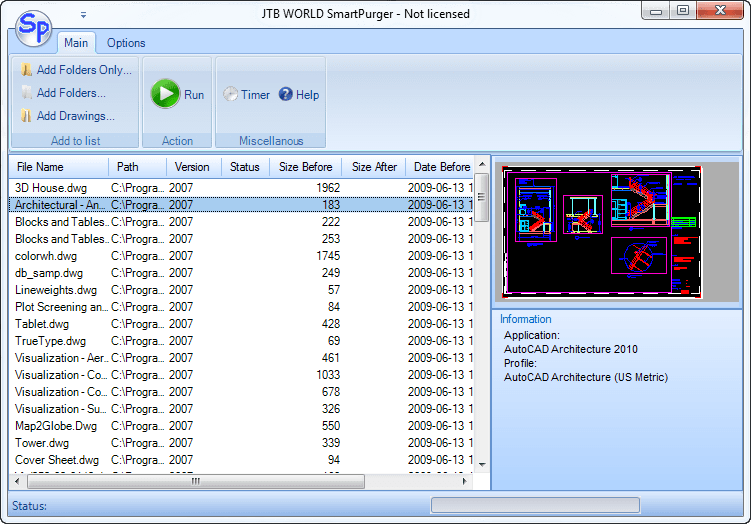
Finally SmartPurger 3.0 is released with a refreshed look and available as 32-bit and 64-bit application making it possible to use together with AutoCAD 32-bit and 64-bit on both Windows 32-bit and 64-bit operating systems.
Many customer uses SmartPurger because of its ease to purge different objects within drawings/DWG files to make them smaller.
Others uses SmartPurger to process scripts (SCR or LSP) on thousands of drawings unattended over night or weekend as it does not halt for dialog boxes or corrupted drawings.
The free trial without license file is fully functional except that you can only batch process 3 drawings per session to give you the chance to confirm that the program works as expected. When you purchase you can use SmartPurger with no limitations.
Contact us for a license to activate the time limited fully functional version for free.