Thursday, December 14, 2006

Windows Vista and Office 2007 compatibility for JTB FlexReport

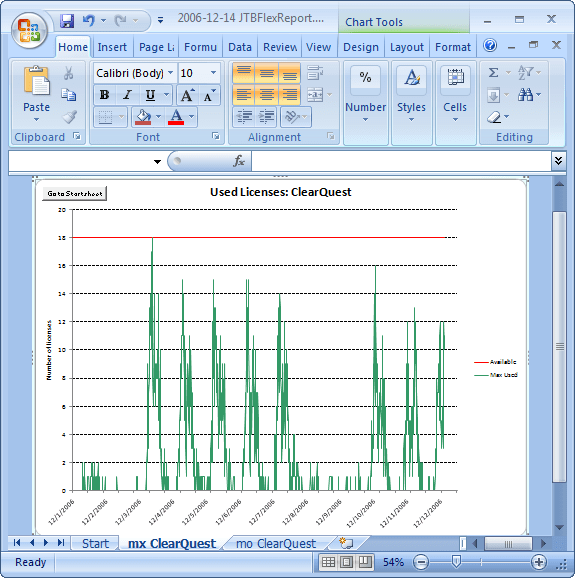
I started to make sure my products work in Windows Vista as well as with Office 2007. During earlier betas of these versions there where a lot of incompatibility but now with the final versions Microsoft have managed to solve these problems so without any changes to JTB FlexReport it work fine in my tests with both Windows Vista + Office 2007 and Windows XP + Office 2007 .


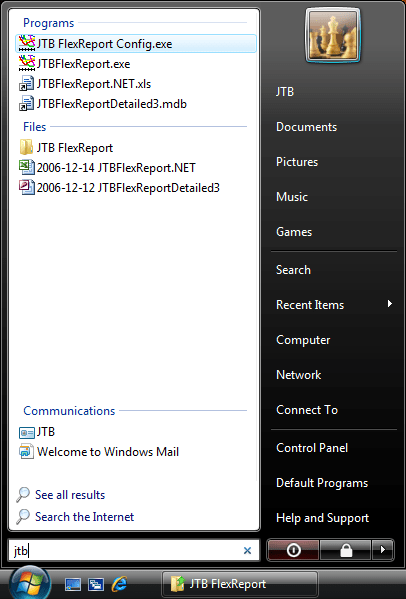
And here comes a Windows Vista tip. To quickly run an application click on Windows Start and enter for example jtb and see the result to the left or enter cmd followed by Enter to start the Command Prompt.


Technorati tags: ,

Open source A/E/C CAD

A start-up, non-profit company, geared towards increasing the performance of the A/E/C Industry of Asia Pacific intend to create a special software, or group of software's, and distribute it to the public through open source. Functionalities included would be 2D, 3D, design computations, process optimization, virtual simulation, Quantity Breakdown, Import/Export to data library.

If you would like to participate feel free to contact josepaolocalma@yahoo.com. He is right now looking for a competent Project Manager for this project.

Technorati tags: ,

Wednesday, December 13, 2006

Why SmartPurger can batch run AutoLISP files directly

Most batch programs for AutoCAD and its verticals can only run script files (files with the SCR extension). SmartPurger can also run AutoLISP files (files with the LSP, FAS or VLX extension) directly among all other useful things. Here is one reason why it can be useful.

If you want to redefine a block definition without inserting a new block in a drawing you can insert a file using = as this example shows.

(command "insert" "blockname=c:\\path\\filename.dwg"))
(command)

The row (command) cancels the insert command but still the block is updated. But if this is run by the script command (command) stops the script from executing any further. It doesn't help to load a lisp file from the script file. But this can work when running a lisp file using SmartPurger like this sample below. The last to rows are needed for SmartPurger to continue and process the next drawing.

; The name of the block to redefine
(setq blockname "Tag - Metric")
; The path and name to the block use for redefining
(setq blockfile "C:\\temp\\Tag - Metric.dwg")
; Insert the new block and cancel using (command)
(command "insert" (strcat blockname "=" blockfile))
(command)
(command "QSAVE")
(command "_QUIT")

Click here to download the free trial of SmartPurger. It also for the AutoCAD 2007 platform where you might have trouble to get ScriptPro to work. The trial is fully functional except that you can only batch 3 drawings at a time. The fully functional version can be purchased from 25 USD. Since it has ability to close dialog boxes like the one for missing shapes it can almost run forever without interruption.

Technorati tags: ,

Sunday, December 10, 2006

AutoCAD Error Aborting FATAL ERROR: Unhandled e06d7363h Exception at 7c812a5bh


I was working with Autodesk Architectural Desktop 2007 when I started to get this error. After a couple of times I noticed that it happened when I clicked on the File menu. I did not want to reinstall and wondered what it could be. Other menues worked well so I thought about the Drawing History. I started to set Options>Open and Save>File Open>Number of recently-used files to list to 0 and restarted ADT. Now I could access the File menu. It also helped to delete this registry key: HKEY_CURRENT_USER\Software\Autodesk\AutoCAD\R17.0\ACAD-5004:409\Recent File List
I can reproduce the error editing the key File1. When it is C:\ADT2007 ABC spaces construct.dwg it crashes. This is a non existing drawing. When changed to C:\test.dwg that also is non existing it does not crash. What if it was related to the lenght. I tried C:\12345678901234567890123.dwg and it crashed and C:\1234567890123456789012.dwg without getting a crash. Oh well.
But I want the history and I want to be able to use names with more than 17 characters including .dwg. I've used files with names like this before and it worked so it's probably something else related to this problem. Still not satisfied I searched the Knowledge Base and found
TS1061587 that was about the same error message but the issue was not related. I tried to enable hardware acceleration as the solution was and what do you know. It solved the problem. For a moment. Then it returned again. Workaround found but not satisfied with it. Let's see if the ADT Error Report's I sent in to Autodesk helps... If you know of a solution please add a comment.
Update! The problem has started to happen in AutoCAD 2007 as well.
2007-04-07 Update!
A solution is found. See this
KB document. This
error will occur if an incorrect version of a Microsoft DLL file MFC80U.DLL
exists on the computer.
2007-10-25 Update. Shaan posts about AutoCAD crashes when the File menu is accessed

Friday, November 3, 2006

Windows Live Writer and Blogger Beta problem solved

I got WLW working again after migrating to Blogger Beta. WLW didn't post at all and could not load the style template.

I got this tip by email from Joe Cheng at Microsoft that solved the problem. I initially posted about it to the msn Groups.

Find this registry key:
HKEY_CURRENT_USER\Software\Windows Live Writer\Weblogs\2e27accf-425c-4996-9c2d-a075aad9307a

Rewrite BlogId and PostApiUrl to use "beta.blogger.com" instead of "www.blogger.com" (leaving the rest of the URL the same). Then restart Writer and try again.

Sunday, October 29, 2006

Hotfix for users IE7 and Autodesk Design Review 2007 or Autodesk DWF Viewer 7.0

Since IE7 beta and the recent IE7 final release I was a bit worried that it took so long but here it is. See this post on Beyond the Paper blog or at Autodesk support site. "Autodesk has a Hotfix for Autodesk Design Review 2007 and Autodesk DWF Viewer 7.0 that addresses compatibility issues with Microsoft Internet Explorer 7."

Hotfix for AutoCAD 2007-based products - Closing Drawings

Been quite busy lately so I just installed this Hotfix - Closing Drawings - AutoCAD® 2007-based products may crash when closing drawings. This problem can also manifest itself while saving or plotting drawings.

Friday, October 13, 2006

New companies using JTB FlexReport

Companies all over the world uses JTB FlexReport, the FLEXnet/FLEXlm license report solution to keep better control on their licenses, usage and costs.

Some of the new customers are:

Arlington County DES Eng. Div., Virginia, US
TU Ilmenau Universitätsrechenzentrum, Germany
BC Consultants, Inc., Virginia, US

TDC, Denmark
BOOTH HANSEN, Illinois, US
Dürr Systems GmbH, Germany

Sandis, California, US
Coomes Consulting Group Pty Ltd, Australia
Vulcan Materials Company, Alabama, US

Aker Kvaerner, Norway
SHW Group LLP, Texas, US
South Tyneside Council, UK

Benchmark Group, Alabama, US
Coperion Werner & Pfleiderer, Germany
HWS Consulting Group, Inc., Nebraska, US

Guardian Life, New York, US
Woodward, Illinois, US
PÖYRY TECNOLOGIA, Brasil

STS Consultants, LTD., Wisconsin, US
George Kelk Corporation, Canada
Royal Huisman Shipyard b.v., The Netherlands

GF KONSULT AB, Sweden
Johnson, Mirmiran and Thompson, Baltimore, US
Gunnar Karlsen a.s, Norway

Alfa Laval Lund AB, Sweden
Universitaet Karlsruhe, Germany
Kleinschmidt Associates, US

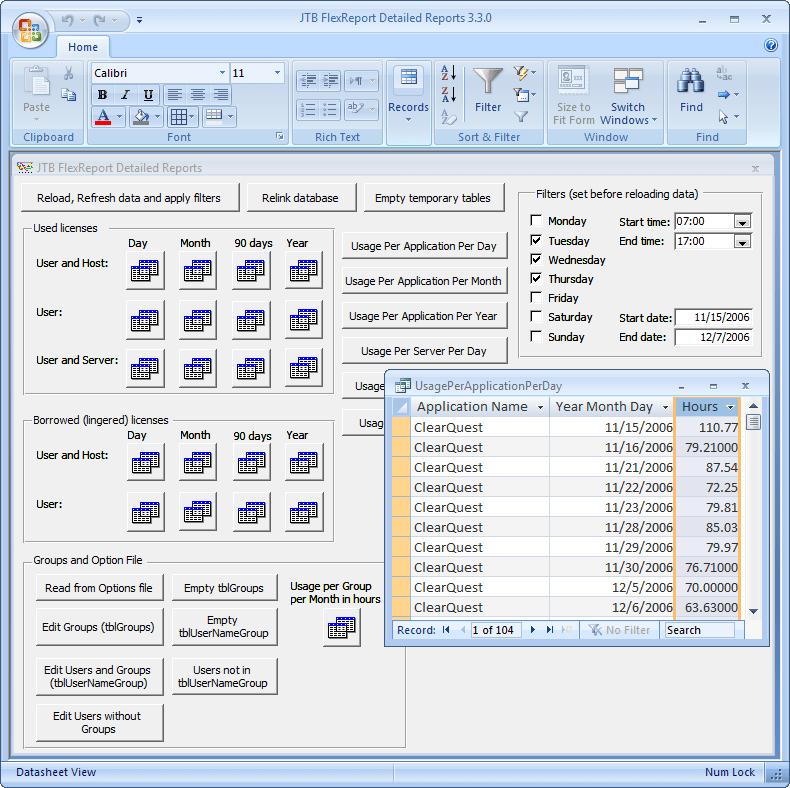
JTB FlexReport is their solution to have better control on their network licenses based on the FLEXlm or FLEXnet technology. E.g. details on what users are using the product most or least can be reported on as well as graphical reports as seen below. This is done for applications like ARM, Rational Rose, SoldWorks, AutoCAD, MagiCAD, Novapoint, Mathcad, ProE, Matlab, ESRI ArcGIS, Intergraph GeoMedia, SpeechWorks and others.

JTB FlexReport has support for consolidating several version of one application. If you have Autodesk subscription you are allowed to have for example AutoCAD 2007, AutoCAD 2006 and AutoCAD 2005 available for the users as long as you don't use more licenses as you have subscription for. JTB FlexReport can group these licenses together in one graph.

Read more about JTB FlexReport and ask for a free fully functional trial.
Thursday, October 5, 2006

(Code Search)

I tried the new Google Code Search and it looks promising including support for regular expressions. But it seems to not find things as I wish it would find.

Google Code Search

Does the code really need to be in an archive like zip?

Take a look at this search for some code I have in an AutoLISP file:

http://www.google.com/codesearch?hl=en&lr=&q=%5C%28vlax-ename-%3Evla-object+area&btnG=Search

It finds one in a newsgroup that is zipped. Why could it not find this file I wonder that is not zipped:

http://www.jtbworld.com/download/HATCHB.LSP

Another wish is that it could find code snippets on web sites and blogs.

Technorati tags:

Tuesday, October 3, 2006

Architectural Desktop 2007 Service Pack 1 released

ADT 2007 SP1 was made available for some days ago and I recommend to download the readme and see if it make sense for you to install it. It includes the AutoCAD 2007 SP1 as well so there is a lot of reasons why you should install it.
...improving upon a number of features within the product, some of which include, Construction Lines, Doors,Inserting DXF Files, Multi-View Blocks, Project Management, Properties Palette, Reference Keynote Legend, Roof Slabs, Spaces, Stairs, Style Manager, Tool Palettes, Windows while also addressing early customer feedback.

Performance is also improved in some areas. Project-based callouts will no longer make plot preview that slow. File open time has also been somewhat improved. This is true if FIELDEVAL is set to update when plotting or opening. The use of Project Standards will no longer have a significant effect on file open time.

Notice also the hotfixes:

Hotfix - Plotting to Raster Files Performance Improvement

Hotfix - Regenerating Drawings Containing Text

Wednesday, September 13, 2006

Don't use LMTOOLS to borrow Autodesk products

Borrow and return licenses from within the Autodesk product you have is the way to go.

In AutoCAD it is found in the Tools menu but for products like ADT and ABS it is hidden in Help>About>Product Information and then you can select License borrow.

Via Autodesk Knowledge Base

Wednesday, September 6, 2006

Turbo is back

A bit nostalgic see that the Turbo development products from Borland are back. I used Turbo Pascal and later Delphi quite a lot many years ago. Great products.

Now Turbo C++, Turbo Delphi, Turbo Delphi for .NET and Turbo C# are released and the Explorer versions are even for free competing with Microsoft's Visual Studio Express products.

Technorati: , , ,

Tuesday, September 5, 2006

Autodesk software for free for students

Great initiative by Autodesk. One thing I wonder is what software's are available. Something in the back of my mind says that I've seen a list of the included software's and that Architectural Desktop is not included but Revit is. Another setback for ADT? Let me know if this has changed or if I'm wrong.

Via Between the Lines

Technorati:

Sunday, September 3, 2006

DWGgateway supports DWG 2007

Some days ago I mentioned that Open Design Alliance supports DWG 2007. Now it seems to be used by SolidWorks an ODA member. The beta for DWGgateway that works for AutoCAD 2007 can be downloaded. Notice that this link must be used to get the beta.

AutoCAD® free download

According to their email:

DWGgateway 3.0 (beta) now works with AutoCAD 2007

If you’re an AutoCAD® user who occasionally has issues sharing files with colleagues, DWGgateway™ can make your life easier than ever now that it reads files created with AutoCAD 2007 and converts older AutoCAD file formats to 2007 format

Try DWGgateway 3.0 beta

Use DWGgateway to:
* Open files from any version of AutoCAD.
* Create Adobe PDF documents.
* Eliminate the need to upgrade your AutoCAD licenses.

Notice the following. When I installed the software and started ADT 2007 I got a dialog box forcing me to activate the product using name, email, title and country.

It still forces me for example to plot both the model and the layout to PDF even though I just want the layout. It uses the saved page setup and does not use the AutoCAD plot interface.

Uninstalling DWGgateway does not clean up fully from CUI. The menu and toolbar show up as unresolved.

For some DWGgateway can be useful no doubt. But if you want PDF files I recommend CutePDF instead and if you want to convert between different DWG versions I recommend DWG TrueConvert 2007.

Here is what I said about DWGgateway almost a year ago.

Technorati: Open Design Alliance, DWG, AutoCAD 2007, AutoCAD, , ,

Some of the latest blog posts

Subscribe to RSS headline updates from:
Powered by FeedBurner

Contact Us | About JTB World | Website General Terms of Use | Privacy Policy
^ Top of page

© 2004- JTB World. All rights reserved.