Monday, February 19, 2007

Installation of AutoCAD 2008 based applications

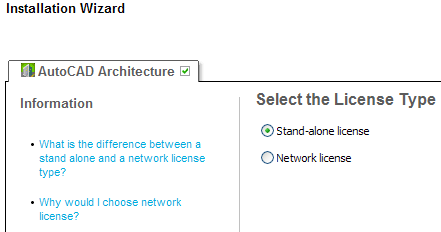
One of the first things to notice is when installing AutoCAD 2008 or for example AutoCAD Architecture 2008 (formerly known as Architectural Desktop or ADT and soon probably known as ACA 2008) is that the Installation Wizard has been updated.

The help is easy available during the setup. For example if you wonder "When performing a Typical installation, what gets installed?" or "What is the advantage to installing the Materials Library?"
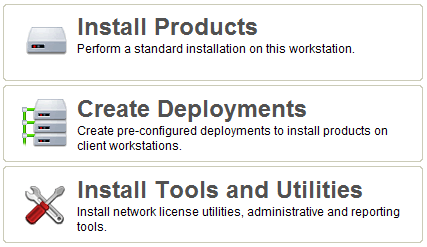
I like that you directly from the media can install using both license types Stand-alone license and Network license. No need to create a deployment if you don't want to. The deployment wizard is only possible to run from the media.
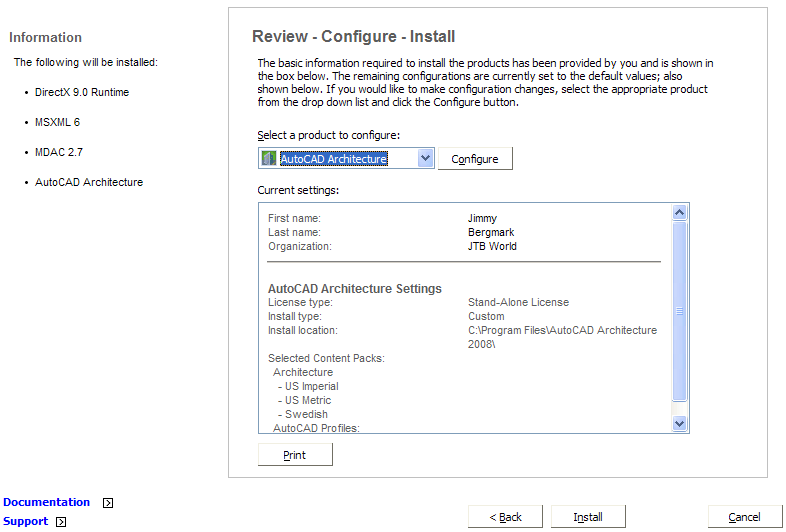
Another nice thing is that you don't get a strange dialog box at the beginning telling you that some components needs to be installed without knowing what these components are. Now you directly see what will be installed prior to AutoCAD.
AutoCAD 2008 Network License Activation Utility has got a facelift but nothing new more than that from what I can see.
Autodesk Product Manager has got it's AdpmProducts.bin updated but looks like before.
Macrovision's SAMreport Lite has not been updated. It is v3.6 that is included.
Macrovision's FLEXnet Publisher (one time named FLEXlm) network license files lmtools.exe and lmgrd.exe are updated and the version is 11.4. (The versions 10.8.5 and 11.4 have been fully tested against Windows Vista by Macrovision)

Sunday, February 18, 2007

Cadalyst Online PlanRoom for trial purposes only

You might have seen the ads about Cadalyst Online PlanRoom.

Cadalyst Online PlanRoom is a secure, Web-based project management system, featuring easy-to-use, time-saving tools to help you collaborate and streamline projects by centralizing plans, large-format drawings and specifications in one place.

It says "Click Here to Register for a FREE Account". Looks like a great deal, but if you read the fine print in Terms & Conditions you will notice that it says "for trial purposes only."

Another think in the FAQ that I reacted about was this:

Q. What types of files can I upload and view?
A. Image files such as TIFF and JPEG are the safest file types to use. Adobe PDF and Autodesk DWF formats are also supported but may take slightly longer to view. CAD files such as AutoCAD DWG and MicroStation DGN may also work, but are more complicated and can contain links to XREF (External Reference) files that will also need to be uploaded. Most PLT plot files also view, as do office documents such as Word, WordPerfect and Excel files.

Notice the text I made bold. I don't necessarily agree with that unless you have very low quality of your image files.

Saturday, February 17, 2007

Autodesk's new Customer Involvement Program (CIP)

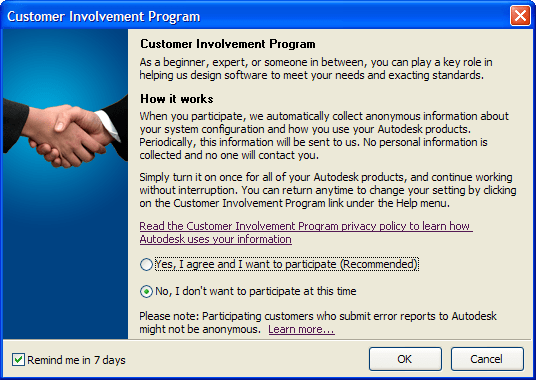
Autodesk Customer Involvement Program (CIP) is something new in AutoCAD 2008 based products and I guess some will raise their voice against it or being uncomfortable about it but I suggest that you participate.

If you choose to participate in the Customer Involvement Program, AutoCAD will automatically send Autodesk information about what features you use most, any problems that you encounter, and other information helpful to the future direction of the product.

Here is the complete list of the information that would be automatically sent to Autodesk:

  • Name and version of the Autodesk product
  • AutoCAD commands used, and amount of time spent in AutoCAD
  • Error conditions encountered, fatal and non-fatal
  • File formats imported or exported with AutoCAD
  • Operating system name and version
  • System configuration information such as processor, amount of memory, and graphics card
  • IP address, used to estimate your country or region

You can choose to participate or stop participating at any time by accessing the Customer Involvement Program dialog in the product help menu or use the new long command CustomerInvolvementProgram. Your choice applies to all Autodesk products installed on the computer your choice is made.

If you have answered yes to participate it is saved in the registry. As you can see it is not related to any Autodesk product or version. Either it is enabled or it is not.

HKEY_LOCAL_MACHINE\SOFTWARE\Autodesk\MC3\MC3Enabled

1 if for Yes and 0 for No (Affects all users on th machine.)

This setting can also be set using the updated CAD Manager Control Utility.

.

HKEY_CURRENT_USER\Software\Autodesk\MC3\MC3OptIn

Update: (The MC3OptIn value controls whether the current user is sending CIP data)

Friday, February 9, 2007

Microsoft Office Outlook 2007 e-mail editor white paper

For good and bad Outlook 2007 uses the same HTML rendering engine as Word 2007 uses.

In previous releases Outlook used the Internet Explorer rendering engine and since the Word engine is a bit different your emails in Outlook 2007 might show up different than before.

Link to Microsoft Office Outlook 2007 e-mail editor white paper - Outlook - Microsoft Office Online

Word 2007 HTML and CSS Rendering Capabilities in Outlook 2007 (Part 1 and Part 2)

Download Outlook 2007 Tool: HTML and CSS Validator.

Wednesday, February 7, 2007

Free Online Virus and Malware Scan

Individual files can be scanned on demand and Virustotal uses multiple antivirus engines to test the file. The file is tested with products form F-Secure, Grisoft, McAfee, Symantec among others.

Virustotal is a service that analyzes suspicious files and facilitates the quick detection of viruses, worms, trojans, and all kinds of malware detected by antivirus engines.

Specs:

  • Free, independent service
  • Use of multiple antivirus engines
  • Real-time automatic updates of virus signatures
  • Detailed results from each antivirus engine
  • Real time global statistics

What antivirus product do you use and what are the pros and cons? I am beta testing Norton 360 from Symantec on one of my machines and so far it works pretty good.

Via F-Secure : News from the Lab

Tuesday, February 6, 2007

Change AutoCAD from standalone to network

I post this for my own memory as with much else on this blog but it might as well be useful for you. Use the registry and change Type at this location. (change the x depending on version and vertical/flavor. For example AutoCAD 2007 is R17.0\ACAD-5001:409).

[HKEY_LOCAL_MACHINE\SOFTWARE\Autodesk\AutoCAD\Rxx.x\ACAD-xxxx:xxx\AdLM] "Type"=dword:00000019

19=network license NLM
2a=standalone licence SLM

Using the registry hack with AutoCAD 2009 and later the cascading licensing service doesn’t install, so cascading will not work when converted from SLM to NLM. If you install network version and convert to SLM then PLU doesn’t install and user will not be able to transfer his license.

See also Change AutoCAD network to standalone to network on how to get the cascading licensing service installed.

UPDATE: For newer versions take a look at How to change AutoCAD from network license to standalone, Change AutoCAD 2013 from Network license to Standalone and Change AutoCAD 2014 from Network license to Standalone

Monday, February 5, 2007

SolidWorks Labs reviewed

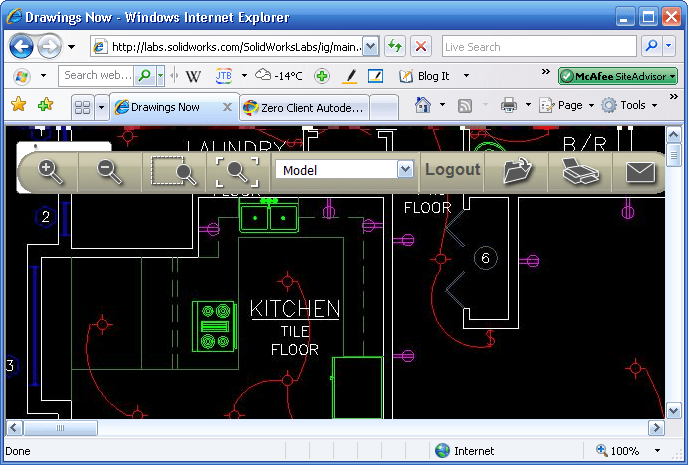
Here is a complement for Freewheel that only handles DWF files at this point. At SolidWorks Labs there is Drawings Now a simple web viewer that can read DWG, DXF or native SolidWorks drawing files. Besides is a sample drawing in DWG 2007 format that I tried. A nice thing is that it remembers the drawings I have uploaded so I easily can view them again.


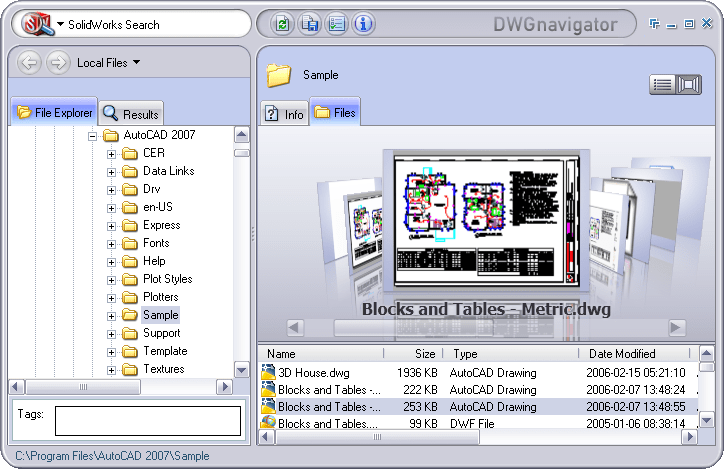
DWG navigator is a cool viewer (Vista look without Vista) that is built using Microsoft Visual Studio 2005, WinFX, Expression and .NET Framework 3.0. If Visual Studio really needs to be installed as it says I don't know since I did have everything installed already. It can search within files, find where for example an xref is used, run Pack and Go, save to newer or older file versions, rename a DWG file and update the references where it is used, replace a file with another one and have the host file updated, etc. Quite many functions and much more than a viewer. (For some reasons lmutil.exe v. 11.3 is included in the install folder. Will it be licensed using FLEXnet later on and have a price tag on it? There is 87 days remaining on the beta as well the about dialog box says.)

Link to CAD Insider: SolidWorks Labs Introduced

try catch problem

I have run into situations several times using Visual Studio 2005 and VB.NET when it's not possible to catch an error using try and catch. The solution has been to use the old on error goto or on error resume next.

Friday, February 2, 2007

Get AutoCAD 2007 running on Windows Vista

I've been able to run AutoCAD 2007 as well as most other software's I need on Windows Vista without problems. There are some things needed to have it working and it might be some things I have not tried that does not work for you. If you just try to start AutoCAD Microsoft warns about "minor compatibility issues" but I have not found them so far. Running as Administrator solves a lot of compatibility problems with applications and that is the same with ADT 2007.

Autodesk will be announcing official details on Microsoft Windows Vista support for AutoCAD and AutoCAD LT in the next 2-4 weeks according to Shaan. So you might want to wait until then.

Run the installation as Administrator.

Run also the application as Administrator. Right click to do that or change the properties to have it run as Administrator.

It is also possible to run a program in compatibility mode for Windows XP (Service Pack 2).

You can also turn off User Account Control (UAC).

What is your trick to get applications running on Windows Vista? 

Update. Autodesk will release an update for AutoCAD 2007 and AutoCAD LT 2007.

No Technorati Tags

I've stopped adding Technorati tags. I have thought about it a time and after reading Are Technorati Tags Useless? I stopped adding them. Are you missing them?

ObjectDCL for AutoCAD 2007

Owen Wengerd has contributed to the open source project ObjectDCL so AutoCAD 2007 is supported. I wonder if this is true though. "ObjectDCL has been sold" it says.

Autodesk Design Review is free-of-charge now

I guess you have not missed this but it is worth mentioning anyway.

Autodesk Design Review is available FREE-of-charge. With Design Review you can markup, review, batch print and a lot more. Download your copy now.

This will surely make DWF usage more wide spread.

Via Between the Lines, Connected and Beyond the Paper

Problem with Mozy on Windows XP and opened/locked files

I have started to get SnapshotError0 using Mozy online backup and followed the advice here but it didn't help. This was the response from Mozy support:

Microsoft has a program running on your computer called the Volume Shadow Copy Service or VSS. VSS is the best option out there for backing up open and locked files. When we chose to use VSS, it was fully supported by Microsoft. Recently, Microsoft has made the decision to stop supporting VSS in Windows XP. It is apparently fixed and supported in Windows Vista, which will be released in January of next year, and in Windows Server 2003.

Why is it still showing "Open/locked file support" on your website when it does not work?

It does, for 99% of our users. Unfortunately, the remainder of our users have trouble. We're continuing to work on a fix, but again, this is Microsoft's software and they have declared an end to Windows XP's support cycle with regards to VSS. This being the case, I would again recommend upgrading to Vista when you have the chance.

Do you have this problem too? Do you have a solution for the VSS problem?

Some of the latest blog posts

Subscribe to RSS headline updates from:
Powered by FeedBurner

Contact Us | About JTB World | Website General Terms of Use | Privacy Policy
^ Top of page

© 2004- JTB World. All rights reserved.