Tuesday, February 27, 2007

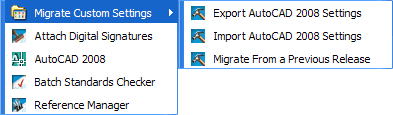
Migrate custom settings in AutoCAD 2008


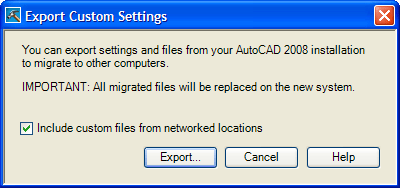
Here's how it works in AutoCAD 2008. You can export your custom settings between systems running the same release of AutoCAD, or export the custom settings and later re-import them on the same computer if you need to reinstall AutoCAD. When exporting custom settings, a migration package is created that contains an XML file. This file contains custom settings, a listing of the custom files from local locations used with AutoCAD, and optionally, custom files in network locations. The migration package is a ZIP file archive, so it has the file extension ZIP. During the import process, you select the ZIP file archive that contains the exported custom settings you want to merge onto your computer.

File types that are most commonly included in the migration package are: xml, lin, pat, pgp, pc3, pmp, ini, shx, mlm, ctb, stb, cui, mnl, fmp, cus, psf, bmp, atc and aws.

Friday, February 23, 2007

lmtools.exe crash solution

If you get a crash of lmtools.exe (Macrovision's network license management application) when you try to access the system settings tab the solution is as follow.

  • Open System Properties, click Start, click Control Panel, and then double-click System.
  • Click the Advanced tab and, under Performance, click Settings.
  • Click the Data Execution Prevention tab.
  • Add all exe files like lmgrd.exe, lmtools.exe, lmutil.exe and the vendor deamon for example adskflex.exe to the Data Execution Prevention exception list.

    Data Execution Prevention (DEP) helps prevent damage from viruses and other security threats that attack by running (executing) malicious code from memory locations that only Windows and other programs should use. DEP can take advantage of software and hardware support.

    A detailed description of the Data Execution Prevention (DEP) feature in Windows XP Service Pack 2, Windows XP Tablet PC Edition 2005, and Windows Server 2003

  • Thursday, February 22, 2007

    Snipping Tool the Vista killer application or is it AutoCAD 2008?

    There are actually reasons to upgrade to Vista. Snipping Tool is not really a killer application but it is really a good one that is included with Vista.

    By the way. AutoCAD 2008 based applications are supported to run on Vista. For some it will be the killer application on Vista due to all the great 2D functionality added to it.

    Microsoft® Windows Vista™ Home Basic, Home Premium, Ultimate, Business, and Enterprise, Windows® XP Home and Professional SP2, Windows® 2000 SP4 can be used as operating systems to run AutoCAD 2008.

    You can use Snipping Tool that is found among the Accessories to capture a screen shot, or snip, of any object on your screen and then annotate, save, or share the image.

    There’s no hotkey so you have to right click on the icon and set a shortcut key for it. PrintScreen cannot be used though so use something else that is easy to remember F12 is close so try Ctrl+F12.

    Simply use a mouse or tablet pen to capture any of the following types of snips:

    • Free-form Snip. Draw an irregular line, such as a circle or a triangle, around an object.
    • Rectangular Snip. Draw a precise line by dragging the cursor around an object to form a rectangle.
    • Window Snip. Select a window, such as a browser window or dialog box, that you want to capture.
    • Full-screen Snip. Capture the entire screen when you select this type of snip.

    After you capture a snip, it's automatically copied to the mark-up window, where you can annotate, save, or share the snip.

    AutoCAD 2008 among applications with a Windows Vista logo

    This article contains a list of applications that have earned the "Certified for Windows Vista" logo or the "Works with Windows Vista" logo. These applications are officially supported on Windows Vista by our independent software vendor (ISV) partners.
    Here are some of the applications in the list:
    • SolidWorks Corporation SolidWorks 2007 SP01 15.1.103
    • TechSmith Corporation SnagIt 8 8.2.0.157
    • Autodesk, Inc AutoCAD 2008 - English
    • Autodesk, Inc AutoCAD LT 2008 - English
    • Autodesk, Inc Autodesk VIZ Stilton S020 9.0.0
    • Autodesk, Inc Autodesk 3ds Max 9 32-bit 9.5.0
    • Bentley Systems, Incorporated Bentley MicroStation V8 XM Edition 08.09.03.48 8.9.3037
    The complete list is here and is updated regularly.
    Applications that have earned the "Certified for Windows Vista" logo or the "Works with Windows Vista" logo

    Wednesday, February 21, 2007

    CAD Manager Control Utility for AutoCAD 2008

    The CAD Manager Control Utility has been updated for AutoCAD 2008. It is also still backward compatible with AutoCAD 2007.
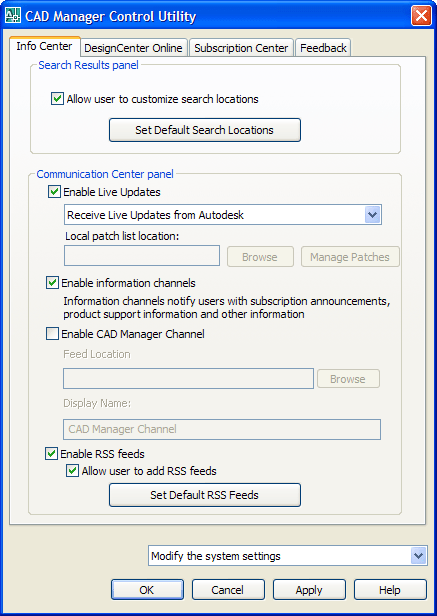
    The Search Results tab of InfoCenter can be configured to display content from various sources, such as the product Help system, CAD Manager Channels, or the Internet. You can specify whether users who install from the deployment can customize access to their InfoCenter search locations. The following file formats are supported: xml, doc, chm, html, htm, pdf and xml. This is a great way for the CAD Manager to add the CAD Manuals and other useful documents so they are easily accessed.
    The search locations are saved in the registry at this location.
    HKEY_LOCAL_MACHINE\SOFTWARE\Autodesk\AutoCAD\R17.1\ACAD-6001:409\CadManagerControl\Infocenter\SearchResults
    The CAD Managers dream has come true. Enable CAD Manager Channels. Controls the display of the CAD Manager Channels in InfoCenter. Aside from being able to toggle CAD Manager Channels, you can also define the CAD Manager feed location and set the display name for the CAD Manager Channel.
    Enable RSS Feeds. Users can subscribe to any number of RSS feeds. Each feed is contained within a discrete InfoCenter category. Additionally, you can specify whether users can add RSS feeds.
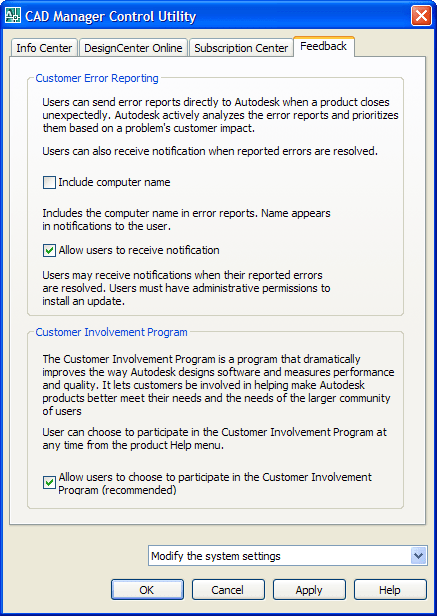
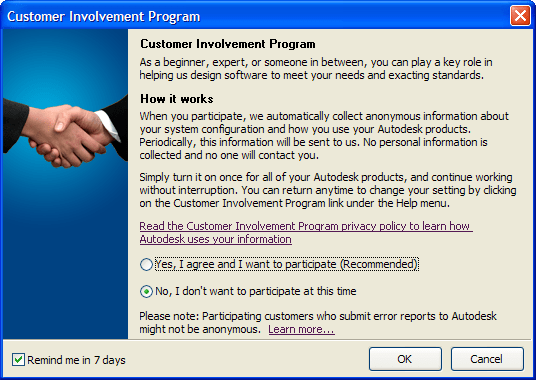
    Customer Involvement Program (CIP) is also a new thing. As CAD Manager you should consider if you want to allow your users to participate or not. A lot of data is sent to Autodesk's servers. Don't worry. My suggestion is that you do participate. Check out here what CIP is.
    Something that is not possible with this utility is to edit the RSS feeds or add new ones as well as specify what AutoCAD Help files should be included in a search.
    If you want to hack some xml take a look at this file.
    %USERPROFILE%\Application Data\Autodesk\AutoCAD 2008\R17.1\enu\Support\infocenter.xml
    Notice that you need to set the item id correct and follow the general syntax overall to have it working.
    <?xml version="1.0" encoding="utf-8" ?> <ICXmlSourceTree xmlns:xsi="http://www.w3.org/2001/XMLSchema-instance" xmlns:xsd="http://www.w3.org/2001/XMLSchema"> <SearchLocations> <Item DisplayNum="5" Enabled="true" ID="4"> <Name xlate="true" UID="401">User's Guide</Name> <Url xlate="true" UID="404">Help\acad_aug.chm</Url> <Group xlate="true" UID="403">AutoCAD Help</Group> <Description xlate="true" UID="402">AutoCAD User's Guide</Description> </Item> ....... <Item DisplayNum="5" Enabled="true" ID="29"> <Name xlate="true" UID="2901">JTB World Blog</Name> <Url xlate="true" UID="2904">http://feeds.feedburner.com/JtbWorld</Url> <Group xlate="true" UID="2903">RSS Feeds</Group> <Description xlate="true" UID="2902">Software development and Consulting - CAD, AutoCAD, ADT, VB.NET, VBA, AutoLISP, VisualLISP, databases, Access, SQL Server and more</Description> </Item> </RssFeeds> </ICXmlSourceTree>
    Tuesday, February 20, 2007

    Virtual PC 2007

    Final release of Microsoft Virtual PC 2007 available for free. 

    I've used Virtual PC 2007 to run for example Windows Vista Ultimate together with the latest AutoCAD 2008 and AutoCAD Architecture 2008 and confirmed that it works to run older versions of AutoCAD like AutoCAD 2007, AutoCAD 2006, AutoCAD 2005 and AutoCAD 2004 on Vista.

    AutoCAD 2008 on myFeedz from Adobe Labs

    Adobe Labs has released a new kind of feed reader or so called social newspaper as a technology preview. I took my OPML from RSS Bandit and gave myFeedz a try. It's pretty nice. Give it a try and see what the news are about AutoCAD 2008 using myFeedz.

    Below I also tried some of the API to create a tag cloud as well as showing 5 new articles related to AutoCAD 2008.

    My myFeedz profile tag cloud
    Five new blog posts about AutoCAD 2008


    What is myFeedz
    myFeedz is a social newspaper because what people talk about matters. But people talk about too many things. myFeedz finds what's important from the sea of information out there and shows you what you need to read. It learns from what you like and helps you keep up with your interests.
    What myFeedz is not
    • myFeedz is not an online RSS reader, although news are tracked via RSS feeds.
    • myFeedz is not a search engine, although you can search articles by specific tags.
    • myFeedz is not a bookmarking service, although you can submit feeds of your favorite websites.
    The social component
    myFeedz shows the news that matter to the people, the most linked to and referenced news. It also learns from what users like to read and uses that information to better personalize the service for each of them.
    Not a regular RSS reader
    A RSS reader simply shows you articles from your feeds only, ordered by date. There's no relevance sorting or filtering, you get a lot of noise that makes it difficult to find out what's really interesting.
    myFeedz uses artificial intelligence techniques to show you personalized news about topics you are interested in. Some of the things used to create an article's importance are its source, tags, popularity, rating, language and more. Your profile (tags, feeds and reading history) is then also taken into account to determine how important that article is for you.
    All this complicated process helps you save time and keep up with the things you like.

    Monday, February 19, 2007

    AutoCAD 2008 feeds

    Interested in all the buzz about AutoCAD 2008?
    Here is a feed using Technorati (29 found) tag search where you can find what is said about AutoCAD in the blog sphere. If you use search in blog posts (226 found) there are more to be found in this feed.
    Another way is to use Google Blog Search (114 found) so here is a feed for that.
    Here is using Microsoft Live Search Feeds Beta (105 found). The search engine is not supporting feeds as output. At least is not with a good result since it points to the actual feed and not the post.
    But there is a lot of crap found as well as posts in forums. One site had the AutoCAD 2008 CD to be downloaded 1.13GB.

    AutoCAD 2008 pipe

    Trying the new pipes from Yahoo I aggregated all official Autodesk blogs that are about AutoCAD 2008. Here is the pipe and here is the RSS feed. One thing that does not seem to work is to filter the content of the blog posts so it is only those with AutoCAD 2008 in the title that shows up.
    I also cloned it to make a pipe and RSS feed in German as well as a pipe and RSS feed in French. But it seems like not all posts get translated.
    Il est officiel - AutoCAD 2008 est ici !
    Le moment est venu de nouveau...... pour que blogging débute sur le prochain dégagement d'AutoCAD ! Je signalerai quelques nouveaux dispositifs chaque jour pour ceux de vous qui préfèrent prendre votre médecine dans de plus petites doses... ici que nous allons !...
    AutoCAD 2008 das ein youve, das!!! wartet!
    AutoCAD 2008 ist auf seiner Weise zu einem Computer nahe Ihnen undseinem verpackt mit Werkzeugen, die Ihre zeichnendeAlltagsproduktivität erheblich verbessern können! Einige meinerLieblingswerkzeuge schließen ein: Automatisierte Anmerkung Skalierung(Yeah!!!) Schichteigenschaften…
    Not sure it make much sense since I don't understand either of the languages. But trying those automated language translators before I know it can be a lot of errors in the process.

    Installation of AutoCAD 2008 based applications

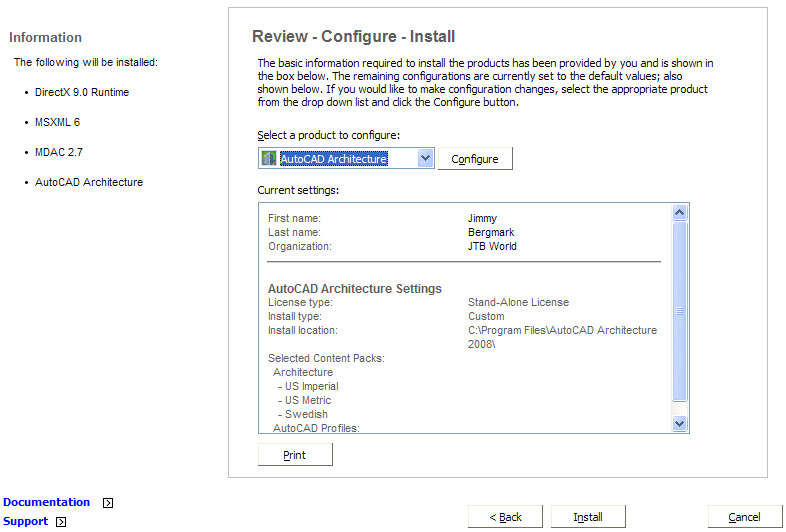
    One of the first things to notice is when installing AutoCAD 2008 or for example AutoCAD Architecture 2008 (formerly known as Architectural Desktop or ADT and soon probably known as ACA 2008) is that the Installation Wizard has been updated.

    The help is easy available during the setup. For example if you wonder "When performing a Typical installation, what gets installed?" or "What is the advantage to installing the Materials Library?"
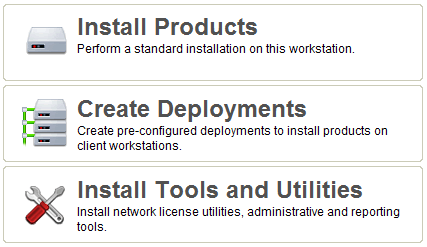
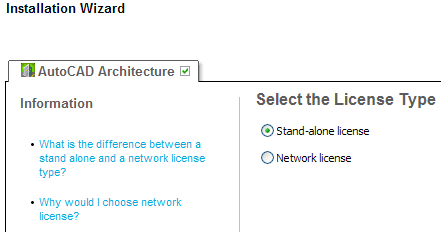
    I like that you directly from the media can install using both license types Stand-alone license and Network license. No need to create a deployment if you don't want to. The deployment wizard is only possible to run from the media.

    Another nice thing is that you don't get a strange dialog box at the beginning telling you that some components needs to be installed without knowing what these components are. Now you directly see what will be installed prior to AutoCAD.

    AutoCAD 2008 Network License Activation Utility has got a facelift but nothing new more than that from what I can see.
    Autodesk Product Manager has got it's AdpmProducts.bin updated but looks like before.
    Macrovision's SAMreport Lite has not been updated. It is v3.6 that is included.
    Macrovision's FLEXnet Publisher (one time named FLEXlm) network license files lmtools.exe and lmgrd.exe are updated and the version is 11.4. (The versions 10.8.5 and 11.4 have been fully tested against Windows Vista by Macrovision)

    Sunday, February 18, 2007

    Cadalyst Online PlanRoom for trial purposes only

    You might have seen the ads about Cadalyst Online PlanRoom.

    Cadalyst Online PlanRoom is a secure, Web-based project management system, featuring easy-to-use, time-saving tools to help you collaborate and streamline projects by centralizing plans, large-format drawings and specifications in one place.

    It says "Click Here to Register for a FREE Account". Looks like a great deal, but if you read the fine print in Terms & Conditions you will notice that it says "for trial purposes only."

    Another think in the FAQ that I reacted about was this:

    Q. What types of files can I upload and view?
    A. Image files such as TIFF and JPEG are the safest file types to use. Adobe PDF and Autodesk DWF formats are also supported but may take slightly longer to view. CAD files such as AutoCAD DWG and MicroStation DGN may also work, but are more complicated and can contain links to XREF (External Reference) files that will also need to be uploaded. Most PLT plot files also view, as do office documents such as Word, WordPerfect and Excel files.

    Notice the text I made bold. I don't necessarily agree with that unless you have very low quality of your image files.

    Saturday, February 17, 2007

    Autodesk's new Customer Involvement Program (CIP)

    Autodesk Customer Involvement Program (CIP) is something new in AutoCAD 2008 based products and I guess some will raise their voice against it or being uncomfortable about it but I suggest that you participate.

    If you choose to participate in the Customer Involvement Program, AutoCAD will automatically send Autodesk information about what features you use most, any problems that you encounter, and other information helpful to the future direction of the product.

    Here is the complete list of the information that would be automatically sent to Autodesk:

    • Name and version of the Autodesk product
    • AutoCAD commands used, and amount of time spent in AutoCAD
    • Error conditions encountered, fatal and non-fatal
    • File formats imported or exported with AutoCAD
    • Operating system name and version
    • System configuration information such as processor, amount of memory, and graphics card
    • IP address, used to estimate your country or region

    You can choose to participate or stop participating at any time by accessing the Customer Involvement Program dialog in the product help menu or use the new long command CustomerInvolvementProgram. Your choice applies to all Autodesk products installed on the computer your choice is made.

    If you have answered yes to participate it is saved in the registry. As you can see it is not related to any Autodesk product or version. Either it is enabled or it is not.

    HKEY_LOCAL_MACHINE\SOFTWARE\Autodesk\MC3\MC3Enabled

    1 if for Yes and 0 for No (Affects all users on th machine.)

    This setting can also be set using the updated CAD Manager Control Utility.

    .

    HKEY_CURRENT_USER\Software\Autodesk\MC3\MC3OptIn

    Update: (The MC3OptIn value controls whether the current user is sending CIP data)

    Friday, February 9, 2007

    Microsoft Office Outlook 2007 e-mail editor white paper

    For good and bad Outlook 2007 uses the same HTML rendering engine as Word 2007 uses.

    In previous releases Outlook used the Internet Explorer rendering engine and since the Word engine is a bit different your emails in Outlook 2007 might show up different than before.

    Link to Microsoft Office Outlook 2007 e-mail editor white paper - Outlook - Microsoft Office Online

    Word 2007 HTML and CSS Rendering Capabilities in Outlook 2007 (Part 1 and Part 2)

    Download Outlook 2007 Tool: HTML and CSS Validator.

    Wednesday, February 7, 2007

    Free Online Virus and Malware Scan

    Individual files can be scanned on demand and Virustotal uses multiple antivirus engines to test the file. The file is tested with products form F-Secure, Grisoft, McAfee, Symantec among others.

    Virustotal is a service that analyzes suspicious files and facilitates the quick detection of viruses, worms, trojans, and all kinds of malware detected by antivirus engines.

    Specs:

    • Free, independent service
    • Use of multiple antivirus engines
    • Real-time automatic updates of virus signatures
    • Detailed results from each antivirus engine
    • Real time global statistics

    What antivirus product do you use and what are the pros and cons? I am beta testing Norton 360 from Symantec on one of my machines and so far it works pretty good.

    Via F-Secure : News from the Lab

    Some of the latest blog posts

    Subscribe to RSS headline updates from:
    Powered by FeedBurner

    Contact Us | About JTB World | Website General Terms of Use | Privacy Policy
    ^ Top of page

    © 2004- JTB World. All rights reserved.