Thursday, April 17, 2008

Understanding Floating Point Precision in AutoCAD, Excel, etc.

AutoCAD has had 64-bit accuracy in the 32-bit platform for many years but still with 64-bit accuracy things can go wrong with with "unexpected" result.

Why is 1.320 - 1.3190 not equal to 0.001 when it really is 0.001?

Excel caluculation

Be careful when you make comparisons like this.

Both AutoCAD, Excel and many other applications are designed in accordance to the IEEE Standard for Binary Floating-Point Arithmetic (IEEE 754). The standard defines how floating-point numbers are stored and calculated.

A floating-point number is stored in binary in three parts within a 65-bit range: the sign, the exponent, and the mantissa.

1 Sign Bit
11 Bit Exponent
1 Implied Bit
52 Bit Mantissa

A detailed article that describes this thoroughly is Understanding Floating Point Precision, aka “Why does Excel Give Me Seemingly Wrong Answers?”

Wednesday, April 16, 2008

Autodesk subscription customers and previous releases

I have previously written about Autodesk support for prior versions and wanted to add this information as well.

Usually updates to terms and conditions might slip through but this one is useful and another incentive to be on subscription.

The TsAndCs_WW.pdf has all the fine prints. There is also a list of eligible products.

Effective April 7, 2008, Subscription customers may now use previous versions up to three releases back from the 2009 product release up to the total number of licenses of the product currently under Subscription.

As part of the new enhancement to the current policy, a Subscription customer is no longer required to have owned the previous version in order to use it.

The updated terms and conditions clarify the extended policy and how you may use previous versions. (Section 2.4)

Access the Eligible Previous Version list in Subscription Center. Once logged in click on the Subscription Administration link on the left hand navigation.
What do you need to know?

The new terms and conditions (Adobe® PDF format, requires Adobe® Reader®) apply immediately if you have an existing Subscription contract.

The new terms and conditions apply if you renew your contract, or purchase additional products on  subscription, or add new products or services to an existing contract.

No action is required for the new terms and conditions to take effect. Please refer to Section 8.9 of your existing Subscription terms and conditions if you want to see the options you have when Autodesk revises the terms and conditions.
The terms and conditions, which are referenced in all order confirmations, are available on Subscription Center, or you can also download the terms and conditions as a Microsoft® Word document. (Download ZIP file)
If you still have questions about the new terms and conditions or would like to notify us that you do not accept them, contact your Authorized Autodesk Reseller or the Autodesk Business Center.
Thank you for choosing Subscription for your Autodesk products.
Sincerely,
The Autodesk Subscription Team

Do you want to republish any of the blogs posts?

I have got some requests from Autodesk resellers if they can republish some of the blog posts or other AutoCAD related things from the website.

If you have a newsletter, knowledge base or want to inform your customers or user group in any other way feel free to contact me and let me know how and where you want to use the information. I will most probably let you do it for free as long as you give credits to JTB World and link back to the blog or website.

Splogs and the like are of course not welcome stealing content.

Tuesday, April 15, 2008

Autodesk NavisWorks 2009 is shipping today

Autodesk NavisWorks 2009 contains many new features and enhancements.

NavisWorks Clas Detective

Here is what "Manage" contains and to some extent the other variants "Review" and "Simulate":

Interface Enhancements

  • Object Animation

    Animate objects across an animation timeline using simple but powerful object manipulation and animation tools.

    Interact with objects whilst they interact with the viewer, all via new simple but powerful scripting tools.

    Link object movement with TimeLiner for precise object movement scheduling based on project tasks, for more informative and realistic 4D process planning.

    Link object movement with Presenter for enhanced worksite realism in exported photo-realistic animations.

    Link object movement with Clash Detective to automatically check for interferences between static and moving objects, for example a door colliding with an obstructing column.

    Link object movement with both TimeLiner and Clash Detective together for full time-based interference checking. Scheduling the moving of a crane on-site could coincide with the delivery of construction materials, all simulated in Autodesk NavisWorks Manage 2009, all checked for scheduling and interference issues, all adding up to a powerful, automated workspace simulation and planning tool.

  • .NET GUI Modernization

    Up-to-date look and feel including new icons, improved control bar docking and tabbed control bars.

  • Workspaces

    Allow predefined default window and menu layouts, as well as full customization and sharing of layouts across multiple PCs.

    New editor for Global Options.

    A change from complex tabs to a logical tree structure, making finding options much simpler. Also making global options sharable across multiple PCs through import and export.

Licensing Enhancements

  • FlexLM Licensing

    The capability of check-in / check-out of licenses, timed-out licenses to automatically return checked-out licenses after a set period of time.

  • Autodesk Standalone Licensing

    Support for the well-known and well-documented Autodesk standard licensing technology.

Operating System Support

  • Microsoft Vista Support

    Full support for Microsoft's latest operating system.

  • 64-bit Support

    Support for 64-bit versions of both XP and Vista.

File Formats

  • 3D Text Support

    Visualization of 3D text from AutoCAD and MicroStation.

  • Parametric Support

    Increasing cylinder accuracy, and dramatically reducing the memory footprint of file formats containing them. Of key benefit to the MicroStation exporter and DGN file reader.

  • Object Animation Playback

    Playback of object animations inside NWD and NWC files that have been created in Autodesk NavisWorks Manage 2009 or Autodesk NavisWorks Simulate 2009.

  • File Format Updates

    Revit 2009

    ArchiCAD 11

    MAX 9 (32-bit and 64-bit)

    MAX 2008 and 2009

    VIZ 2008 and 2009

    AutoCAD 2009 (32-bit and 64-bit)

    Inventor 2009

    Primavera v6

    Faro 4.1

    MicroGDS 10

What are the minimum system requirements?
XP or Vista and 512 MB minimum in RAM and 2 GB or more recommended.

If you have a previous version of NavisWorks installed on your system, you can install Autodesk NavisWorks Manage 2009 and keep other versions of the program on the same system.

NavisWorks 2009 does not include the Ribbon but it would surprise me if it was not added to NavisWorks 2010.

Previous related posts:
Welcome Autodesk NavisWorks describes the difference between the NavisWorks products.
NavisWorks forum on AUGI

It will probably not take long before a NavisWorks discussion group is added.

From the press release:
Revit Architecture 2009, Revit Structure 2009, Revit MEP 2009, AutoCAD Civil 3D 2009 and Autodesk NavisWorks 2009 now shipping

Autodesk is now shipping the 2009 versions of its comprehensive software solutions for building information modeling (BIM) including Revit Architecture, Revit Structure, Revit MEP, AutoCAD Civil 3D, and Autodesk NavisWorks software solutions.  BIM is an integrated workflow built on coordinated, reliable information about a project from design through construction and into operations. By adopting BIM, architects, engineers, contractors and owners can easily create coordinated, digital design information and documentation; use that information to more accurately visualize, simulate, and analyze performance, appearance and cost; and reliably deliver the project faster, more economically and with reduced environmental impact. The 2009 Autodesk BIM Solutions include:

· Revit Architecture 2009 (BIM for architects and designers) allows customers to capture early design concepts with improved analysis and visualization capabilities through increased sustainable design and energy analysis capabilities via interfaces with partner applications. The new Mental Ray engine for rendering has improved visualization functionality, improving speed, quality, and usability. www.autodesk.com/revitarchitecture

· Revit Structure 2009 (BIM for structural engineers, designers and drafters) has been enhanced with greater modeling and documentation capabilities.  The AutoCAD Revit Structure Suite now includes AutoCAD Structural Detailing, enabling steel and reinforced concrete detailing and shop drawings as well as state-of-the-art formwork drawings www.autodesk.com/revitstructure

· Revit MEP 2009 (BIM for Mechanical, Electrical, and Plumbing engineering) provides customers with enhanced modeling capabilities, more robust Building Performance Analysis capabilities that support sustainable design, and more than double the previously available content. www.autodesk.com/revitmep

· AutoCAD Civil 3D 2009 enables the benefits of BIM for civil engineering, from surveying and design through to documentation submittal and the delivery of 3D models for GPS machine control during construction. Important new functions in AutoCAD Civil 3D 2009 include a stormwater hydraulics and hydrology solution for storm sewer design, watershed analysis, detention pond modeling and culvert analysis, survey functionality that allows users to directly import raw data and criteria-based road design that follows local design requirements such as stopping and passing sight and headlight distances. www.autodesk.com/civil3d

· Autodesk NavisWorks 2009 software solutions (Autodesk NavisWorks Review, Autodesk NavisWorks Manage, Autodesk NavisWorks Simulate, and Autodesk NavisWorks Freedom) improve coordination, collaboration, and project sequencing for design and construction projects. With the 2009 versions of the Autodesk NavisWorks solutions, users can aggregate design models and data from documents created on both Autodesk and non-Autodesk software applications; develop more comprehensive views of projects and analyze for clash detection; and make better design and construction decisions.  www.autodesk.com/navisworks

Autodesk’s 3D modeling technologies are helping customers understand and improve the performance and operation of their designs before they are built.  The updated BIM solutions also improve project collaboration and integration between the building design, civil engineering and construction disciplines.

Share and Review Models

Fully integrated with the Revit platform for BIM and AutoCAD Civil 3D, Autodesk Design Review is the free* all - digital way to share, review, mark up, and measure models created within the BIM process.  For more information, please visit www.autodesk.com/designreview-aec

Autodesk Design Visualization Award 2008

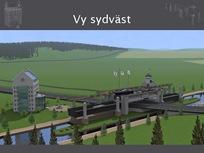
Congratulations to the students Emil Andersson and David Hultberg that got this award. Autodesk is giving it to students in a building visualization class.

Among the applications used where AutoCAD Architecture, AutoCAD, Autodesk 3ds Max 9, Autodesk Combustion and Autodesk DWF Viewer. (Did they not use Autodesk Design Review?)

This is an interesting project as it is a elevator bridge for ships that go on the famous "Göta kanal" (190.5 km and 58 locks) that makes it possible to sail across Sweden and will now take a jump over a high way.

The Göta Canal was opened back in 1832 and was largely built by 58,000 billeted soldiers from 16 different regiments. During the 22 years building was in progress, about 60,000 men, including a company of Russian war prisoners and a number of civilian workers, worked a total of about 7 million man-days, each of 12 hours.

To keep the men in good spirits, 14 measures of schnapps were included in their weekly rations, since fingers and feet were liable to go numb in cold weather.

Invigningen av Göta kanal i Mem år 1832. Målning av K. Chr. Berger

The opening of the Göta Canal in Mem, Sweden 1832. Painting by K. Chr. Berger

Göta canal in showed in red

More on Göta kanal at www.gotakanal.se and the Swedish press release.


Monday, April 14, 2008

Solution to Outlook.exe keep running after exit


For some time I've run into the problem that Outlook 2007 is not closed fully. The application is no longer visible but the process keeps running as can be seen in Task Manager. It is normal that it can take a few seconds up to some minutes but now it never stops running. And if an email comes during this time I got notified about it and can open that email. If I try to start Outlook it shows the application using the same Outlook.exe process. This happens on Vista SP1 and might happen on other Windows versions as well.

The solution in my case was that I found Skype (version 3.6) locking up Outlook because it was set to "Show Outlook Contacts" in the View menu. When I disabled that option Outlook closed as it should.

image 

One symptom I have seen is that I get the notification that "A data file did not close properly the last time it was used as is being checked for problems. Performance might be affected while the check is in progress."

data file did not close properly notification

Another is this message when starting Outlook could be "Outlook failed to start correctly last time. Starting Outlook in safe mode will help you correct or isolate the startup problem in order to successfully start the program. Some functionality may be disabled in this mode. Do you want to start Outlook in safe mode?"

Outlook failed to start

Then "Data file check in process" can be seen for quite a while.

Outlook Data file check in process

Some other tips if this happens are to check the consistency of the PST files using SCANPST.EXE. Check also for other applications that might connect to Outlook or access the PST files like Google Desktop. Antivirus programs could also be the cause of the locks.

If nothing else works you can try to select "Perform an automatic sen/receive when exiting." in Options>Send/Receive...


Saturday, April 12, 2008

Windows Vista indexing sidebar gadget

and after a while the index is up-to-date

I rely heavily on being able to quickly find information on my computer and among my emails in Outlook so this is a useful gadget.

It's easy to pause the indexing and also force it to index now with the latest Windows Search 4 update for Vista. Previously I used a couple of home made shortcuts for that purpose to a couple of cmd files with:
NET START "Windows Search"
and also
NET STOP "Windows Search"

Thanks Brandon Paddock for making it available. Get it via his blog or directly here.

I got an error that it could not find the adaptive.vbs script file but it was easily solved by adding an "en-us" folder and move the vbs folder there.

Friday, April 11, 2008

Package license file introduced with AutoCAD 2009

One of the new features in Autodesk 2009 products is prior version support.

This knowledge base document describes the details:

Package license files for prior version licensing

Issue
You received a package license file for prior version network licensing and you want to know more about the new license file format.
Solution

The package license file contains a set number of licenses for four different versions of your software. For example, an AutoCAD 2009 package license file will contain a set number of licenses that can be used for AutoCAD 2009, 2008, 2007 or 2006. Note: Running an instance of any one of these versions will consume one license in the package. Running more than one version, even on the same machine, will consume more than one license in the package.

If you have a 2-license package for AutoCAD 2009, the following scenarios can be expected:

  • Two machines running AutoCAD 2009 will consume two licenses. No licenses will be available for other users.
  • The same machine running AutoCAD 2008 and AutoCAD 2009 will consume two licenses. No licenses will be available for other users.
  • The same machine running three instances of AutoCAD 2007 will consume one license. One license will be available for other users.

Important notes regarding package license files:

  • Package license files come with the current version and three previous versions of the same product only. It is not possible to configure the products included in the package in any way.
  • Package license files may be combined as usual with license files for different products. See the following solution for details on combining license files: Combining Autodesk® license files.
  • Do not combine package license files with non-package license files for product versions contained in the package. Doing so will disable the older license INCREMENT for the product and only the package license count will be available. For example, do not combine an AutoCAD 2009 package license file with a regular license file for AutoCAD 2008, 2007 or 2006. 
  • Both the PACKAGE and INCREMENT sections of this license file are required for licensing to work correctly. When you combine license files, be sure to include both of these sections along with any PLIST INCREMENTs.
  • License borrowing, options files and license cascading work the same for package license files as they do for regular license files. When you configure an options file, use the feature codes of the individual product versions contained within the package. For example, if you want to reserve 5 licenses of AutoCAD in an options file, you will need four separate RESERVE statements, one for the feature code that corresponds to each version.

The following is an example of a package license file for AutoCAD 2009:

SERVER servername 123456789012
USE_SERVER
VENDOR adskflex port=2080
PACKAGE 64300ACD_F adskflex 1.000 COMPONENTS="57600ACD_2009_0F \
    54600ACD_2008_0F 51200ACD_2007_0F 48800ACD_2006_0F" \
    OPTIONS=SUITE SUPERSEDE ISSUED=09-Apr-2008 SIGN="012E 89A4 \
    36DD 8159 57BA 4F7E 90B7 8D70 F7BB 894D F530 73BD 9F61 CFB5 \
    B219 1F86 83A0 A9B1 6996 6866 B63A D7F2 88B7 0DDB AFB4 C576 \
    90BE 792B 7YT4 2AE1" SIGN2="1150 74B2 6D6C D194 9IT2 0B6E F745 \
    BE18 48A1 D48B B049 0A4A F4B0 7F13 45DE 04E3 BDEA EA5B EE04 \
    806B 4001 C1BB 4826 423A 971D 4349 12AA 6178 724F 4257"
INCREMENT 64300ACD_F adskflex 1.000 permanent 1 \
    VENDOR_STRING=nfr:permanent BORROW=4320 SUPERSEDE DUP_GROUP=UH \
    SUITE_DUP_GROUP=UHV ISSUED=09-Apr-2008 SN=321-12345678 \
    SIGN="016F 83DD FBDE 7D7E 7E53 AD0F 0750 2B2C 04EB A746 B2BB \
    41C0 5986 C1F1 7603 1128 F51B 920C 3CA7 B8FF 6B39 D4C7 6C44 \
    F86B E5C2 683C 0FB2 7904 4393 D8A8" SIGN2="0236 3870 7AC9 B755 \
    123A F111 AFEF HS%$ 4554 3EE6 547E 8DE4 E7D3 26D8 96EA 0398 \
    A696 1A87 2DCE 04B0 E49C 910C B707 459D JD6A 92C3 0120 BCAA \
    961F AC90"
INCREMENT PLIST adskflex 1.000 permanent 1 \
    VENDOR_STRING=A07:51600ACDLAND_2007_0F:52200CIV3D_2007_0F;B07:51900AMECH_PP_2007_0F:51300INVBUN_11_0F:52900INVPRORS_11_0F:53000INVPROSIM_11_0F:51400INVPRO_11_0F;C07:51200ACD_2007_0F:52500REVITS_9_0F:54100REVITS_9_1F:53700REVSU_3_0F:54200REVSU_4_0F;D07:52600REVIT_9_0F:52500REVITS_9_0F;E07:57600ACD_2009_0P:59300INVBUN_2009_0P;F07:51800BLDSYS_2007_0F:53100REVSYP_1_0F:54500REVSYP_2_0F;G07:53400REVITST_3_0F:53700REVSU_3_0F;H07:54300REVIT_9_1F:54100REVITS_9_1F;I07:54400REVITST_4_0F:54200REVSU_4_0F;A08:55500ACDLAND_2008_0F:55400CIV3D_2008_0F;B08:54900AMECH_PP_2008_0F:55000INVBUN_2008_0F:55100INVPRORS_2008_0F:55200INVPROSIM_2008_0F:55300INVPRO_2008_0F;C08:54600ACD_2008_0F:54700REVITS_2008_0F:54800REVSU_2008_0F;D08:57100REVIT_2008_0F:54700REVITS_2008_0F;F08:55600BLDSYS_2008_0F:55700REVSYP_2008_0F;G08:57200REVITST_2008_0F:54800REVSU_2008_0F;A09:59800ACDLAND_2009_0F:59700CIV3D_2009_0F;B09:59200AMECH_PP_2009_0F:59300INVBUN_2009_0F:59400INVPRORS_2009_0F:61700INVMFG_2009_0F:59500INVPROSIM_2009_0F:59600INVPRO_2009_0F;D09:62100REVIT_2009_0F:60900REVITS_2009_0F;C09:57600ACD_2009_0F:60900REVITS_2009_0F:61000REVSU_2009_0F;F09:59900BLDSYS_2009_0F:60000REVSYP_2009_0F;G09:62200REVITST_2009_0F:61000REVSU_2009_0F;J09:67800RVTMPJ_2009_0F:60000REVSYP_2009_0F \
    SUPERSEDE ISSUED=09-Apr-2008 SIGN="1DA3 DE47 4E42 2C8C 6342 \
    E829 9E8D 1C22 3095 5717 63F3 152F 30D6 C903 7726 1B03 7F59 \
    C85D D60D D920 20C7 0E04 88BE BAB6 A55A 0182 EBB9 9B44 12C5 \
    E5AE" SIGN2="10B8 3138 5505 2D5B 3963 D17B 4950 1CF3 EBB9 5782 \
    4085 3A4A D888 9A5E 5371 173D A556 074D 5FBD A93A 5203 1127 \
    13CD 3DE4 6EED ED54 6F33 D840 C4C2 8426"

Knowledge Base document: Package license files for prior version licensing

JTB FlexReport works with these license files and can also report company wide usage on combined usage of multiple versions of one product.

Solve problem with AutoCAD 2009 Help Search

If you find that your Search tab in AutoCAD 2009 Help is broken it can be fixed by running a repair of AutoCAD. One reason why this can happen is if you install AutoCAD 2009 and after that AutoCAD 2008.

Broken help

This is what it should look like.

AutoCAD 2009 Help

If you know a quicker way to repair this make a comment on how.

Thursday, April 10, 2008

Access 2007 Runtime SP1 available

I have updated the detailed network license reports in JTB FlexReport that can make use the Access 2007 Runtime SP1. Download details are found in this previous blogpost.

Found out about SP1 via the Access Team Blog.

AutoCAD 2009 on Citrix? Citrix & Autodesk alliance

Do you want to run AutoCAD 2009 on Citrix? AutoCAD 2009 itself is not possible but AutoCAD Map 3D 2009 is Citrix Ready and is of course based on AutoCAD 2009.

Citrix XenApp (new name for Presentation Server) is used for server virtualization that makes this possible.

Citrix & Autodesk website

-Are other AutoCAD 2009 platform–based applications available that are Citrix Ready?
No. AutoCAD Map 3D 2009 is the only AutoCAD 2009–based application that has been designated Citrix Ready.

-Why is AutoCAD Map 3D the only AutoCAD 2009 platform–based application that is Citrix Ready?
In response to requests from customers, AutoCAD Map 3D was selected for the Citrix Ready certification program in 2008. Other Autodesk products may be added to the program at a later date as we evaluate customer satisfaction with AutoCAD Map 3D.

-How does AutoCAD Map 3D performance in a Citrix environment compare to AutoCAD Map 3D installed in a stand-alone environment?
Graphics performance may be affected because most servers are not configured with high-end graphics systems.

-Does JTB FlexReport work with the Citrix Ready AutoCAD Map 3D licensing?
Yes you are able to monitor your license usage with JTB FlexReport.

I really hope other products will be Citrix Ready soon as well. I have long time seen a valid need for that. At an EPC company where I worked before we used Citrix extensively and often had engineers on site or traveling and many times I found that it had been really useful for them if we had been able to install AutoCAD and other verticals including our customizations and other 3:rd party applications on the Citrix server.

Visit www.autodesk.com/citrix for details.

Wednesday, April 9, 2008

Finally IE Automatic Component Activation Available

I wrote about this problem more than two years ago in the post Problem with embedded DWF Viewer.

Now you will no longer have this problem with "Press SPACEBAR or ENTER to activate and use this control" or "click to activate".

See details on the IEBlog.

Tuesday, April 8, 2008

Autodesk Draw important application using Google Gears

Project Draw from the Autodesk Labs is recognized among the so far few applications using Google Gears.

Using Google Gears

If you are on a plane or on the beach you can work with drawing a flowchart or a Windows UI mockup using the free Draw.

Draw

Via Google Operating System blog

Some of the latest blog posts

Subscribe to RSS headline updates from:
Powered by FeedBurner

Contact Us | About JTB World | Website General Terms of Use | Privacy Policy
^ Top of page

© 2004- JTB World. All rights reserved.