Wednesday, February 24, 2016

FlexNet vulnerability in version 11.13.1.0 and earlier

Flexera Software FlexNet Publisher, version 11.13.1.0 and earlier, lmgrd and custom vendor daemon servers contain a buffer overflow vulnerability that may be leveraged to gain code execution. Vulnerability Note VU#485744 on CERT describes “Flexera Software FlexNet Publisher lmgrd contains a buffer overflow vulnerability”.

Users of affected software should contact product vendors for update information.

I checked if Autodesk has released an update but nothing so far. Check with your vendors and contact them if they have not provided an update.

ANSYS does have an update for this.

When there is an update for FlexNet ready from your vendor I foresee no problem to use JTB FlexReport or JTB FlexReport LT with it. Lmutil.exe that is in the JTB FlexReport folder or the folder where JTB FlexReport LT.exe is located could be updated but should not be affected by this vulnerability.

UPDATE March 3, 2016: Autodesk has released 11.13.1.2 and is available here.

Wednesday, February 10, 2016

JTB FlexReport 10.0 released

JTB FlexReport 10.0 has been released. JTB FlexReport is a solution for monitoring network license usage and software usage in general. With its reports you are in a better position to know the actual usage of often expensive licenses. You will easier predict when and how to handle the need of increases or decreases of your licenses.

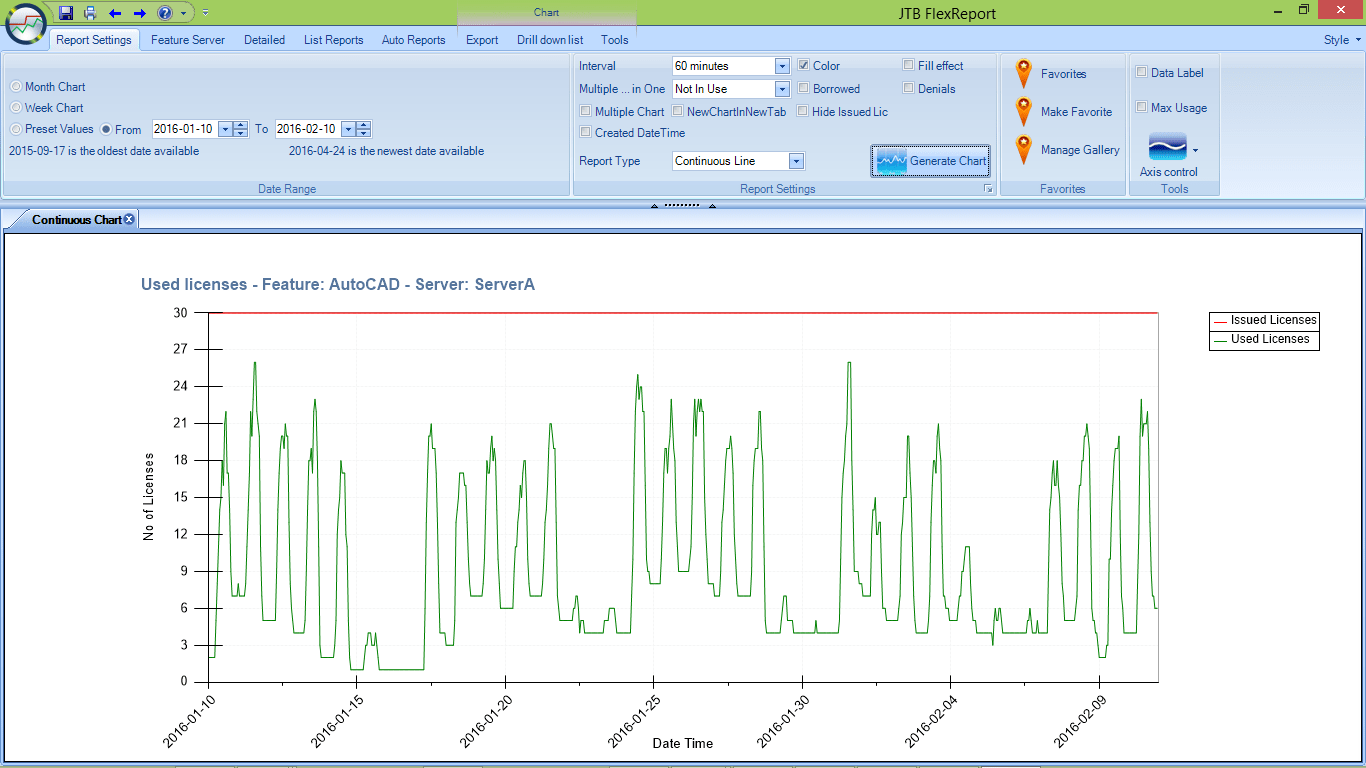
Here’s a chart showing usage for the last month. The Chart Client is easier to use now because depending on report type, settings that are not relevant to that report type are hidden.

Notice a welcome feature making it much easier to create commonly used charts. Make favorites and access them quickly.

Here are downloads.

Here’s the revision history describing when is new and fixed in this release.

Thhis update is for all customer with current maintenance agreement. If yours has expired you’re welcome to renew it.

Contact us to get a time limited license file for free. You can try it in your environment with your real data for a few weeks with full functionality. Support is free so if you run into any questions we’re here to help you.

Thursday, January 21, 2016

SSMPropEditor 6.1 available - Sheet Set Manager Editor

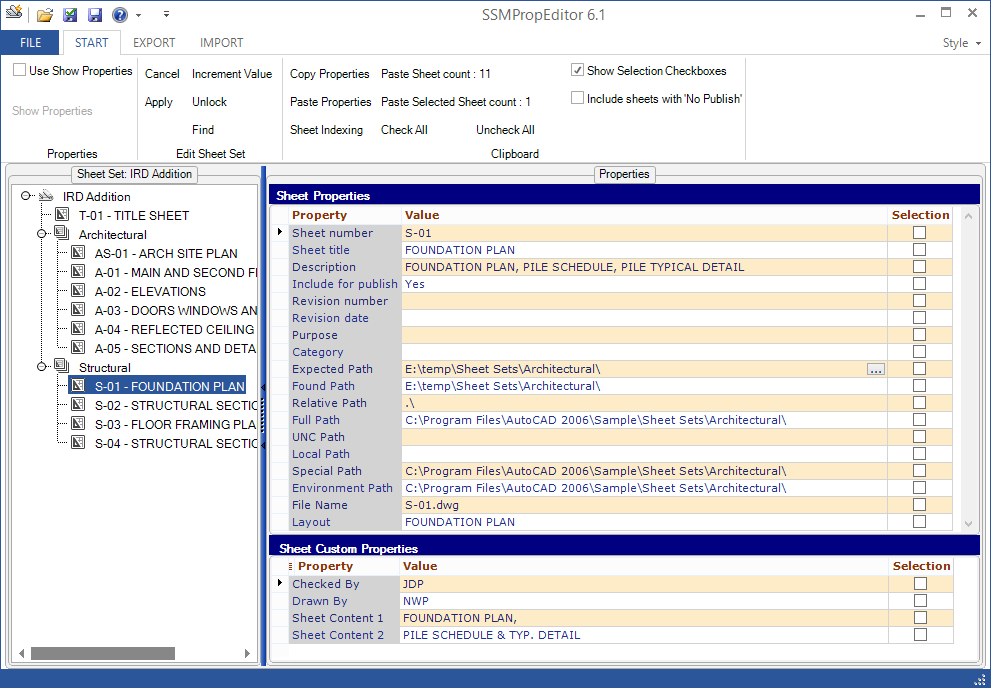
SSMPropEditor 6.1 is now available. This Sheet Set Manager Editor can save hours of work if your company uses AutoCAD’s Sheet Set Manager. Use Find and Replace of text among all properties and all sheets or change properties on multiple sheets at the same time. If you want to make changes in Excel, that can be done too. Copy custom properties that are defined in one Sheet Set into another Sheet Set. All you need to speed up your work with the Sheet Set Manager.

SSMPropEditor

For details on this release see the revision history.

Downloads are available here and works in trial mode for 30 days. Existing customers can upgrade for free and use their existing license file.

More from JTB World: Create new Sheet Sets including drawings based on an Excel template with out JTB Sheet Set Creator.

Friday, December 18, 2015

Open Live Writer (aka Windows Live Writer)

This is the first post I’ve done using Open Live Writer (OLW). With the release 0.5.1.2 there is support for Blogger after Google updated their API to use OAuth 2 and thus breaking the functionality in the old Windows Live Writer and the initial release of OLW. The error was: Blogger returned the following error: NotFound: Not Found.

image

A known issue with this release is that labels/categories can’t be set when posting to Blogger.

For some background on how Microsoft’s WLW became Open Source OLW see the Announcing Open Live Writer - An Open Source Fork of Windows Live Writer post by Hanselman.

Monday, December 7, 2015

Text Bubble 2.6 for AutoCAD now also as Trial

JTB World’s Text Bubble app for AutoCAD has been updated to version 2.6 and is now also available as a trial.

With our Text Bubble app you can easily create and renumber text bubbles in AutoCAD as well as convert existing text into text bubbles.

See also our JTB Text Bubble Plus app with more functionalities.

Wednesday, December 2, 2015

How to save layouts to separate drawings

If you want to save all your layouts to separate drawings our free LayoutsToDwgs.lsp can do the trick. It has just been updated to both solve an issue related to a dialog box showing “Include AutoCAD Map information in the export?” as well as to work fine with the most recent versions of AutoCAD. Direct download of this AutoLISP app is here.

Tuesday, December 1, 2015

SSMPropEditor 6.0 available - Sheet Set Manager Editor

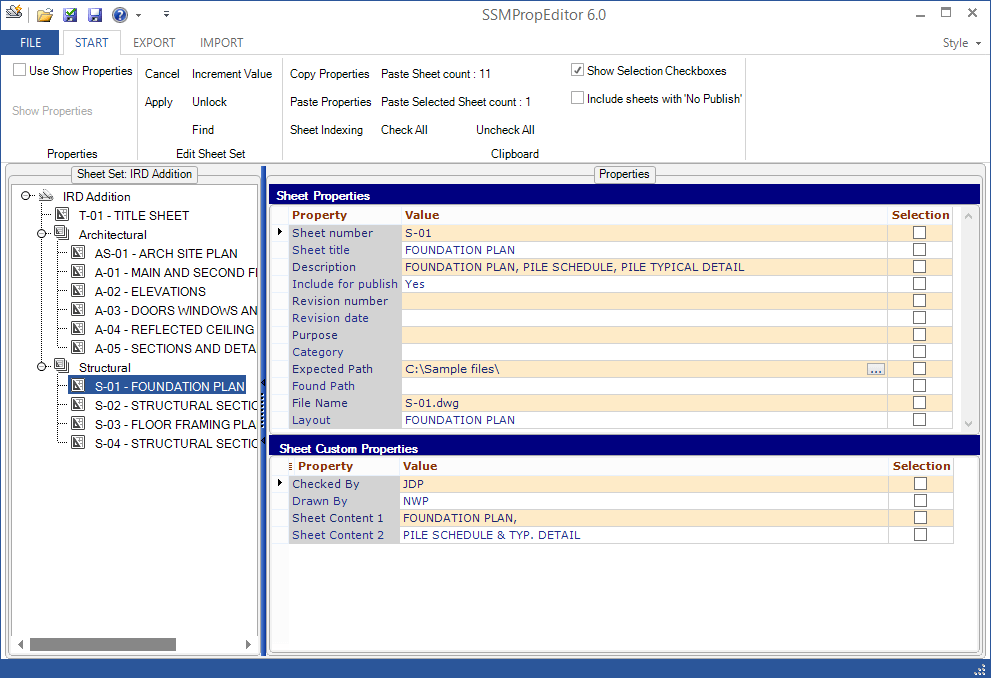
SSMPropEditor 6.0 is now available. This Sheet Set Manager Editor can save hours of work if your company uses AutoCAD’s Sheet Set Manager. Use Find and Replace of text among all properties and all sheets or change properties on multiple sheets at the same time. If you want to make changes in Excel, that can be done too. Copy custom properties that are defined in one Sheet Set into another Sheet Set. All you need to speed up your work with the Sheet Set Manager.

For details on this release see the revision history.

The installer for SSMPropEditor as an app within AutoCAD will be available later this month.

Download is available here and works in trial mode for 30 days. Existing customers can upgrade for free.

More from JTB World: Create new Sheet Sets including drawings based on an Excel template with out JTB Sheet Set Creator.

Monday, November 30, 2015

AutoCAD 2016 for Mac and AutoCAD LT 2016 for Mac

AutoCAD 2016 for Mac and AutoCAD LT 2016 for Mac were released November 21, 2015 and here are the news:

  • Xref path management – You can now map Xref file paths from your Mac to Windows machines, including networked servers, so sharing drawings back-and-forth between project team members is now easier.
  • Express Tools – We’ve brought over several of the popular Express Tools from Windows to Mac, so you get the efficiency gains from Express Tools on your Mac and experience less friction when switching between platforms.
  • Features from the Windows version of AutoCAD 2016 – This release includes many of the newest features from the Windows version. You can now use Revision Clouds, DIM Command Enhancements, Command Preview, and Selection Effects on the Mac platform.
  • Properties Palette – You can now display the Properties you use most often without having to scroll through the entire properties list.
  • Multi-Lingual User Interface (MUI) – Set your language (French or English) in the Mac System Preferences and AutoCAD will follow. There’s now no need for a separate install.
  • Update Notification – Updates are now delivered as small packages that don’t require lengthy downloads or install times.
  • Smaller PDFs with select-and-search capability – PDF output file-size is now greatly reduced, making it easier to share and open. Text in your PDFs is now selectable and searchable.
  • Pan and Zoom – Navigating your drawings is now easier because we’ve sped up and smoothed out panning and zooming.
  • TrueType font enhancements – All TrueType font text is retained in the drawing, so panning and zooming performance is considerably improved.

More about AutoCAD for Mac.

Friday, November 27, 2015

jtbworld.com is now mobile-friendly

After some work on our main website jtbworld.com it is now mobile-friendly as well having a responsive design that is adapting to the size of the web browser you use.

If you still find any issues on the site please let us know.

Monday, November 16, 2015

ACA_db 4.1 released - for AutoCAD Architecture and MEP

With ACA_db you can use AutoCAD Architecture or AutoCAD MEP even more as part of your BIM process. Property Set values can automatically be updated back and forth to one or many external databases. If you make changes to the Extended Data values within a Property Set they can be synchronized back to the external database. Any Property in a Property Set Definition can be exported and all editable Properties can be imported.

This release adds support for AutoCAD Architecture 2016 or AutoCAD MEP 2016 as well as some bug fixes.

Synchronization between database and CAD

Contact us to get a time limited license file for free.

Tuesday, October 13, 2015

DWG Columns for Explorer 2.2 released

JTB Word's DWG Columns for Explorer has been updated. We've fixed an issue with cleaning up column information when uninstalling. It has also been tested with Windows 10.

If you want to see the DWG and DXF properties and metadata in Explorer columns please give the trial a try. No need to have AutoCAD or other CAD programs installed for this to work. After the trial has expired you can still use it to show the DWG version information as long as you like.

Click to see a larger version with more columns

Monday, October 12, 2015

ArcGIS License Server and lmutil.exe problem

A couple of customers of JTB FlexReport reported about an issue with the the usage monitoring of Esri ArcGIS licenses (like ARC/INFO, Grid, Tin, Viewer). The number of issued licenses and the number of licenses in use were 2-5 times higher than what the ArcGIS License Server Administrator showed.

We found that it was the FlexNet tool lmutil.exe that caused this problem. lmutil.exe v11.12.1.4 and v11.12.1.2 did not work but v11.11.1.2 and v11.11.1.0 did work.

Thus the solution was to take an older version of lmutil.exe and use it. Put the version of lmutil.exe from the Esri license server in a separate folder (for example: C:\lmutil Esri\) on the machine where JTB FlexReport is installed and point to that location in JTB FlexReport Config on the FlexNet tab. This ensures that lmutil.exe is not updated when upgrading JTB FlexReport next time.

Wednesday, October 7, 2015

JTB FlexReport - Supervision et optimisation des licences

If you speak French better than English or just prefer French head over to our reseller RasterTech's new webpage http://www.rastertech.fr/flexreport "JTB FlexReport est une solution économique mais complète pour un suivi des actifs logiciels et des licences, fournissant des statistiques enrichies." JTB FlexReport is not localized to other languages (yet) but our French reseller RasterTech has done product documentation in French and can also provide product support in French.

Monday, October 5, 2015

HVACPAC for AutoCAD 2016

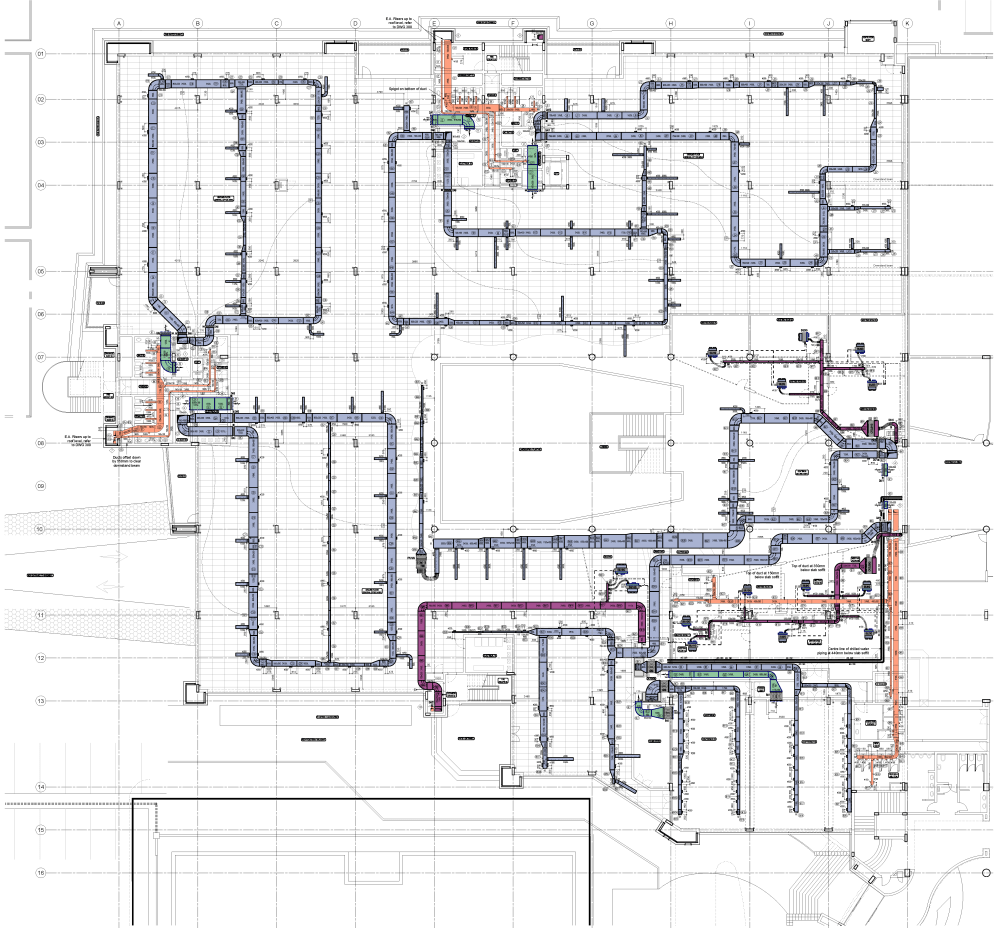
HVACPAC for AutoCAD is now available with support for AutoCAD 2016. Are you still doing HVAC and Piping work more or less manually in AutoCAD HVACPAC is the plug-in for you that will automate your work and save valuable time. Visit HVACPAC for AutoCAD for a 30-day trial.

Some of the latest blog posts

Subscribe to RSS headline updates from:
Powered by FeedBurner

Contact Us | About JTB World | Website General Terms of Use | Privacy Policy
^ Top of page

© 2004- JTB World. All rights reserved.