Wednesday, April 30, 2008

Find commands in Office 2007 and AutoCAD 2009

You know what you look for in Word, Excel or PowerPoint but cannot find it in the Ribbon. Now with the free Search Commands this is so much easier.

Do you know for example where you can find the command to Insert Form Field?

image

It is found on the Insert tab and under Quick Parts. Took me a while to find the first time.

Or click on the Search Commands tab and enter "field" and there you have it as well as other related commands.

Hoover with the mouse over any of the results and you find more information including where it is found.

BTW. Similar functionality is included already out-of-the-box in AutoCAD 2009.

And here are the matches using Search menu.


The Microsoft Office Lab Website and Blog. This is another blog to keep a watch on as more useful tools will be released.

Max AutoCAD entity handle number

The handle value is stored as a 64 bit number (8 bytes) in the DWG file no matter if you run 32-bit or 64-bit AutoCAD. The maximum value for a handle is: "FFFFFFFFFFFFFFFF" as hexadecimal or 6744073709551615 as integer.

If you for example use the LIST command you see the handle listed:
Handle = 1e9

Or if you list the properties using AutoLISP:
(entget(car(entsel)))
that can give a result like this:
(5 . "1E9")

If you with AutoLISP want to delete an object based on its handle ("1E9") this can be used:
(entdel(handent "1e9"))

The last tip can be useful if you have a problem with for example:
*Warning* Multiply owned object, handle "1e9"

Monday, April 28, 2008

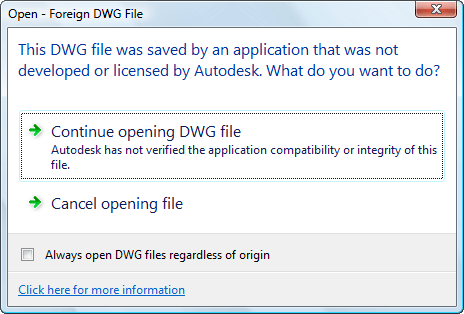
Foreign DWG File

Here is a new dialog box in AutoCAD 2009 that shows up if you open a DWG file that was saved by an application that was not developed or licensed by Autodesk.

Foreign DWG File

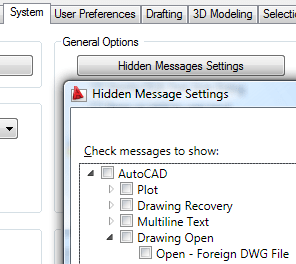
Something new is if you check the box to make sure you don't get a message like this again you can at any time restore it through Options>System>Hidden Message Settings.

Hidden Message Settings

At the bottom of the Hidden Message Settings dialog box you can also see a full preview of what the message look like.

For more information on TrustedDWG: http://www.autodesk.com/trusteddwg

Sunday, April 27, 2008

JTB FlexReport 4.1.2 released

JTB FlexReport 4.1.2 is now available to help you report on your network license usage. Check the revision history for details.

JTB FlexReport

Autodesk's new prior usage and Package license file introduced with AutoCAD 2009 and other 2009 products is fully supported.

Fully functional trial is available upon request.

PS. This information has been emailed to all customers and trial users and if you have not received any email it might be that your email filter has stopped it so please contact me one way or the other.

Excel document version created in year 1601

I had one of the rare crashes of Vista and when I fired up Excel next time I notice that the original had this information. Version created last time the user saved the file 1:00 am January 1, 1601". That was some hundred years ago. Call it the Year 1601 bug.

Excel Document Recovery

Friday, April 25, 2008

You're Not as Backed Up as You Think

Ziff Davis Enterprise has a white paper about online backup, SaaS backup, cloud backup or whatever you want to call it. I've used Mozy for quite a while and think it's really convenient. My Outlook PST files, Visual Studio projects, AutoCAD drawings, everything is backuped and I don't need to think about closing Outlook or AutoCAD to have the backup working in the background several times a day.

IT departments typically configure user PCs so all work files are stored on network drives. But most users circumvent this approach, storing files on their hard drives. Additionally, laptops users often work outside the office and offline, synchronizing only sporadically and keeping their current work on the local drive. As a result, data on local drives doesn’t get backed up.

I know by experience how true that is with users having the bad habit to save all their CAD work on the desktop instead of in the correct location on the network for example.

You can find the white paper here after registering.

If you want to just try Mozy you can do it for free as long as you don't need to backup more than 2 GB. If you need more there are affordable plans for unlimited space.

What does Encyclopaedia Britannica say about CAD?

Not much actually but you should be able to read the full article computer-aided engineering thanks to the Encyclopaedia Britannica WebShare initiative open for web publishers and bloggers.

computer-aided engineering in industry, the integration of design and manufacturing into a system under the direct control of digital computers. CAE combines the use of computers in industrial-design work, computer-aided design (CAD), with their use in manufacturing operations, computer-aided manufacturing (CAM)....

Have you seen a non-digital computer?

Tried searching for BIM but there was nothing found. Architecture on the other hand had quite a large article that you only can access via the link from this site unless you have access to it as a subscriber.

the art and technique of designing and building, as distinguished from the skills associated with construction. The practice of architecture is employed to fulfill both practical and expressive requirements of civilized people and thus embraces both utilitarian and aesthetic ends....Roman aqueduct

This link will hopefully take you to an image of Pont du Gard, Roman aqueduct, Nîmes, France, by Marcus Vipsanius Agrippa, during the Augustan period.

One good reason to blog is having full access for a year on Encyclopaedia Britannica.

The table of contents on the Architecture page did not work good at least in IE7 as I hardly could navigate without having the list automatically scroll.

Thursday, April 24, 2008

Autodesk NavisWorks Freedom 2009

The free viewer Autodesk NavisWorks Freedom 2009 is available now. It is a great 3D viewer and with great performance on even very large BIM models created with AutoCAD, Revit or several other applications.
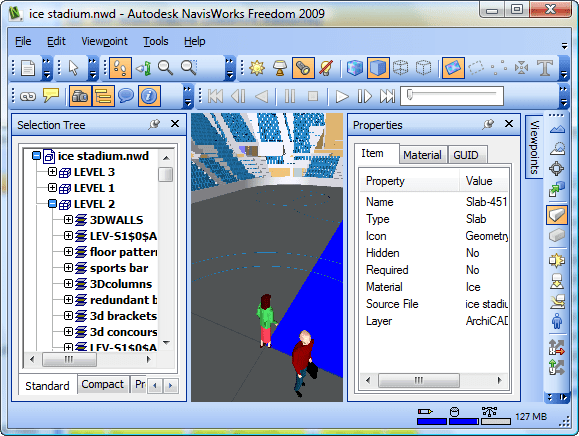
A good news is the support for 3D DWF files as they can be created without the need to have any of the full versions of NavisWorks and if you have tried with a really large model in Autodesk Design Review you will probably find that Freedom handles it much better.

www.autodesk.com/navisworksfreedom

When running the downloaded exe file Autodesk_NavisWorks_Freedom_2009_English_Win_32bit.exe (126MB) it says it will install in C:\Autodesk\NavisWorks Freedom 2009 but what it actually does it to extract all files required to run the setup to that folder and then the real install starts.

New Features

Autodesk NavisWorks Freedom 2009 contains a number of key enhancements for this release.

Interface Enhancements

  • .NET GUI Modernization - Up-to-date look and feel including new icons, improved control bar docking and tabbed control bars.

  • The Selection Tree Control Bar - Shows the internal structure of the loaded NWD, allowing direct navigation through the tree list to required elements in the project.

  • The Properties Control Bar - Shows all properties of a selected geometry item.

  • TimeLiner Playback - Abitlity to play back a TimeLiner sequence.

  • Animation Playback - Ability to play back viewpoint and object animation.

  • New Editor for Global Options. - A change from complex tabs to a logical tree structure, making finding options much simpler. Also making global options sharable across multiple PCs through import and export.

  • Viewable Comments - Ability to view comments recorded in NWD files.

Display Enhancements

  • 3D Text Support - The visualization of 3D text brought into other NavisWorks products from AutoCAD and MicroStation, and exported in the NWD.

  • Parametric Support - Any parametric data brought into other NavisWorks products and exported in the NWD will be displayed in Freedom. This data increases cylinder accuracy, and dramatically reduces the memory footprint to load and display them.

Operating System Support

  • Microsoft Vista Support - Full support for Microsoft's latest operating system.

  • 64-bit Support - Support for 64-bit versions of both XP and Vista.

File Formats

  • Autodesk DWF support - Freedom is now capable of reading and displaying Autodesk’s DWF Design Review format. (comment by me: only DWF files with 3D content as this is a 3D viewer)

image

For more about NavisWorks see this previous post.

Why was not this simple thing fixed or added to AutoCAD 2009?

Don't underestimate the work needed to implement something new for a large company like Autodesk.

Now that AutoCAD 2009 is on your desktop or installed you might wonder why didn't Autodesk fix this or that or add this simple thing that would save my day. Take a look at the newsgroups and you'll see proof of that.

I looked at the list of people behind AutoCAD 2008 that is showing in the hidden easter egg and found the following:

118 Software Development
59 Test Development
7 Integration and Build
18 User Assistance
16 Product Design
15 Product Management & Marketing
9 Project Management
38 World Wide Localization
3 Beta Team
11 Interns
7 Special Helpers
9 Senior Management

The AutoCAD 2009 team is probably in the same size.

So here is one small wish I have listed on my AutoCAD 2009 page:
"Saveall command should respect the Options setting to save in another version."

How much work can it be?

It might look like this in no specific list order:

  • One developer to spend five minutes implementing the change.
  • Activate the Beta Team so some guinea pigs can give it a try outside the walls of Autodesk.
  • One program manager to write the specification.
  • One localization expert to review the specification for localizability issues.
  • One usability expert to review the specification for accessibility and usability issues.
  • At least one dev, tester and PM to brainstorm security vulnerabilities.
  • One PM to add the security model to the specification.
  • One tester to write the test plan.
  • One test lead to update the test schedule.
  • One tester to write the test cases and add them to the nightly automation.
  • Three or four testers to participate in an ad hoc bug bash.
  • One technical writer to write the documentation.
  • One technical reviewer to proofread the documentation.
  • One copy editor to proofread the documentation.
  • One documentation manager to integrate the new documentation into the existing body of text, update tables of contents, indexes, etc.
  • Eleven translators to translate the documentation and error messages into all the languages supported by AutoCAD.The managers for the translators probably live in in other countries like China and Europe, which are both severely time-shifted from the HQ, so dealing with them can be a fairly complex logistical problem.
  • A team of senior managers to coordinate all these people, write the cheques, and justify the costs to their Vice President.
  • Still wondering? Hopefully not that much now.

    I was thinking about the post Is Eeyore Designing Your Software? when I wrote this.

    LTCCLispWiki a free lisp source code repository

    You find the Wiki launched by Greg Robinson at http://lispwiki.com. As the startup page is not much edited click on All Pages on the left side.

    Greg Robinson's "LTCC was instrumental in creating the Bonus Tools program extension to AutoCAD release 14, which continues to be part of the core software package as 'Express Tools'"

    I contributed with my hatchb.lsp as a starter.

    Wednesday, April 23, 2008

    Find blocks and more with Autodesk Seek

    Looking for drawings, blocks for AutoCAD or Revit? Autodesk Seek finds DGN, DOC, DWF, DWG, DXF, GSM, LCF, PDF, RFA, RVG, RVT, SKP, ZIP files.

    Found on Autodesk Seek

    What is Autodesk® Seek?
    It is a web service that allows designers - architects, engineers, students - to search and find generic or manufacturer-specific building products or components and associated design content. This content could include 3D models, 2D drawings, specifications, and descriptions for that product or component.

    Which industries are you targeting with Autodesk® Seek?
    Currently, it is targeted at designers working in the AEC (Architecture, Engineering, and Construction) industry. We are considering extending the service to include content particularly useful for mechanical designers in the future.

    How do I use the browse capability on Autodesk® Seek?
    The browse capability on Autodesk® Seek allows you to browse for content using AEC industry standard classifications, including MasterFormat 2004, Omniclass 1.0, and Uniformat II.

    Autodesk Seek

    Senior Software Architect of Autodesk Inc. Mike Haley discusses the company's latest product Autodesk Seek and its business model at FORA.tv. See also The Autodesk Seek Taxonomy System and the Autodesk Seek Search Engine.

    Via Between the Lines

    AutoCAD 2009 redundancy ToolTips and Quick Properties

    Talk about redundant information seeing both rollover ToolTips and Quick Properties at the same time with the same information.

    It could be useful it if was possible to set transparency of these two.

    Tuesday, April 22, 2008

    Solve uninstall problems with Windows Installer CleanUp Utility

    If you fail to install any program this utility can come handy. It is one of the tools you should know about and use in emergency situations. It can be used even with Autodesk products like AutoCAD.

    Once you have removed the application using the Windows Installer Cleanup Utility, it is strongly recommended that you follow the steps in solution TS45252 to remove other Autodesk applications and clean up any folders or registry keys left behind.

    Download and instructions on Microsoft.com and Autodesk Knowledge Base document: Product uninstall from the Control Panel fails

    Monday, April 21, 2008

    Win32/Vundo.gen!D OneCare and Skype conflict

    Skype Skype and Microsoft OneCare OneCare seem to have a problem to solve. You probably don't have a trojan in your computer.

    Trojan:Win32/Vundo.gen!D is Quarantined OneCare says after scanning the PC.

    To find out more I created a support log and found this information.

    Windows Live OneCare found potentially harmful or unwanted software on your computer.
    Threat Name: Trojan:Win32/Vundo.gen!D
    File Name: pid:1200
    Threat Severity: Severe
    Threat Category: Trojan
    Threat found by On Demand Scan: (ANTIVIRUS_ONDEMAND)
    Threat Status: Quarantined

    Still it did not say anything about what and where this was. I then figured out that Skype was closed each time after a scan and obviously OneCare think Skype does something it should not do. Let's see if it is Microsoft or Skype that fixes this as there are no Trojan really there and there is no unwanted software that should be stopped from running.

    Update: Problem is now solved by Microsoft.

    Ribbon image sizes in AutoCAD 2009

    Image handling in AutoCAD needs more work to be done as well as documentation. If you want to do customization you will find that there is a lot of trial and error. Unfortunately with the new Ribbon there are a lot of problems.

    In CUI there are three sizes available, Standard, Medium and Large. It is not obvious what the difference is.

    If Standard is used and no label is showed there is a frame around the icon as seen below on the one without a label. If Medium or Large is used and there is a Large image specified it will be used.

    Another thing is that the image size is not respected. Notice that the images above are larger than the correct 32x32 size below.


    What if you want to use other image formats than BMP. The "select image file dialog box" is limited to BMP file formats but if you enter * as file name and press enter or *.png you will find that you actually can select and use PNG, GIF, JPG if you want. One good thing with and reason to use PNG is the support for transparency.

    Share your tips in the comments.

    Saturday, April 19, 2008

    Autodesk Register Today

    image

    I have a problem with this Register Today dialog box that shows up in different Autodesk products when registering the application. I cannot use Alt+Tab to switch to it and it is not visible at the task bar. It's a minor thing that is quite annoying as I need to switch to another application to grab my login details.

    Friday, April 18, 2008

    Rearrange the Ribbon tab order in AutoCAD 2009

    This cannot be done with the Office 2007 Ribbon. It's easy. Just drag and drop the tab and you are done. Make sure your workspace is saved automatically if you want the location to persist. The other way is to use CUI (right click and select Customize).

    Drag and drop of the Annotate tab

    Thursday, April 17, 2008

    Silver Peak still significant performance gains with DWG 2007

    Head over to the blog post "Riverbed and DWG 2007 file format workaround" and read the comment by Silver Peak on the DWG file format changes and WAN accelerators issue.

    "Riverbed is affected by the AutoCAD file format/ISP setting issue more so than rival Silver Peak, and Silver Peak would like the world to know. To be clear, Riverbed will still accelerate AutoCAD DWG files over the WAN, even on a full save, but the data reduction is less than what Silver Peak is able to accomplish." - Infoworld

    I'm still wondering how it is with AutoCAD 2009 and verticals like AutoCAD Civil 3D 2009 and there were no word on verticals in the article.

    Understanding Floating Point Precision in AutoCAD, Excel, etc.

    AutoCAD has had 64-bit accuracy in the 32-bit platform for many years but still with 64-bit accuracy things can go wrong with with "unexpected" result.

    Why is 1.320 - 1.3190 not equal to 0.001 when it really is 0.001?

    Excel caluculation

    Be careful when you make comparisons like this.

    Both AutoCAD, Excel and many other applications are designed in accordance to the IEEE Standard for Binary Floating-Point Arithmetic (IEEE 754). The standard defines how floating-point numbers are stored and calculated.

    A floating-point number is stored in binary in three parts within a 65-bit range: the sign, the exponent, and the mantissa.

    1 Sign Bit
    11 Bit Exponent
    1 Implied Bit
    52 Bit Mantissa

    A detailed article that describes this thoroughly is Understanding Floating Point Precision, aka “Why does Excel Give Me Seemingly Wrong Answers?”